
aws-lambda-proxy





Forked from https://github.com/vincentsarago/lambda-proxy/
A zero-requirement proxy linking AWS API Gateway {proxy+} requests and AWS Lambda.
Install
$ pip install -U pip
$ pip install aws-lambda-proxy
Or install from source:
$ git clone https://github.com/layertwo/aws-lambda-proxy.git
$ cd aws-lambda-proxy
$ pip install -U pip
$ pip install -e .
Usage
Lambda proxy is designed to work well with both API Gateway's REST API and the newer and cheaper HTTP API. If you have issues using with the HTTP API, please open an issue.
With GET request
from aws_lambda_proxy import API, Response, StatusCode

APP = API(name="app")

@APP.route('/test/tests/<id>', methods=['GET'], cors=True)
def print_id(id):
    return Response(status_code=StatusCode.OK, content_type='plain/text', body=id)
With POST request
from aws_lambda_proxy import API, Response, StatusCode

APP = API(name="app")

@APP.route('/test/tests/<id>', methods=['POST'], cors=True)
def print_id(id, body):
    return Response(status_code=StatusCode.OK, content_type='plain/text', body=id)
Binary body
from aws_lambda_proxy import API

APP = API(name="app")

@APP.route('/test', methods=['POST'])
def print_id(body):
    body = json.loads(body)
Routes
Route schema is simmilar to the one used in Flask
Variable parts in the route can be specified with angular brackets
/user/<username>. By default a variable part in the URL accepts any string without a slash however a different converter can be specified as well by using<converter:name>.
Converters:
int: integerstring: stringfloat: float numberuuid: UUID
example:
/app/<user>/<id>(userandidare variables)/app/<string:value>/<float:num>(valuewill be a string, whilenumwill be a float)
Regex
You can also add regex parameters descriptions using special converter regex()
example:
@APP.get("/app/<regex([a-z]+):regularuser>")
def print_user(regularuser):
    return Response(status_code=StatusCode.OK, content_type='plain/text', body=f"regular {regularuser}")

@APP.get("/app/<regex([A-Z]+):capitaluser>")
def print_user(capitaluser):
    return Response(status_code=StatusCode.OK, content_type='plain/text', body=f"CAPITAL {capitaluser}")
Warning
when using regex() you must use different variable names or the route might not show up in the documentation.
@APP.get("/app/<regex([a-z]+):user>")
def print_user(user):
    return Response(status_code=StatusCode.OK, content_type='plain/text', body=f"regular {user}")

@APP.get("/app/<regex([A-Z]+):user>")
def print_user(user):
    return Response(status_code=StatusCode.OK, content_type='plain/text', body=f"CAPITAL {user}")
This app will work but the documentation will only show the second route because in openapi.json, route names will be /app/{user} for both routes.
Route Options
- path: the URL rule as string
- methods: list of HTTP methods allowed, default: ["GET"]
- cors: allow CORS, default:
False - token: set
access_tokenvalidation - payload_compression_method: Enable and select an output body compression
- binary_b64encode: base64 encode the output body (API Gateway)
- ttl: Cache Control setting (Time to Live)
- cache_control: Cache Control setting
- description: route description (for documentation)
- tag: list of tags (for documentation)
Cache Control
Add a Cache Control header with a Time to Live (TTL) in seconds.
from aws_lambda_proxy import API, Response, StatusCode
APP = API(app_name="app")

@APP.get('/test/tests/<id>', cors=True, cache_control="public,max-age=3600")
def print_id(id):
   return Response(status_code=StatusCode.OK, content_type='plain/text', body=id)
Note: If function returns other then "OK", Cache-Control will be set to no-cache
Binary responses
When working with binary on API-Gateway we must return a base64 encoded string
from aws_lambda_proxy import API, Response, StatusCode

APP = API(name="app")

@APP.get('/test/tests/<filename>.jpg', cors=True, binary_b64encode=True)
def print_id(filename):
    with open(f"{filename}.jpg", "rb") as f:
        return Response(status_code=StatusCode.OK, content_type='image/jpeg', body=f.read())
Compression
Enable compression if "Accept-Encoding" if found in headers.
from aws_lambda_proxy import API, Response, StatusCode

APP = API(name="app")

@APP.get(
   '/test/tests/<filename>.jpg',
   cors=True,
   binary_b64encode=True,
   payload_compression_method="gzip"
)
def print_id(filename):
    with open(f"{filename}.jpg", "rb") as f:
       return Response(status_code=StatusCode.OK, content_type='image/jpeg', body=f.read())
Simple Auth token
Lambda-proxy provide a simple token validation system.
- a "TOKEN" variable must be set in the environment
- each request must provide a "access_token" params (e.g curl http://myurl/test/tests/myid?access_token=blabla)
from aws_lambda_proxy import API, Response, StatusCode

APP = API(name="app")

@APP.get('/test/tests/<id>', cors=True, token=True)
def print_id(id):
    return Response(status_code=StatusCode.OK, content_type='plain/text', body=id)
URL schema and request parameters
QueryString parameters are passed as function's options.
from aws_lambda_proxy import API, Response, StatusCode

APP = API(name="app")

@APP.get('/<id>', cors=True)
def print_id(id, name=None):
    return Response(status_code=StatusCode.OK, content_type='plain/text', body=f"{id}{name}")
requests:
$ curl /000001
   0001

$ curl /000001?name=layertwo
   0001layertwo
Multiple Routes
from aws_lambda_proxy import API, Response, StatusCode
APP = API(name="app")

@APP.get('/<id>', cors=True)
@APP.get('/<id>/<int:number>', cors=True)
def print_id(id, number=None, name=None):
    return Response(status_code=StatusCode.OK, content_type='plain/text', body=f"{id}-{name}-{number}")
requests:
$ curl /000001
   0001--

$ curl /000001?name=layertwo
   0001-layertwo-

$ curl /000001/1?name=layertwo
   0001-layertwo-1
Advanced features
Context and Event passing
Pass event and context to the handler function.
from aws_lambda_proxy import API, Response, StatusCode

APP = API(name="app")

@APP.get("/<id>", cors=True)
@APP.pass_event
@APP.pass_context
def print_id(ctx, evt, id):
    print(ctx)
    print(evt)
    return Response(status_code=StatusCode.OK, content_type='plain/text', body=f"{id}")
Automatic OpenAPI documentation
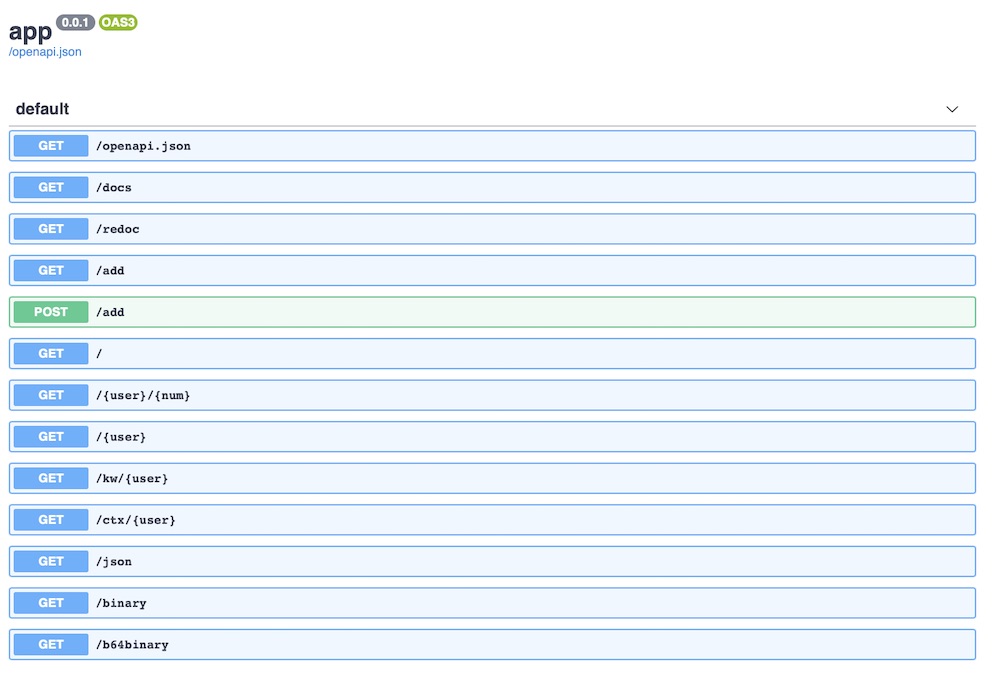
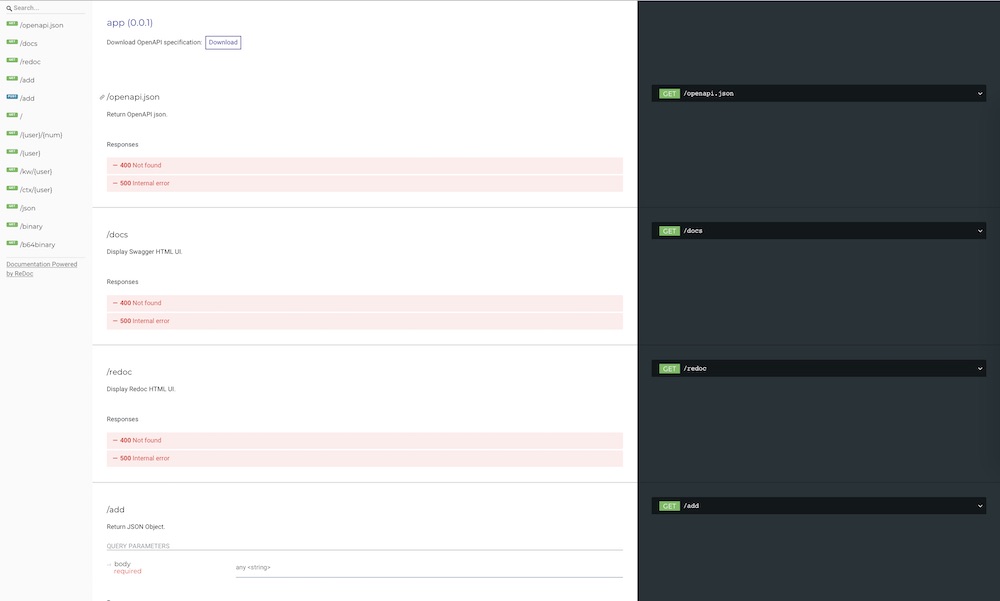
By default the APP (aws_lambda_proxy.API) is provided with three (3) routes:
-
/openapi.json: print OpenAPI JSON definition -
/docs: swagger html UI -
/redoc: Redoc html UI
Function annotations
To be able to render full and precise API documentation, aws_lambda_proxy uses python type hint and annotations link.
from aws_lambda_proxy import API, Response, StatusCode

APP = API(name="app")

@APP.route('/test/<int:id>', methods=['GET'], cors=True)
def print_id(id: int, num: float = 0.2) -> Response:
    return Response(status_code=StatusCode.OK, content_type='plain/text', body=id)
In the example above, our route /test/<int:id> define an input id to be a INT, while we also add this hint to the function print_id we also specify the type (and default) of the num option.
Custom Domain and path mapping
Note: When using path mapping other than root (/), / route won't be available.
from aws_lambda_proxy import API, Response, StatusCode

api = API(name="api", debug=True)


# This route won't work when using path mapping
@api.get("/", cors=True)
# This route will work only if the path mapping is set to /api
@api.get("/api", cors=True)
def index():
    html = """<!DOCTYPE html>
    <html>
        <header><title>This is title</title></header>
        <body>
            Hello world
        </body>
    </html>"""
    return Response(status_code=StatusCode.OK, content_type="text/html", body=html)


@api.get("/yo", cors=True)
def yo():
    return Response(status_code=StatusCode.OK, content_type="text/plain", body="YOOOOO")
Examples
Contribution & Development
Issues and pull requests are more than welcome.
Dev install & Pull-Request
$ git clone https://github.com/layertwo/aws-lambda-proxy.git
$ cd aws-lambda-proxy
$ pip install -e .[test]
License
See LICENSE.txt.
1 maintainer

Metadata
1 maintainer
Release files for aws-lambda-proxy 1.1.1
For a detailed explanation of source distributions (sdists) and built distributions (wheels), please see the package formats documentation.
Source distribution (sdist)
| File | Size | Uploaded | Provenance | |
|---|---|---|---|---|
| aws_lambda_proxy-1.1.1.tar.gz | 21.0 kB | With provenance | Details |
Built distribution (wheel)
| File | Interpreter | ABI | Platform | Reset |
|---|---|---|---|---|
| aws_lambda_proxy-1.1.1-py3-none-any.whl | Python 3 | none | any | Details |
Total release size: 34.4 kB
Release files / aws_lambda_proxy-1.1.1.tar.gz
| Download URL | aws_lambda_proxy-1.1.1.tar.gz |
|---|---|
| Size | 21.0 kB |
| Tags | Source |
|
SHA-256 checksum How to use checksums |
69f5a14ce37f86055ccc95ab04c6e57d6c033eb71b0a8384195300ec6a35c617
|
|
BLAKE2b-256 checksum How to use checksums |
c496e003d936452561c89fc738b8ceaaf75cfc3cd4b197cf936412a31f99611e
|
| Upload date | |
|
Uploaded using Trusted Publishing? What is trusted publishing? |
Yes |
| Uploaded via |
twine/6.1.0 CPython/3.13.7
|
Provenance
Provenance describes where a file came from. On PyPI, provenance is shared via attestations, which provide a verifiable record of the build or publishing details. View details, limitations and caveats.


PyPI Publish Attestation
PyPI verified that this artifact, at this checksum, originated from the publisher listed below.
Signed by GitHub Actions, verified by PyPI on Sep 15, 2025.
Transparency logRelease files / aws_lambda_proxy-1.1.1-py3-none-any.whl
| Download URL | aws_lambda_proxy-1.1.1-py3-none-any.whl |
|---|---|
| Size | 13.4 kB |
| Tags | Python 3 |
|
SHA-256 checksum How to use checksums |
4fe72e7dcaab5492f6931c4882f37ad555809501b1af69522485574ee4564c5c
|
|
BLAKE2b-256 checksum How to use checksums |
1a4534bc7e00dc8d3a65b946313150e13b2795d486a5445207774e919b020b22
|
| Upload date | |
|
Uploaded using Trusted Publishing? What is trusted publishing? |
Yes |
| Uploaded via |
twine/6.1.0 CPython/3.13.7
|
Provenance
Provenance describes where a file came from. On PyPI, provenance is shared via attestations, which provide a verifiable record of the build or publishing details. View details, limitations and caveats.
PyPI Publish Attestation
PyPI verified that this artifact, at this checksum, originated from the publisher listed below.
Signed by GitHub Actions, verified by PyPI on Sep 15, 2025.
Transparency logSecurity for aws-lambda-proxy 1.1.1
Provenance
Provenance describes where a file came from. On PyPI, provenance is shared via attestations, which provide a verifiable record of the build or publishing details. View details, limitations and caveats.
Full provenance
All 2 files in this release have been uploaded with provenance metadata.
Attestation for aws_lambda_proxy-1.1.1.tar.gz
PyPI Publish Attestation
PyPI verified that this artifact, at this checksum, originated from the publisher listed below.
Signed by GitHub Actions, verified by PyPI on Sep 15, 2025.
Transparency logA note on package security
PyPI is a repository for distributing packages, not a service for auditing them. While third-party security researchers and our staff do their best to detect and remove malicious packages, PyPI cannot guarantee the quality, security or suitability of any given package.














