
aws-sessions-switcher: Manage multiple aws sessions and switch between them seamlessly
Working with multiple AWS Accounts from the command like can sometimes be difficult if you have to switch between multiple projects or between environments of the same project.
aws-sessions-switcher is a tool I developed to help myself to make switching between accounts / roles across projects easier.
I don't see why such a tool cannot be of help to someone like me and hence decided to make it available to everyone who
might be interested.
I hope it helps someone someday!
If you have any suggestions or want to contribute to this tool, you are very welcome !
PS: This is a work in progress, and there is definitely a LOT to improve / optimize.
Installation:
pip install aws-sessions-switcher
Basic setup
Setup 1: Configure a project
aws-sessions-switcher configure
Type the details about your AWS Environment, the role you would like to assume, project name etc...
You can configure additional projects by executing aws-sessions-switcher projects add command

Setup 2: Update your AWS Credentials file
The previous command will tell you under what profile name your AWS credentials must be placed, in the default ~/.aws/credentials file
Setup 3: Now see all the assumptions you can make
Running aws-sessions-switcher or aws-sessions-switcher -l will tell you how to assume the different roles that you have configured using this tool!
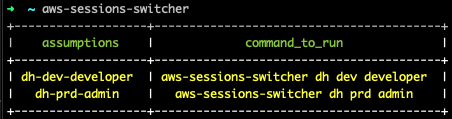
Some Example commands
| command | description |
|---|---|
aws-sessions-switcher configure |
Sets up the tool |
aws-sessions-switcher reset |
Deletes the configuration file created by this tool |
aws-sessions-switcher -l |
List all the assumptions that can be made |
aws-sessions-switcher projects |
Lists all the configured projects |
aws-sessions-switcher environments |
Lists all environments for all projects |
aws-sessions-switcher environments -n ABCD |
Lists only the environments configured for the project named ABCD |
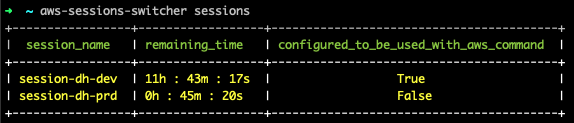
aws-sessions-switcher sessions |
Lists all the sessions you have created using this tool |
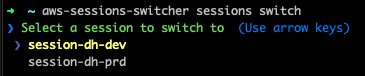
aws-sessions-switcher sessions switch |
Gives the ability to switch between multiple sessions |
aws-sessions-switcher projects add |
Add an additional project |
aws-sessions-switcher projects delete -n ABCD |
Deletes the configuration of the project named ABCD |
aws-sessions-switcher environments add -n ABCD |
TODO: |
aws-sessions-switcher environment delete -n ABCD -e dev |
TODO: |
aws-sessions-switcher my\_project dev admin |
Attempts to assume 'admin' role on the 'dev' environment of the project named 'my_project' |
Sample Outputs
Configuring your first project
All the assumptions you can make
Assuming a role from one of the configured projects

All the active sessions
Switching between active sessions
1 maintainer

Metadata
1 maintainer
Release files for aws-sessions-switcher 0.0.16
For a detailed explanation of source distributions (sdists) and built distributions (wheels), please see the package formats documentation.
Source distribution (sdist)
| File | Size | Uploaded | Provenance | |
|---|---|---|---|---|
| aws_sessions_switcher-0.0.16.tar.gz | 13.0 kB | Without provenance | Details |
Built distribution (wheel)
| File | Interpreter | ABI | Platform | Reset |
|---|---|---|---|---|
| aws_sessions_switcher-0.0.16-py2.py3-none-any.whl | Python 2, Python 3 | none | any | Details |
Total release size: 27.5 kB
Release files / aws_sessions_switcher-0.0.16.tar.gz
| Download URL | aws_sessions_switcher-0.0.16.tar.gz |
|---|---|
| Size | 13.0 kB |
| Tags | Source |
|
SHA-256 checksum How to use checksums |
f8dbbcf7cfe925d883f79ae20ab3c5aa7e48be683e8ae579ab51ceaf3cbab9ff
|
|
BLAKE2b-256 checksum How to use checksums |
51dc254f8000b94a444a791e996cbed13f151b9275aba1bfb757191b63e5cc40
|
| Upload date | |
|
Uploaded using Trusted Publishing? What is trusted publishing? |
No |
| Uploaded via |
twine/4.0.1 CPython/3.8.13
|
Release files / aws_sessions_switcher-0.0.16-py2.py3-none-any.whl
| Download URL | aws_sessions_switcher-0.0.16-py2.py3-none-any.whl |
|---|---|
| Size | 14.5 kB |
| Tags | Python 2 Python 3 |
|
SHA-256 checksum How to use checksums |
089868cd8467d6b14481431431fcb79d66025d8a3b66d6f8f3c08f10393aa48f
|
|
BLAKE2b-256 checksum How to use checksums |
6d97b65625368a6b3c77ae19f0569cd6d96c4dbb15ccd4206fa2f82cd7f6dab5
|
| Upload date | |
|
Uploaded using Trusted Publishing? What is trusted publishing? |
No |
| Uploaded via |
twine/4.0.1 CPython/3.8.13
|
Security for aws-sessions-switcher 0.0.16
Provenance
Provenance describes where a file came from. On PyPI, provenance is shared via attestations, which provide a verifiable record of the build or publishing details. View details, limitations and caveats.
No provenance found
None of the files in this release were uploaded with provenance metadata.
A note on package security
PyPI is a repository for distributing packages, not a service for auditing them. While third-party security researchers and our staff do their best to detect and remove malicious packages, PyPI cannot guarantee the quality, security or suitability of any given package.
To learn more about protecting yourself from malicious actors, visit our package security documentation.














