
Overview
Get AWS Transit Gateway details.
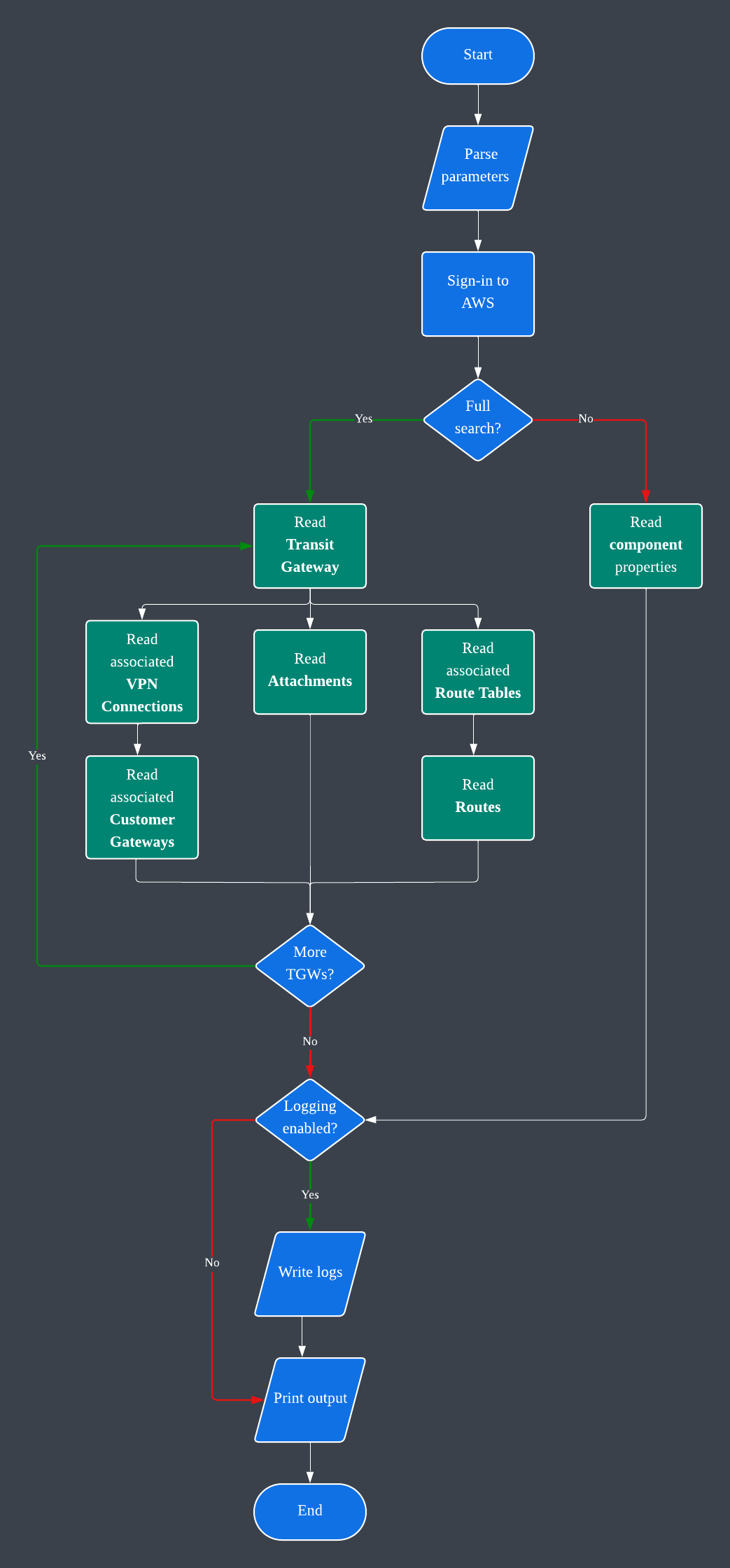
This module helps to retrieve AWS Transit Gateway details, including the following:
Transit Gateways
Transit Gateway Route Tables
Transit Gateway Routes
Transit Gateway Attachments
Customer Gateways
VPN Connections
The aws_authenticator module is installed with this module, and is used to login to AWS using IAM access key credentials from the following environment variables:
TGW_AWS_ACCESS_KEY_ID
TGW_AWS_SECRET_ACCESS_KEY
TGW_AWS_SESSION_TOKEN (Optional. Default: None.)
If the environment variables are not set, the module will try to use the default AWS credentials from the AWS CLI configuration file.
Usage
Installation:
pip3 install aws_tgw_details
# or
python3 -m pip install aws_tgw_details
Set environment variables:
export TGW_AWS_ACCESS_KEY_ID=your_access_key_id
export TGW_AWS_SECRET_ACCESS_KEY=your_secret_access_key
export TGW_AWS_SESSION_TOKEN=your_session_token
Examples:
# Overview.
aws_tgws

# Help.
aws_tgws -h

# Get all Transit Gateways.
aws_tgws -t ALL

# Get a specific Transit Gateway.
aws_tgws -t tgw-1234567890abcdef0

# Get all Customer Gateways.
aws_tgws -c ALL
You can also use the available functions independently to create your own workflow instead of using the installed aws_tgws command line tool.
Options
-h, --help           show this help message and exit
-V, --version        show program's version number and exit
-t, --tgw_id [TGW_ID]
                     Transit Gateway ID. Use 'ALL' to get all TGWs. Default: None.
-y, --tgw_only       Transit Gateway details only, no other components.
-r, --tgw_rt_id [TGW_RT_ID]
                     Transit Gateway Route Table ID. Default: None.
-a, --tgw_attachment_id [TGW_ATTACHMENT_ID]
                     Transit Gateway Attachment ID. Default: None.
-v, --tgw_vpn_connection_id [TGW_VPN_CONNECTION_ID]
                     VPN Connection ID. Use 'ALL' to get all connections. Default: None.
-c, --cgw_id [CGW_ID]
                     Customer Gateway ID. Use 'ALL' to get all CGWs. Default: None.
-w, --region [REGION]
                     AWS Region. Default: us-east-1.
-l, --log_path [LOG_PATH]
                     Log file path. Default: /tmp.
-e, --log_level [{NONE,DEBUG,INFO,WARNING,ERROR,CRITICAL}]
                     Log level. Default: INFO.
-o, --output_file [OUTPUT_FILE]
                     Output file and path. Default: ./transit_gateway_details.json
Output
The output is in the JSON format. Additionally, the output for the full Transit Gateway details will also be written to file. You can customize the output path and file name using the -o option. More details in help.
Logging
The module creates logs in the /tmp directory with the <application_name>.<utc_date_and_time>.log file name format. This can be customized or disabled by setting the -l and -e options. More details in help.
Boto3 Functions
- Transit Gateway
1 maintainer

Release files for aws_tgw_details 1.0.18
For a detailed explanation of source distributions (sdists) and built distributions (wheels), please see the package formats documentation.
Source distribution (sdist)
| File | Size | Uploaded | |
|---|---|---|---|
| aws_tgw_details-1.0.18.tar.gz | 7.8 kB | Details |
Built distribution (wheel)
| File | Interpreter | ABI | Platform | Reset |
|---|---|---|---|---|
| aws_tgw_details-1.0.18-py3-none-any.whl | Python 3 | none | any | Details |
Total release size: 16.4 kB
Release files / aws_tgw_details-1.0.18.tar.gz
| Download URL | aws_tgw_details-1.0.18.tar.gz |
|---|---|
| Size | 7.8 kB |
| Tags | Source |
|
SHA-256 checksum How to use checksums |
6da8c146517d6cb554028923ceb5eaccc9a810ec83f4f168c9c150633104a95f
|
|
BLAKE2b-256 checksum How to use checksums |
543fa2ecc800962a41c98b7f371c3045b337ac2a097a6d8316def01ba828083a
|
| Upload date | |
|
Uploaded using Trusted Publishing? What is trusted publishing? |
No |
| Uploaded via |
poetry/1.8.2 CPython/3.12.3 Linux/5.15.154+
|
Release files / aws_tgw_details-1.0.18-py3-none-any.whl
| Download URL | aws_tgw_details-1.0.18-py3-none-any.whl |
|---|---|
| Size | 8.5 kB |
| Tags | Python 3 |
|
SHA-256 checksum How to use checksums |
d28d2db57f04d0ebe36c0509d6d32c5f3343ed9e2fe7f5deee1926acb865e68f
|
|
BLAKE2b-256 checksum How to use checksums |
39a443176785881bbd6dfc10f30a87c420c205a0aee962d4415642735df9b0fe
|
| Upload date | |
|
Uploaded using Trusted Publishing? What is trusted publishing? |
No |
| Uploaded via |
poetry/1.8.2 CPython/3.12.3 Linux/5.15.154+
|














