
Get AWS Transit Gateway details.

Project description
Overview
Get AWS Transit Gateway details.
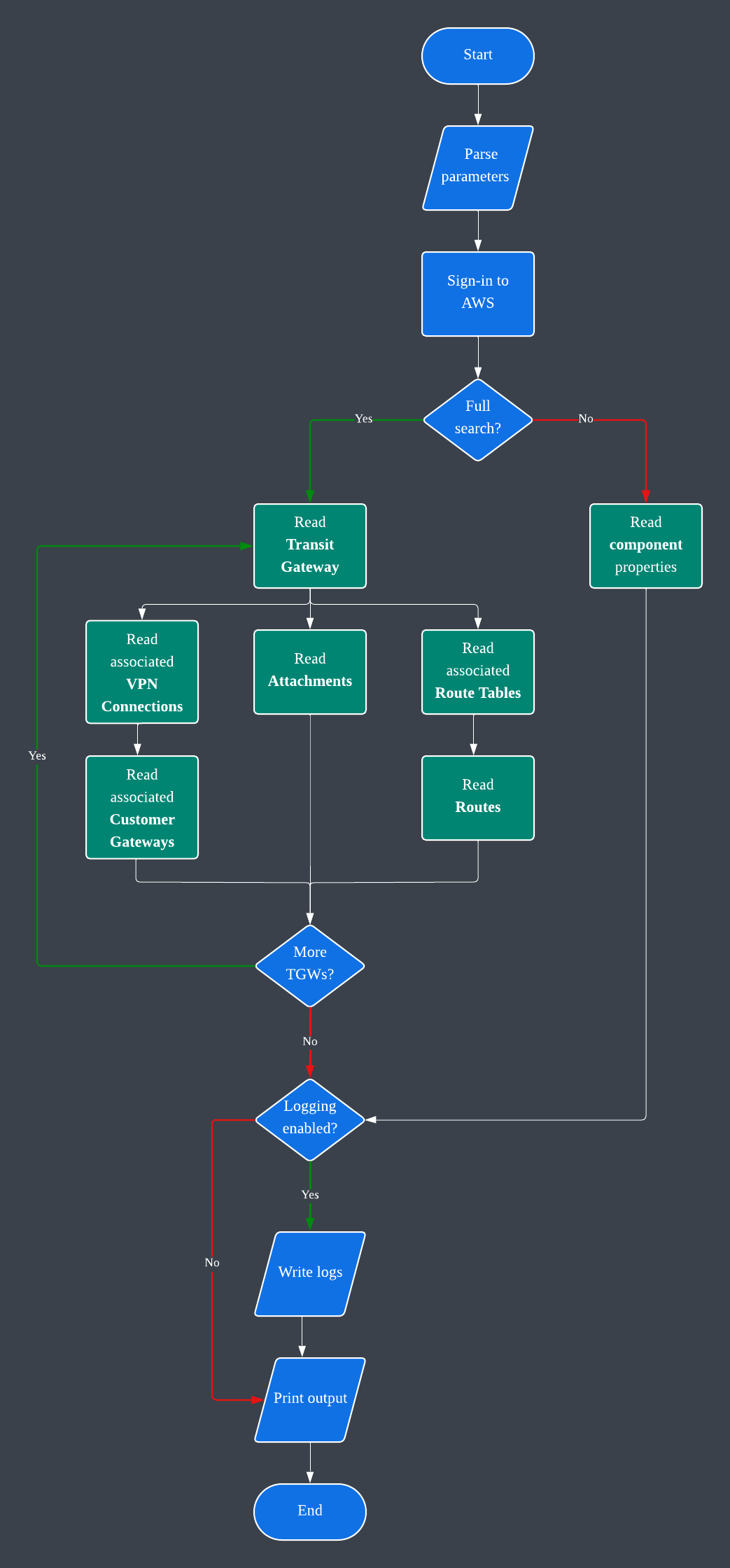
This module helps to retrieve AWS Transit Gateway details, including the following:
Transit Gateways
Transit Gateway Route Tables
Transit Gateway Routes
Transit Gateway Attachments
Customer Gateways
VPN Connections
The aws_authenticator module is installed with this module, and is used to login to AWS using IAM access key credentials from the following environment variables:
TGW_AWS_ACCESS_KEY_ID
TGW_AWS_SECRET_ACCESS_KEY
TGW_AWS_SESSION_TOKEN (Optional. Default: None.)
If the environment variables are not set, the module will try to use the default AWS credentials from the AWS CLI configuration file.
Usage
Installation:
pip3 install aws_tgw_details
# or
python3 -m pip install aws_tgw_details
Set environment variables:
export TGW_AWS_ACCESS_KEY_ID=your_access_key_id
export TGW_AWS_SECRET_ACCESS_KEY=your_secret_access_key
export TGW_AWS_SESSION_TOKEN=your_session_token
Examples:
# Overview.
aws_tgws

# Help.
aws_tgws -h

# Get all Transit Gateways.
aws_tgws -t ALL

# Get a specific Transit Gateway.
aws_tgws -t tgw-1234567890abcdef0

# Get all Customer Gateways.
aws_tgws -c ALL
You can also use the available functions independently to create your own workflow instead of using the installed aws_tgws command line tool.
Options
-h, --help           show this help message and exit
-V, --version        show program's version number and exit
-t, --tgw_id [TGW_ID]
                     Transit Gateway ID. Use 'ALL' to get all TGWs. Default: None.
-y, --tgw_only       Transit Gateway details only, no other components.
-r, --tgw_rt_id [TGW_RT_ID]
                     Transit Gateway Route Table ID. Default: None.
-a, --tgw_attachment_id [TGW_ATTACHMENT_ID]
                     Transit Gateway Attachment ID. Default: None.
-v, --tgw_vpn_connection_id [TGW_VPN_CONNECTION_ID]
                     VPN Connection ID. Use 'ALL' to get all connections. Default: None.
-c, --cgw_id [CGW_ID]
                     Customer Gateway ID. Use 'ALL' to get all CGWs. Default: None.
-w, --region [REGION]
                     AWS Region. Default: us-east-1.
-l, --log_path [LOG_PATH]
                     Log file path. Default: /tmp.
-e, --log_level [{NONE,DEBUG,INFO,WARNING,ERROR,CRITICAL}]
                     Log level. Default: INFO.
-o, --output_file [OUTPUT_FILE]
                     Output file and path. Default: ./transit_gateway_details.json
Output
The output is in the JSON format. Additionally, the output for the full Transit Gateway details will also be written to file. You can customize the output path and file name using the -o option. More details in help.
Logging
The module creates logs in the /tmp directory with the <application_name>.<utc_date_and_time>.log file name format. This can be customized or disabled by setting the -l and -e options. More details in help.
Boto3 Functions
- Transit Gateway
Release history Release notifications | RSS feed


Download files
Download the file for your platform. If you're not sure which to choose, learn more about installing packages.
Source Distribution
Built Distribution
Filter files by name, interpreter, ABI, and platform.
If you're not sure about the file name format, learn more about wheel file names.
Copy a direct link to the current filters
File details
Details for the file aws_tgw_details-1.0.15.tar.gz.
File metadata
- Download URL: aws_tgw_details-1.0.15.tar.gz
- Upload date:
- Size: 7.5 kB
- Tags: Source
- Uploaded using Trusted Publishing? No
- Uploaded via: poetry/1.8.2 CPython/3.12.3 Linux/5.15.154+
File hashes
| Algorithm | Hash digest | |
|---|---|---|
| SHA256 |
9b32a095fdc7cb378f68963b2cef13256b78885ebd98a94236082d5e0f6ad284
|
|
| MD5 |
190eaa7a9c125063d9b1f234309a58f6
|
|
| BLAKE2b-256 |
2d43e1e226d79c47ef793bdd8a5fbbeae03cdbe421f7e792aa72d393da799bc2
|
File details
Details for the file aws_tgw_details-1.0.15-py3-none-any.whl.
File metadata
- Download URL: aws_tgw_details-1.0.15-py3-none-any.whl
- Upload date:
- Size: 7.8 kB
- Tags: Python 3
- Uploaded using Trusted Publishing? No
- Uploaded via: poetry/1.8.2 CPython/3.12.3 Linux/5.15.154+
File hashes
| Algorithm | Hash digest | |
|---|---|---|
| SHA256 |
911877b9e3d0edfd64c35edb4c9ab3c9c674e3d6ce27e4ca5310ac28c2c8e613
|
|
| MD5 |
42251d421aa7b7c3e3c4af29133c2ae4
|
|
| BLAKE2b-256 |
94539b05be90fe5f7f25061500efeb8840cf9614651e790518cdf38653792a7f
|






