
aws-xray-lambda-segment-shim


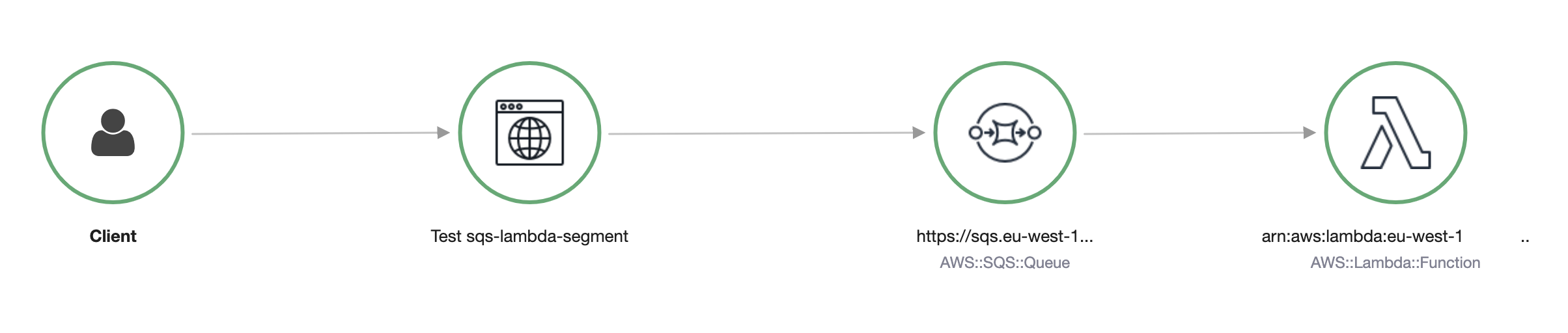
It’s not currently possibly follow an AWS Xray trace through a Lambda Function triggered by an SQS Queue.
Unless you use aws-xray-lambda-segment-shim!
Installation
pip install aws-xray-lambda-segment-shimUsage
from aws_xray_lambda_segment_shim import get_sqs_triggered_recorder


def lambda_handler(event, context):
    for i, record in enumerate(event["Records"]):
        recorder = get_sqs_triggered_recorder(
            record=record,
            lambda_request_id=context.aws_request_id,
            lambda_arn=context.invoked_function_arn,
        )
        with recorder.in_segment():
            with recorder.in_subsegment(f"SQS Record {i}") as subsegment:
                print(
                    "I'm triggered by an SQS Record and using trace id ",
                    subsegment.trace_id,
                )
TriggeredXrayRecorder is a child class of aws_xray_sdk.AWSXRayRecorder so you can use all the methods you would expect from following the aws-xray-sdk documentation.
Caveats
This approach causes all subsegments created with it to appear only in the trace that was passed in by SQS. There will still be a separate Lambda trace that will not contain these subsegments and will not show as being triggered by SQS.
This approach is useful if you are using SQS as an intermediary for a process you’re already tracing as it then makes logical sense to view the traces from that starting point.
If you’re more likely to view your traces as starting at the lambda function (i.e. you do not have any tracing prior to the SQS queue) then your mileage may vary with this approach.
We are also here working outside the scope of what is expected by the aws-xray-sdk. We are pretending to be AWS Lambda when we’re initiating a trace, we’re using undocumented fields to pretend to be AWS Lambda, and to allow the correlation of the SQS message and the Lambda Invocation (edge creation).
If this wasn’t the only way to pursue a trace through SQS to lambda I would suggest you avoid it! But given the complexity involved in automating this from AWS’s side, it may be a while before we see native support.
Testing
You can run the python tests with:
pip install -r requirements.txt
make local-test
Terraform Tests
You can run the terraform tests with:
$ make install-xray-daemon-mac
$ make run-xray-daemon-mac
Then in a new terminal run:
$ make terraform-init
$ make terraform-apply
$ make terraform-send-message
Once that’s complete you can click on the xray URL provided at the end of the test to observe the trace is correct.
1 maintainer

Metadata
1 maintainer
Release files for aws-xray-lambda-segment-shim 0.5.3
For a detailed explanation of source distributions (sdists) and built distributions (wheels), please see the package formats documentation.
Source distribution (sdist)
| File | Size | Uploaded | Provenance | |
|---|---|---|---|---|
| aws_xray_lambda_segment_shim-0.5.3.tar.gz | 6.0 kB | Without provenance | Details |
Built distribution (wheel)
| File | Interpreter | ABI | Platform | Reset |
|---|---|---|---|---|
| aws_xray_lambda_segment_shim-0.5.3-py3-none-any.whl | Python 3 | none | any | Details |
Total release size: 13.7 kB
Release files / aws_xray_lambda_segment_shim-0.5.3.tar.gz
| Download URL | aws_xray_lambda_segment_shim-0.5.3.tar.gz |
|---|---|
| Size | 6.0 kB |
| Tags | Source |
|
SHA-256 checksum How to use checksums |
e269d702d0a4ce9408a0f768ba0b12c2bfa2e55a6dab21c2e90a52525bffaf2d
|
|
BLAKE2b-256 checksum How to use checksums |
8ce6a41aaca5f94faff0691056a1bfce4c5f266cdc7030ab5b88fdf0ff567acc
|
| Upload date | |
|
Uploaded using Trusted Publishing? What is trusted publishing? |
No |
| Uploaded via |
twine/3.4.2 importlib_metadata/4.7.1 pkginfo/1.7.1 requests/2.26.0 requests-toolbelt/0.9.1 tqdm/4.62.2 CPython/3.9.6
|
Release files / aws_xray_lambda_segment_shim-0.5.3-py3-none-any.whl
| Download URL | aws_xray_lambda_segment_shim-0.5.3-py3-none-any.whl |
|---|---|
| Size | 7.7 kB |
| Tags | Python 3 |
|
SHA-256 checksum How to use checksums |
f15b96b8ed81f75e5a72b1c720d3d865cd6bbeeb49918025eed835edfeb0cd2e
|
|
BLAKE2b-256 checksum How to use checksums |
43928f424bb875d6b017eaec5e08e4a7c9b602d3a7b8d50080565ea068810170
|
| Upload date | |
|
Uploaded using Trusted Publishing? What is trusted publishing? |
No |
| Uploaded via |
twine/3.4.2 importlib_metadata/4.7.1 pkginfo/1.7.1 requests/2.26.0 requests-toolbelt/0.9.1 tqdm/4.62.2 CPython/3.9.6
|
Security for aws-xray-lambda-segment-shim 0.5.3
Provenance
Provenance describes where a file came from. On PyPI, provenance is shared via attestations, which provide a verifiable record of the build or publishing details. View details, limitations and caveats.
No provenance found
None of the files in this release were uploaded with provenance metadata.
A note on package security
PyPI is a repository for distributing packages, not a service for auditing them. While third-party security researchers and our staff do their best to detect and remove malicious packages, PyPI cannot guarantee the quality, security or suitability of any given package.
To learn more about protecting yourself from malicious actors, visit our package security documentation.














