












Welcome to awscli_mate Documentation
awscli_mate improves the original AWS CLI.
Make sure you have done:
pip install awscli_mate
pip install boto3
pip install fire
Set AWS Profile as Default
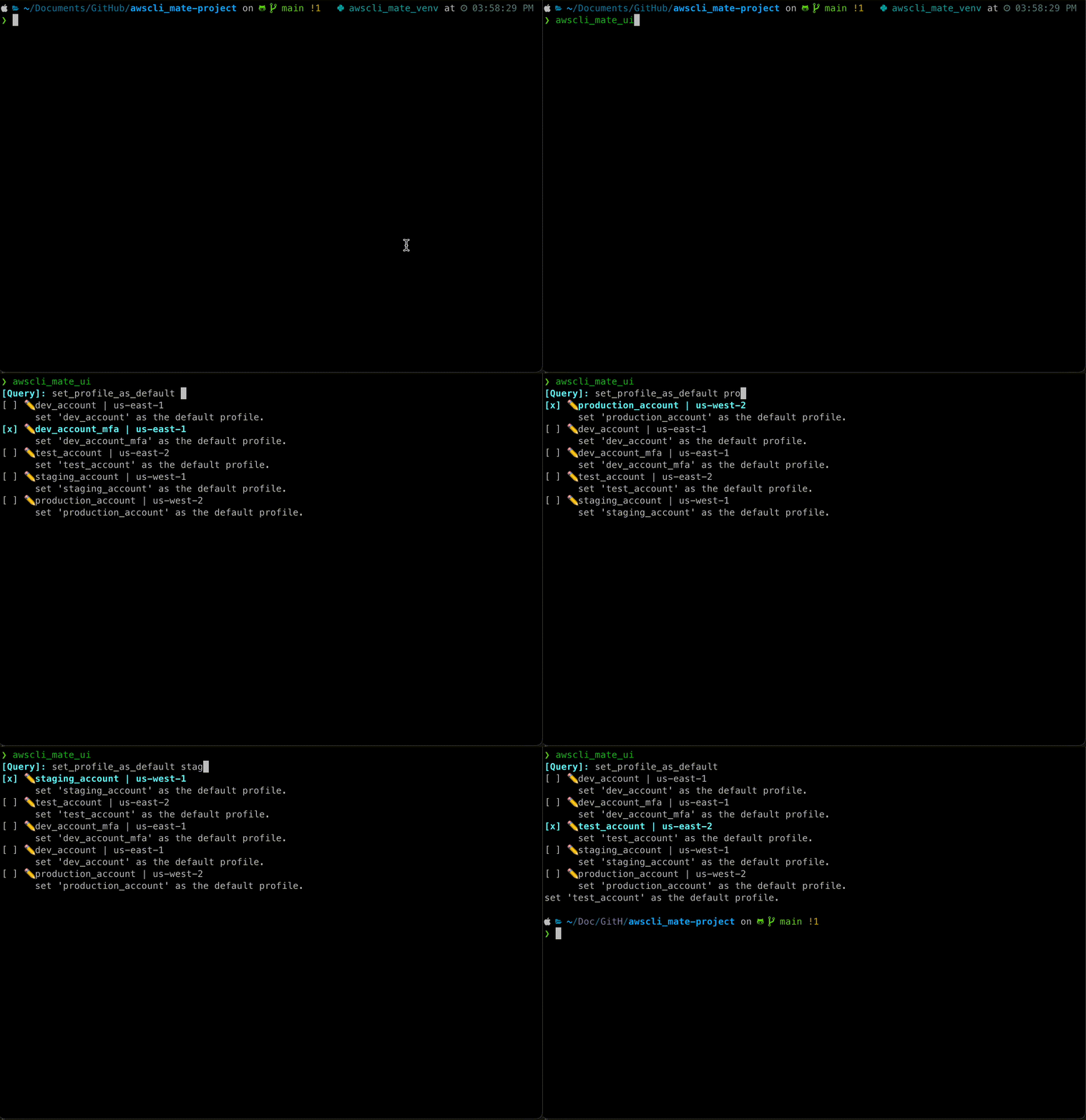
It is very common that you wants to set a profile as the default when using a tools that doesn’t support explicit --profile ... argument. awscli_mate provides a command to do this for you. It will update your .aws/config and .aws/credentials file and set the default profile to the one you specified.
Example:
awscli_mate set_profile_as_default --profile=your_profileOne Click MFA auth
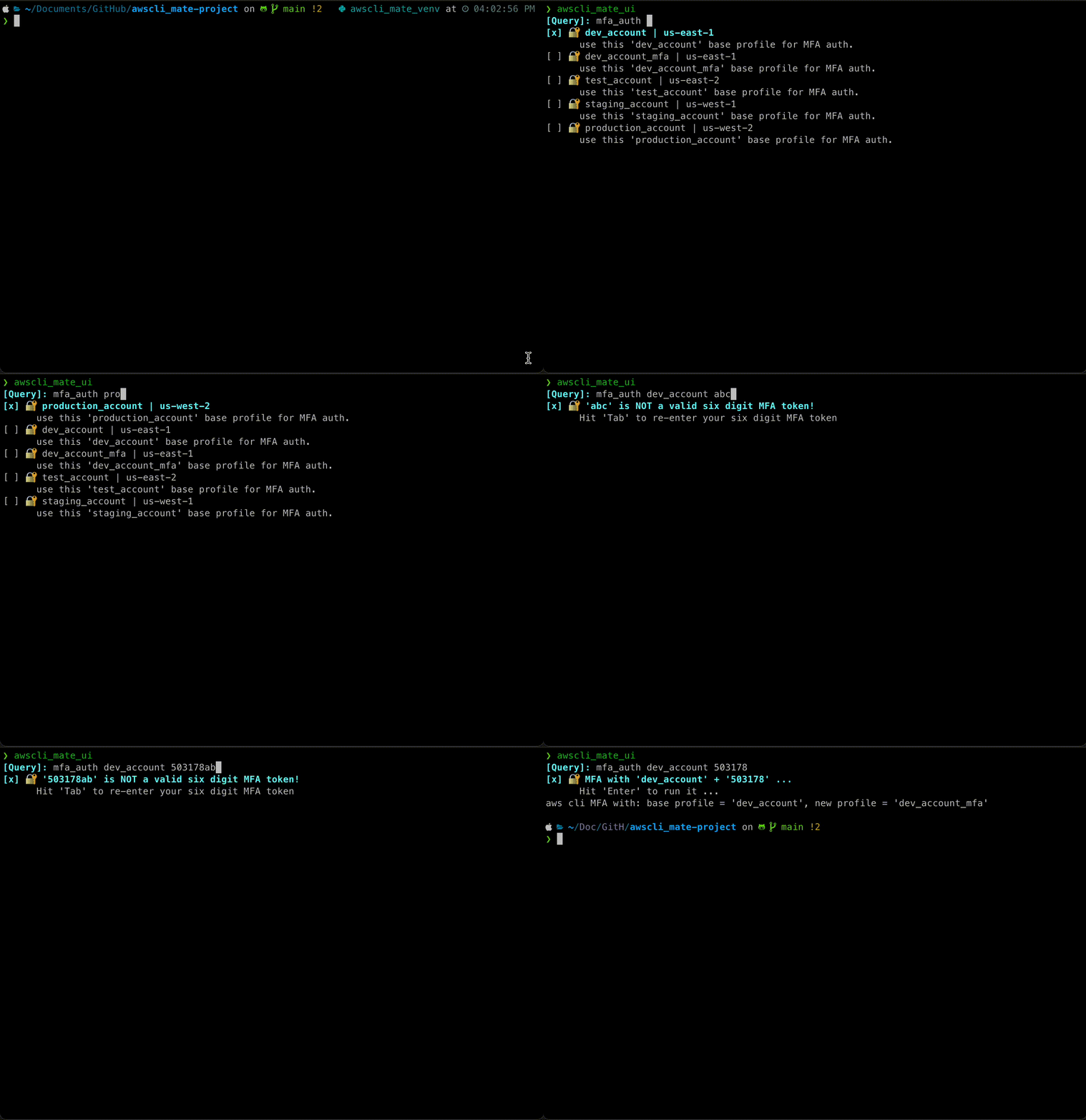
Based on this AWS re:Post How do I use an MFA token to authenticate access to my AWS resources through the AWS CLI?, you have to run aws sts get-session-token ... command to get some token, and manually copy and paste them to either environment variable or .aws/credentials file. This is a bit tedious. awscli_mate provides a one-click command to do this for you. Basically, it will use a base profile to get the token, let’s say it is your_profile, and automatically create / update a new profile called your_profile_mfa in your .aws/config and .aws/credentials file. So you can keep using the your_profile_mfa in your application.
Example:
awscli_mate mfa_auth --profile=your_profile --mfa_code=123456 --hours=12 --overwrite_default=TrueNote that this command also automatically set the MFA profile as default profile. If you don’t want to set the your_profile_mfa as default profile automatically, you can just remove the --overwrite_default part.
Use awscli_mate as a Python Library
See example.
Use awscli_mate as a Interactive CLI
Set named AWS Profile as default
Do MFA Authentication
Keyboard shortcuts:
hit Ctrl + E or UP to move item selection up.
hit Ctrl + R to scroll item selection up.
hit Ctrl + D or DOWN to move item selection up.
hit Ctrl + F to scroll item selection up.
hit Ctrl + H or LEFT to move query input cursor to the left (this won’t work on Windows).
hit Ctrl + L or RIGHT to move query input cursor to the right.
hit Ctrl + G to move query input cursor to the previous word.
hit Ctrl + K to move query input cursor to the next word.
hit Ctrl + X to clear the query input.
hit Tab to auto-complete.
hit BACKSPACE to delete query input backward.
hit DELETE to delete query input forward.
hit Enter to run it.
Install
awscli_mate is released on PyPI, so all you need is:
$ pip install awscli_mateTo upgrade to latest version:
$ pip install --upgrade awscli_mate1 maintainer

Metadata
1 maintainer
Release files for awscli-mate 1.1.3
For a detailed explanation of source distributions (sdists) and built distributions (wheels), please see the package formats documentation.
Source distribution (sdist)
| File | Size | Uploaded | |
|---|---|---|---|
| awscli_mate-1.1.3.tar.gz | 21.1 kB | Details |
Built distribution (wheel)
| File | Interpreter | ABI | Platform | Reset |
|---|---|---|---|---|
| awscli_mate-1.1.3-py3-none-any.whl | Python 3 | none | any | Details |
Total release size: 39.4 kB
Release files / awscli_mate-1.1.3.tar.gz
| Download URL | awscli_mate-1.1.3.tar.gz |
|---|---|
| Size | 21.1 kB |
| Tags | Source |
|
SHA-256 checksum How to use checksums |
3c487399304d335bbff9b63268b105ea9caba88862baf8eb7b6c432abf911edb
|
|
BLAKE2b-256 checksum How to use checksums |
7b43dc73ed11bf7eaa67313020b0fb42489728d192e47e785acc753fc0048f97
|
| Upload date | |
|
Uploaded using Trusted Publishing? What is trusted publishing? |
No |
| Uploaded via |
twine/6.0.1 CPython/3.11.8
|
Release files / awscli_mate-1.1.3-py3-none-any.whl
| Download URL | awscli_mate-1.1.3-py3-none-any.whl |
|---|---|
| Size | 18.3 kB |
| Tags | Python 3 |
|
SHA-256 checksum How to use checksums |
41e33216cea637d0efe244ca69a8bae411760ad5dce8182312e004a9bee2065d
|
|
BLAKE2b-256 checksum How to use checksums |
4056a1f18be88961bb09e52dd410d46c647e2344e54a8a2b121c62589ca7c267
|
| Upload date | |
|
Uploaded using Trusted Publishing? What is trusted publishing? |
No |
| Uploaded via |
twine/6.0.1 CPython/3.11.8
|














