
AWS Documentation MCP Server
Model Context Protocol (MCP) server for AWS Documentation
This MCP server provides tools to access AWS documentation, search for content, and get recommendations.
Features
- Read Documentation: Fetch and convert AWS documentation pages to markdown format
- Search Documentation: Search AWS documentation using the official search API (global only)
- Read Sections: Fetches sections of AWS documentation page and converts it to markdown format.
- Recommendations: Get content recommendations for AWS documentation pages (global only)
- Get Available Services List: Get a list of available AWS services in China regions (China only)
Prerequisites
Installation Requirements
- Install
uvfrom Astral or the GitHub README - Install Python 3.10 or newer using
uv python install 3.10(or a more recent version)
Installation
| Kiro | Cursor | VS Code |
|---|---|---|
 |
 |
 |
Configure the MCP server in your MCP client configuration:
{
  "mcpServers": {
    "awslabs.aws-documentation-mcp-server": {
      "command": "uvx",
      "args": ["awslabs.aws-documentation-mcp-server@latest"],
      "env": {
        "FASTMCP_LOG_LEVEL": "ERROR",
        "AWS_DOCUMENTATION_PARTITION": "aws",
        "MCP_USER_AGENT": "Mozilla/5.0 (Windows NT 10.0; Win64; x64) AppleWebKit/537.36 (KHTML, like Gecko) Chrome/131.0.0.0 Safari/537.36"
      },
      "disabled": false,
      "autoApprove": []
    }
  }
}
For Kiro MCP configuration, see the Kiro IDE documentation or the Kiro CLI documentation for details.
For global configuration, edit ~/.kiro/settings/mcp.json. For project-specific configuration, edit .kiro/settings/mcp.json in your project directory.
Windows Installation
For Windows users, the MCP server configuration format is slightly different:
{
  "mcpServers": {
    "awslabs.aws-documentation-mcp-server": {
      "disabled": false,
      "timeout": 60,
      "type": "stdio",
      "command": "uv",
      "args": [
        "tool",
        "run",
        "--from",
        "awslabs.aws-documentation-mcp-server@latest",
        "awslabs.aws-documentation-mcp-server.exe"
      ],
      "env": {
        "FASTMCP_LOG_LEVEL": "ERROR",
        "AWS_DOCUMENTATION_PARTITION": "aws"
      }
    }
  }
}
Note: Set
AWS_DOCUMENTATION_PARTITIONtoaws-cnto query AWS China documentation instead of global AWS documentation.Corporate Networks: If you're behind a corporate proxy or firewall that blocks certain User-Agent strings, set
MCP_USER_AGENTto match your browser's User-Agent to an allowable string.
or docker after a successful docker build -t mcp/aws-documentation .:
{
  "mcpServers": {
    "awslabs.aws-documentation-mcp-server": {
      "command": "docker",
      "args": [
        "run",
        "--rm",
        "--interactive",
        "--env",
        "FASTMCP_LOG_LEVEL=ERROR",
        "--env",
        "AWS_DOCUMENTATION_PARTITION=aws",
        "mcp/aws-documentation:latest"
      ],
      "env": {},
      "disabled": false,
      "autoApprove": []
    }
  }
}
Environment Variables
| Variable | Description | Default |
|---|---|---|
FASTMCP_LOG_LEVEL |
Logging level (DEBUG, INFO, WARNING, ERROR, CRITICAL) | WARNING |
AWS_DOCUMENTATION_PARTITION |
AWS partition (aws or aws-cn) |
aws |
MCP_USER_AGENT |
Custom User-Agent string for HTTP requests | Chrome-based default |
Corporate Network Support
For corporate environments with proxy servers or firewalls that block certain User-Agent strings:
{
  "env": {
    "MCP_USER_AGENT": "Mozilla/5.0 (Windows NT 10.0; Win64; x64) AppleWebKit/537.36 (KHTML, like Gecko) Chrome/131.0.0.0 Safari/537.36"
  }
}
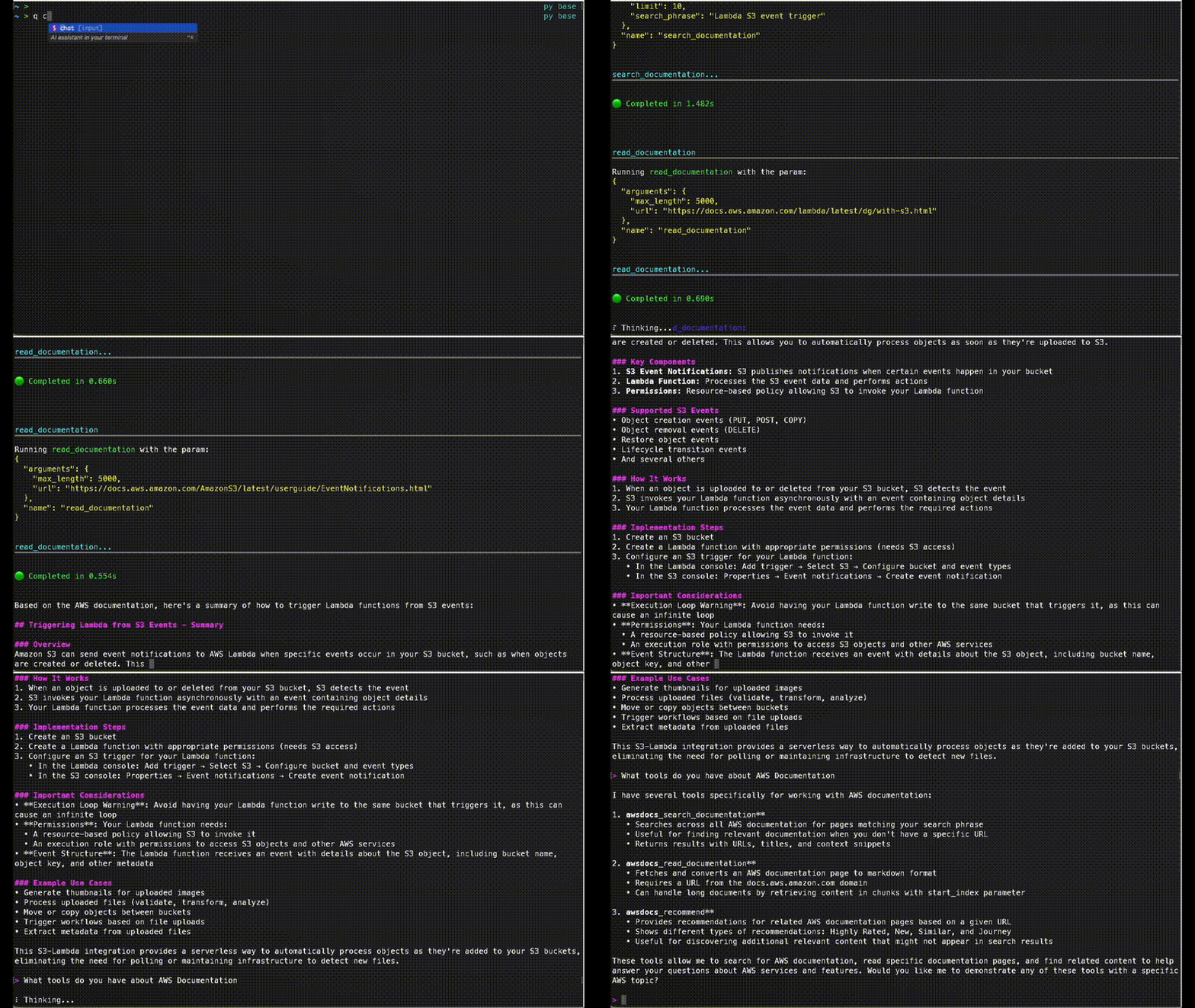
Basic Usage
Example:
- "look up documentation on S3 bucket naming rule. cite your sources"
- "recommend content for page https://docs.aws.amazon.com/AmazonS3/latest/userguide/bucketnamingrules.html"
Tools
read_documentation
Fetches an AWS documentation page and converts it to markdown format.
read_documentation(url: str) -> str
search_documentation (global only)
Searches AWS documentation using the official AWS Documentation Search API.
search_documentation(ctx: Context, search_phrase: str, limit: int, product_types: Optional[List[str]], guide_types: Optional[List[str]]) -> SearchResponse
read_sections (global only)
Fetches sections of AWS documentation page and converts it to markdown format.
read_sections(url: str, section: list[str]) -> list[dict]
recommend (global only)
Gets content recommendations for an AWS documentation page.
recommend(url: str) -> list[dict]
get_available_services (China only)
Gets a list of available AWS services in China regions.
get_available_services() -> str
Development
For getting started with development on the AWS Documentation MCP server, please refer to the awslabs/mcp DEVELOPER_GUIDE first. Everything below this is specific to AWS Documentation MCP Server development.
Running tests
Unit tests: uv run --frozen pytest --cov --cov-branch --cov-report=term-missing
Unit tests with integration tests: uv run --frozen pytest --cov --cov-branch --cov-report=term-missing --run-live
2 maintainers


Metadata
2 maintainers
Release files for awslabs.aws-documentation-mcp-server 1.1.23
For a detailed explanation of source distributions (sdists) and built distributions (wheels), please see the package formats documentation.
Source distribution (sdist)
| File | Size | Uploaded | Provenance | Actions |
|---|---|---|---|---|
| awslabs_aws_documentation_mcp_server-1.1.23.tar.gz | 3.9 MB | With provenance | Details for awslabs_aws_documentation_mcp_server-1.1.23.tar.gz |
Built distribution (wheel)
| File | Interpreter | ABI | Platform | Actions Reset |
|---|---|---|---|---|
| awslabs_aws_documentation_mcp_server-1.1.23-py3-none-any.whl | Python 3 | none | any | Details for awslabs_aws_documentation_mcp_server-1.1.23-py3-none-any.whl |
Total release size: 3.9 MB
Release files / awslabs_aws_documentation_mcp_server-1.1.23.tar.gz
| Download URL | awslabs_aws_documentation_mcp_server-1.1.23.tar.gz |
|---|---|
| Size | 3.9 MB |
| Tags | Source |
|
SHA-256 checksum How to use checksums |
3e553b674a96b907e312f17aa6b6ac859e8057aa882f1716536983f2b8d7f5f1
|
|
BLAKE2b-256 checksum How to use checksums |
c2e8a52b18a514eebb63d2080cb9fca62d99f14c308edda8b234f27817696ede
|
| Upload date | |
|
Uploaded using Trusted Publishing? What is trusted publishing? |
Yes |
| Uploaded via |
twine/6.1.0 CPython/3.13.7
|
Provenance
Provenance describes where a file came from. On PyPI, provenance is shared via attestations, which provide a verifiable record of the build or publishing details. View details, limitations and caveats.


PyPI Publish Attestation
PyPI verified that this artifact, at this checksum, originated from the publisher listed below.
Signed by GitHub Actions, verified by PyPI on May 8, 2026.
Transparency logRelease files / awslabs_aws_documentation_mcp_server-1.1.23-py3-none-any.whl
| Download URL | awslabs_aws_documentation_mcp_server-1.1.23-py3-none-any.whl |
|---|---|
| Size | 27.6 kB |
| Tags | Python 3 |
|
SHA-256 checksum How to use checksums |
6dae604db2e9e11d570e614dff3d75db3094de960db5faa4bc16d18437bf1696
|
|
BLAKE2b-256 checksum How to use checksums |
14474a9f84b7fe5422799a8aea670cad2291af99224d83b694552cfabe869f7d
|
| Upload date | |
|
Uploaded using Trusted Publishing? What is trusted publishing? |
Yes |
| Uploaded via |
twine/6.1.0 CPython/3.13.7
|
Provenance
Provenance describes where a file came from. On PyPI, provenance is shared via attestations, which provide a verifiable record of the build or publishing details. View details, limitations and caveats.
PyPI Publish Attestation
PyPI verified that this artifact, at this checksum, originated from the publisher listed below.
Signed by GitHub Actions, verified by PyPI on May 8, 2026.
Transparency logSecurity for awslabs.aws-documentation-mcp-server 1.1.23
Provenance
Provenance describes where a file came from. On PyPI, provenance is shared via attestations, which provide a verifiable record of the build or publishing details. View details, limitations and caveats.
Full provenance
Both files in this release have been uploaded with provenance metadata.
Attestation for awslabs_aws_documentation_mcp_server-1.1.23.tar.gz
PyPI Publish Attestation
PyPI verified that this artifact, at this checksum, originated from the publisher listed below.
Signed by GitHub Actions, verified by PyPI on May 8, 2026.
Transparency logA note on package security
PyPI is a repository for distributing packages, not a service for auditing them. While third-party security researchers and our staff do their best to detect and remove malicious packages, PyPI cannot guarantee the quality, security or suitability of any given package.
To learn more about protecting yourself from malicious actors, visit our package security documentation.














