
An AWS Labs Model Context Protocol (MCP) server for AWS Documentation
Verified details
These details have been verified by PyPIProject links
GitHub Statistics
Maintainers


Project description
AWS Documentation MCP Server
Model Context Protocol (MCP) server for AWS Documentation
This MCP server provides tools to access AWS documentation, search for content, and get recommendations.
Features
- Read Documentation: Fetch and convert AWS documentation pages to markdown format
- Search Documentation: Search AWS documentation using the official search API (global only)
- Recommendations: Get content recommendations for AWS documentation pages (global only)
- Get Available Services List: Get a list of available AWS services in China regions (China only)
Prerequisites
Installation Requirements
- Install
uvfrom Astral or the GitHub README - Install Python 3.10 or newer using
uv python install 3.10(or a more recent version)
Installation
| Cursor | VS Code |
|---|---|
 |
 |
Configure the MCP server in your MCP client configuration:
{
  "mcpServers": {
    "awslabs.aws-documentation-mcp-server": {
      "command": "uvx",
      "args": ["awslabs.aws-documentation-mcp-server@latest"],
      "env": {
        "FASTMCP_LOG_LEVEL": "ERROR",
        "AWS_DOCUMENTATION_PARTITION": "aws",
        "MCP_USER_AGENT": "Mozilla/5.0 (Windows NT 10.0; Win64; x64) AppleWebKit/537.36 (KHTML, like Gecko) Chrome/131.0.0.0 Safari/537.36"
      },
      "disabled": false,
      "autoApprove": []
    }
  }
}
For Amazon Q Developer CLI, add the MCP client configuration and tool command to the agent file in ~/.aws/amazonq/cli-agents.
Example, ~/.aws/amazonq/cli-agents/default.json
{
  "mcpServers": {
    "awslabs.aws-documentation-mcp-server": {
      "command": "uvx",
      "args": ["awslabs.aws-documentation-mcp-server@latest"],
      "env": {
        "FASTMCP_LOG_LEVEL": "ERROR",
        "AWS_DOCUMENTATION_PARTITION": "aws"
      },
      "disabled": false,
      "autoApprove": []
    }
  },
  "tools": [
    // .. other existing tools
    "@awslabs.aws-documentation-mcp-server"
  ],
}
Windows Installation
For Windows users, the MCP server configuration format is slightly different:
{
  "mcpServers": {
    "awslabs.aws-documentation-mcp-server": {
      "disabled": false,
      "timeout": 60,
      "type": "stdio",
      "command": "uv",
      "args": [
        "tool",
        "run",
        "--from",
        "awslabs.aws-documentation-mcp-server@latest",
        "awslabs.aws-documentation-mcp-server.exe"
      ],
      "env": {
        "FASTMCP_LOG_LEVEL": "ERROR",
        "AWS_DOCUMENTATION_PARTITION": "aws"
      }
    }
  }
}
Note: Set
AWS_DOCUMENTATION_PARTITIONtoaws-cnto query AWS China documentation instead of global AWS documentation.Corporate Networks: If you're behind a corporate proxy or firewall that blocks certain User-Agent strings, set
MCP_USER_AGENTto match your browser's User-Agent to an allowable string.
or docker after a successful docker build -t mcp/aws-documentation .:
{
  "mcpServers": {
    "awslabs.aws-documentation-mcp-server": {
      "command": "docker",
      "args": [
        "run",
        "--rm",
        "--interactive",
        "--env",
        "FASTMCP_LOG_LEVEL=ERROR",
        "--env",
        "AWS_DOCUMENTATION_PARTITION=aws",
        "mcp/aws-documentation:latest"
      ],
      "env": {},
      "disabled": false,
      "autoApprove": []
    }
  }
}
Environment Variables
| Variable | Description | Default |
|---|---|---|
FASTMCP_LOG_LEVEL |
Logging level (DEBUG, INFO, WARNING, ERROR, CRITICAL) | WARNING |
AWS_DOCUMENTATION_PARTITION |
AWS partition (aws or aws-cn) |
aws |
MCP_USER_AGENT |
Custom User-Agent string for HTTP requests | Chrome-based default |
Corporate Network Support
For corporate environments with proxy servers or firewalls that block certain User-Agent strings:
{
  "env": {
    "MCP_USER_AGENT": "Mozilla/5.0 (Windows NT 10.0; Win64; x64) AppleWebKit/537.36 (KHTML, like Gecko) Chrome/131.0.0.0 Safari/537.36"
  }
}
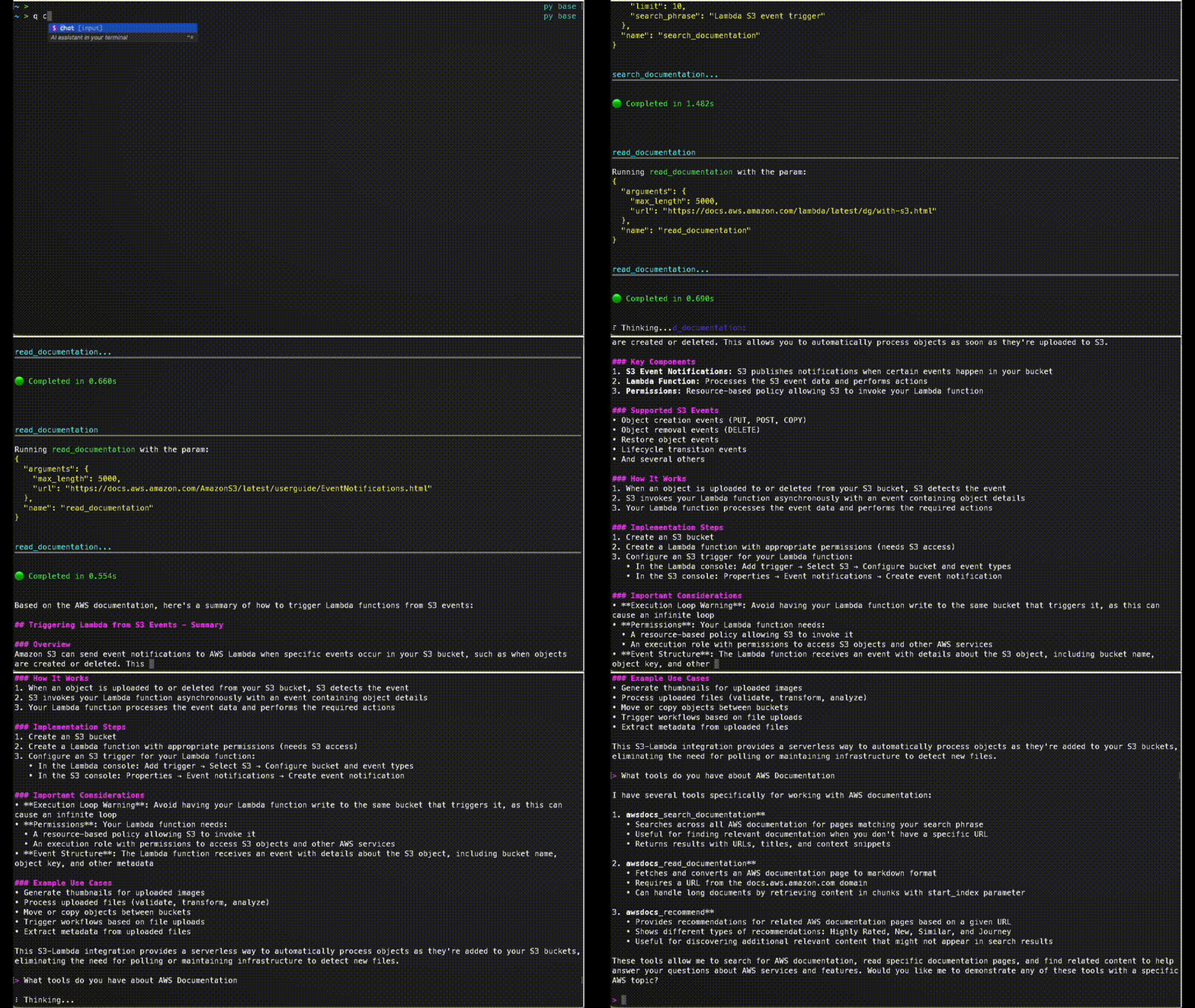
Basic Usage
Example:
- "look up documentation on S3 bucket naming rule. cite your sources"
- "recommend content for page https://docs.aws.amazon.com/AmazonS3/latest/userguide/bucketnamingrules.html"
Tools
read_documentation
Fetches an AWS documentation page and converts it to markdown format.
read_documentation(url: str) -> str
search_documentation (global only)
Searches AWS documentation using the official AWS Documentation Search API.
search_documentation(search_phrase: str, limit: int) -> list[dict]
recommend (global only)
Gets content recommendations for an AWS documentation page.
recommend(url: str) -> list[dict]
get_available_services (China only)
Gets a list of available AWS services in China regions.
get_available_services() -> str
Project details
Verified details
These details have been verified by PyPIProject links
GitHub Statistics
Maintainers
Release history Release notifications | RSS feed


Download files
Download the file for your platform. If you're not sure which to choose, learn more about installing packages.
Source Distribution
Built Distribution
Filter files by name, interpreter, ABI, and platform.
If you're not sure about the file name format, learn more about wheel file names.
Copy a direct link to the current filters
File details
Details for the file awslabs_aws_documentation_mcp_server-1.1.10.tar.gz.
File metadata
- Download URL: awslabs_aws_documentation_mcp_server-1.1.10.tar.gz
- Upload date:
- Size: 3.9 MB
- Tags: Source
- Uploaded using Trusted Publishing? Yes
- Uploaded via: twine/6.1.0 CPython/3.13.7
File hashes
| Algorithm | Hash digest | |
|---|---|---|
| SHA256 |
c4fe01f663b09edc7d5278a474ca5c41714d1fc79ba31a2e05642809c26a1bb2
|
|
| MD5 |
955f522bbe4360fd2394e2a16d9a2cfc
|
|
| BLAKE2b-256 |
57eef75caf3b0e0e1783d6ea5383cecebe927b0a582d13e95280dbe54e6d97f9
|
Provenance
The following attestation bundles were made for awslabs_aws_documentation_mcp_server-1.1.10.tar.gz:
Publisher:
release.yml on awslabs/mcp
-
Statement:
-
Statement type:
https://in-toto.io/Statement/v1 -
Predicate type:
https://docs.pypi.org/attestations/publish/v1 -
Subject name:
awslabs_aws_documentation_mcp_server-1.1.10.tar.gz -
Subject digest:
c4fe01f663b09edc7d5278a474ca5c41714d1fc79ba31a2e05642809c26a1bb2 - Sigstore transparency entry: 682555230
- Sigstore integration time:
-
Permalink:
awslabs/mcp@57d7d67b0b51f57475321e111f7d76677740319f -
Branch / Tag:
refs/tags/2025.11.20251107160628 - Owner: https://github.com/awslabs
-
Access:
public
-
Token Issuer:
https://token.actions.githubusercontent.com -
Runner Environment:
github-hosted -
Publication workflow:
release.yml@57d7d67b0b51f57475321e111f7d76677740319f -
Trigger Event:
push
-
Statement type:
File details
Details for the file awslabs_aws_documentation_mcp_server-1.1.10-py3-none-any.whl.
File metadata
- Download URL: awslabs_aws_documentation_mcp_server-1.1.10-py3-none-any.whl
- Upload date:
- Size: 23.4 kB
- Tags: Python 3
- Uploaded using Trusted Publishing? Yes
- Uploaded via: twine/6.1.0 CPython/3.13.7
File hashes
| Algorithm | Hash digest | |
|---|---|---|
| SHA256 |
6034159c45eac15e6184c3408027a6c2a5012d69a3431675c786fac82ad97f27
|
|
| MD5 |
45f0e6bb374a63a6a586df3be6a26ab2
|
|
| BLAKE2b-256 |
5bce3bc74ffb05a455bc0054836696536112d6a4f848a04eaaa8f1e1a858186d
|
Provenance
The following attestation bundles were made for awslabs_aws_documentation_mcp_server-1.1.10-py3-none-any.whl:
Publisher:
release.yml on awslabs/mcp
-
Statement:
-
Statement type:
https://in-toto.io/Statement/v1 -
Predicate type:
https://docs.pypi.org/attestations/publish/v1 -
Subject name:
awslabs_aws_documentation_mcp_server-1.1.10-py3-none-any.whl -
Subject digest:
6034159c45eac15e6184c3408027a6c2a5012d69a3431675c786fac82ad97f27 - Sigstore transparency entry: 682555251
- Sigstore integration time:
-
Permalink:
awslabs/mcp@57d7d67b0b51f57475321e111f7d76677740319f -
Branch / Tag:
refs/tags/2025.11.20251107160628 - Owner: https://github.com/awslabs
-
Access:
public
-
Token Issuer:
https://token.actions.githubusercontent.com -
Runner Environment:
github-hosted -
Publication workflow:
release.yml@57d7d67b0b51f57475321e111f7d76677740319f -
Trigger Event:
push
-
Statement type:






