
Automated Water Supply Model







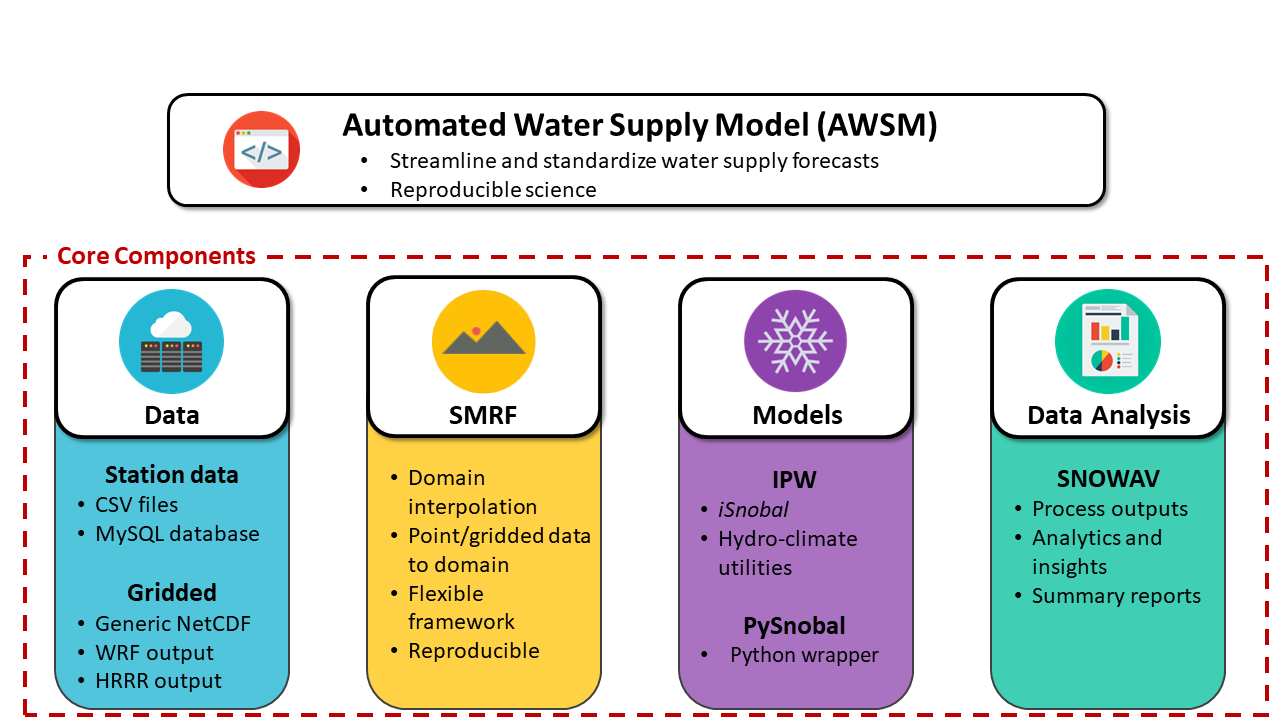
Automated Water Supply Model (AWSM) was developed at the USDA Agricultural Research Service (ARS) in Boise, ID. AWSM was designed to streamline the work flow used by the ARS to forecast the water supply of multiple water basins. AWSM standardizes the steps needed to distribute weather station data with SMRF, run an energy and mass balance with iSnobal, and process the results, while maintaining the flexibility of each program.
Quick Start
The fastest way to get up and running with AWSM is to use the docker images that are pre-built and can deployed cross platform.
To build AWSM natively from source checkout the install instructions here.
Docker
Docker images are containers that allow us to ship the software to our users seamlessly and without a headache. It is by far the easiest way to use AWSM. If you are curious to read more about them, visit Whats a container on docker's website.
Using docker images comes with very minor quirks though, such as requiring you to
mount a volume to access the data when you are done with your run. To mount a
data volume, so that you can share data between the local file system and the
docker, the -v option must be used. For a more in depth discussion and
tutorial, read about docker volumes. The container has a shared data volume
at /data where the container can access the local file system.
NOTE: On the host paths to the volume to mount, you must use full absolute paths!
Running the Demo
To simply run the AWSM demo; mount the desired directory as a volume and run the image, using the following command:
For Linux:
docker run -v <path>:/data -it usdaarsnwrc/awsm:develop
For MacOSX:
docker run -v /Users/<path>:/data -it usdaarsnwrc/awsm:develop
For Windows:
docker run -v /c/Users/<path>:/data -it usdaarsnwrc/awsm:develop
The output netCDF files will be placed in the location you mounted (using the -v option). We like to use ncview to view our netcdf files quickly.
Setting Up Your Run
To use the AWSM docker image to create your own runs, you need to setup a project folder containing all the files necessary to run the model. Then using the same command above, mount your project folder and provide a path to the configuration file. An example of a project folder might like:
My_Basin
      ├── air_temp.csv
      ├── cloud_factor.csv
      ├── config.ini
      ├── maxus.nc
      ├── metadata.csv
      ├── output
      ├── precip.csv
      ├── solar.csv
      ├── topo.nc
      ├── vapor_pressure.csv
      ├── wind_direction.csv
      └── wind_speed.csv
Then the command would be:
docker run -v <path>/My_Basin:/data -it usdaarsnwrc/awsm:develop <path>/My_Basin/config.ini
2 maintainers


Metadata
2 maintainers
Release files for awsm 0.11.2
For a detailed explanation of source distributions (sdists) and built distributions (wheels), please see the package formats documentation.
Source distribution (sdist)
| File | Size | Uploaded | |
|---|---|---|---|
| awsm-0.11.2.tar.gz | 7.4 MB | Details |
Built distribution (wheel)
| File | Interpreter | ABI | Platform | Reset |
|---|---|---|---|---|
| awsm-0.11.2-py2.py3-none-any.whl | Python 3, Python 2 | none | any | Details |
Total release size: 14.5 MB
Release files / awsm-0.11.2.tar.gz
| Download URL | awsm-0.11.2.tar.gz |
|---|---|
| Size | 7.4 MB |
| Tags | Source |
|
SHA-256 checksum How to use checksums |
5212cdba5d4e5367c0f1ad4eba6fea74e82bc3a05aaf6614f78576c61063e7b2
|
|
BLAKE2b-256 checksum How to use checksums |
50f7bcd2e8ed0e33bb7f71a873005761e15e865cecc3603ed294263313be7387
|
| Upload date | |
|
Uploaded using Trusted Publishing? What is trusted publishing? |
No |
| Uploaded via |
twine/1.15.0 pkginfo/1.5.0.1 requests/2.9.1 setuptools/44.1.1 requests-toolbelt/0.9.1 tqdm/4.49.0 CPython/2.7.12
|
Release files / awsm-0.11.2-py2.py3-none-any.whl
| Download URL | awsm-0.11.2-py2.py3-none-any.whl |
|---|---|
| Size | 7.2 MB |
| Tags | Python 2 Python 3 |
|
SHA-256 checksum How to use checksums |
987031e7651550319b85ac04326da0faf0d5598ac240b41661c1ca06d3133003
|
|
BLAKE2b-256 checksum How to use checksums |
3685c39fe773df0e806182f0fe4dd91efe1a8d9f7e24da3ab7e442b263d7db58
|
| Upload date | |
|
Uploaded using Trusted Publishing? What is trusted publishing? |
No |
| Uploaded via |
twine/1.15.0 pkginfo/1.5.0.1 requests/2.9.1 setuptools/44.1.1 requests-toolbelt/0.9.1 tqdm/4.49.0 CPython/2.7.12
|














