

awsnav
Every AWS service in your terminal.
Browse EC2, S3, Bedrock and 430+ other services from the keyboard, scan every region
for what is actually running, and drill from any resource into the calls that explain it.




Quick start · Features · Region scan · Install · Keys · How it works
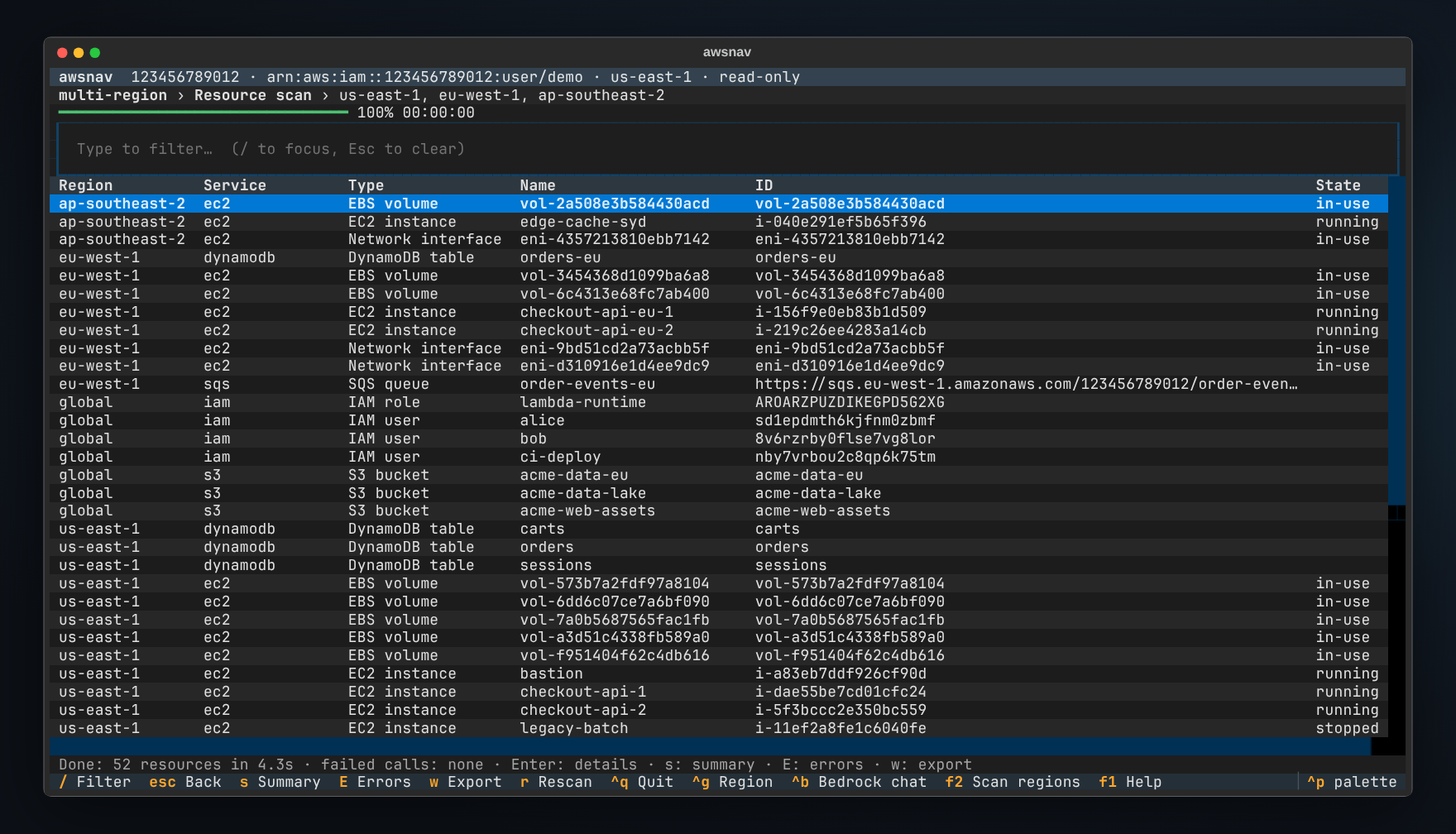
awsnav reads the API models that ship inside boto3, so it knows every AWS service the moment boto3 does. EC2 and S3 work the same way as Bedrock, AgentCore, and whatever AWS launches next week. No plugins, no per-service code, no command syntax to remember. If boto3 can call it, awsnav can browse it.
Quick start
pipx install awsnav
awsnav
Enter an access key and secret, or just press Enter to use your usual AWS
profile, SSO session or environment variables. Type to find a service, Enter
to open it, F2 to scan every region. F1 shows all keys.
Features
- Every service, automatically. 436 services today, from EC2 and S3 to Bedrock, Bedrock Agents and AgentCore. Each one opens on its resource types, such as Instances, Buckets, Foundation Models or Agents. Upgrading boto3 adds new services and API calls with no awsnav release.
- Scan every region at once.
F2finds active resources across all regions, or the ones you pick, and streams them into one table. AWS-created defaults are left out, so you see what you run. Export to JSON or CSV, or run the same scan from scripts withawsnav --scan. - Drill down without reading docs. Open any resource and awsnav lists the read-only calls that its fields can fill in. A bucket leads to its policy, versioning and objects. An instance leads to its console output, status, image and subnet. A Bedrock agent leads to its versions and aliases.
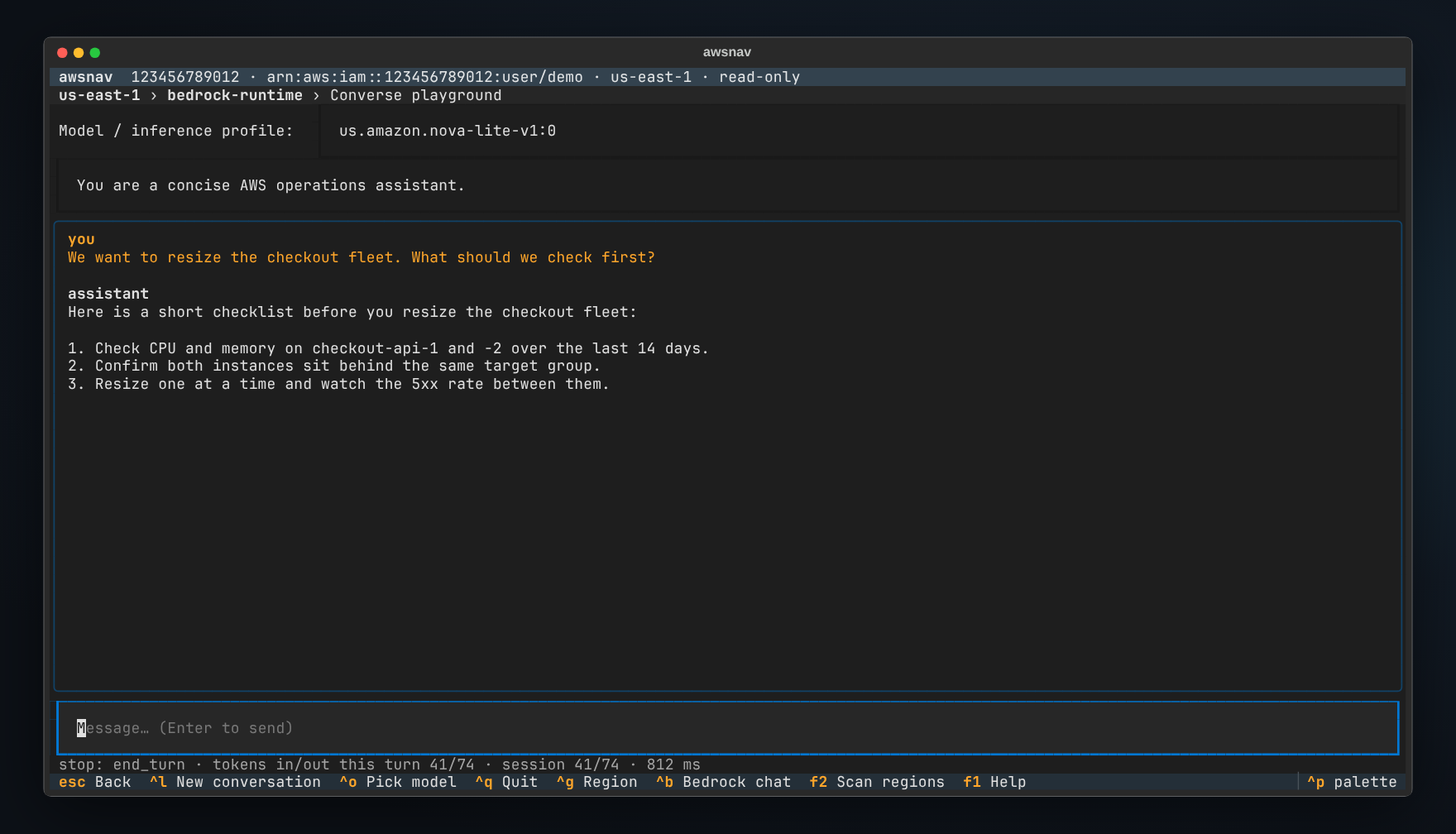
- Bedrock built in. List foundation models, custom models, guardrails,
agents and knowledge bases, then chat with any text model or inference
profile straight from its detail screen (
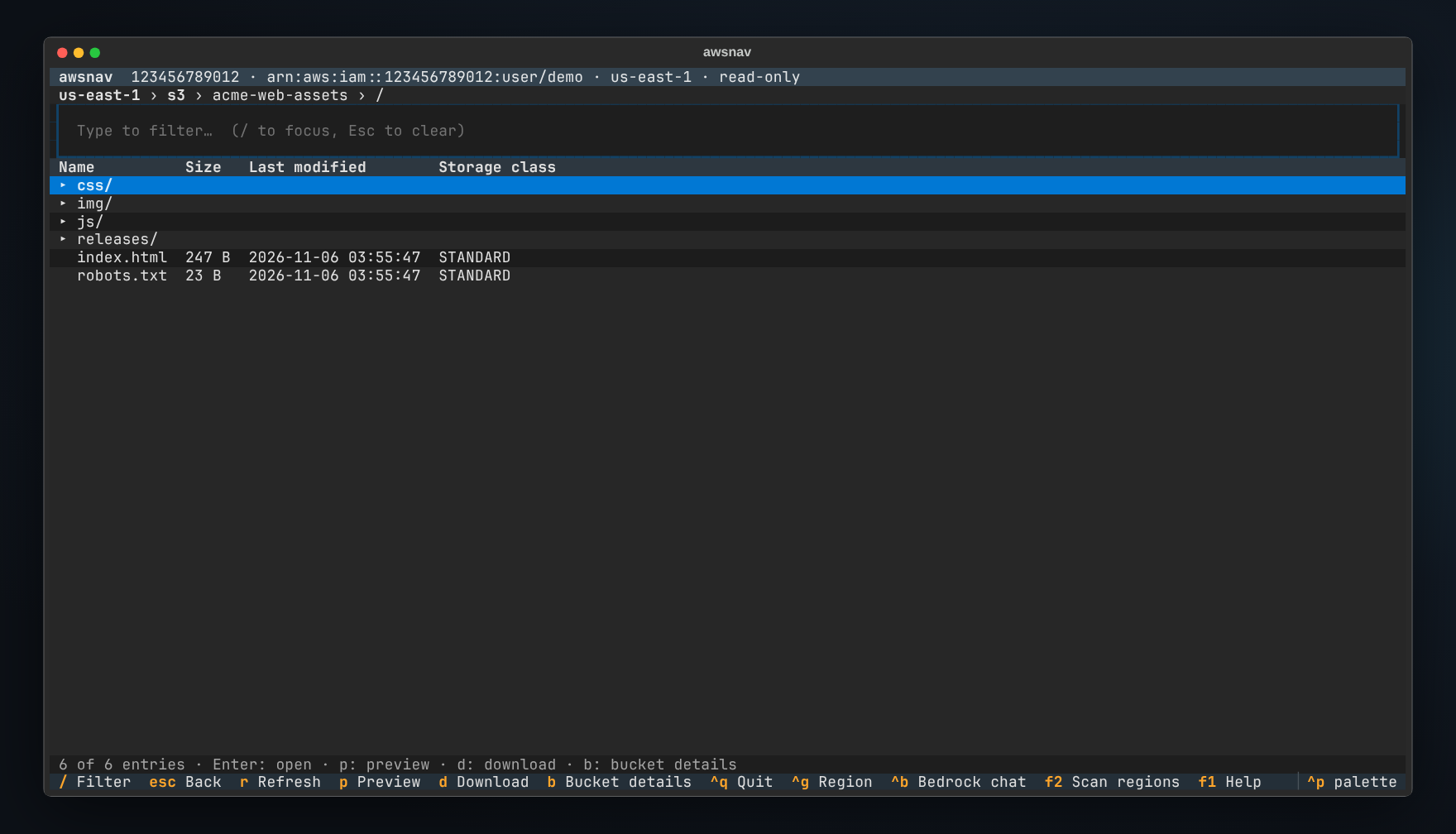
Ctrl+Banywhere). - S3 like a file manager. Browse buckets as folders, preview an object's first 64 KiB with syntax highlighting, and download it.
- Any API call when you need it. The operation runner calls any of the thousands of AWS operations with JSON parameters. It is prefilled from the resource you are on, with the AWS documentation shown alongside.
- Safe by default. Browsing and scanning only ever call read-only
operations. Write calls need
--allow-writeand a confirmation that shows exactly what will run. Credentials stay in memory and are never written to disk. - Region-aware.
Ctrl+Gswitches region. Anything opened from a scan result keeps working in that resource's own region, wherever you are. - Works anywhere a terminal does. Over SSH, in tmux, on a jump host,
against LocalStack (
--endpoint-url). Light on dependencies: boto3 and Textual.
In motion
Find EC2, open the instances, look at one, then scan three regions and filter the results. Afterwards, ask a Bedrock model a question without leaving the terminal.
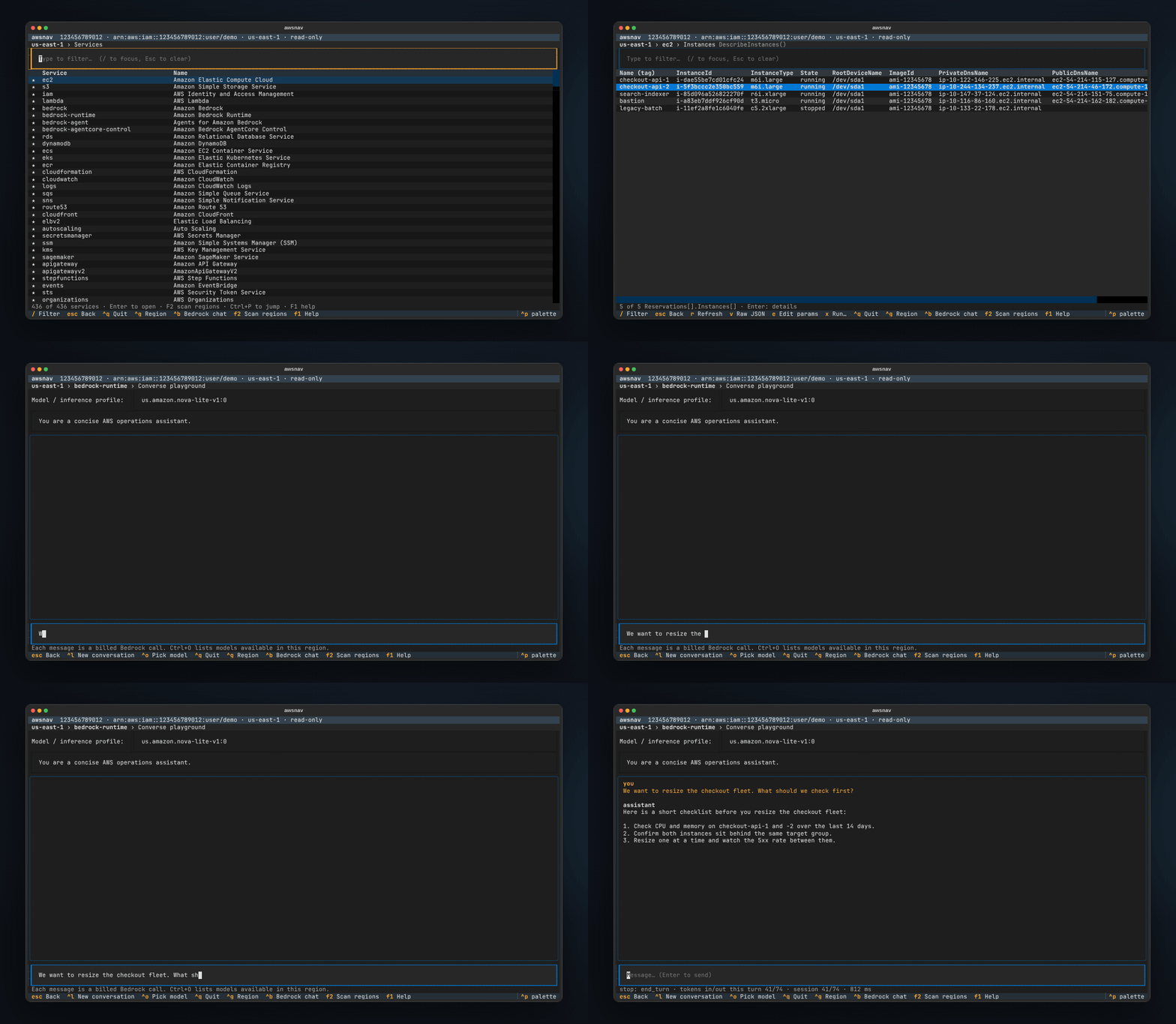
Scan every region
Pick regions and press Ctrl+R. The estimate tells you how many read-only
calls the scan will make before you start.
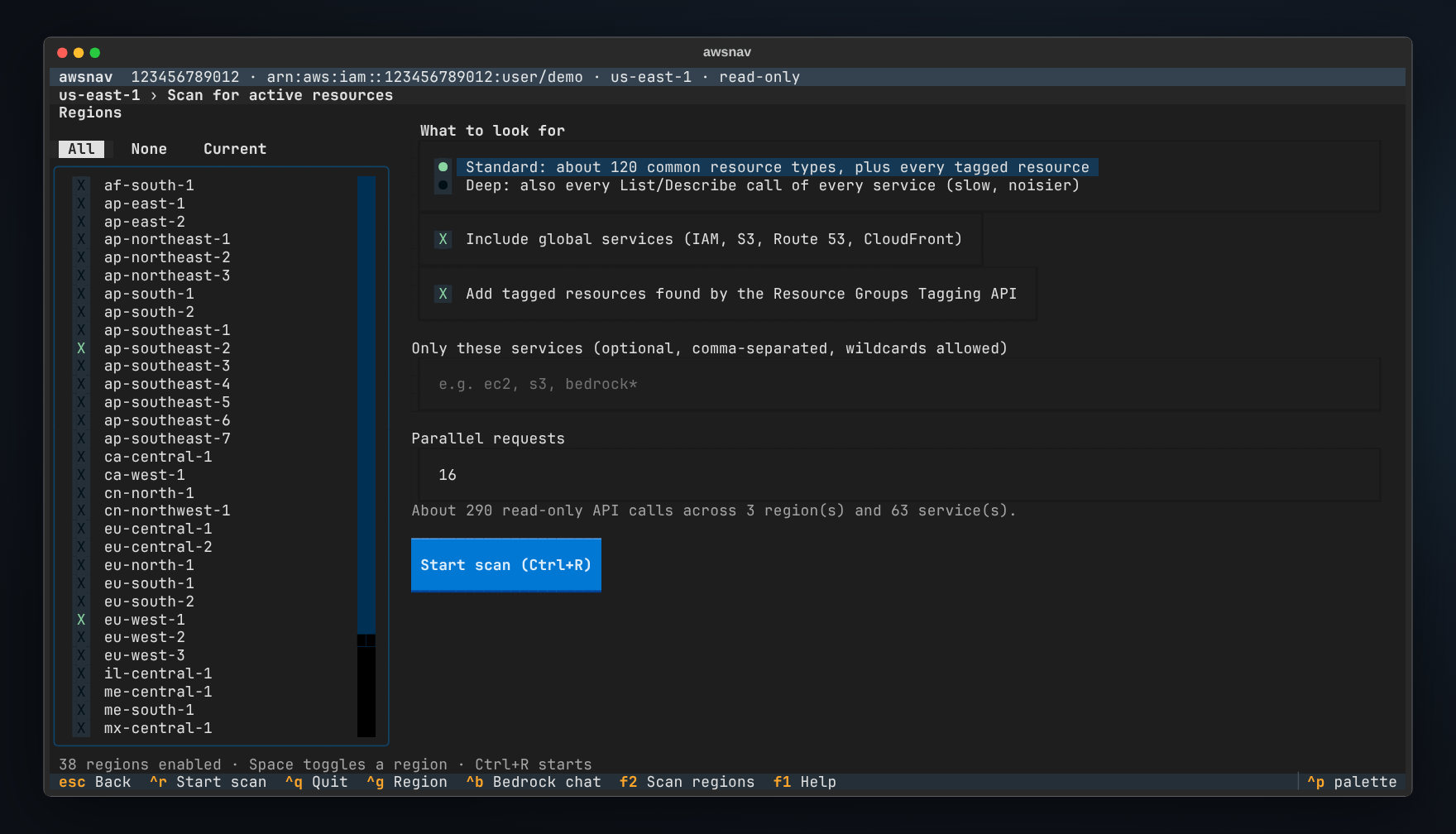
The standard scan covers about 120 resource types across compute, networking, storage, databases, analytics, AI/ML, security and developer tools, plus every resource the Resource Groups Tagging API knows about. AWS-created defaults are skipped: default VPCs and their subnets and security groups, AWS-managed keys, service-linked roles, managed EventBridge rules, terminated instances and deleted stacks. Deep mode adds every parameterless List and Describe call of every service, except catalogue lookups such as instance types, for when "about 120 types" is not enough.
Global services such as IAM, Route 53 and CloudFront are scanned once, and S3
buckets land in their own region. Calls that fail are grouped as missing
permission, not offered in that region, or other error (E), so a partial
result is never silent.
awsnav --scan                                          # all enabled regions, table on stdout
awsnav --scan --scan-regions us-east-1,eu-west-1 -o inventory.csv
awsnav --scan --services 'ec2,rds,bedrock*' -o inventory.json
awsnav --scan --deep --workers 32 -o everything.json
Resources and details
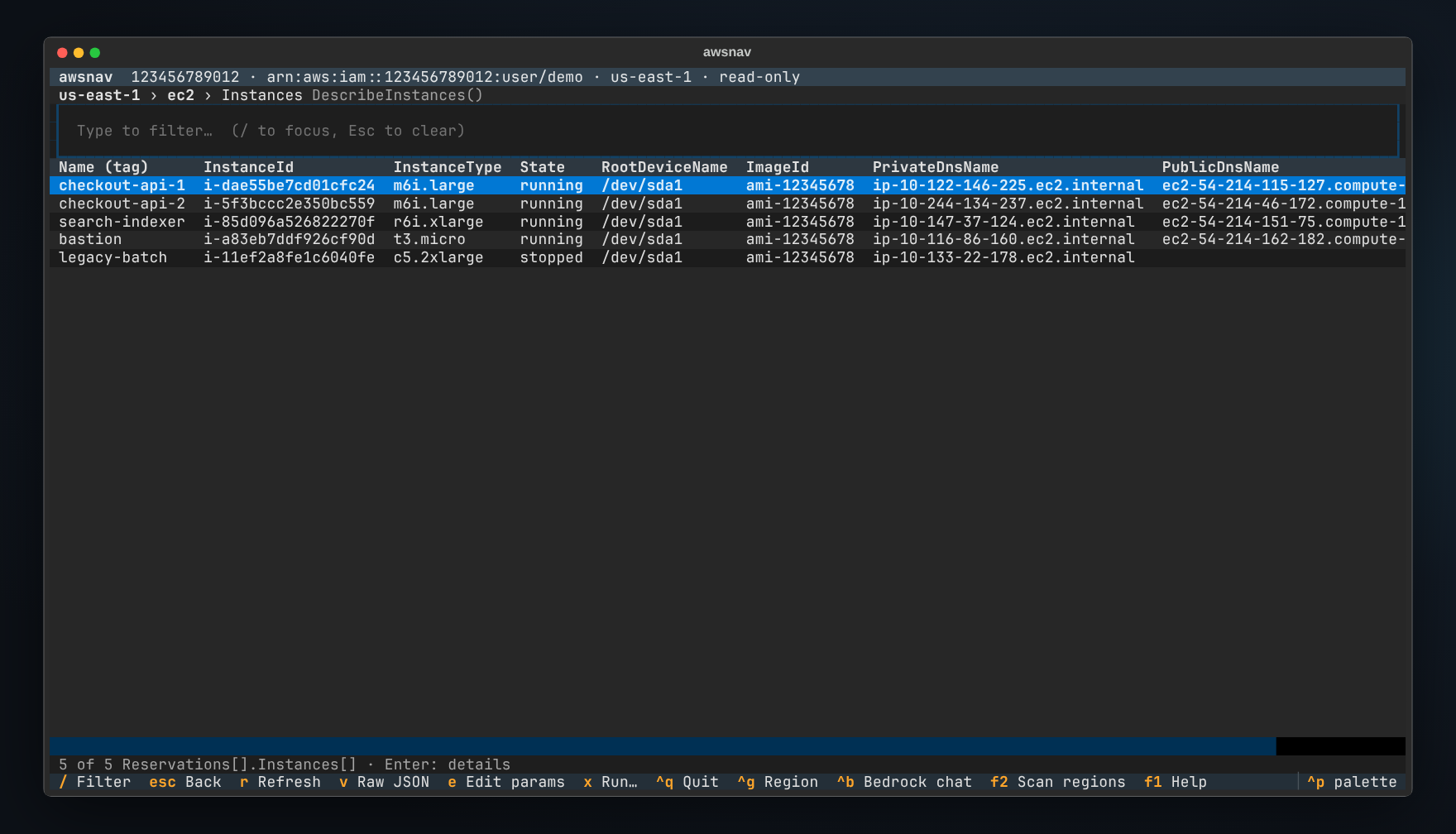
Resource lists pick their own columns: names from Name tags, IDs, states,
types and dates first; ARNs and URLs last. / filters as you type.
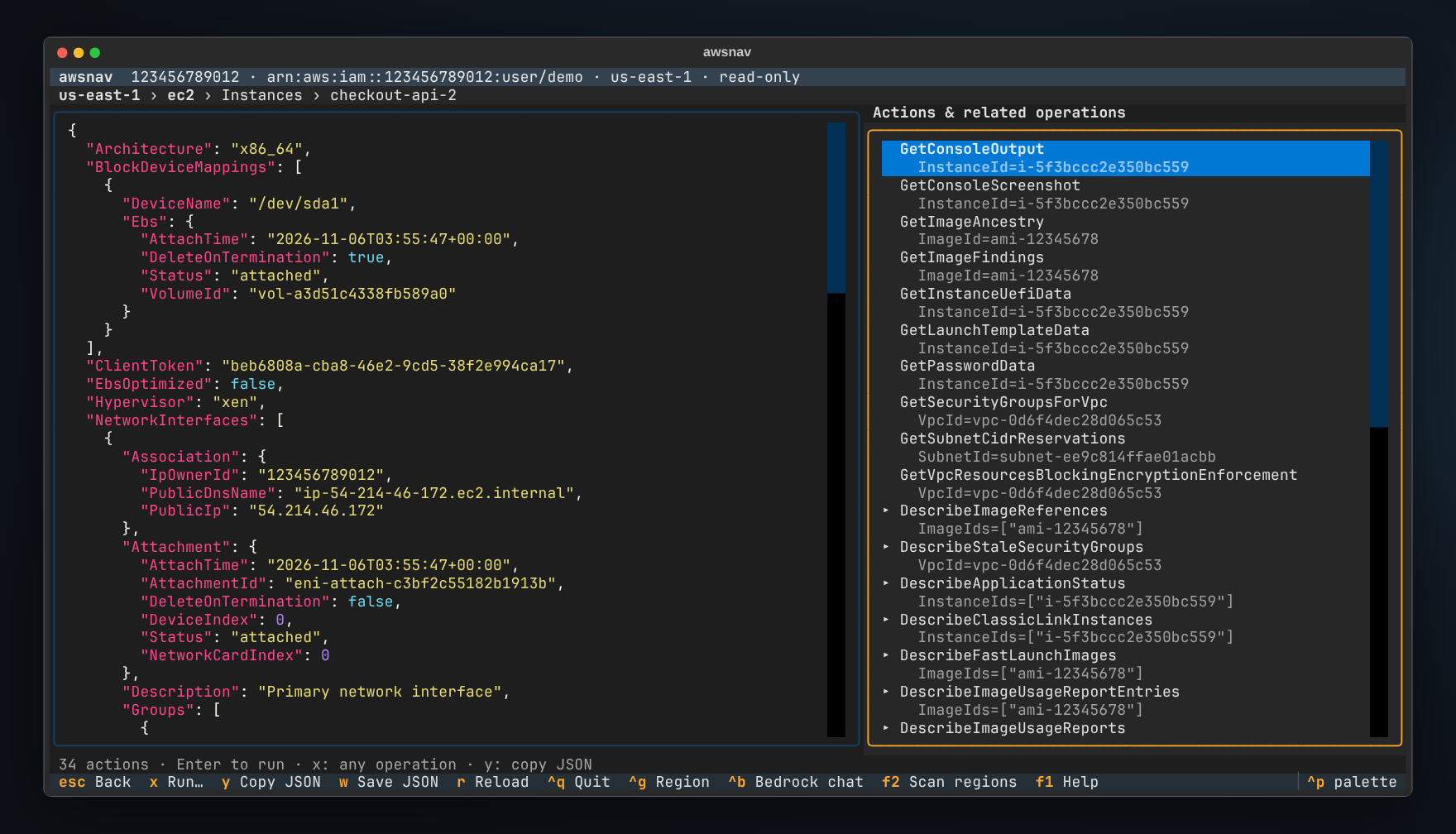
A resource's details show its full JSON next to everything you can do with it.
Calls marked ▸ lead to more resources, and they chain: bucket, object, object
tags.
S3
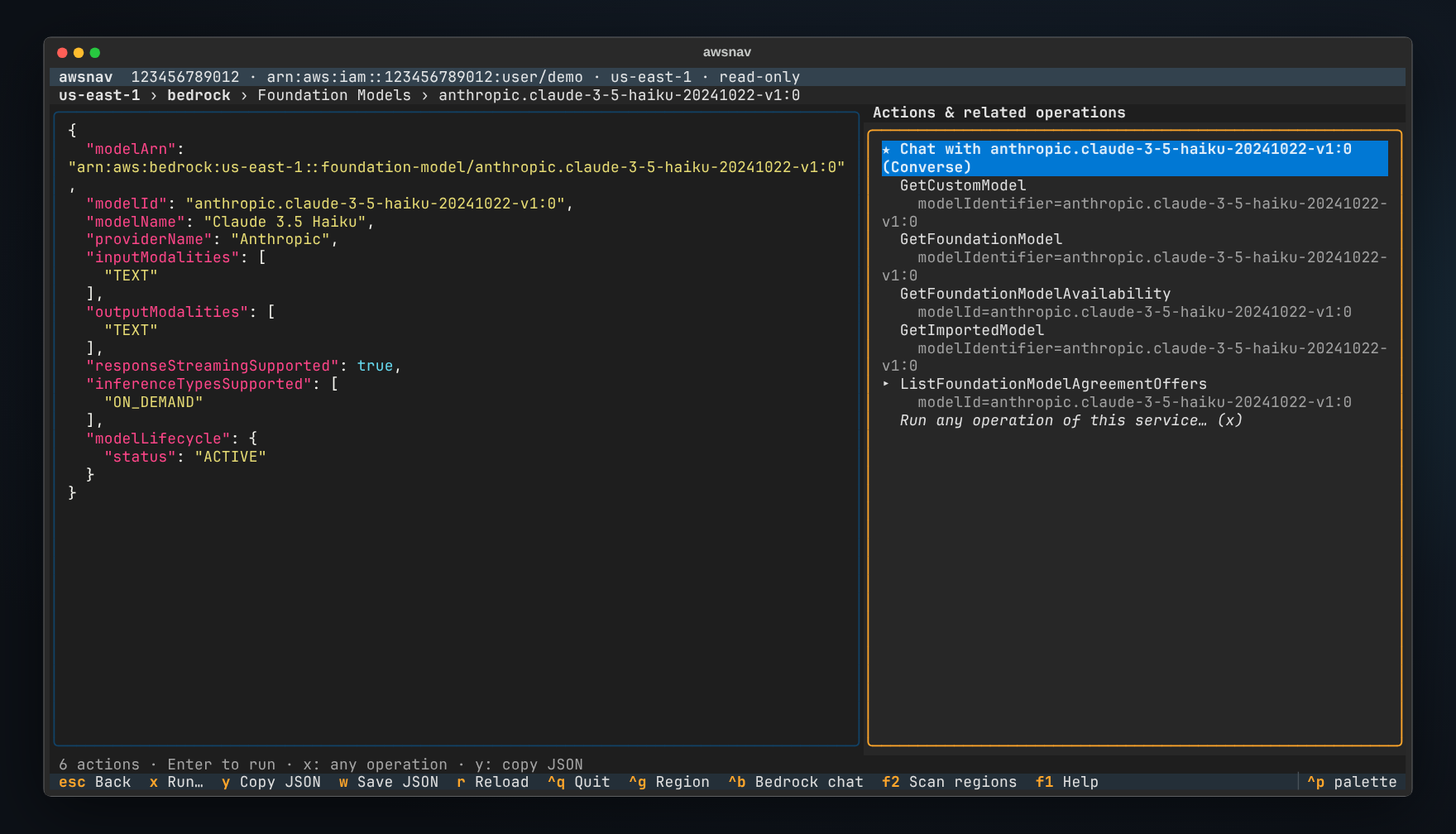
Bedrock
Models, profiles, agents, knowledge bases, guardrails and AgentCore runtimes are all browsable. Any text model is one keypress away from a chat.
Operation runner
Any operation, any parameters. Required fields are templated, values are prefilled from where you came from, and the AWS documentation for every parameter sits on the right.
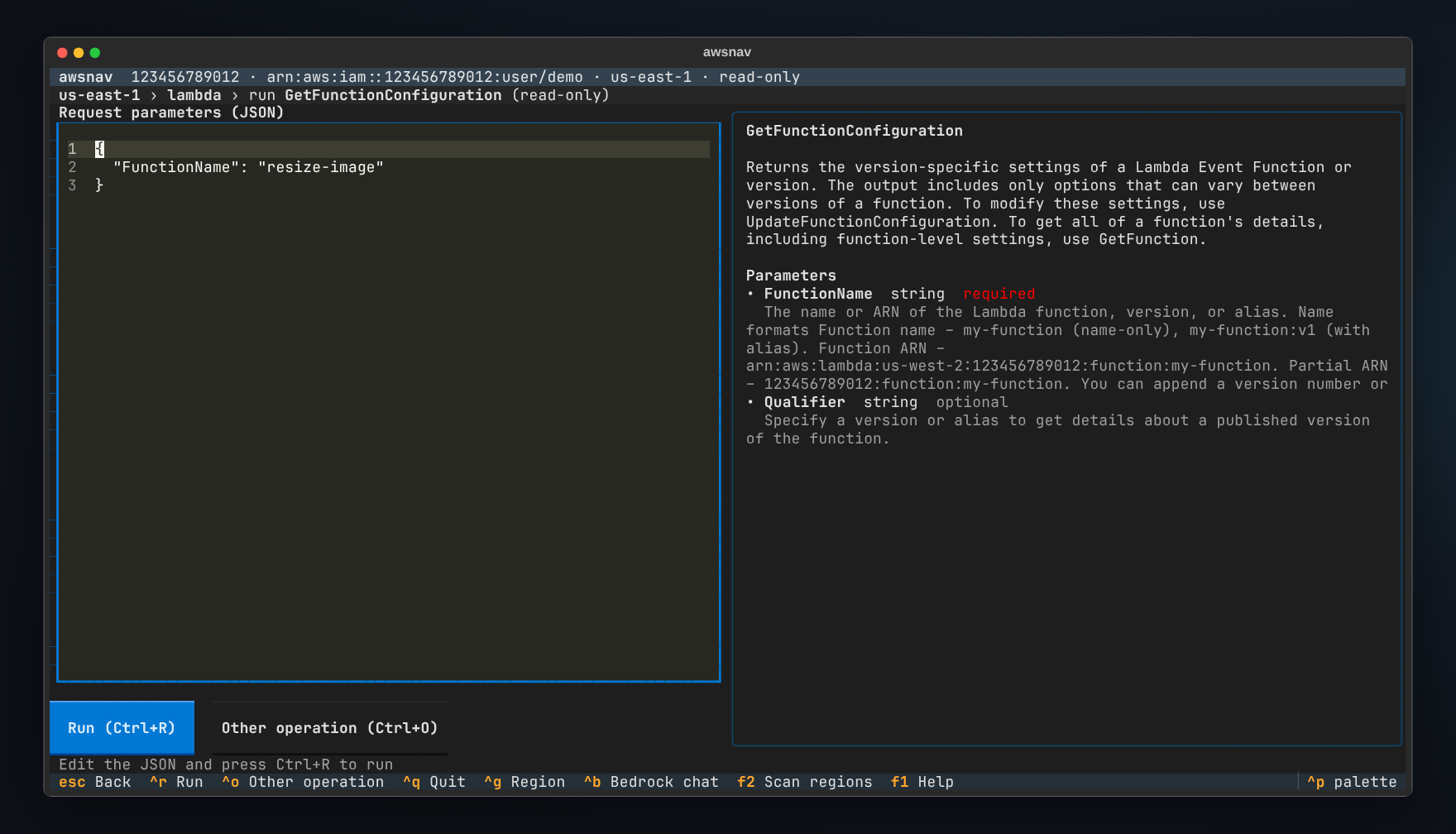
Screenshots show a demo account served by moto, a local AWS mock;
Bedrock replies are stubbed. They are regenerated from the real app with scripts/ (see
docs/RELEASING.md).
Install
awsnav is on PyPI. With pipx (recommended; keeps awsnav in its own environment):
pipx install awsnav
pipx upgrade awsnav          # later, for new versions
Or with pip, into a virtual environment:
python -m venv .venv && . .venv/bin/activate
pip install awsnav
To run the latest unreleased code from main:
pipx install git+https://github.com/redasgard/awsnav.
Release wheels are built by CI with signed SLSA provenance; see
docs/RELEASING.md to verify one. To get services AWS has
just launched, upgrade boto3: pipx runpip awsnav install -U boto3.
Requirements: Python 3.10 or newer and a terminal with 256 colours. awsnav runs wherever Textual does: Linux, macOS and Windows terminals.
Credentials and permissions
awsnav uses the same credentials as the AWS CLI:
- Keys from
--access-key,--secret-keyand--session-token, or typed into the login form. Without them, theAWS_ACCESS_KEY_ID,AWS_SECRET_ACCESS_KEYandAWS_SESSION_TOKENvariables fill the form. - A profile with
--profile NAME, which takes precedence over key variables. - The default chain (
~/.aws, SSO, instance roles) when the form is left empty.
The identity is checked with STS on connect and shown in the top bar. For
browsing and scanning, the AWS managed ReadOnlyAccess policy covers almost
everything; anything it does not cover shows up as a clear permission error,
not a crash. See SECURITY.md for exactly what awsnav does with
your keys.
| Option | Meaning |
|---|---|
--region |
Starting region ($AWS_REGION, then us-east-1). Switch any time with Ctrl+G. |
--profile |
Use a named profile instead of keys. |
--endpoint-url |
Send every call to another endpoint, such as LocalStack at http://localhost:4566. |
--max-items |
Items fetched per list call. Default 500. |
--allow-write |
Let the operation runner call write operations, each after confirmation. |
--no-login |
Skip the login form and connect with the default credential chain. |
--scan |
Headless region scan, tuned with --scan-regions, --deep, --services, --no-global, --no-tagged, --workers and -o. |
Keys
| Key | Action |
|---|---|
type, then Enter |
filter the list and open the selection |
Esc |
clear the filter, then go back one level |
/ |
filter the current list (every word must match) |
Ctrl+P |
jump to any service by name |
Ctrl+G |
change region |
F2 |
scan regions for active resources |
Ctrl+B |
Bedrock chat |
F1 or ? |
all keys |
a |
in a service: show every API operation, not only resource lists |
x |
run any operation, prefilled from the current resource |
r / v / e |
in a list: refresh / raw JSON / edit parameters and run again |
y / w |
in details: copy JSON / save JSON to a file |
p / d / b |
in S3: preview / download / bucket details |
s / E / w |
in scan results: summary / failed calls / export |
Ctrl+R |
run the operation, or start the scan |
Ctrl+Q |
quit |
How it works
awsnav/
  catalog.py      reads botocore's API models: services, operations, parameters,
                  where the resource list sits in each response, and which
                  operations a resource's fields can fill in
  session.py      credentials, per-region clients, paginated calls
  scanner.py      multi-region scan: curated inventory, tagging pass, deep mode
  formatting.py   column choice and cell rendering for any response shape
  ui/             Textual screens: services, resources, details, runner,
                  S3 browser, Bedrock chat, scan setup and results
Nothing is hard-coded per service. A resource type is any List, Describe
or Get call that needs no parameters. A drill-down is any read-only call
whose required parameters can be matched to a resource's fields, for example
Bucket from a bucket's Name, or modelIdentifier from a model's modelId.
A handful of curated defaults keep the noisy cases sane, such as listing only
your own AMIs instead of every public one.
Development
git clone https://github.com/redasgard/awsnav && cd awsnav
python -m venv .venv && . .venv/bin/activate
pip install -e '.[dev]' ruff
pytest -q
The tests never touch AWS. They run against moto and botocore stubs, drive the real app headlessly through EC2, S3, IAM, SQS, Bedrock and the region scan, and check that every operation of every bundled service can be described and templated. See CONTRIBUTING.md, including how to add a resource type to the scan.
License
MIT, see LICENSE. Made by Red Asgard.
awsnav is an independent open-source project. It is not affiliated with, endorsed by or sponsored by Amazon Web Services. AWS and the names of AWS services are trademarks of Amazon.com, Inc. or its affiliates.
1 maintainer

Metadata
1 maintainer
Release files for awsnav 0.1.0
For a detailed explanation of source distributions (sdists) and built distributions (wheels), please see the package formats documentation.
Source distribution (sdist)
| File | Size | Uploaded | Provenance | Actions |
|---|---|---|---|---|
| awsnav-0.1.0.tar.gz | 63.3 kB | With provenance | Details for awsnav-0.1.0.tar.gz |
Built distribution (wheel)
| File | Interpreter | ABI | Platform | Actions Reset |
|---|---|---|---|---|
| awsnav-0.1.0-py3-none-any.whl | Python 3 | none | any | Details for awsnav-0.1.0-py3-none-any.whl |
Total release size: 119.2 kB
Release files / awsnav-0.1.0.tar.gz
| Download URL | awsnav-0.1.0.tar.gz |
|---|---|
| Size | 63.3 kB |
| Tags | Source |
|
SHA-256 checksum How to use checksums |
69651188eab433ccd7dee744d85bd336a46150cc6d7fdb17f42a6fdad9854127
|
|
BLAKE2b-256 checksum How to use checksums |
093a4d3b77288f8b5a5470128320d90438dab4731a14499ee06768e157f15dca
|
| Upload date | |
|
Uploaded using Trusted Publishing? What is trusted publishing? |
Yes |
| Uploaded via |
twine/7.0.0 CPython/3.13.16
|
Provenance
Provenance describes where a file came from. On PyPI, provenance is shared via attestations, which provide a verifiable record of the build or publishing details. View details, limitations and caveats.


PyPI Publish Attestation
PyPI verified that this artifact, at this checksum, originated from the publisher listed below.
Signed by GitHub Actions, verified by PyPI on Nov 7, 2026.
Transparency logRelease files / awsnav-0.1.0-py3-none-any.whl
| Download URL | awsnav-0.1.0-py3-none-any.whl |
|---|---|
| Size | 55.9 kB |
| Tags | Python 3 |
|
SHA-256 checksum How to use checksums |
19a0f2bc08f1250b5759ca88682119cb0e4554d345e51ebc381c64a7c9505a12
|
|
BLAKE2b-256 checksum How to use checksums |
38a53eeb26be5793816f2c5b4fe8ae041e094779bd62335c9696eb0a9902a9b4
|
| Upload date | |
|
Uploaded using Trusted Publishing? What is trusted publishing? |
Yes |
| Uploaded via |
twine/7.0.0 CPython/3.13.16
|
Provenance
Provenance describes where a file came from. On PyPI, provenance is shared via attestations, which provide a verifiable record of the build or publishing details. View details, limitations and caveats.
PyPI Publish Attestation
PyPI verified that this artifact, at this checksum, originated from the publisher listed below.
Signed by GitHub Actions, verified by PyPI on Nov 7, 2026.
Transparency logSecurity for awsnav 0.1.0
Provenance
Provenance describes where a file came from. On PyPI, provenance is shared via attestations, which provide a verifiable record of the build or publishing details. View details, limitations and caveats.
Full provenance
Both files in this release have been uploaded with provenance metadata.
Attestation for awsnav-0.1.0.tar.gz
PyPI Publish Attestation
PyPI verified that this artifact, at this checksum, originated from the publisher listed below.
Signed by GitHub Actions, verified by PyPI on Nov 7, 2026.
Transparency logA note on package security
PyPI is a repository for distributing packages, not a service for auditing them. While third-party security researchers and our staff do their best to detect and remove malicious packages, PyPI cannot guarantee the quality, security or suitability of any given package.
To learn more about protecting yourself from malicious actors, visit our package security documentation.













