
Textual TUI to navigate S3 across multiple AWS profiles

Project description
awss3tui
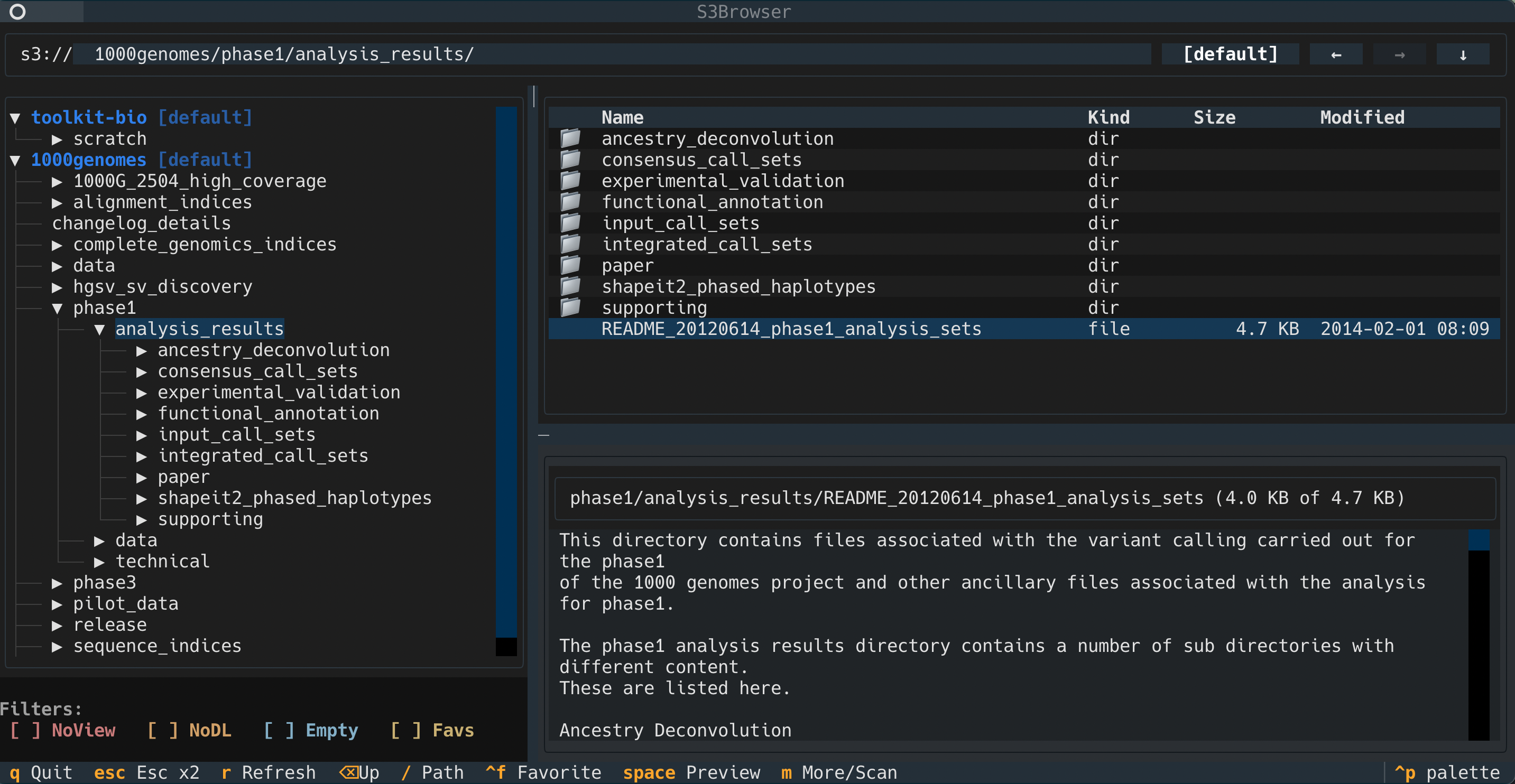
awss3tui is a Textual terminal UI (TUI) and CLI helper for working with Amazon S3 across multiple AWS profiles.
It provides:
- An interactive S3 browser (
s3with no subcommand) - Lightweight wrappers for
aws s3 ls,aws s3 cp, andaws s3 sync - Automatic "best profile" detection for managing multiple roles to reduce profile/session friction
Install
From PyPI:
pip3 install awss3tui
This installs the s3 console script for the TUI and CLI helpers.
Quick Start
Launch the TUI:
s3
Open directly to a bucket/prefix:
s3 s3://my-bucket/path/
# or
s3 my-bucket/path
Force a reindex (bypass cache on startup):
s3 reindex
See more:
s3 --help
Requirements
- Python
>=3.10 - AWS credentials/profiles configured (for example in
~/.aws/config) - AWS CLI available in
PATHfor:s3 login- automatic SSO login flows from the TUI
s3 generate-config- wrapper subcommands (
ls,cp,sync)
Commands
Browser mode (default)
When the first argument is not a known subcommand, s3 treats it as TUI browse mode with optional startup path:
s3 [--profiles ...] [--profile ...] [--region ...] [path]
Notes:
pathmay bes3://bucket/prefixorbucket/prefix.browseis accepted as an alias (s3 browse ...).
s3 reindex
Same as browse mode, but forces a fresh bucket/permission refresh:
s3 reindex [--profiles ...] [--profile ...] [--region ...] [path]
s3 ls
Wrapper around aws s3 ls:
s3 ls [path] [--dry-run] [any aws s3 ls options...]
Behavior:
- Adds
--human-readableunless you already supplied it. - Normalizes
pathtos3://...when needed. - Unknown args are passed through to AWS CLI.
--dry-runprints the resolved command and does not execute it.- auto-selects AWS profiles for s3 ls, s3 cp, and s3 sync using its cached bucket-to-profile mapping, so you usually don’t need to pass --profile. If you do provide --profile, it is respected as an explicit override.
s3 cp
Wrapper around aws s3 cp:
s3 cp <source> <destination> [--dry-run] [any aws s3 cp options...]
Behavior:
- Source/destination are normalized:
- Local-like paths (
.,.., absolute paths,~/..., Windows drive paths) stay local. - Non-local paths are treated as S3 and normalized to
s3://....
- Local-like paths (
--dry-runadds AWS CLI--dryrununless already present, and still runs AWS CLI.- Unknown args are passed through to AWS CLI.
s3 sync
Wrapper around aws s3 sync:
s3 sync <source> <destination> [--dry-run] [any aws s3 sync options...]
Behavior matches cp path normalization and dry-run handling (--dry-run maps to AWS CLI --dryrun).
s3 login
Runs AWS SSO login only for profiles that currently need reauthentication:
s3 login [--profiles dev,prod] [-p dev -p prod]
s3 generate-config
Generates/merges AWS SSO role profiles and prints resulting config to stdout:
s3 generate-config [--sso-session SESSION]
Details:
- Reads AWS config (defaults to
~/.aws/config, respectsAWS_CONFIG_FILE). - Reads SSO access tokens from
~/.aws/sso/cache. - Discovers accounts/roles via AWS SSO APIs.
- Creates/updates profile blocks with
sso_session,sso_account_id,sso_role_name,region=us-east-1, andoutput=json. - Rewrites existing profile
sso_sessionreferences to canonical session names when equivalent sessions exist. - Exits with guidance if no valid cached SSO token exists for a session.
- Writes merged config to stdout (it does not directly edit files for you).
TUI Features
Core UI
- Left pane: bucket/prefix tree.
- Right pane:
- file explorer table (prefixes/objects)
- preview panel
- Draggable split handles for pane resizing.
Profile-aware bucket access
For each bucket, the app probes available profiles and picks the best effective profile:
good: list + read object bytesno_download: list allowed but object read deniedno_view: listing denied
You can manually switch profile per bucket from the profile button in the path bar.
SSO handling
- Startup preflight checks for expired/near-expired SSO tokens and can run
aws sso login. - Runtime operations retry once after SSO reauth when token-expired errors are detected.
- In-flight reauth per profile is deduplicated.
Preview and stats
- File preview loads first
4096bytes, withm/More to fetch additional chunks. - Folder preview shows immediate child stats.
- Press
mon a folder preview to run recursive scan (up to50,000keys; reports partials when truncated).
Download flows
- Download selected file(s) to chosen path.
- Download entire prefix recursively.
- Multi-select in table:
- click: single select
- Ctrl/Cmd-click: toggle
- Shift-click: range select
Favorites and filters
- Favorite a bucket with
Ctrl+F. - Toggle filters from the left pane:
- hide
no_view - hide
no_download - hide empty buckets
- show only favorites
- hide
Keybindings
Global/app:
q: quit immediatelyEsctwice within 1 second: confirm quitr: refresh bucketsCtrl+Lor/: focus path inputAlt+Left/Alt+Right: back/forward navigation historyBackspace: go to parent prefixCtrl+F: toggle favorite bucketSpace: preview selected rowm: preview more / recursive scan
Widget behaviors:
- Tree:
Right: move focus to table
- Table:
Left: move focus to treeEnteron bucket/prefix: openEnteron object: download- double-click on bucket/prefix: open
- Path input:
Down: move focus to tableEnter: navigate to typed path
Local State and Cache
State is stored under:
${XDG_CONFIG_HOME:-~/.config}/awss/bucket-cache.json${XDG_CONFIG_HOME:-~/.config}/awss/config.json
bucket-cache.json stores:
- resolved bucket -> profile mapping
- access classification
- empty-bucket flags
- save timestamp
- hash of
~/.aws/config+~/.aws/credentials
Cache behavior:
- automatically reindexes every ~30 days
- invalidates immediately when AWS config/credentials hash changes
- startup may use cache first;
reindexorrtriggers live refresh - if live refresh fails and cache exists, cached buckets can still be used
config.json stores:
- favorite buckets
- bucket filter toggles
Development
Run tests:
python -m unittest discover -s tests -p "test_*.py"
Current suite covers CLI dispatch/wrappers, service logic, and headless Textual behavior.


Download files
Download the file for your platform. If you're not sure which to choose, learn more about installing packages.
Source Distribution
Built Distribution
Filter files by name, interpreter, ABI, and platform.
If you're not sure about the file name format, learn more about wheel file names.
Copy a direct link to the current filters
File details
Details for the file awss3tui-0.6.tar.gz.
File metadata
- Download URL: awss3tui-0.6.tar.gz
- Upload date:
- Size: 49.3 kB
- Tags: Source
- Uploaded using Trusted Publishing? Yes
- Uploaded via: twine/6.1.0 CPython/3.13.7
File hashes
| Algorithm | Hash digest | |
|---|---|---|
| SHA256 |
599dd6dec13308f589f2c23a8b7eed79746a23135632c7c376c5c48bacdce29b
|
|
| MD5 |
0263f5fbec2414bee91217c27542b1ff
|
|
| BLAKE2b-256 |
aeef90e2b321580b1ff7fb4498c24b55886899730ecf6453959413e25c569939
|
Provenance
The following attestation bundles were made for awss3tui-0.6.tar.gz:
Publisher:
bump-minor.yml on mmcguffi/aws-s3-tui
-
Statement:
-
Statement type:
https://in-toto.io/Statement/v1 -
Predicate type:
https://docs.pypi.org/attestations/publish/v1 -
Subject name:
awss3tui-0.6.tar.gz -
Subject digest:
599dd6dec13308f589f2c23a8b7eed79746a23135632c7c376c5c48bacdce29b - Sigstore transparency entry: 929771846
- Sigstore integration time:
-
Permalink:
mmcguffi/aws-s3-tui@b3ff084b000ef97d74bca4946fe350fb11dc0bb4 -
Branch / Tag:
refs/heads/main - Owner: https://github.com/mmcguffi
-
Access:
public
-
Token Issuer:
https://token.actions.githubusercontent.com -
Runner Environment:
github-hosted -
Publication workflow:
bump-minor.yml@b3ff084b000ef97d74bca4946fe350fb11dc0bb4 -
Trigger Event:
push
-
Statement type:
File details
Details for the file awss3tui-0.6-py3-none-any.whl.
File metadata
- Download URL: awss3tui-0.6-py3-none-any.whl
- Upload date:
- Size: 41.9 kB
- Tags: Python 3
- Uploaded using Trusted Publishing? Yes
- Uploaded via: twine/6.1.0 CPython/3.13.7
File hashes
| Algorithm | Hash digest | |
|---|---|---|
| SHA256 |
ebd3cde686cf20f968176354699ba97f5dafa63ce11ec8bfcf89039d61ba790f
|
|
| MD5 |
2b8a46b95cce51212c1c1fc081be3f24
|
|
| BLAKE2b-256 |
2554019511df6085e93aace0a41b3323293a52d0ba4bc6bac0ed8ad1d1fd54b5
|
Provenance
The following attestation bundles were made for awss3tui-0.6-py3-none-any.whl:
Publisher:
bump-minor.yml on mmcguffi/aws-s3-tui
-
Statement:
-
Statement type:
https://in-toto.io/Statement/v1 -
Predicate type:
https://docs.pypi.org/attestations/publish/v1 -
Subject name:
awss3tui-0.6-py3-none-any.whl -
Subject digest:
ebd3cde686cf20f968176354699ba97f5dafa63ce11ec8bfcf89039d61ba790f - Sigstore transparency entry: 929771847
- Sigstore integration time:
-
Permalink:
mmcguffi/aws-s3-tui@b3ff084b000ef97d74bca4946fe350fb11dc0bb4 -
Branch / Tag:
refs/heads/main - Owner: https://github.com/mmcguffi
-
Access:
public
-
Token Issuer:
https://token.actions.githubusercontent.com -
Runner Environment:
github-hosted -
Publication workflow:
bump-minor.yml@b3ff084b000ef97d74bca4946fe350fb11dc0bb4 -
Trigger Event:
push
-
Statement type:






