
Keras-based framework for AI on the Edge
aXeleRate streamlines training and converting computer vision models to be run on various platforms with hardware acceleration. It is optimized for both the workflow on local machine(Ubuntu 18.04/20.04 - other Linux distributions might work, but not tested. Mac OS/Windows are not supported) and on Google Colab. Currently supports trained model conversion to: .kmodel(K210), .tflite format(full integer and dynamic range quantization support available), .onnx formats. Experimental support: Google Edge TPU.
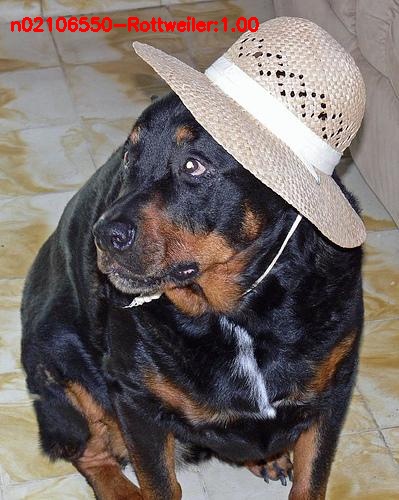
Standford Dog Breed Classification Dataset NASNetMobile backend + Classifier

|
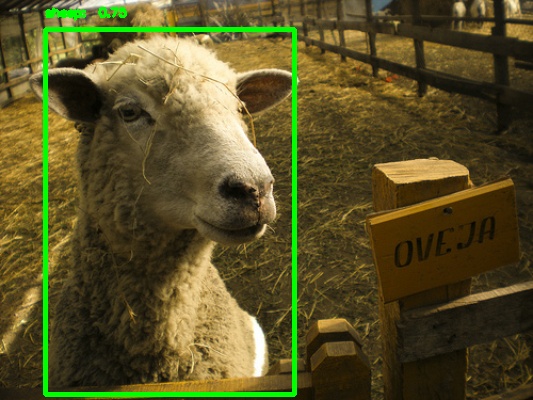
PASCAL-VOC 2012 Object Detection Dataset MobileNet1_0 backend + YOLOv3
|
Human parsing Semantic Segmentation MobileNet5_0 backend + Segnet-Basic
|
 |
 |
 |
aXeleRate
TL;DR
aXeleRate is meant for people who need to run computer vision applications(image classification, object detection, semantic segmentation) on the edge devices with hardware acceleration. It has easy configuration process through config file or config dictionary(for Google Colab) and automatic conversion of the best model for training session into the required file format. You put the properly formatted data in, start the training script and (hopefully) come back to see a converted model that is ready for deployment on your device!
🔧 Key Features
- Supports multiple computer vision models: object detection(YOLOv3), image classification, semantic segmentation(SegNet-basic)
- Different feature extractors to be used with the above network types: Full Yolo, Tiny Yolo, MobileNet, SqueezeNet, NASNetMobile, ResNet50, and DenseNet121.
- Automatic conversion of the best model for the training session. aXeleRate will download the suitable converter automatically.
- Currently supports trained model conversion to: .kmodel(K210), .tflite format(full integer and dynamic range quantization support available), .tflite(Edge TPU), .onnx(for later on-device optimization with TensorRT).
- Model version control made easier. Keras model files and converted models are saved in the project folder, grouped by the training date. Training history is saved as .png graph in the model folder.
- Two modes of operation: locally, with train.py script and .json config file and remote, tailored for Google Colab, with module import and dictionary config.
💾 Install
Stable version:
pip install axelerate
Daily development version:
pip install git+https://github.com/AIWintermuteAI/aXeleRate
If installing in Anaconda environment, make sure you have necessary CUDA/CUDNN version installed in that environment to use GPU for training.
💻 Project Story
aXeleRate started as a personal project of mine for training YOLOv2 based object detection networks and exporting them to .kmodel format to be run on K210 chip. I also needed to train image classification networks. And sometimes I needed to run inference with Tensorflow Lite on Raspberry Pi. As a result I had a whole bunch of disconnected scripts each had somewhat overlapping functionality. So, I decided to fix that and share the results with other people who might have similar workflows.
aXeleRate is still work in progress project. I will be making some changes from time to time and if you find it useful and can contribute, PRs are very much welcome!
☑️ TODO list:
TODO list is moving to Github Projects!
Acknowledgements
- YOLOv2 Keras code jeongjoonsup and Ngoc Anh Huynh https://github.com/experiencor/keras-yolo2 https://github.com/penny4860/Yolo-digit-detector
- SegNet Keras code Divam Gupta https://github.com/divamgupta/image-segmentation-keras
- Big Thank You to creator/maintainers of Keras/Tensorflow
Donation
Recently there were a few people that wanted to make a small donation to aXeleRate, because it helped them with their work. I was caught off guard with the question about donations :) I didn't have anything set up, so I quickly created a page for them to be able to send money. If aXeleRate was useful in your work, you can donate a pizza or a beer to the project here https://www.buymeacoffee.com/hardwareai . But times are tough now(and always), so if you don't have much to spare, don't feel guilty! aXeleRate is totally open source and free to use.
1 maintainer

Metadata
1 maintainer
Release files for axelerate 0.7.5
For a detailed explanation of source distributions (sdists) and built distributions (wheels), please see the package formats documentation.
Source distribution (sdist)
| File | Size | Uploaded | Provenance | |
|---|---|---|---|---|
| axelerate-0.7.5.tar.gz | 69.9 kB | Without provenance | Details |
Built distribution (wheel)
| File | Interpreter | ABI | Platform | Reset |
|---|---|---|---|---|
| axelerate-0.7.5-py3-none-any.whl | Python 3 | none | any | Details |
Total release size: 156.5 kB
Release files / axelerate-0.7.5.tar.gz
| Download URL | axelerate-0.7.5.tar.gz |
|---|---|
| Size | 69.9 kB |
| Tags | Source |
|
SHA-256 checksum How to use checksums |
9274c75374019e7aac7cfc7bb6026c17575ce52bda37ec37f25a23cd8877264b
|
|
BLAKE2b-256 checksum How to use checksums |
b69ec86b2233bf23d9caea1dbcff05b77d4960c659e8e4664820776e4beb043f
|
| Upload date | |
|
Uploaded using Trusted Publishing? What is trusted publishing? |
No |
| Uploaded via |
twine/3.7.1 importlib_metadata/4.8.2 pkginfo/1.8.2 requests/2.26.0 requests-toolbelt/0.9.1 tqdm/4.62.3 CPython/3.10.0
|
Release files / axelerate-0.7.5-py3-none-any.whl
| Download URL | axelerate-0.7.5-py3-none-any.whl |
|---|---|
| Size | 86.6 kB |
| Tags | Python 3 |
|
SHA-256 checksum How to use checksums |
d409ccb8ae8184175a486e553281d10539aedc49bc0b41c7e119894a2a9d29ff
|
|
BLAKE2b-256 checksum How to use checksums |
f9f963b87ed481a2b1b73d8ee1bd06de43ff5b315d2ed2475136f57c942fb532
|
| Upload date | |
|
Uploaded using Trusted Publishing? What is trusted publishing? |
No |
| Uploaded via |
twine/3.7.1 importlib_metadata/4.8.2 pkginfo/1.8.2 requests/2.26.0 requests-toolbelt/0.9.1 tqdm/4.62.3 CPython/3.10.0
|
Security for axelerate 0.7.5
Provenance
Provenance describes where a file came from. On PyPI, provenance is shared via attestations, which provide a verifiable record of the build or publishing details. View details, limitations and caveats.
No provenance found
None of the files in this release were uploaded with provenance metadata.
A note on package security
PyPI is a repository for distributing packages, not a service for auditing them. While third-party security researchers and our staff do their best to detect and remove malicious packages, PyPI cannot guarantee the quality, security or suitability of any given package.














