

AXML
AXML/ARSC: The Rosetta Stone for Android's Binary XML

Android doesn't speak in plain text XML. To save space and speed up parsing, it uses a compressed, obfuscated binary format (AXML) for its manifests and a complex table (ARSC) for its resources. axml is your translator.
This is a standalone, dependency-free, native Python library built to decode the secrets of Android's binary XML and resource files. It is a battle-hardened pillar of the new Androguard Ecosystem, providing the critical ability to turn machine-optimized formats back into human-readable intelligence.
This is a library for handling the AXML file format. AXML is the informal
common name for the compiled binary XML data format used in Android app files.
The Android Open Source Project does not seem to have named the format, other
than referring to is as binary XML or compiled XML.So AXML stands for
Android XML. The file format is based on compiling XML source into a binary
format based on protobuf. There are a number of different Android XML file
types that are compiled to AXML, these are generically known as Android
Resources.
All of these files are included in the APK's ZIP package with the file extension
.xml even though they are actually AXML and not XML.
Some specific data files, like String Resources and Style Resources, are instead
compiled into a single file resources.arsc in its own data format, known as
ASRC. AXML files often refer to values that are in resources.arsc.
The entry point for an app is the "app
manifest"
defines the essential data points that every app must have, like Package Name
and Version Code, and includes lots of other metadata that describe the
app. Every Android app file (APK) must include
AndroidManifest.xml,
which in the APK is the compiled binary AXML format, not XML, despite the file
extension. The source code files for the binary app manifest file are also
called AndroidManifest.xml, but they are actually XML. There can be
multiple source files,
but there is only ever one single compiled binary AndroidManifest.xml that is
valid in the APK.
https://developer.android.com/guide/topics/manifest/manifest-intro#reference
Installation
If you would like to install it locally, please create a new venv to use it directly, and then:
$ git clone https://github.com/androguard/axml.git
$ pip install -e .
or directly via pypi:
$ pip install axml
Usage
Two new commands will be exported in your current environnement: axml and arsc, that will allow to read and display
the corresponding files.
$ axml -i AndroidManifest.xml
$ arsc -i resources.arsc
API
The most easy way to use this project is probably directly via using the API:
>>> from axml.axml import AXMLPrinter
>>> from axml.arsc import ARSCPrinter
>>> AXMLPrinter(open("AndroidManifest.xml", "rb").read())
>>> obj
<axml.axml.printer.AXMLPrinter object at 0x76b5a34b0550>
>>> obj.package
'org.t0t0.androguard.TC'
>>> obj.androidversion
{'Code': '1', 'Name': '1.0'}

>>> obj = ARSCPrinter(open("test.arsc", "rb").read())
>>> obj
<axml.arsc.printer.ARSCPrinter object at 0x76b5a34b1310>
>>> obj.get_xml()
b'<resources>\n<public type="drawable" name="icon" id="0x7f020000"/>\n<public type="drawable" name="icon" id="0x7f020000"/>\n<public type="drawable" name="icon" id="0x7f020000"/>\n<public type="layout" name="main" id="0x7f030000"/>\n<public type="string" name="hello" id="0x7f040000"/>\n<public type="string" name="app_name" id="0x7f040001"/>\n</resources>\n'
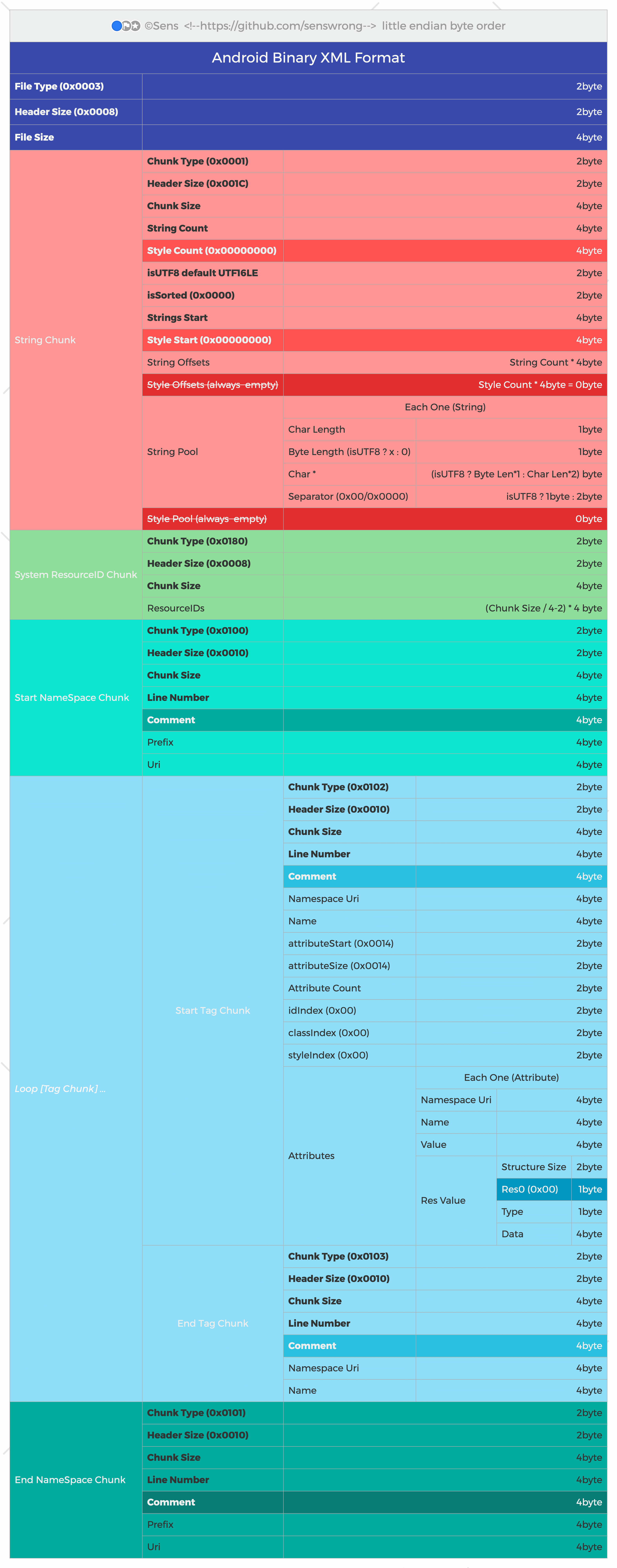
AXML binary format
Some references about the binary AXML format:
- aapt2 compiles XML to protobuf-based AXML
- aapt2 source code
- aapt source code
- The binary format for
AndroidManifest.xmlis defined inApkInfo.proto.
Metadata
Release files for axml 0.0.2
For a detailed explanation of source distributions (sdists) and built distributions (wheels), please see the package formats documentation.
Source distribution (sdist)
| File | Size | Uploaded | Provenance | |
|---|---|---|---|---|
| axml-0.0.2.tar.gz | 103.4 kB | Without provenance | Details |
Built distribution (wheel)
| File | Interpreter | ABI | Platform | Reset |
|---|---|---|---|---|
| axml-0.0.2-py3-none-any.whl | Python 3 | none | any | Details |
Total release size: 203.9 kB
Release files / axml-0.0.2.tar.gz
| Download URL | axml-0.0.2.tar.gz |
|---|---|
| Size | 103.4 kB |
| Tags | Source |
|
SHA-256 checksum How to use checksums |
4f0244afadda2997b6ce045dbda448efcc120acd05af85bf8aa4b86cfcf9eb3e
|
|
BLAKE2b-256 checksum How to use checksums |
b8535700f69439db56c8bafd4ebf96d841494aea0182065f1830d4cd91280310
|
| Upload date | |
|
Uploaded using Trusted Publishing? What is trusted publishing? |
No |
| Uploaded via |
twine/6.2.0 CPython/3.13.3
|
Release files / axml-0.0.2-py3-none-any.whl
| Download URL | axml-0.0.2-py3-none-any.whl |
|---|---|
| Size | 100.5 kB |
| Tags | Python 3 |
|
SHA-256 checksum How to use checksums |
fa2dbda0938425306b32d4601ff4a8b7d0935c62a1ede47e54099dbd2d79b9de
|
|
BLAKE2b-256 checksum How to use checksums |
9261f12b64e22f0785dc5aabc32771aa3b5a5f638bb65673bcd2c369fc74d8b7
|
| Upload date | |
|
Uploaded using Trusted Publishing? What is trusted publishing? |
No |
| Uploaded via |
twine/6.2.0 CPython/3.13.3
|
Security for axml 0.0.2
Provenance
Provenance describes where a file came from. On PyPI, provenance is shared via attestations, which provide a verifiable record of the build or publishing details. View details, limitations and caveats.
No provenance found
None of the files in this release were uploaded with provenance metadata.
A note on package security
PyPI is a repository for distributing packages, not a service for auditing them. While third-party security researchers and our staff do their best to detect and remove malicious packages, PyPI cannot guarantee the quality, security or suitability of any given package.
To learn more about protecting yourself from malicious actors, visit our package security documentation.














