

Axon
A glass-box coding agent for your terminal. See every step: every LLM call, tool, token, cache hit and cent.




112 slash commands · 21 built-in tools · 15 provider presets
Axon is an agentic coding assistant that reads, searches, edits and runs code in your repository, much like Claude Code. The difference is that nothing is hidden. Each turn is drawn as a numbered timeline: the model that was called and why, the tokens it consumed, how much of the prompt came from cache, which tools ran with which arguments, what each one fed back to the model, who approved it, which hooks fired, and what it all cost, to four decimal places.
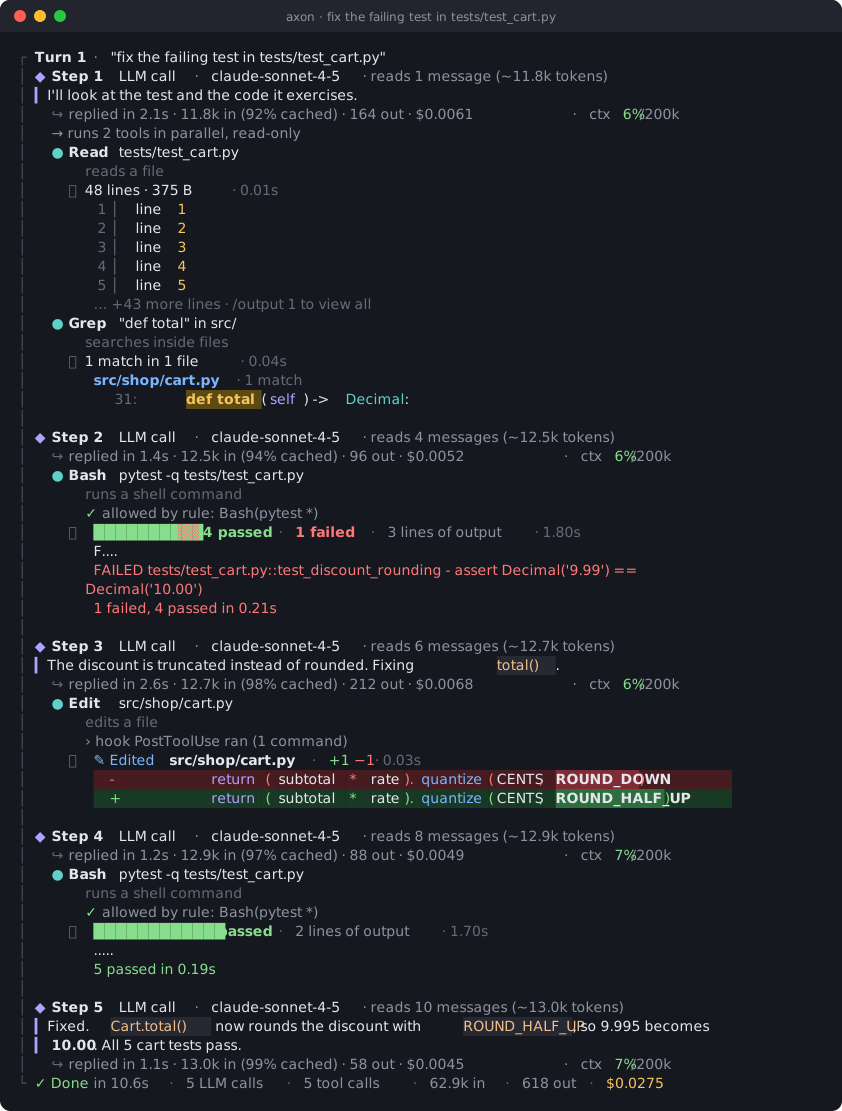
The same turn as plain text (NO_COLOR=1)
> fix the failing test in tests/test_cart.py

┌ Turn 1 · "fix the failing test in tests/test_cart.py"
│ ◆ Step 1  LLM call · claude-sonnet-4-5 · reads 1 message (~11.8k tokens)
│ ▎ I'll look at the test and the code it exercises.
│   ↪ replied in 2.1s · 11.8k in (92% cached) · 164 out · $0.0061 · ctx 6%/200k
│   → runs 2 tools in parallel, read-only
│   ● Read  tests/test_cart.py
│       reads a file
│     ⎿  48 lines · 375 B · 0.01s
│         1 │ line 1
│         2 │ line 2
│         3 │ line 3
│         4 │ line 4
│         5 │ line 5
│        … +43 more lines · /output 1 to view all
│   ● Grep  "def total" in src/
│       searches inside files
│     ⎿  1 match in 1 file · 0.04s
│        src/shop/cart.py · 1 match
│           31:     def total(self) -> Decimal:
│
│ ◆ Step 2  LLM call · claude-sonnet-4-5 · reads 4 messages (~12.5k tokens)
│   ↪ replied in 1.4s · 12.5k in (94% cached) · 96 out · $0.0052 · ctx 6%/200k
│   ● Bash  pytest -q tests/test_cart.py
│       runs a shell command
│       ✓ allowed by rule: Bash(pytest *)
│     ⎿  ██████████▒▒ 4 passed · 1 failed · 3 lines of output · 1.80s
│        F....
│        FAILED tests/test_cart.py::test_discount_rounding - assert Decimal('9.99') ==
│       Decimal('10.00')
│        1 failed, 4 passed in 0.21s
│
│ ◆ Step 3  LLM call · claude-sonnet-4-5 · reads 6 messages (~12.7k tokens)
│ ▎ The discount is truncated instead of rounded. Fixing `total()`.
│   ↪ replied in 2.6s · 12.7k in (98% cached) · 212 out · $0.0068 · ctx 6%/200k
│   ● Edit  src/shop/cart.py
│       edits a file
│       › hook PostToolUse ran (1 command)
│     ⎿  ✎ Edited src/shop/cart.py · +1 −1 · 0.03s
│            -         return (subtotal * rate).quantize(CENTS, ROUND_DOWN)
│            +         return (subtotal * rate).quantize(CENTS, ROUND_HALF_UP)
│
│ ◆ Step 4  LLM call · claude-sonnet-4-5 · reads 8 messages (~12.9k tokens)
│   ↪ replied in 1.2s · 12.9k in (97% cached) · 88 out · $0.0049 · ctx 7%/200k
│   ● Bash  pytest -q tests/test_cart.py
│       runs a shell command
│       ✓ allowed by rule: Bash(pytest *)
│     ⎿  ████████████ 5 passed · 2 lines of output · 1.70s
│        .....
│        5 passed in 0.19s
│
│ ◆ Step 5  LLM call · claude-sonnet-4-5 · reads 10 messages (~13.0k tokens)
│ ▎ Fixed. `Cart.total()` now rounds the discount with `ROUND_HALF_UP`, so 9.995
│ ▎ becomes 10.00. All 5 cart tests pass.
│   ↪ replied in 1.1s · 13.0k in (99% cached) · 58 out · $0.0045 · ctx 7%/200k
└ ✓ Done in 10.6s · 5 LLM calls · 5 tool calls · 62.9k in · 618 out · $0.0275
Contents
Start here: What you need · Install · Set up a model · Your first task · Cheat sheet · Reading a turn · Update or uninstall · Your data · FAQ · Troubleshooting
Reference: Highlights · Providers · Glass-box tracing · Commands · Tools · Extending Axon · Memory · Settings · Storage · Analytics · Solver · SDK and HTTP API · Testing · Project structure · Docs
What you need
| A computer | macOS, Windows 10/11 or Linux (WSL works too) |
| Python 3.10 or newer | check with the command below; the installer tells you if it is missing |
| A model to talk to | an API key from a provider (AgentRouter, Anthropic, OpenAI, Gemini, DeepSeek, OpenRouter, …) or a free local model with Ollama / LM Studio |
Check Python (open a terminal: Terminal on macOS, PowerShell on Windows):
python3 --version      # macOS / Linux
py --version           # Windows (or: python --version)
You need 3.10 or higher. If it is missing or older:
| System | Install Python |
|---|---|
| macOS | download from python.org, or brew install python |
| Windows | download from python.org and tick "Add python.exe to PATH" during setup (the "python" that opens the Microsoft Store is only a placeholder) |
| Ubuntu / Debian | sudo apt install python3 python3-venv |
| Fedora | sudo dnf install python3 |
Install
Copy one line into your terminal and press Enter. It installs Axon in its own environment (nothing
else on your system changes) and adds an axon command. Run the same line again any time to update.
macOS · Linux · WSL
curl -fsSL https://raw.githubusercontent.com/gpr-27/axon/main/install.sh | bash
Windows (PowerShell)
irm https://raw.githubusercontent.com/gpr-27/axon/main/install.ps1 | iex
Windows (Command Prompt)
powershell -NoProfile -ExecutionPolicy Bypass -Command "irm https://raw.githubusercontent.com/gpr-27/axon/main/install.ps1 | iex"
When it finishes, close the terminal and open a new one (so it finds the new axon command), then
check it works:
axon --version
The installer uses uv or pipx if you already have
them, and otherwise a private virtual environment in ~/.axon/venv (%USERPROFILE%\.axon\venv on Windows).
Other ways to install: uv, pipx, pip, from a clone
| Tool | Install | Update | Remove |
|---|---|---|---|
| uv | uv tool install git+https://github.com/gpr-27/axon.git |
uv tool upgrade axon-terminal |
uv tool uninstall axon-terminal |
| pipx | pipx install git+https://github.com/gpr-27/axon.git |
pipx upgrade axon-terminal |
pipx uninstall axon-terminal |
| pip | pip install "git+https://github.com/gpr-27/axon.git" |
same command with --force-reinstall |
pip uninstall axon-terminal |
For git installs, uv tool upgrade and pipx upgrade can skip a new commit while the version number
is unchanged. Re-running the one-line installer always picks it up.
From a clone (editable install, for development):
git clone https://github.com/gpr-27/axon.git
cd axon
./install.sh        # macOS / Linux / WSL / Git Bash   -> ~/.local/bin/axon
.\install.ps1       # PowerShell                       -> %USERPROFILE%\.axon\bin\axon.cmd
install.bat         # cmd, or double-click
Or by hand: python -m venv .venv, activate it, then python -m pip install -e ".[dev]".
python scripts/axon_run.py runs Axon from a checkout without installing it.
Installer options: pin a version, choose a method, dry run
# pin a branch, tag or commit
curl -fsSL https://raw.githubusercontent.com/gpr-27/axon/main/install.sh | bash -s -- --ref v0.27.2
# force a method: auto | uv | pipx | venv
curl -fsSL https://raw.githubusercontent.com/gpr-27/axon/main/install.sh | bash -s -- --method venv
# show what it would do without changing anything
curl -fsSL https://raw.githubusercontent.com/gpr-27/axon/main/install.sh | bash -s -- --dry-run
$env:AXON_INSTALL_REF = "v0.27.2"; irm https://raw.githubusercontent.com/gpr-27/axon/main/install.ps1 | iex
PowerShell parameters: -Method -Ref -Source -InstallDir -PythonExe -Uninstall -NoPath -NoShim -DryRun -Help.
Both installers read AXON_INSTALL_METHOD, AXON_INSTALL_REF, AXON_INSTALL_DIR, AXON_BIN_DIR,
AXON_INSTALL_SOURCE (a folder, git+ URL, archive URL or PyPI requirement), AXON_PYTHON and
AXON_NO_MODIFY_PATH=1. Without git, the installer downloads the GitHub archive instead.
Set up a model
Run the guided setup once:
axon setup
It asks three things: which provider, your API key (typed hidden, checked live before it is
saved) and which model. Keys are stored in ~/.axon/.env on your machine only.
Where to get a key:
| Provider | Get a key at | Good for |
|---|---|---|
| AgentRouter (default) | agentrouter.org/console | DeepSeek V4, Claude Opus 5.5, GPT-6 through one key |
| Anthropic | console.anthropic.com | Claude models directly |
| OpenAI | platform.openai.com/api-keys | GPT models |
| Google Gemini | aistudio.google.com/apikey | Gemini (has a free tier) |
| DeepSeek | platform.deepseek.com | DeepSeek directly, low cost |
| OpenRouter | openrouter.ai/keys | hundreds of models through one key |
No key, no cost, works offline: install Ollama, run ollama pull qwen2.5-coder:7b,
then pick Ollama (Local) in axon setup.
You can change any of this later from inside Axon: /model (switch model), /provider (switch
provider), /keys (add, replace, test or remove keys), /endpoint (use a proxy or custom URL) and
/settings (every option in one menu). axon doctor checks that everything is set up correctly.
Your first task
Go to a project folder and start Axon there. It works on the files in that folder:
cd path/to/your/project
axon
Then just type what you want, in plain words, and press Enter:
explain how this project is structured
find why the tests in tests/test_cart.py fail and fix it
add a --verbose flag to the CLI and update the README
Axon plans the work, reads and searches your files, runs commands and edits code, and shows every step as it goes (what each mark means). Things to know:
- Approvals. Out of the box Axon runs in
bypassmode and does not ask before running tools. Press Shift+Tab to switch todefault(asks before edits and commands),acceptEdits(edits freely, asks before commands) orplan(read-only: it only plans). Dangerous commands such asrm -rf /are blocked in every mode. - Talk while it works. Type a message while Axon is busy: it is queued and shown to the model between
steps.
/btw <question>asks a quick side question without interrupting. Esc stops the current turn. - Undo. Axon snapshots files before changing them:
/rewindrestores code, the conversation, or both. - Pick up later.
axon -ccontinues your last session in that folder,axon -rlets you choose one. - Shell commands. Start a line with
!to run it yourself (!git status); Axon reads the output and explains it.
Cheat sheet
| You want to… | Type |
|---|---|
| See every command | /help (or ? for keyboard shortcuts) |
| Switch model / provider | /model · /provider |
| Add or replace an API key | /keys |
| Change any setting | /settings |
| See what a turn cost | /cost · /stats (all-time) |
| See how full the context is | /context · change its size with /context limit (128k default, 256k, 1M) |
| Attach a file to your message | @path/to/file (Ctrl+P opens a fuzzy finder) |
| Run a shell command | !command |
| Save a note Axon should remember | # note (this project) · #~ note (every project) |
| See a tool's full output | /output 3, or Ctrl+F for the full transcript (click to expand) |
| Undo changes | /rewind |
| Start fresh | /clear (the old session stays resumable) |
| Retry after a provider error | /retry or type continue |
| Copy the last answer | /copy |
| Change how much detail is shown | Ctrl+O cycles compact → normal → detailed → debug |
| Quit | /exit or Ctrl+D twice |
axon "explain the auth flow"                         # start with a prompt
axon -p "list TODOs in src/" --output-format json    # one answer, no interactive session (scripts, CI)
axon --mode plan                                     # read-only planning
axon --model deepseek-v4-flash --context-limit 256k  # choose model and context size for this run
axon -w feature-x                                    # work in a separate git worktree
Reading a turn
Every turn is drawn as a timeline. Each kind of row has its own mark, so you can always tell what the model thought, what it did and what it said:
 › fix the failing test

┌ Turn 3 · "fix the failing test"                       deepseek-v4-flash · bypass mode
│ ◆ Step 1  LLM call · deepseek-v4-flash · reads 5 messages (~9.3k tokens)
│   ✻ Thinking
│   ┊ The test fails on rounding. Let me run it first.
│   ✻ thought for 1.2s
│   ↪ replied in 3.8s · 9.1k in · 287 out · $0.0398 · context █░░░░░░░ 1% of 1M
│   ● Bash  pytest -q tests/test_cart.py
│       runs a shell command · why: Let me run it first.
│     ⎿  exit code 1 · 3 lines of output · 1.80s
│        FAILED tests/test_cart.py::test_discount_rounding
│        1 failed, 4 passed in 0.21s
│
│ ◆ Step 2  LLM call · deepseek-v4-flash · reads 8 messages (~10.4k tokens)
│   → includes 1 tool result from step 1 (128 B · ~32 tokens)
│ ▎ The discount is truncated instead of rounded. Fixing it.
│   ↪ replied in 2.5s · 10.4k in (89% cached) · 128 out · $0.0093
└ ✓ Done in 6.4s · 2 LLM calls · 1 tool call · 19.5k in · 415 out · $0.0491
| Mark | Meaning |
|---|---|
┌ Turn … └ ✓ Done |
One prompt and everything it caused, closed by the totals for the turn |
◆ Step N LLM call |
One request to the model: which model, and how much it reads |
✻ Thinking, ┊ |
The model's reasoning. /thinking switches between the full text and a one-line summary |
↪ replied in … |
That call's time, tokens (and how many came from cache), cost and context use |
→ runs 3 tools … |
Several tool calls at once: in parallel when all are read-only, otherwise one after another |
● Tool target |
A tool call, followed by what the tool does and why the model called it |
⎿ |
The tool's result: a summary, a short preview, and /output n for everything |
→ includes … |
Which tool results the next LLM call receives |
▎ |
Text written by the model |
⚠, ✗ |
Retries, warnings and failures |
While Axon works, the bottom of the screen shows a spinner with a live timer for the current tool
or step, the tokens streamed so far, and a tip underneath. Ctrl+F (or /transcript) opens the whole session
full-screen, where every block can be expanded or collapsed with a click.
Update or uninstall
Update: run the same install line again (it picks up the newest version).
Uninstall:
# macOS / Linux / WSL
curl -fsSL https://raw.githubusercontent.com/gpr-27/axon/main/install.sh | bash -s -- --uninstall
# Windows
& ([scriptblock]::Create((irm https://raw.githubusercontent.com/gpr-27/axon/main/install.ps1))) -Uninstall
Uninstalling keeps your settings, keys and sessions in ~/.axon. Delete that folder too if you want
everything gone.
Your data
Everything stays on your computer, under ~/.axon (%USERPROFILE%\.axon on Windows), organised per
project. Nothing is deleted automatically.
| What | Where | See it with |
|---|---|---|
| Every conversation, with full tool outputs | ~/.axon/projects/<project>/sessions/ |
/resume, /history, Ctrl+F |
| Everything you did (prompts, commands, settings changes, approvals) | …/<project>/activity.jsonl |
/activity |
| A plain-text copy of everything shown on screen | …/<project>/screen/ |
any text editor |
| File snapshots for undo | …/<project>/checkpoints/ |
/rewind |
| What it costs | ~/.axon/usage.jsonl |
/cost, /stats, /report |
| Your keys | ~/.axon/.env |
/keys |
/project shows the folder for the project you are in. /delete moves a session to a trash folder
(/restore brings it back). axon purge is the only thing that really deletes data, and it asks first.
~/.axon/README.md explains the layout in detail.
FAQ
Does it cost money? Axon itself is free. The model provider charges for the tokens each request uses;
Axon shows the cost of every step, every turn (/cost) and over time (/stats). Local models through
Ollama or LM Studio cost nothing. Use /budget 2 to stop a session at $2.
Is my code sent anywhere? Only to the model provider you chose, and only what the model needs for your request (the files it reads, command output). Nothing is sent to Axon's authors. With a local model nothing leaves your machine.
Which model should I use? deepseek-v4-flash (the default on AgentRouter) is fast and cheap for most
work; switch to a larger model (/model) for hard problems. /model lists what your provider offers.
Does it work on Windows? Yes: PowerShell 7, Windows PowerShell 5.1, Command Prompt, Windows Terminal, Git Bash and WSL. See docs/windows.md.
Can I use it in scripts or CI? Yes: axon -p "…" --output-format json prints one answer (or
stream-json for every event) and exits. There is also a Python SDK and a local HTTP API (below).
I use Claude Code. Does my setup carry over? Axon reads CLAUDE.md, .claude/commands,
.claude/agents, .claude/skills, .mcp.json and the same hook format. Claude Code's own model choice
is not used; Axon's model comes from /model.
Highlights
| Readable timeline | Thinking, LLM calls, tool calls (with what each tool does and why it was called) and the model's answer each have their own mark; live timers while tools run; previews of every result; resumed sessions are redrawn the same way. |
| Smart shell | !cmd runs a command and the model responds to its output. Type while it works to queue messages; /btw asks a side question. |
| Tips that fit | Usage tips are written by the model from what you are doing, checked against the real command list, and shown under the spinner and after turns. |
| Glass-box trace | Four trace levels, from one line per tool up to the raw request. /inspect replays any stored turn, /explain summarises one without an LLM call, and /payload shows the exact prompt that was sent. |
| Cost you can audit | Per-call pricing including cache reads and writes, /cost by source and model, cache hit rate and savings, a cache-miss explanation, budget guards, and an HTML usage report. |
| Any model | Anthropic, OpenAI, OpenRouter, Gemini, DeepSeek, xAI, Groq, Mistral, Together, Fireworks, Cerebras, Azure, AgentRouter, plus local Ollama and LM Studio. Fallback chains handle 429, 5xx and overload errors. |
| Claude Code compatible | Reads CLAUDE.md, .claude/settings.json, .claude/commands, .claude/agents, .claude/skills and .mcp.json, and uses the same hook protocol, so an existing setup works as-is. |
| Safe by construction | Allow, ask and deny rules, plan mode, a workspace path jail, hard-blocked catastrophic commands, file checkpoints and /rewind. A project file can never redirect your API key to another host. |
| Extensible | MCP (stdio, HTTP, SSE), lifecycle hooks, skills, custom slash commands, subagents, plugins and output styles. |
| Native on Windows | Works in PowerShell 7, Windows PowerShell 5.1 and cmd, as well as Git Bash, WSL, macOS and Linux shells. See docs/windows.md. |
| Scriptable | Print mode with text, json and stream-json output, a Python SDK, and axon serve, a local HTTP/SSE API. |
Providers
Pick a model with /model, or switch provider with /provider and --provider <id>. The endpoint
and key follow the model you select. Keys are read from the environment, then from ~/.axon/.env.
| Preset id | Provider | Endpoint | API key variable(s) | Default model |
|---|---|---|---|---|
agentrouter |
AgentRouter | https://agentrouter.org |
AXON_API_KEY, AGENTROUTER_API_KEY |
deepseek-v4-flash |
ollama |
Ollama (Local) | http://localhost:11434/v1 |
none (local) | qwen2.5-coder:7b |
lmstudio |
LM Studio (Local) | http://localhost:1234/v1 |
none (local) | qwen/qwen3-coder-30b |
gemini |
Google Gemini | https://generativelanguage.googleapis.com/v1beta/openai/ |
GEMINI_API_KEY, GOOGLE_API_KEY |
gemini-2.5-flash |
openrouter |
OpenRouter | https://openrouter.ai/api/v1 |
OPENROUTER_API_KEY |
anthropic/claude-sonnet-4.5 |
openai |
OpenAI | https://api.openai.com/v1 |
OPENAI_API_KEY |
gpt-5 |
anthropic |
Anthropic | https://api.anthropic.com |
ANTHROPIC_API_KEY |
claude-opus-5-5 |
xai |
xAI Grok | https://api.x.ai/v1 |
XAI_API_KEY |
grok-4 |
groq |
Groq | https://api.groq.com/openai/v1 |
GROQ_API_KEY |
llama-3.3-70b-versatile |
mistral |
Mistral AI | https://api.mistral.ai/v1 |
MISTRAL_API_KEY |
mistral-large-latest |
deepseek |
DeepSeek | https://api.deepseek.com |
DEEPSEEK_API_KEY |
deepseek-chat |
together |
Together AI | https://api.together.xyz/v1 |
TOGETHER_API_KEY |
Qwen/Qwen3-Coder-480B-A35B-Instruct-FP8 |
fireworks |
Fireworks AI | https://api.fireworks.ai/inference/v1 |
FIREWORKS_API_KEY |
accounts/fireworks/models/qwen3-coder-480b-a35b-instruct |
cerebras |
Cerebras | https://api.cerebras.ai/v1 |
CEREBRAS_API_KEY |
qwen-3-coder-480b |
azure |
Azure OpenAI | https://YOUR-RESOURCE.openai.azure.com |
AZURE_OPENAI_API_KEY |
gpt-4o |
Any other OpenAI-compatible endpoint works with --base-url and AXON_API_KEY. Use /pricing to
see per-model token prices and /keys to check which keys are configured.
Glass-box tracing
Every turn is recorded as a structured trace and rendered live at one of four levels. Set the level
with --trace, /trace, Ctrl+O, or trace_level in settings.
| Level | Shows |
|---|---|
compact |
One line per tool call, the answer, and the turn footer |
normal |
The step timeline described in Reading a turn: every LLM call with its tokens, cache, time, cost and context gauge; the thinking; every tool call with what it does, why, a result preview and its timing; what each step feeds back; permission denials, hooks, retries and compaction |
detailed |
Adds full tool input JSON, longer result previews, the exact bytes and tokens sent back to the model, the prompt breakdown, cache-miss causes, the cost split and stop reasons |
debug |
Adds the raw request and usage fields of every event |
Related commands:
Ctrl+F//transcriptopens the session full-screen; click or press Enter on a block to expand or collapse it./output <n>prints tool call n in full (/output listshows what is kept); in terminals with link support, the/output nhint itself is clickable and opens the full output./inspect [n]replays the timeline of a stored turn. The default is the last turn./explain [n]summarises a turn in plain language, without an LLM call./payloadshows the exact prompt sent to the model, with token counts per section./context [--why]draws a coloured grid of context usage by category./costshows spend by source and model, the cache hit rate and savings, and the last cache-miss cause./focushides everything except prompts, one-line tool summaries and answers.--debug [api,hooks,...]writes a debug log to~/.axon/debug/<session>.log.
Commands
112 built-in commands. Run /help for the list or /help <command> for details; the full reference is in docs/commands.md.
| Group | Commands |
|---|---|
| Session | /activity /branch /clear /delete /exit /export /history /loop /project /rename /restore /resume /retry /rewind /sessions /star /tag |
| Context & Cost | /autocompact /compact /context /cost /faq /payload /pricing /recap /window |
| Model & Modes | /effort /endpoint /fast /goal /keys /mode /model /permissions /plan /provider /thinking /trace |
| Code & Review | /btw /copy /diff /find /output /paste /queue /review /security-review /simplify /test /todos /transcript |
| Agents, Skills & Tools | /agents /debug /explain /hooks /inspect /main /mcp /plugin /reload-plugins /skill-doctor /skills /subagents /tasks /tools |
| Memory & Project | /add-dir /cd /import /init /learn /memory /optimize /prompt |
| System | /bug /color /config /doctor /env /focus /help /keybindings /notify /output-style /release-notes /settings /status /statusbar /statusline /terminal-setup /theme /vim |
| Code | /index /map |
| Getting started | /new /next /setup /tips |
| Git | /changes /commit /git /pr |
| Insight | /budget /insights /report /stats |
| Integrations | /serve |
| Solve | /autofix /fix /plan-resume /plan-run /plans /verify |
Subcommands run outside the REPL: axon setup, axon doctor, axon mcp …, axon stats,
axon report, axon serve, axon map, axon new and axon purge. For every flag, see
docs/commands.md.
Tools
| Tool | Default permission | What it does |
|---|---|---|
Read |
allow | Read a file. |
Write |
ask | Create a new file or completely overwrite an existing one (parent directories are created). |
Edit |
ask | Replace an exact string in a file you have Read this session. |
MultiEdit |
ask | Apply several exact-string edits to ONE file atomically: edits run in order, each on the result of the previous one, and if any edit fails nothing is written. |
NotebookEdit |
ask | Edit a Jupyter notebook (.ipynb) by cell. |
Patch |
ask | Apply a unified diff (as produced by git diff / diff -u) to one or more files atomically. |
Glob |
allow | Find files by glob pattern, e.g. "/*.py", "src//.{ts,tsx}", ".md" (no slash = top level of path only; use **/ to recurse). |
Grep |
allow | Search file contents with a regular expression (ripgrep syntax; literal braces/parens need escaping, e.g. "interface{}"). |
Ls |
allow | List a directory. |
CodeSearch |
allow | Structural code navigation (Python AST; regex-based for JS/TS, Go, Rust, Java, C/C++, C#, Ruby, PHP...). |
Bash |
ask | Run a shell command and return its combined stdout/stderr and exit code. |
BashOutput |
allow | Read new output from a background shell started with Bash(run_in_background=true) since the last read, plus its status. |
KillShell |
allow | Stop a background shell (and all of its child processes) by shell_id. |
TodoWrite |
allow | Create/update the visible task list for multi-step work (3+ steps, or when the user gives several tasks). |
WebFetch |
ask | Fetch a URL (http/https) and return its content as readable text: HTML is converted to markdown-like text (headings, lists, code blocks, links), JSON is pretty-printed. |
WebSearch |
ask | Search the web for current information: documentation, error messages, release notes, library versions. |
Task |
allow | Delegate a task to a subagent with its own isolated context and returns only its final report. |
ExitPlanMode |
ask | Propose a concrete plan and exit 'plan' mode. |
Skill |
allow | Load the full instructions of a skill listed under 'Available Skills' in the system prompt. |
AskUserQuestion |
allow | Ask the user 1-4 multiple-choice questions in the terminal when a decision genuinely needs their input (ambiguous requirements, choosing between approaches). |
UsageStats |
allow | Report Axon's recorded LLM usage: cost, tokens, prompt-cache reads/writes, hit rate and cache savings, grouped by model, source (main agent vs each subagent / auxiliary call), day, tool or session. |
MCP tools appear as mcp__<server>__<tool>. Use --tools "Read,Grep" to restrict the set, and
--allowedTools / --disallowedTools (or permissions rules) to control approval.
Extending Axon
Every extension point is a plain file. The full formats are in docs/extending.md, and ready-to-copy files are in examples/.
| Extension | Where | Example |
|---|---|---|
| MCP servers | ~/.axon/mcp.json, <project>/.mcp.json, <project>/.axon/mcp.json |
examples/mcp.json |
| Hooks | hooks in settings.json (user, project, local) or config.toml |
examples/settings.json, examples/hooks/ |
| Skills | ~/.axon/skills/<name>/SKILL.md, <project>/.axon/skills/… |
examples/skills/ |
| Custom commands | ~/.axon/commands/*.md, <project>/.axon/commands/*.md |
examples/commands/ |
| Subagents | ~/.axon/agents/*.md, <project>/.axon/agents/*.md |
examples/agents/ |
| Output styles | ~/.axon/output-styles/*.md, <project>/.axon/output-styles/*.md |
examples/output-styles/ |
| Plugins | ~/.axon/plugins/<name>/plugin.json bundling all of the above |
docs/extending.md |
The matching .claude/ locations are read too.
MCP in practice:
axon mcp add github --env 'GITHUB_TOKEN=${GITHUB_TOKEN}' -- npx -y @modelcontextprotocol/server-github
axon mcp add --transport http docs https://example.com/mcp --header 'Authorization: Bearer ${DOCS_TOKEN}'
axon mcp add --scope project db -- python tools/db_mcp.py   # saved to <project>/.mcp.json
axon mcp list
${VAR} and ${VAR:-default} are expanded when the server starts, so the file keeps the reference
and not the secret. Inside a session, /mcp manages servers, tools, resources, prompts and logs.
MCP prompts become slash commands.
Hooks run at SessionStart, UserPromptSubmit, PreToolUse, PostToolUse, Stop,
SubagentStop, PreCompact, Notification and SessionEnd. Each hook receives the event as JSON
on stdin. Exit code 2 blocks the action, and JSON on stdout can allow, ask, deny or add context.
/hooks lists the hooks that are loaded.
Subagents. The model delegates work through the Task tool. The built-in agents are
general-purpose, explore, plan, code-reviewer, test-runner and analytics. Use /agents
to create your own, /subagents to open a subagent's transcript, and --agent <name> to run the
whole session as one.
Output styles. Built-in styles are default, explanatory, learning and concise, plus any
custom Markdown style you add. Switch with /output-style.
Memory
Instruction files load broadest first and are concatenated, so a narrower file never overrides a broader one:
- Managed policy:
/Library/Application Support/Axon/AXON.md(macOS),/etc/axon/AXON.md(Linux),C:\Program Files\Axon\AXON.md(Windows) - User:
~/.axon/AXON.mdand~/.axon/rules/**/*.md - Project: in each directory from the filesystem root down to the workspace,
AXON.md,.axon/AXON.md,CLAUDE.md,.claude/CLAUDE.md,.axon/rules/**/*.md, thenAXON.local.md.AGENTS.mdis used when no AXON or CLAUDE file exists. - On demand:
AXON.mdfiles in subdirectories, and rules withpaths:frontmatter, load the first time a tool touches a matching file. - Auto memory:
~/.axon/projects/<project>/memory/MEMORY.md - Saved items:
# note,/learnand/memory add
@path imports are followed up to 4 levels deep. /init writes an AXON.md from an analysis of
the repository, and /memory lists everything that was loaded.
Settings
Settings are applied from lowest to highest priority:
- Built-in defaults
~/.axon/config.toml, then<project>/.axon/config.toml~/.axon/settings.json, then<project>/.claude/settings.json,<project>/.axon/settings.json,<project>/.claude/settings.local.jsonand<project>/.axon/settings.local.json--settings <file|json>.envfiles (<project>/.env,~/.axon/.env)AXON_*environment variables- Command-line flags
Permission rules and hooks are merged across all of these layers rather than replaced. Project
files may not set api_key or base_url.
| Key | Default | Purpose |
|---|---|---|
model / small_model |
deepseek-v4-flash / same |
Main model, and the cheap model for compaction and side tasks |
provider, base_url |
https://agentrouter.org |
Provider preset and endpoint |
mode |
bypass |
default, acceptEdits, plan or bypass |
effort, thinking |
quantum, true |
Reasoning effort tier and extended thinking |
trace_level |
normal |
compact, normal, detailed or debug |
budget_session_usd, budget_turn_usd, budget_action |
none, none, stop |
Live budget guard (warn, stop or downgrade) |
fallback_model |
none | Failover chain for 429, 5xx and overload errors |
context_limit |
128000 |
How much of the model's context window Axon uses: 128k, 256k or 1M (0 = the model's maximum). Change it with /context limit or --context-limit 256k |
compact_at |
0.75 |
Auto-compact at this share of the context limit (96k of 128k by default) |
permissions.allow / ask / deny |
[] |
Rules such as Bash(git *), Edit(src/**), WebFetch(domain:docs.python.org) |
output_style, theme, vim_mode |
default, auto, false |
Appearance |
respond_to_bash_commands |
true |
After !cmd, the model responds to the command's output |
tips, tips_llm |
true, true |
Show usage tips; let the model write them (otherwise they come from the command list) |
suggestions |
true |
Suggested next steps (with reasons) after each turn; /next <n> runs one |
notifications, notify_after_seconds |
important, 30 |
Desktop notifications while you are in another app: important = Axon needs your approval or an answer, a turn failed, a long turn (≥ 30 s) or a background turn finished; all = after every turn; off |
Every key, with its environment variable and settings.json spelling, is listed in
docs/configuration.md.
Storage layout
All state lives under ~/.axon, or under AXON_HOME if you set it. Axon writes inside your
project only when you ask it to, for example with /init or a project-scoped memory. Everything a
project produces is kept in that project's own folder; ~/.axon/README.md (generated) explains
every file, and /project (alias /where) shows which project you opened and where its data is.
~/.axon/
  README.md                                           generated guide to this folder
  settings.json  config.toml  .env  mcp.json  AXON.md    user-level config & memory
  agents/  commands/  skills/  plugins/  rules/  output-styles/
  memory/                                             user-wide memory (all projects)
  history.jsonl                                       prompt history (all projects)
  usage.jsonl                                         every LLM call: tokens + cost
  logs/  cache/                                       logs and scratch data
  backup/<timestamp>/                                 originals kept by migrations
  projects/index.json                                 every project: path, last opened, size
  projects/<project-key>/
    project.json  README.md                           name, workspace path, git, counts
    activity.jsonl                                    append-only journal of everything
    sessions/<session-id>.jsonl                       full transcript (+ _sub_<n> subagents)
    outputs/<session-id>/                             full tool/shell outputs cut for the model
    screen/<stamp>-<session-id>.log                   plain-text copy of the terminal
    traces/<session-id>.jsonl                         per-turn glass-box traces
    checkpoints/<session-id>/                         file snapshots for /rewind (+ rewound/)
    memory/MEMORY.md                                  auto memory for this project
    todos/<session-id>.json                           todo list state
    trash/                                            deleted sessions (/restore)
    images/  pastes/  exports/  plans/  debug/        attachments, exports, debug logs
Nothing is deleted automatically: cleanup_period_days defaults to 0 (keep forever). Set it to
N > 0 to prune sessions, traces and todos older than N days at startup (the journal, memory,
screen logs and trash are never pruned). /delete moves a session to the project's trash/ and
/restore <id> brings it back. Run axon purge [project|caches|all] to delete stored data on
purpose.
The activity journal records every prompt, slash command, ! shell command, # note, /btw
question and answer, queued message, permission decision, settings change, turn (stop reason and
cost), tool call, error, retry, rewind, resume and delete, with secrets redacted. Read it with
/activity [N] [--kind k] [--session id] [--since 2h] [--all-projects] [--export file.md|.jsonl]
or axon activity with the same flags; axon projects lists every project, and
/history all shows a transcript including messages a rewind removed. Transcripts that older
versions kept in ~/.axon/sessions/ are moved into their project once (copied, verified, the
originals kept in ~/.axon/backup/).
Analytics
Every LLM call is appended to ~/.axon/usage.jsonl, recording model, source, tokens, cache use,
latency and cost.
/stats [today|7d|30d|all]andaxon statsshow cost, tokens, cache, models, sources, tools and the most expensive turns./reportandaxon report [--days N] [--out PATH] [--all-projects] [--open]write a self-contained HTML dashboard (inline SVG, no scripts)./insightsasks the analytics subagent to explain your spending and suggest savings./budget [amount|off]sets a spending limit for the session.- The
UsageStatstool lets the model answer questions about usage from the same data.
Solver: verify, fix, plan
| Command | Does |
|---|---|
/verify [checks] |
Detects the project's tests, lint, typecheck and build from pyproject.toml, package.json, go.mod, Cargo.toml and similar files, runs them, and lists failures with file:line |
/fix [command | error] |
Error Doctor: turns a failing command or pasted traceback into a precise fix prompt for the agent |
/autofix [command] [--max N] |
Runs verify, fix and re-verify until the checks pass (3 attempts by default) |
/plan-run <task> (alias /solve) |
Plan, approve, execute: the model drafts the steps, you review and edit them, then the agent runs each step against a live checklist |
/plans, /plan-resume [id] |
List saved plans, or continue an unfinished one |
To replace the detected checks, set verify_commands in your settings.
SDK and HTTP API
from axon.features.sdk import AxonOptions, query, run

for event in query("explain src/app.py", AxonOptions(mode="plan")):
    if event["type"] == "text_delta":
        print(event["text"], end="")

result = run("fix the failing test", AxonOptions(mode="acceptEdits", max_turns=20))
print(result.text, result.cost_usd, result.session_id)
Each event is a JSON-serialisable dict, such as llm_call_start, tool_use, permission,
tool_result, llm_call_end (with usage and cost), cache_status and finally result. Approvals
are non-interactive: anything that would need a human is denied unless you pass can_use_tool.
axon serve exposes the same events over HTTP:
axon serve --port 8765            # binds 127.0.0.1 and prints a bearer token
curl -N -H "Authorization: Bearer $TOKEN" -H "Content-Type: application/json" \
     -d '{"prompt":"summarise README.md","stream":true}' http://127.0.0.1:8765/v1/query
The endpoints are GET /health, GET /v1/sessions, GET /v1/usage and POST /v1/query (SSE or
JSON). Binding to a non-loopback address requires --allow-remote.
Troubleshooting
| Problem | Fix |
|---|---|
axon: command not found after installing |
Open a new terminal. If it persists, add ~/.local/bin (macOS/Linux) or %USERPROFILE%\.axon\bin (Windows) to your PATH, or re-run the installer. |
python: command not found inside a session on macOS |
macOS ships only python3. Axon's Bash tool uses the workspace .venv automatically; for your own shell, recreate a moved or broken venv with python3 -m venv .venv (or uv venv). |
| "running scripts is disabled on this system" (Windows) | Use the irm … | iex one-liner, or powershell -ExecutionPolicy Bypass -File .\install.ps1; both apply to that one run only. |
| A turn failed with an HTTP error from the provider | The work done so far is kept: type continue or /retry. Persistent errors: try /model to switch model, or axon doctor. |
| "rejected the request as invalid" | The provider refused the request itself, not an outage. /retry once; if it repeats, /compact or switch model with /model. |
| Garbled boxes or symbols | Set AXON_ASCII=1 for plain ASCII output, or use a UTF-8 terminal font. |
| Too much or too little detail | Ctrl+O cycles the trace level; /trace compact is the quietest, /thinking hides the full reasoning. |
| Tips or suggestions are distracting | /tips off, or set suggestions = false. |
| Too many (or no) desktop notifications | /notify shows when they fire. /notify off, /notify all, or /notify after 60 to raise the threshold for finished turns. Notifications only appear while another app is in front. |
| Wrong model or provider in use | The turn header shows the real model and provider (deepseek-v4-flash via AgentRouter). Switch with /model or /provider; /status shows the active model and endpoint. |
| Want a different API key | /keys → replace (it is checked before saving); /keys test checks every key. |
| Scroll wheel or text selection does not work | Mouse capture is off by default. If you turned on mouse_click_expand, hold ⌥ (Option) or Shift while dragging, or turn it off in /settings. |
| The answer uses only part of a wide window | Set max_width to 0 in /settings (full width is the default). |
Testing
python -m pip install -e ".[dev]"
python -m pytest -q -m "not e2e"          # unit and integration suite
python -m pytest -q -m e2e tests/e2e      # end-to-end: the real CLI against a fake LLM server
The end-to-end suite (about 1,000 tests) starts the real axon process against a local fake
OpenAI/Anthropic-compatible server and a fake MCP server, so it needs no network access and no API
key. For details, see docs/testing.md.
Project structure
axon/
├── install.sh · install.ps1 · install.bat   installers: one-line remote install or from a clone
├── .github/workflows/                       CI (lint, tests on Linux/macOS/Windows, installers) and PyPI release
├── pyproject.toml                           package metadata and the only dependency list
├── check_models.py                          live latency/health check across models
├── scripts/
│   ├── setup_env.py                         installer core used by install.*
│   ├── axon_run.py                          run from a checkout without installing
│   └── gen_docs.py                          regenerates the reference parts of the docs
├── src/axon/
│   ├── cli.py                               argument parsing, print mode, REPL, subcommands
│   ├── config.py · storage.py · platform.py settings, on-disk layout, OS/terminal layer
│   ├── agent/                               loop, prompt, context, memory, subagents, trace, worktrees
│   ├── providers/                           Anthropic + OpenAI-compatible clients, catalog, pricing, failover
│   ├── tools/                               built-in tools (files, search, shell, web, tasks, …)
│   ├── permissions/                         rules engine, path jail
│   ├── commands/                            slash-command registry and the built-in commands
│   ├── hooks/ · mcp/ · skills/              extension systems
│   ├── session/                             transcripts, checkpoints, cost ledger
│   ├── features/                            analytics, solver, planner, SDK, server, scaffolding, onboarding
│   └── ui/                                  renderer, markdown, input editor, pickers, theme
├── examples/                                ready-to-copy config, hooks, agents, commands, skills
├── docs/                                    architecture, configuration, commands, extending, Windows, testing
└── tests/                                   unit/integration suites and tests/e2e
Documentation
| Document | Covers |
|---|---|
| docs/architecture.md | Module map and the data flow of a single turn |
| docs/configuration.md | Every setting, file location and precedence rule |
| docs/commands.md | Every slash command and CLI flag |
| docs/extending.md | Formats for hooks, skills, commands, agents, plugins, MCP and output styles |
| docs/windows.md | PowerShell and cmd specifics, shells, troubleshooting |
| docs/testing.md | Running and writing tests |
| CHANGELOG | Release notes (also shown by /release-notes) |
Contributing
- Fork the repository and create a branch.
- Run
python -m pip install -e ".[dev]". - Make your change, adding tests next to the existing ones in
tests/. - Run
ruff check src scripts testsand the test suite. Both must pass. - If you changed commands, tools, providers or settings, run
python scripts/gen_docs.pyto refresh the generated reference sections.--checkexits non-zero when they are stale. - Open a pull request that describes the change and how you verified it.
License
No license file has been published yet, so all rights are reserved by the author until one is added. Please open an issue if you would like to use Axon under specific terms.
1 maintainer

Metadata
1 maintainer
Release files for axon-terminal 0.27.2
For a detailed explanation of source distributions (sdists) and built distributions (wheels), please see the package formats documentation.
Source distribution (sdist)
| File | Size | Uploaded | |
|---|---|---|---|
| axon_terminal-0.27.2.tar.gz | 993.8 kB | Details |
Built distribution (wheel)
| File | Interpreter | ABI | Platform | Reset |
|---|---|---|---|---|
| axon_terminal-0.27.2-py3-none-any.whl | Python 3 | none | any | Details |
Total release size: 1.9 MB
Release files / axon_terminal-0.27.2.tar.gz
| Download URL | axon_terminal-0.27.2.tar.gz |
|---|---|
| Size | 993.8 kB |
| Tags | Source |
|
SHA-256 checksum How to use checksums |
2ba81fd785545308997e15a3556ce7703b727dee8e687c999fa962e7cb761a2b
|
|
BLAKE2b-256 checksum How to use checksums |
5bfe2866f00838d5fced90105dd0eac811e44b2e02045c22d8fb5f28ecd3862a
|
| Upload date | |
|
Uploaded using Trusted Publishing? What is trusted publishing? |
No |
| Uploaded via |
twine/7.0.0 CPython/3.11.16
|
Release files / axon_terminal-0.27.2-py3-none-any.whl
| Download URL | axon_terminal-0.27.2-py3-none-any.whl |
|---|---|
| Size | 865.5 kB |
| Tags | Python 3 |
|
SHA-256 checksum How to use checksums |
095df3d09b6a27e40da37e6aacafcdfb07c2057d1f1689e97eb6d97f5331f1fc
|
|
BLAKE2b-256 checksum How to use checksums |
3a82371a37ea6832bb7098b474960d2fc948c12118e04edc9b9f1c2fc9664a95
|
| Upload date | |
|
Uploaded using Trusted Publishing? What is trusted publishing? |
No |
| Uploaded via |
twine/7.0.0 CPython/3.11.16
|














