
This release is a pre-release and may not be stable for production use.
axonometry
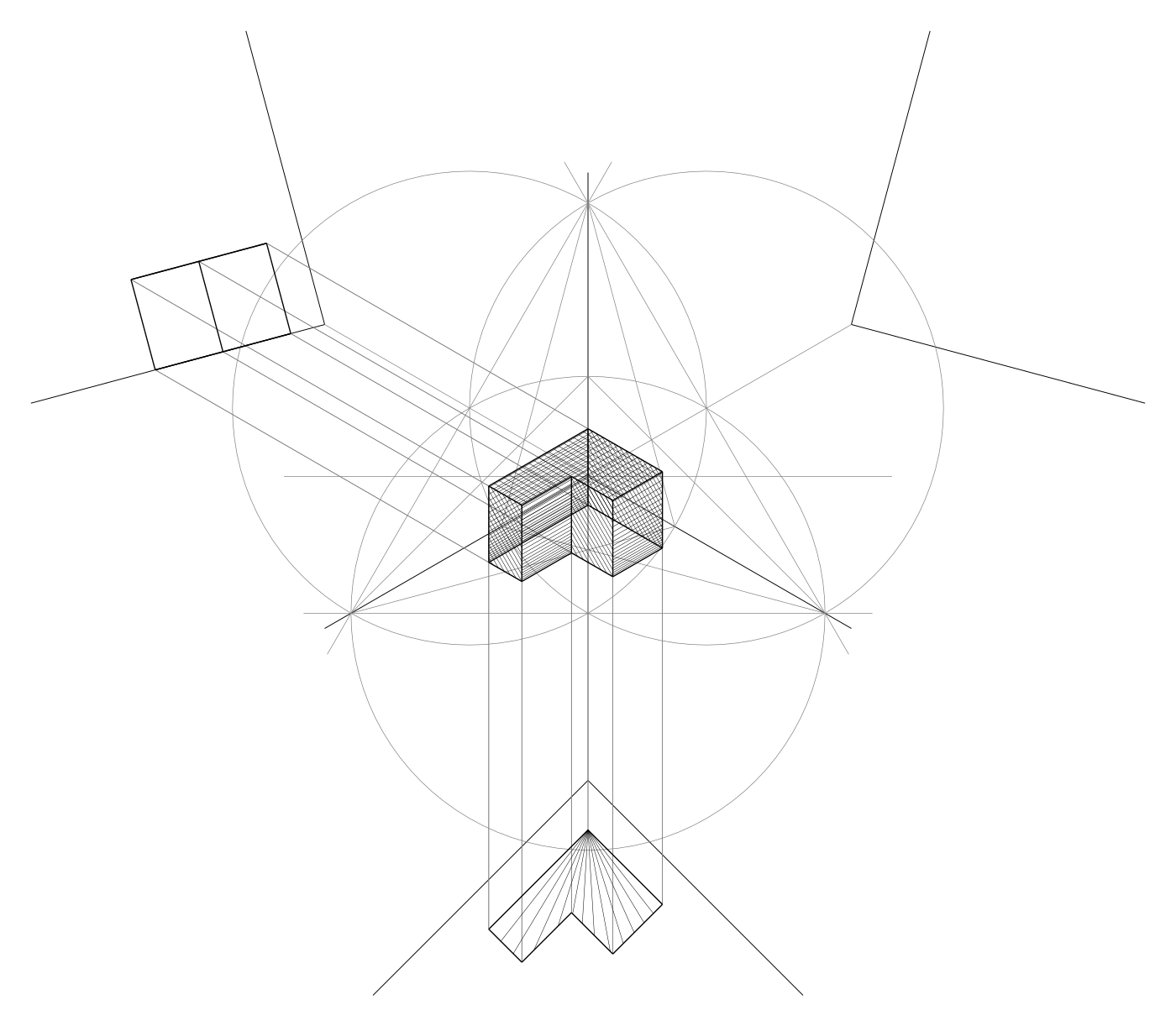
axonometry draws three-dimensional objects the way they were drawn by hand: by projection.
A Python scripting library for axonometric drawings, made for pen plotters. A script states projection operations — a line in the plan, its projection into space, the intersection of two lines — and every point of the image is found where two projection lines cross, as on a drafting table. It is part of a doctoral research project in architectural representation at the AlICe laboratory (Université libre de Bruxelles).
📖 Documentation: https://axonometry.readthedocs.io — tutorial, how-to guides, the geometry behind the library, and the API reference.
Install
Python 3.11 to 3.13 (3.13 recommended). The simplest way is uv, which fetches Python and the library to run a script:
uv run --python 3.13 --with axonometry script.py
uv run --python 3.13 --prerelease=allow --with axonometry script.py   # release candidates
or install it like any package: pip install axonometry.
How it works
from axonometry import Axonometry, Line, Point

my_axo = Axonometry(30, 30)                       # an isometric system
line = my_axo.xy.draw_line(Line(Point(x=70, y=40), Point(x=70, y=15)))  # a line in the plan
line.project(distance=80)                         # the same line, 80 mm above the plan
my_axo.save_svg("first_drawing")                  # the SVG file, in ./output/
An axonometry is four planes: the picture plane, where points have three coordinates, and three reference planes — the plan xy and the elevations yz and zx — tilted into the paper. A point in space is never computed by a projection matrix. Its views are drawn in two reference planes, and the point is where their projection lines cross:
view in xy ─┐
            ├→ projection lines → intersection → point in the picture plane
view in zx ─┘
The construction stays in the drawing, on its own layer: the SVG file has one layer per pen (system, construction traces, geometry, hatches), with the paths in the order of the construction. Many defaults are random: the same script never makes quite the same drawing.
Development
git clone https://codeberg.org/mononym/axonometry.git
cd axonometry
git switch dev             # contributions branch from dev
uv sync                    # package + dev dependencies
Test |
uv run python -m unittest discover tests |
Lint |
uv tool run ruff check && uv tool run ruff format --diff |
Licenses |
uvx reuse lint |
Docs |
uv run sphinx-autobuild docs/source docs/build |
Figures |
uv run python docs/source/_scripts/figures.py (after a change that affects the drawings) |
CI (Woodpecker) runs the tests on Python 3.11, 3.12 and 3.13, the lint and the license check.
Layout:
src/axonometry/
  axonometry.py          the entry point: a system, its four planes and its drawing
  trihedron.py           the axes on the paper and the tilt of the reference planes
  plane.py               picture plane and reference planes, where geometry is drawn
  point.py, line.py      the elements; the line is the element of a plotter drawing
  surface.py, volume.py  closed polygons and prisms
  hatch.py               fill styles, measured in true size
  operations.py          geometric questions answered by construction
  drawing.py, paper.py   the record of the paths, SVG export, papers and pens
  axo_config.toml        layers, pens and colors
docs/source/             Sphinx docs (tutorial, how-to, explanation, reference)
examples/                example scripts and files
Before adding a feature, read the design principles and the contribution guide. Feedback of any kind is welcome, and doesn’t require software development skills.
Issues and contributions: https://codeberg.org/mononym/axonometry/issues
Acknowledgements
Licenses
axonometry: GNU General Public License v3.0 or later
documentation & images: Creative Commons Attribution 4.0 International
test drawing tests/bunny.svg: Creative Commons Attribution-ShareAlike 4.0 International
configuration, CI and generated files: CC0 1.0 Universal
1 maintainer

Metadata
1 maintainer
Release files for axonometry 0.2.0rc1
For a detailed explanation of source distributions (sdists) and built distributions (wheels), please see the package formats documentation.
Source distribution (sdist)
| File | Size | Uploaded | Provenance | Actions |
|---|---|---|---|---|
| axonometry-0.2.0rc1.tar.gz | 98.5 kB | Without provenance | Details for axonometry-0.2.0rc1.tar.gz |
Built distribution (wheel)
| File | Interpreter | ABI | Platform | Actions Reset |
|---|---|---|---|---|
| axonometry-0.2.0rc1-py3-none-any.whl | Python 3 | none | any | Details for axonometry-0.2.0rc1-py3-none-any.whl |
Total release size: 201.1 kB
Release files / axonometry-0.2.0rc1.tar.gz
| Download URL | axonometry-0.2.0rc1.tar.gz |
|---|---|
| Size | 98.5 kB |
| Tags | Source |
|
SHA-256 checksum How to use checksums |
98926230a0041cbfc3eb8597460a3261cd92d558ded09cc771ab09385e5735ef
|
|
BLAKE2b-256 checksum How to use checksums |
7642d2913a5a3df98d4e7d8ef53a7e41cfa271540940605dd53678d34ae86d9c
|
| Upload date | |
|
Uploaded using Trusted Publishing? What is trusted publishing? |
No |
| Uploaded via |
twine/7.0.0 CPython/3.13.18
|
Release files / axonometry-0.2.0rc1-py3-none-any.whl
| Download URL | axonometry-0.2.0rc1-py3-none-any.whl |
|---|---|
| Size | 102.7 kB |
| Tags | Python 3 |
|
SHA-256 checksum How to use checksums |
2546d1201debe1cf78989b8ccbe0be760bc05c00c11b179d4474d3241d964325
|
|
BLAKE2b-256 checksum How to use checksums |
81a6ec4c67b843191603cf5c97bb5e9960d60c37dd7f6ee702b353bddd1e1f4e
|
| Upload date | |
|
Uploaded using Trusted Publishing? What is trusted publishing? |
No |
| Uploaded via |
twine/7.0.0 CPython/3.13.18
|
Security for axonometry 0.2.0rc1
Provenance
Provenance describes where a file came from. On PyPI, provenance is shared via attestations, which provide a verifiable record of the build or publishing details. View details, limitations and caveats.
No provenance found
None of the files in this release were uploaded with provenance metadata.
A note on package security
PyPI is a repository for distributing packages, not a service for auditing them. While third-party security researchers and our staff do their best to detect and remove malicious packages, PyPI cannot guarantee the quality, security or suitability of any given package.
To learn more about protecting yourself from malicious actors, visit our package security documentation.














