
az-scout-plugin-latency-stats
az-scout plugin for inter-region and inter-zone (Availability Zone) latency statistics.
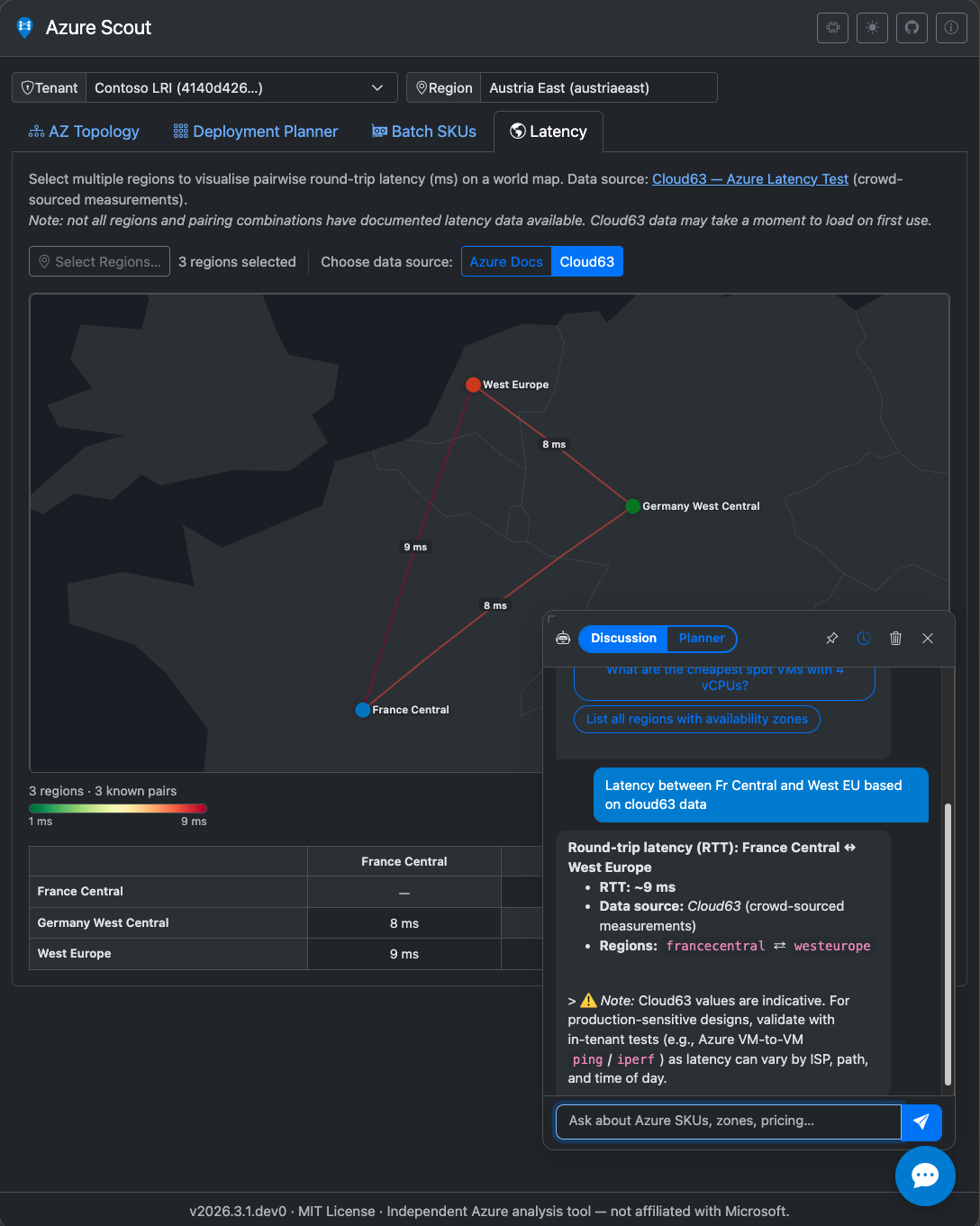
Features
- Latency dataset — static latency matrix based on Microsoft published statistics
- Cloud63 dataset support — optional inter-region crowd-sourced measurements via
mode="cloud63" - Inter-zone dataset support — benchmark-based AZ latency matrix from Cloud63 benchmark API
- API endpoints — inter-region and inter-zone endpoints for matrix and available regions
- MCP tools —
inter_region_latency(...)for inter-region RTT andinter_zone_latency(...)for inter-zone P50 RTT latency in µs - UI tab — interactive D3.js views with inter-region/inter-zone scope switch, map/table synchronization, and bidirectional hover highlighting
- URL hash routing —
#latency-statsselects the plugin tab
Setup
uv pip install az-scout-plugin-latency-stats
az-scout  # plugin is auto-discovered
For development:
git clone https://github.com/az-scout/az-scout-plugin-latency-stats
cd az-scout-plugin-latency-stats
uv sync --group dev
uv pip install -e .
az-scout  # plugin is auto-discovered
Structure
az-scout-plugin-latency-stats/
├── .github/
│   ├── copilot-instructions.md  # Copilot context for this plugin
│   └── workflows/
│       ├── ci.yml               # CI pipeline (lint + test, Python 3.11–3.13)
│       └── publish.yml          # Publish to PyPI on version tags
├── pyproject.toml
├── README.md
├── tools/
│   └── vendor_assets.py         # Stdlib-only sync script for vendored assets
└── src/
    └── az_scout_latency_stats/
        ├── __init__.py          # Plugin class + module-level `plugin` instance
        ├── cloud63.py           # Cloud63 data fetch/cache + inter-region matrix API
        ├── inter_zone.py        # Inter-zone benchmark fetch/cache + AZ matrix API
        ├── latency.py           # Static latency dataset + public API
        ├── metadata.py          # Shared source/disclaimer/methodology constants
        ├── routes.py            # FastAPI APIRouter (optional)
        ├── tools.py             # MCP tool functions (optional)
        └── static/
            ├── css/
            │   └── latency.css      # Plugin styles (auto-loaded via css_entry)
            ├── data/
            │   └── region-coordinates.json
            ├── html/
            │   └── latency-tab.html # HTML fragment (fetched by JS at runtime)
            ├── js/
            │   ├── latency-tab.js           # Main tab bootstrap + inter-region UI logic
            │   └── latency-tab-interzone.js # Inter-zone graph/table rendering + sync
            └── vendor/                      # Vendored third-party assets (see below)
                ├── topojson-client/
                └── world-atlas/
Vendored assets
Following the az-scout vendoring recommendation,
all third-party frontend assets are committed under static/vendor/ and served same-origin from
/plugins/latency-stats/static/vendor/…. The plugin makes no runtime requests to a CDN, so the
map renders correctly in offline and air-gapped deployments.
D3.js is provided by the core az-scout app and is intentionally not re-shipped here.
| Asset | Upstream | Version | License |
|---|---|---|---|
topojson-client/topojson-client.min.js |
topojson-client | 3.1.0 | ISC |
world-atlas/countries-110m.json |
world-atlas | 2.0.2 | ISC |
The committed files are the source of truth — there is no npm, bundler, or build step. To refresh
them (or after bumping a pinned version in tools/vendor_assets.py):
python3 tools/vendor_assets.py                    # download + verify pinned assets
python3 tools/vendor_assets.py --check            # verify committed files only
python3 tools/vendor_assets.py --update-checksums # re-pin checksums after a version bump
How it works
- The plugin loads the HTML fragment into
#plugin-tab-latency-stats. - The user selects a scope:
- Inter-region: select regions and choose source mode (
azuredocsorcloud63). - Inter-zone (AZ): uses the main app region selector (
#region-select).
- Inter-region: select regions and choose source mode (
- Inter-region calls
POST /plugins/latency-stats/inter-region/matrixand renders world map + matrix table. - Inter-zone calls
POST /plugins/latency-stats/inter-zone/matrixand renders AZ graph + pair table. - Hover interactions are synchronized between graph links and table values in both directions.
API
# Pairwise matrix
curl -X POST http://localhost:8080/plugins/latency-stats/inter-region/matrix \
  -H "Content-Type: application/json" \
  -d '{"regions": ["francecentral", "westeurope", "eastus"], "mode": "azuredocs"}'

# All known pairs
curl http://localhost:8080/plugins/latency-stats/inter-region/pairs

# Cloud63 available regions
curl http://localhost:8080/plugins/latency-stats/inter-region/cloud63-regions

# Inter-zone available regions
curl http://localhost:8080/plugins/latency-stats/inter-zone/regions

# Inter-zone AZ matrix
curl -X POST http://localhost:8080/plugins/latency-stats/inter-zone/matrix \
  -H "Content-Type: application/json" \
  -d '{"region": "westeurope"}'
MCP tool
inter_region_latency(source_region="francecentral", target_region="westeurope")
inter_region_latency(source_region="francecentral", target_region="westeurope", mode="cloud63")
inter_zone_latency(region="westeurope", source_zone="az1", target_zone="az2")
Quality checks
uv run ruff check src/ tests/
uv run ruff format --check src/ tests/
uv run mypy src/
uv run pytest
Copilot support
The .github/copilot-instructions.md file provides context to GitHub Copilot about
the plugin structure, conventions, and az-scout plugin API.
Data sources
- Azure Docs (inter-region): Azure Network Latency
- Cloud63 (inter-region optional mode): Azure Latency Test
- Cloud63 benchmark API (inter-zone AZ):
https://fa-azure-network-benchmark.azurewebsites.net/api/data
Inter-zone outputs are exposed in microseconds (latencyUsP50). Always validate with in-tenant measurements.
License
Disclaimer
This tool is not affiliated with Microsoft. All capacity, pricing, and availability information is indicative and not a guarantee of deployment success. Values are dynamic and may change between planning and actual deployment. Always validate in official Microsoft sources and in your target tenant/subscription.
1 maintainer

Metadata
1 maintainer
Release files for az-scout-plugin-latency-stats 2026.8.1
For a detailed explanation of source distributions (sdists) and built distributions (wheels), please see the package formats documentation.
Source distribution (sdist)
| File | Size | Uploaded | Provenance | Actions |
|---|---|---|---|---|
| az_scout_plugin_latency_stats-2026.8.1.tar.gz | 196.0 kB | With provenance | Details for az_scout_plugin_latency_stats-2026.8.1.tar.gz |
Built distribution (wheel)
| File | Interpreter | ABI | Platform | Actions Reset |
|---|---|---|---|---|
| az_scout_plugin_latency_stats-2026.8.1-py3-none-any.whl | Python 3 | none | any | Details for az_scout_plugin_latency_stats-2026.8.1-py3-none-any.whl |
Total release size: 283.6 kB
Release files / az_scout_plugin_latency_stats-2026.8.1.tar.gz
| Download URL | az_scout_plugin_latency_stats-2026.8.1.tar.gz |
|---|---|
| Size | 196.0 kB |
| Tags | Source |
|
SHA-256 checksum How to use checksums |
d211b0365705bb8397d470572c61ee5f872df1f38c2c7a647ec6fb9dc8410411
|
|
BLAKE2b-256 checksum How to use checksums |
48ed624aed643c7653676e4c2ca6a08968c4312b7e89ebbe44a8ad9e80e7aed0
|
| Upload date | |
|
Uploaded using Trusted Publishing? What is trusted publishing? |
Yes |
| Uploaded via |
twine/7.0.0 CPython/3.13.14
|
Provenance
Provenance describes where a file came from. On PyPI, provenance is shared via attestations, which provide a verifiable record of the build or publishing details. View details, limitations and caveats.


PyPI Publish Attestation
PyPI verified that this artifact, at this checksum, originated from the publisher listed below.
Signed by GitHub Actions, verified by PyPI on Aug 12, 2026.
Transparency logRelease files / az_scout_plugin_latency_stats-2026.8.1-py3-none-any.whl
| Download URL | az_scout_plugin_latency_stats-2026.8.1-py3-none-any.whl |
|---|---|
| Size | 87.6 kB |
| Tags | Python 3 |
|
SHA-256 checksum How to use checksums |
b22d83edb1c47b66585acfd731d6b9746743dab3729934f09afd634f15c03fdf
|
|
BLAKE2b-256 checksum How to use checksums |
120169211ea2e18dd035fec2e98b6a147454b69cb5b06ff9e17e0d37cefe2d2d
|
| Upload date | |
|
Uploaded using Trusted Publishing? What is trusted publishing? |
Yes |
| Uploaded via |
twine/7.0.0 CPython/3.13.14
|
Provenance
Provenance describes where a file came from. On PyPI, provenance is shared via attestations, which provide a verifiable record of the build or publishing details. View details, limitations and caveats.
PyPI Publish Attestation
PyPI verified that this artifact, at this checksum, originated from the publisher listed below.
Signed by GitHub Actions, verified by PyPI on Aug 12, 2026.
Transparency logSecurity for az-scout-plugin-latency-stats 2026.8.1
Provenance
Provenance describes where a file came from. On PyPI, provenance is shared via attestations, which provide a verifiable record of the build or publishing details. View details, limitations and caveats.
Full provenance
All 2 files in this release have been uploaded with provenance metadata.
Attestation for az_scout_plugin_latency_stats-2026.8.1.tar.gz
PyPI Publish Attestation
PyPI verified that this artifact, at this checksum, originated from the publisher listed below.
Signed by GitHub Actions, verified by PyPI on Aug 12, 2026.
Transparency logA note on package security
PyPI is a repository for distributing packages, not a service for auditing them. While third-party security researchers and our staff do their best to detect and remove malicious packages, PyPI cannot guarantee the quality, security or suitability of any given package.
To learn more about protecting yourself from malicious actors, visit our package security documentation.














