
A local OSINT workspace for media, geolocation proofs and case management.
Verified details
These details have been verified by PyPIProject links
GitHub Statistics
Maintainers

Project description
Azimut
Azimut is a local OSINT workspace for reviewing media, building geolocation proofs and keeping case notes together.
It is built for open-source investigators, journalists and researchers. Each case is a plain folder that can be reopened, archived or shared.
The name is the French word for azimuth, the compass bearing you sight along to fix a point on the map.
v0.2.6: Portable cases and recoverable deletion
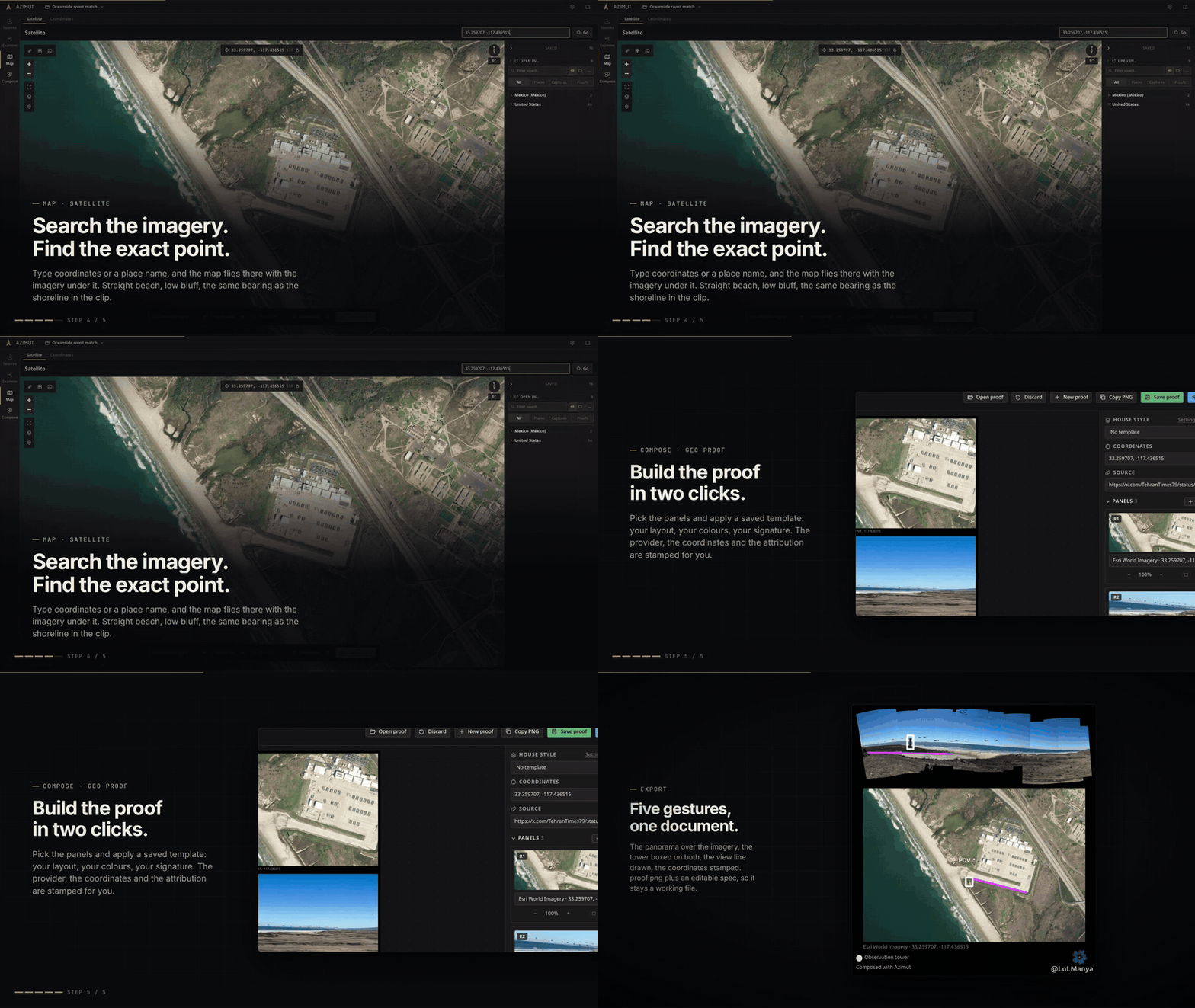
Watch the full tour (2 min 30).
| Tool | What it does |
|---|---|
| Media | Import local files or download by URL (X, Telegram, TikTok, YouTube, Instagram and more via yt-dlp, with a gallery-dl fallback for image-only posts). Public media is fetched cookie-less; a login-walled post prompts once for a browser session or an exported cookies.txt. Each item gets a clean local file, metadata and a SHA-256. Multi-photo posts open a picker. |
| Reverse Search | Prepare an image or a video frame for keyless reverse-image services. Nothing uploads on its own. |
| Inspect | A scratch workspace over any photo or video: frame adjustments, editable crop, sharpest-frame capture, hand-made collage with per-piece warp/scale/rotate, auto-stitch to solve a panorama's layout, and ELA hints. Nothing enters the case until you save. |
| Satellite | Coordinates or a place name become an imagery crop, with select-area capture, map rotation, measurement tools, reference overlays and editable AOI grids for area review. Esri/OSM by default, plus Sentinel-2 with a date calendar and a cloud-ceiling slider; add a Mapbox or Google key for more basemaps. |
| Coordinates | Convert common coordinate formats, copy the result, and open map or geocoding links. |
| Geo Proof | Start a named proof from a reusable house style, select case panels with search, compose them in a grid or free layout, annotate with colored shapes/freehand/text, and export proof.png plus a re-editable spec. |
| Geo Report | Turn a proof into a prepared thread for X, Bluesky, or Mastodon: coordinates, plus code, attribution, target-specific character counts, media, and a structured Markdown case note with linked evidence. |
| Notebook | Tabbed Markdown notes with local media, Mermaid diagrams, linked case evidence, broken-reference markers and a print-ready PDF view. |
Under the hood: reusable proof and thread templates, per-case SQLite with a bounded catalog, a durable one-worker thumbnail queue, the map-capture browser extension, and cross-platform binaries with a bundled ffmpeg.
Every tool works one-shot (a scratch session, no setup) or inside a case, a plain directory holding the whole investigation.
New in v0.2.6:
- Export a complete case as an integrity-checked bundle, then import it as a new case on another machine. Bundles can be protected with a password.
- Delete files, notes, proofs and their dependent records into Trash, then restore them or remove them permanently when the work is no longer needed.
- Select several Files entries before deleting them, with one confirmation and one restore point for the complete action.
- Enrich imported images and videos locally with readable metadata, GPS suggestions and media filters that open stated locations on the map.
- Create and review typed relations from Details or a saved place on the map.
- Keep reusable proof and post presets in Settings backups, and report an issue from About with scrubbed diagnostics.
Install & run
pipx install azimut   # isolated app install; plain `pip install azimut` also works
azimut                # starts on http://127.0.0.1:8477 and opens a browser tab
Update with pipx upgrade azimut, remove with pipx uninstall azimut. Your
cases and settings live under ~/Azimut; upgrades and uninstalling the app do
not remove them. Delete ~/Azimut manually if you also want to remove the data.
Azimut runs in a normal browser tab (Firefox/Chrome); there is no separate window. Closing the terminal it prints its URL into stops the app.
Ready-to-run binary (no Python)
Each release attaches a self-contained binary per OS. Download it from the Releases page and run it; it opens Azimut in your browser.
| OS | Asset |
|---|---|
| Windows | azimut-windows-x86_64.exe |
| macOS (Apple Silicon) | azimut-macos-arm64 |
| macOS (Intel, 14+) | No standalone binary; install with pipx or pip |
| Linux | azimut-linux-x86_64 |
First run, the binaries are unsigned, so the OS warns before letting them open:
- macOS: right-click the file → Open → Open (Gatekeeper only
offers "Open" from the context menu for unidentified developers), or run
xattr -d com.apple.quarantine ./azimut-macos-*once. - Windows: SmartScreen shows "Windows protected your PC"; click More info → Run anyway.
- Linux: mark it executable with
chmod +x azimut-linux-x86_64.
Azimut checks for a newer release on startup by default and links the download.
Settings can disable that check, and Settings → About → Check for updates
runs it manually. Replace the old binary with the new one. To uninstall, delete
the binary. Either way ~/Azimut stays put, so cases open unchanged.
The downloadable binaries bundle a static ffmpeg (and ffprobe), so video
thumbnails, frame scans, video enhancement, and downloads that merge separate
audio+video streams work out of the box. If you pip install azimut instead,
put ffmpeg on your PATH for those features. Everything else works without it.
The bundled ffmpeg is redistributed under its own license; see
ffmpeg.org/legal.html.
From source:
Requires Python 3.11+ and Node.js 20+ for the frontend build.
macOS and Linux:
git clone https://github.com/OsintMeThat/azimut && cd azimut
python3 -m venv .venv && .venv/bin/pip install -e ".[dev]"
cd frontend && npm ci && npm run build && cd ..
.venv/bin/azimut
Windows PowerShell:
git clone https://github.com/OsintMeThat/azimut
Set-Location azimut
py -3.11 -m venv .venv
.venv\Scripts\python -m pip install -e ".[dev]"
Set-Location frontend
npm ci
npm run build
Set-Location ..
.venv\Scripts\azimut.exe
Rebuild and relaunch the local app with the cross-platform helper:
python3 scripts/relaunch.py       # macOS / Linux
py scripts\relaunch.py            # Windows
The tool rebuilds the frontend, stops the previous Azimut instance started
through the same tool, and launches the fresh build. It never kills unrelated
processes by name. Use --no-browser to keep it from opening a new tab.
Frontend development (hot reload, proxied API):
.venv/bin/azimut --no-browser &     # backend on :8477
cd frontend && npm run dev          # UI on :5173
Checks (CI runs these on every push):
uv run ruff check src tests   # lint
uv run mypy                    # type-check the backend
cd frontend && npm run check   # svelte-check (blocks on errors)
Capture extension (optional)
A browser extension (Chrome/Edge and Firefox) captures external map sites straight into a case: Google Maps & Earth, Bing, Yandex, OSM, Apple Maps, Zoom Earth, Copernicus Browser and Satellites.pro, one screenshot per click with coordinates parsed from the URL. It also powers the Capture button on the Google (Maps JS) basemap. Install it from Settings → Capture extension (download the zip, load unpacked, pair with the token shown there); full instructions in extension/README.md.
Building & releasing
The Svelte frontend builds into src/azimut/static/ (git-ignored) and is
bundled into the Python wheel via hatchling artifacts. So npm run build
must run before building the package, or the shipped UI is stale.
cd frontend && npm run build && cd ..    # refresh the bundled UI
uv sync --frozen --no-dev --group release --no-install-project
uv sync --frozen --no-dev --group release --no-build-isolation --no-editable
uv run --no-sync python -m build --no-isolation
uv run --no-sync pyinstaller packaging/azimut.spec
Dependencies
pyproject.toml declares ranges (the contract for pip install azimut
users); uv.lock pins the exact set, and is what CI and the release
builds install. The wheel only declares its dependencies, but the binary
contains them, so building it outside the lock ships whatever the resolver
happened to pick that day.
uv lock --check                  # CI does this: is the lock in sync with pyproject?
uv lock --upgrade                # refresh everything, then run the suite
uv lock --upgrade-package yt-dlp # refresh one
Raising an upper bound is a deliberate act: bump it in pyproject.toml, run
uv lock, and make sure the suite passes before it lands. The weekly
"latest deps" CI job re-resolves past the lock, so upstream breakage shows up
as a red run of ours rather than a broken install for someone else.
yt-dlp and gallery-dl are deliberately unbounded: they track sites that change, so pinning them just schedules a breakage. They can also be updated from inside the app (Settings → About → Downloaders), which is what keeps a months-old binary working.
Releases are automated: push a semver tag and GitHub Actions
(.github/workflows/release.yml) builds the
wheel + Windows/Linux/macOS binaries, attaches them to a GitHub release, and
publishes to PyPI. Don't publish by hand.
git tag v0.2.6 && git push origin v0.2.6
One-time setup: register the repo as a
PyPI Trusted Publisher for the
azimut project (no API token to store).
Principles
- No account, telemetry or automatic upload. The server binds to
127.0.0.1, and Azimut never posts on your behalf. - A case contains the investigation's files and SQLite graph. A closed case folder is complete and portable; ZIP import/export is planned.
- One tab = one tool, useful in 30 seconds.
- Azimut integrates specialized services instead of recreating them.
- The analyst decides; tools do not produce automated verdicts.
- Every artifact records how it was produced.
- Free and open source. No paid key is ever required; bring your own for more basemaps.
Full spec: docs/SPEC.md.
License
AGPL-3.0-only: free and open source; hosted or modified versions must share their source.
Project details
Verified details
These details have been verified by PyPIProject links
GitHub Statistics
Maintainers
Release history Release notifications | RSS feed


Download files
Download the file for your platform. If you're not sure which to choose, learn more about installing packages.
Source Distribution
Built Distribution
Filter files by name, interpreter, ABI, and platform.
If you're not sure about the file name format, learn more about wheel file names.
Copy a direct link to the current filters
File details
Details for the file azimut-0.2.6.tar.gz.
File metadata
- Download URL: azimut-0.2.6.tar.gz
- Upload date:
- Size: 6.8 MB
- Tags: Source
- Uploaded using Trusted Publishing? Yes
- Uploaded via: twine/7.0.0 CPython/3.13.14
File hashes
| Algorithm | Hash digest | |
|---|---|---|
| SHA256 |
49b6ed1d9821c53c4a72f97ff766254c52ea78f9ae9c70b99ae0750ed5c2f288
|
|
| MD5 |
112309e67ec9d8bd3fe47e1874012d44
|
|
| BLAKE2b-256 |
cf28f35cff04e596cb9720c2d2690ce9c81c86c28c4e141396ae4e184c997cca
|
Provenance
The following attestation bundles were made for azimut-0.2.6.tar.gz:
Publisher:
release.yml on OsintMeThat/azimut
-
Statement:
-
Statement type:
https://in-toto.io/Statement/v1 -
Predicate type:
https://docs.pypi.org/attestations/publish/v1 -
Subject name:
azimut-0.2.6.tar.gz -
Subject digest:
49b6ed1d9821c53c4a72f97ff766254c52ea78f9ae9c70b99ae0750ed5c2f288 - Sigstore transparency entry: 2283772824
- Sigstore integration time:
-
Permalink:
OsintMeThat/azimut@c08c9bd43d38c9b5f87521f5436b708c8b84d684 -
Branch / Tag:
refs/tags/v0.2.6 - Owner: https://github.com/OsintMeThat
-
Access:
public
-
Token Issuer:
https://token.actions.githubusercontent.com -
Runner Environment:
github-hosted -
Publication workflow:
release.yml@c08c9bd43d38c9b5f87521f5436b708c8b84d684 -
Trigger Event:
push
-
Statement type:
File details
Details for the file azimut-0.2.6-py3-none-any.whl.
File metadata
- Download URL: azimut-0.2.6-py3-none-any.whl
- Upload date:
- Size: 1.7 MB
- Tags: Python 3
- Uploaded using Trusted Publishing? Yes
- Uploaded via: twine/7.0.0 CPython/3.13.14
File hashes
| Algorithm | Hash digest | |
|---|---|---|
| SHA256 |
68373c8cc89f30adefdec75f3d7944e89e52a10b9dc420bef564b5cc39833bdf
|
|
| MD5 |
e6ad60d9b4d49479ea3f878d2258eb4d
|
|
| BLAKE2b-256 |
b16ab3a4c701815c6110082292b068a39865647bf901a2cbb018417b18d861ee
|
Provenance
The following attestation bundles were made for azimut-0.2.6-py3-none-any.whl:
Publisher:
release.yml on OsintMeThat/azimut
-
Statement:
-
Statement type:
https://in-toto.io/Statement/v1 -
Predicate type:
https://docs.pypi.org/attestations/publish/v1 -
Subject name:
azimut-0.2.6-py3-none-any.whl -
Subject digest:
68373c8cc89f30adefdec75f3d7944e89e52a10b9dc420bef564b5cc39833bdf - Sigstore transparency entry: 2283772905
- Sigstore integration time:
-
Permalink:
OsintMeThat/azimut@c08c9bd43d38c9b5f87521f5436b708c8b84d684 -
Branch / Tag:
refs/tags/v0.2.6 - Owner: https://github.com/OsintMeThat
-
Access:
public
-
Token Issuer:
https://token.actions.githubusercontent.com -
Runner Environment:
github-hosted -
Publication workflow:
release.yml@c08c9bd43d38c9b5f87521f5436b708c8b84d684 -
Trigger Event:
push
-
Statement type:






