
Aziona-CLI Documentation




Aziona CLI is a cross CI platform tool that enables the building, testing, releasing, and deploying, DevOps/GitOps process steps. Pipelines have two major problems, namely the setup of the environment with all the dependencies, environmental variables and the management and maintenance of scripts to be executed during the CI/CD process. Aziona CLI tries to simplify the aforementioned aspects by allowing developers to create agnostic and platform-independent configurations. The advantage of Aziona configurations is that you can declare in one or more YML / Json files the tasks, environment variables, and dependencies needed to run the pipeline.
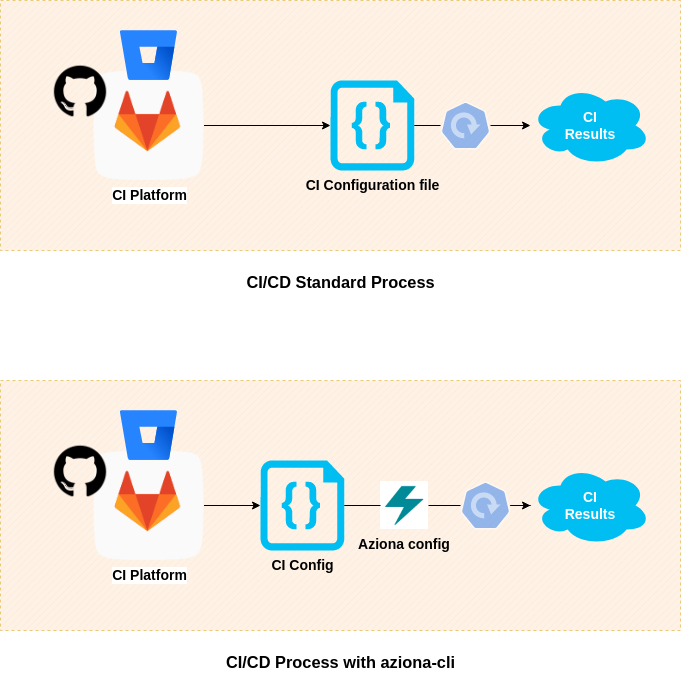
Architecture
Aziona CLI is written in Python3 and can be used in various ways in both local and pipelined environments, such as a:
- Container image (Ubuntu 20.04)
- Python package
- GitHub action
YML structure
The YML structure is divided into targets that include multiple stages; on top of that, you can inject a custom environment and additional settings. Each stage is defined as a single action that imports modules executed with optional arguments.
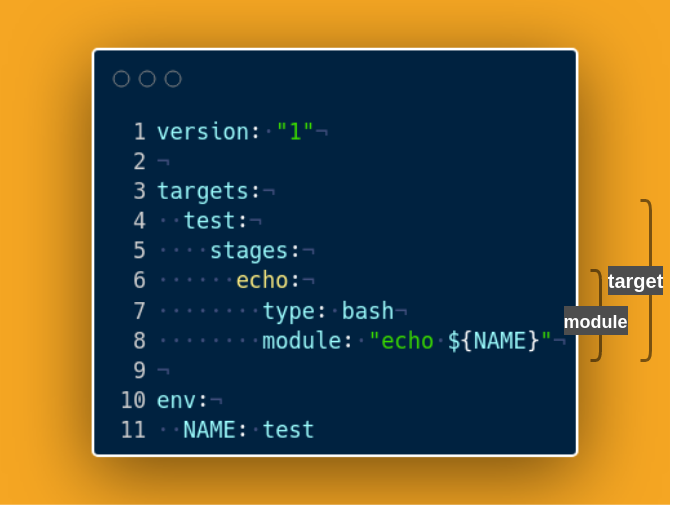
Modules Modules are actions executed by a stage; they have different types like Python or bash modules. Each module has to have defined the type, module, and eventually additional arguments.
Develop environment
Requirements
- python >= 3.7
- pip3
- docker and docker-compose
Setup
git clone https://github.com/azionaventures/aziona-cli.git
sudo make setup-dev
source ./venv/bin/active
Local environment
Requirements
- python >= 3.7
- pip3
- docker and docker-compose
Setup
pip3 install aziona

# or

pip3 install aziona==VERSION
Usage
Ex. Release docker image into Aws ECR from Local env
Require: AWS account and Dockerfile
Create project folder, and create file .aziona.yml with the snippet below.
Create ECR repository in the AWS region where your profile is pointing.
Edit .aziona.yml and export to shell env vars:
- export AWS_ACCESS_KEY_ID=xxx
- export AWS_SECRET_ACCESS_KEY=xxx
- export AWS_ACCOUNT_ID=xxx
- export AWS_ECR_REGION=xxx
- export AWS_ECR_REPOSITORY=xxx
Create sample Dockerfile.
Finally, run:
aziona release
This aziona configuration file firstly makes login on Ecr service, nextly, build docker image, and endly push image to ecr repository
Snippet
version: "1"

targets:
  release:
    stages:
      login:
        module: aziona.packages.docker.login_aws_credentials
        args:
          --region: ${AWS_ECR_REGION}
          --registry: ${AWS_ECR_REGISTRY}
      build:
        module: aziona.packages.docker.build
        args:
          --path: .
          --dockerfile: Dockerfile
          --tag: ${DOCKER_IMAGE}
      push:
        module: aziona.packages.docker.push
        args:
          --image: ${DOCKER_IMAGE}

env:
  AWS_ACCESS_KEY_ID: ${AWS_ACCESS_KEY_ID}
  AWS_SECRET_ACCESS_KEY: ${AWS_SECRET_ACCESS_KEY}
  AWS_ACCOUNT_ID: ${AWS_ACCOUNT_ID}
  AWS_ECR_REGION: ${AWS_ECR_REGION}
  AWS_ECR_REPOSITORY: ${AWS_ECR_REPOSITORY}
  AWS_ECR_REGISTRY: ${AWS_ACCOUNT_ID}.dkr.ecr.${AWS_ECR_REGION}.amazonaws.com
  DOCKER_IMAGE: ${AWS_ECR_REGISTRY}/${AWS_ECR_REPOSITORY}:latest
In the case in the local environment you want to use the aws profiles configured in .aws/credentials you have to use the following configuration:
-
You need to add this args
--profile: ${AWS_PROFILE}to login stage -
Change the env to and export vars:
env:
  AWS_PROFILE: ${AWS_PROFILE}
  AWS_ACCOUNT_ID: ${AWS_ACCOUNT_ID}
  AWS_ECR_REGION: ${AWS_ECR_REGION}
  AWS_ECR_REPOSITORY: ${AWS_ECR_REPOSITORY}
  AWS_ECR_REGISTRY: ${AWS_ACCOUNT_ID}.dkr.ecr.${AWS_ECR_REGION}.amazonaws.com
  DOCKER_IMAGE: ${AWS_ECR_REGISTRY}/${AWS_ECR_REPOSITORY}:latest
[WARNING] It is not recommended to put sensitive data directly into the env.
Ex. Release docker image into Aws ECR from GitHub Action
Let's start with the "Local env" example.
Now that we've texted the process in a local environment, we can create a pipeline in GitHub (or your reference system) that executes our actions.
First, we need to create a ".github" folder in the root of the project with another folder called "workflows" inside.
Create the following secrets in Github:
- AWS_ACCESS_KEY_ID
- AWS_SECRET_ACCESS_KEY
- AWS_ACCOUNT_ID
- AWS_ECR_REGION
- AWS_ECR_REPOSITORY
Then create a release.yml file in .github/workflows and paste the following code:
name: Release docker image to AWS ECR

on:
  push:
    branches:
      - "main"

env:
  AWS_ACCESS_KEY_ID: ${{ secrets.AWS_ACCESS_KEY_ID }}
  AWS_SECRET_ACCESS_KEY: ${{ secrets.AWS_SECRET_ACCESS_KEY }}
  AWS_ACCOUNT_ID: ${{ secrets.AWS_ACCOUNT_ID }}
  AWS_ECR_REGION: ${{ secrets.AWS_ECR_REGION }}
  AWS_ECR_REPOSITORY: ${{ secrets.AWS_ECR_REPOSITORY }}

jobs:
  release:
    name: Push image on ECR
    runs-on: ubuntu-20.04

    steps:
      - name: Checkout
      uses: actions/checkout@v2

      - name: Checkout Action - Aziona CLI
      uses: actions/checkout@v2
      with:
          repository: azionaventures/aziona-cli
          ref:  main
          path: .github/actions/aziona

      - name: Aziona cli
      uses: ./.github/actions/aziona
      with:
          target: release
This pipeline will be started whenever a push is made to the main. The GitHub action of aziona-cli is used to execute the "release" target, which will execute all the actions defined in the .aziona.yml file. This way we can test the pipeline locally and be independent of the versioning system.
Ex. Release docker image into Aws ECR from Bitbucket pipeline
Let's start with the "Local env" example.
Create il file bitbucket-pipelines.yml nella root del progetto e inserite il seguente codice:
image:
  name:

options:
  docker: true

pipelines:
  branches:
    main:
      - step:
          name: Release docker image to AWS ECR
          deployment: env
          image:
            name: azionaventures/aziona-cli:0.1
          script:
            - aziona release
Create deployment named env. Enter the following keys in the deployment:
- AWS_ACCESS_KEY_ID
- AWS_SECRET_ACCESS_KEY
- AWS_ACCOUNT_ID
- AWS_ECR_REGION
- AWS_ECR_REPOSITORY
The pipeline will use the action-cli:0.1 image to execute the step.
Contributing
1. Open issue
2. Use module `aziona.core` for I/O, logging, settings etc
3. Formatting and fix code with `make lint`
4. Merge request
License
1 maintainer

Metadata
1 maintainer
Release files for aziona 0.1.16
For a detailed explanation of source distributions (sdists) and built distributions (wheels), please see the package formats documentation.
Built distribution (wheel)
| File | Interpreter | ABI | Platform | Reset |
|---|---|---|---|---|
| aziona-0.1.16-py36-none-any.whl | Python 3.6 | none | any | Details |
Release files / aziona-0.1.16-py36-none-any.whl
| Download URL | aziona-0.1.16-py36-none-any.whl |
|---|---|
| Size | 71.9 kB |
| Tags | Python 3.6 |
|
SHA-256 checksum How to use checksums |
47a9f3d052e5f95f76e6327b5b75ae9088e06bfa86d250a4530b13fc5a0aa18a
|
|
BLAKE2b-256 checksum How to use checksums |
a029c7b1dc35b8697e8171bb4b55e4b7befb3a5be52ed787c00e3edb498c423c
|
| Upload date | |
|
Uploaded using Trusted Publishing? What is trusted publishing? |
No |
| Uploaded via |
twine/4.0.1 CPython/3.9.13
|
Security for aziona 0.1.16
Provenance
Provenance describes where a file came from. On PyPI, provenance is shared via attestations, which provide a verifiable record of the build or publishing details. View details, limitations and caveats.
No provenance found
None of the files in this release were uploaded with provenance metadata.
A note on package security
PyPI is a repository for distributing packages, not a service for auditing them. While third-party security researchers and our staff do their best to detect and remove malicious packages, PyPI cannot guarantee the quality, security or suitability of any given package.














