
Bring colors to Euclid tiles!

Project description

Bring colors to Euclid tiles!
Azul(ero)* is a toolbox which, among others, provides scripts to download and merge VIS and NIR observations over a MER tile.
For rendering color images, azul process detects and inpaints bad pixels (cold pixels, saturated stars...),
and combines the 4 channels (I, Y, J, H) into an sRGB image.
Input data files can be selected with azul find and then downloaded with azul retrieve,
which connects to public (SAS) or private (EAS) data archives.
Last but not least, azul roam produces flowing videos by panning and zooming images.
*I started this project when Euclid EROs came out...
License
Installation and setup
Install the azulero package with:
pip install azulero
If you wish to access Euclid-internal data with azul retrieve, setup the ~/.netrc file (or _netrc on Windows) for eas-dps-rest-ops.esac.esa.int and euclidsoc.esac.esa.int with your Euclid credentials:
machine eas-dps-rest-ops.esac.esa.int
  login <login>
  password <password>
machine euclidsoc.esac.esa.int
  login <login>
  password <password>
For azul find, download the geojson file which monitors MER processing, e.g., for DR1:
DpdMerFinalCatalog.geojson
Basic usage
The typical workflow is as follows:
- 🎯 Find the tile indices of your objects or coordinates with
azul find. - 📥 Download the individual MER-processed FITS files of your tiles with
azul retrieve. - ✂️ Optionally select the region to be processed with
azul crop. - 🌟 Blend the channels and inpaint artifacts with
azul process. - 🎬 Generate a video from the image with
azul roam.
Usage:
azul [--workspace <workspace>] find [<objects>] [--radec <coordinates>]
azul [--workspace <workspace>] retrieve [--from <provider>] <tile_indices>
azul [--workspace <workspace>] crop <tile_index>
azul [--workspace <workspace>] process <tile_slicing>
azul [--workspace <workspace>] roam <image> <sequence>
with:
<workspace>- The parent directory to save everything, in which one folder per tile will be created (defaults to the current directory).<object>- A space-separated list of object names, e.g.M82 NGC6536.<coordinates>- RA/dec coordinates in decimal degrees, e.g.266.9397155 +64.0472200; Option--radeccan be specified multiple times.<provider>- The data archive name, e.g.sasfor public releases.<tile_indices>- The space-separated list of tiles to be downloaded, typically the result ofazul find.<tile_index>- A single tile index.<tile_slicing>- A single tile index, optionally followed by a slicing à-la NumPy, typically the result ofazul crop.<image>- The path to an input image (not necessarily produced by Azul).<sequence>- The roaming configuration file: see the format description for details.
Example
Here is an example output:
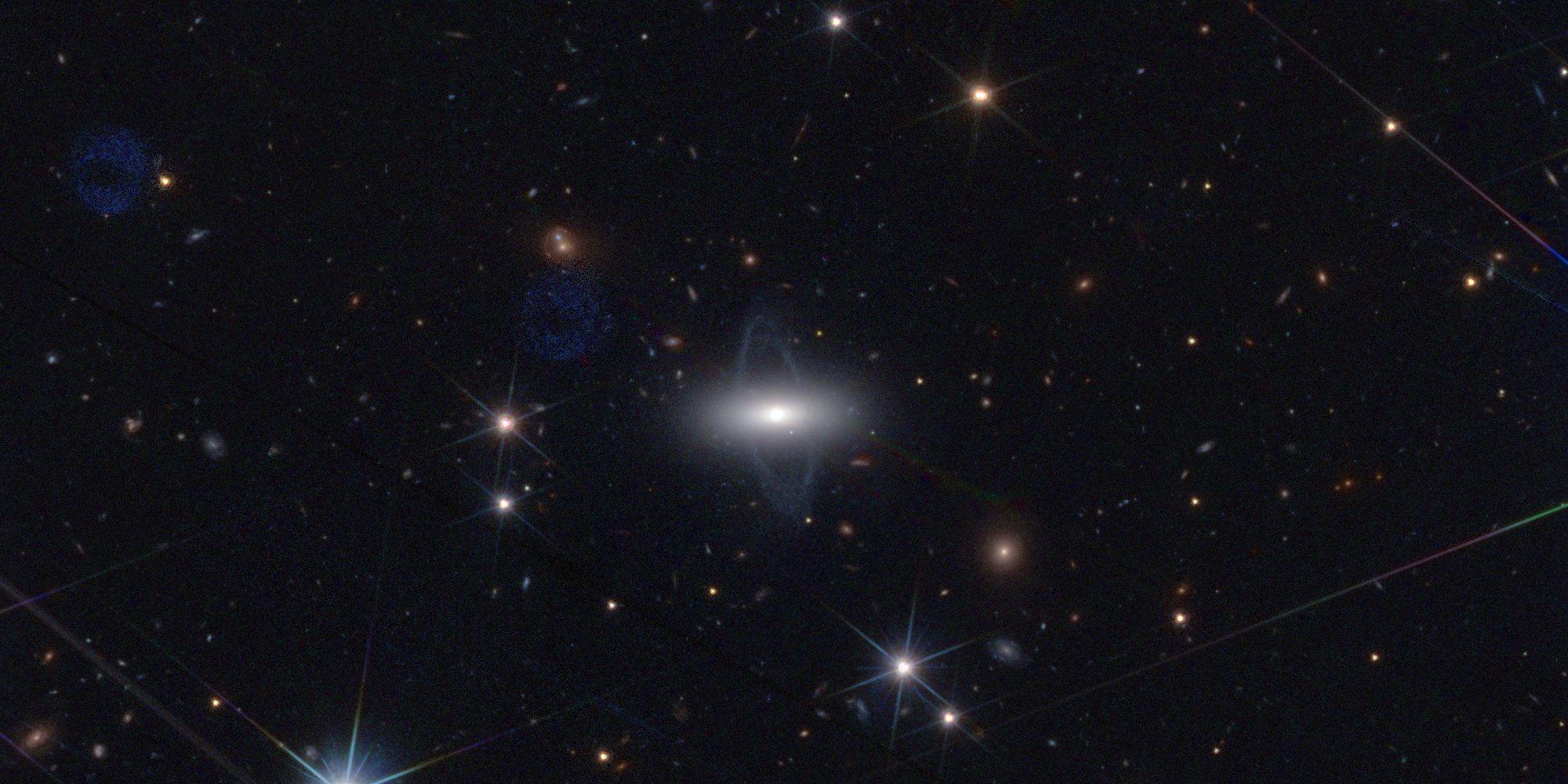
A field around PGC 61356
The two thick blue rings are artifacts of the VIS instrument known as ghosts. To my knowledge, the galaxy in the center -- PGC 61356 -- has never been resolved this way. Rendering the image allowed me to discover this is a splendid polar-ring galaxy! The previously unseen golden structure top left may be an Einstein ring, possibly with two deflectors -- the question remains open.
Credit: ESA Euclid/Euclid Consortium/NASA/Q1-2025/Antoine Basset (CNES)
The picture above was produced by the following commands:
azul retrieve 102159776 --from sas
azul process 102159776[6000:7000,5000:7000]
From the same tile, here is an example over a region with less artifacts:
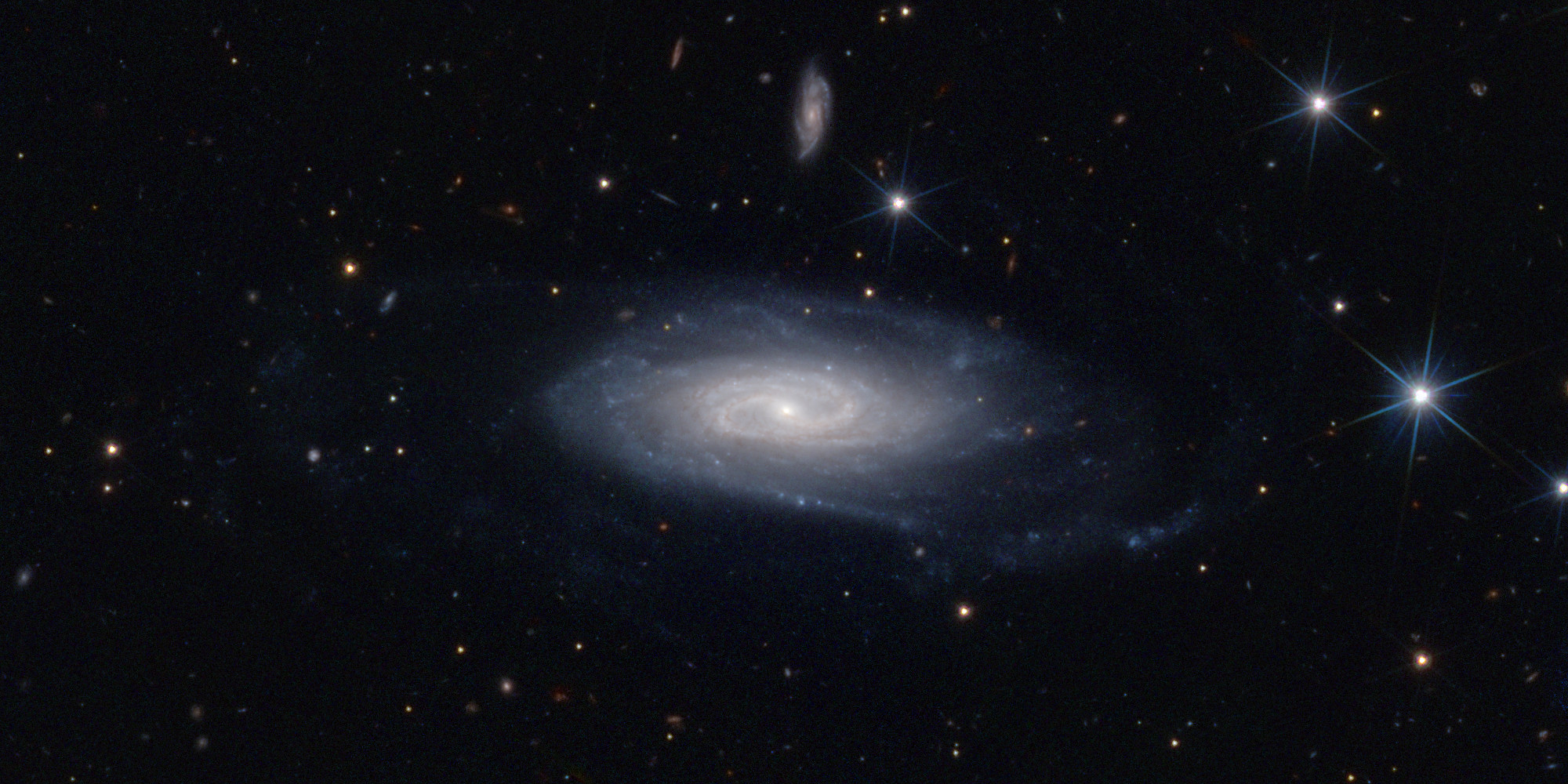
A field around UGC 11116
Credit: ESA Euclid/Euclid Consortium/NASA/Q1-2025/Antoine Basset (CNES)
azul process 102159776[11000:12000,7500:9500]
Advanced usage
Refer to the dedicated pages:
And check the different command help messages:
azul -h
azul find -h
azul retrieve -h
azul crop -h
azul process -h
azul roam -h
Citing Azulero
💞 If you use this software for academic publications, please cite as follows (adapt the version number):
Basset, A., Schirmer, M., Bouvard, T., Gimenez, R., Nguyen-Kim, K., & Candini, G. P. Azulero (Version 1.0.0) [Computer software]. DOI: 10.24400/815952/Azulero.
BibTeX format:
@software{Basset_azulero,
author = {Basset, Antoine and Schirmer, Mischa and Bouvard, Téo and Gimenez, Rollin and Nguyen-Kim, Kane and Candini, Gian Paolo},
license = {Apache-2.0},
title = {{Azulero}},
version = {1.0.0},
year = {2025},
url = {https://github.com/kabasset/azulero},
doi = {10.24400/815952/Azulero}
}
More details in CITATION.cff.
How to help?
- Report bugs, request features, tell me what you think of the tool and results...
- Mention myself (Antoine Basset, CNES) and/or
Azulerowhen you publish images processed with this tool (see example credits above). Cite the software in academic publications (see previous section). - Share with me your images, I'm curious!
Contributors
- Mischa Schirmer (MPIA): Azul's color blending is freely inspired by that of Mischa's script
eummy.py. - Téo Bouvard (Thales): Drafed
retrieve. - Rollin Gimenez (CNES): Fixed packaging.
- Kane Nguyen-Kim (IAP): Provided URLs for retrieving public data.
- Gian Paolo Candini (CSIC): Investigated rendering issues and improved parametrization.
Acknowledgements
- 🚀 Thanks to my CNES and LISA managers, who let me work a bit on this project on open hours!
- 🔥 Congratulations to the whole Euclid community; The mosaics are simply unbelievable!
- 😍 Thank you Euclid astronomers for answering my dummy questions on the contents of the images I posted.
Release history Release notifications | RSS feed


Download files
Download the file for your platform. If you're not sure which to choose, learn more about installing packages.
Source Distribution
Built Distribution
Filter files by name, interpreter, ABI, and platform.
If you're not sure about the file name format, learn more about wheel file names.
Copy a direct link to the current filters
File details
Details for the file azulero-1.0.0.tar.gz.
File metadata
- Download URL: azulero-1.0.0.tar.gz
- Upload date:
- Size: 5.5 MB
- Tags: Source
- Uploaded using Trusted Publishing? No
- Uploaded via: twine/6.2.0 CPython/3.10.12
File hashes
| Algorithm | Hash digest | |
|---|---|---|
| SHA256 |
ff2fff9799937e1be2bd95bde3b648b521c47e8cdfd0b3737b7a3a34b7b9172c
|
|
| MD5 |
a34a88fb3316019dce771c7647cd5f76
|
|
| BLAKE2b-256 |
d7bbcc6681b528138225f130f8bc317e0e555e73ed7dcf0d0430e43441e52a34
|
File details
Details for the file azulero-1.0.0-py3-none-any.whl.
File metadata
- Download URL: azulero-1.0.0-py3-none-any.whl
- Upload date:
- Size: 29.4 kB
- Tags: Python 3
- Uploaded using Trusted Publishing? No
- Uploaded via: twine/6.2.0 CPython/3.10.12
File hashes
| Algorithm | Hash digest | |
|---|---|---|
| SHA256 |
ecc208e94b307103d85edf4a46663b14d704ccddf17daca0fc81bb80e9e8e5b4
|
|
| MD5 |
47ab8934844946b597780979adb55143
|
|
| BLAKE2b-256 |
55badd16322ecada852c55d032c28300ccdb6317852cb511edb04e91a6896792
|






