

b9y-cli - Commandline Client
A client for Bambleweeny for the command line.
Install
Assuming you have a Python environment, you can install the CLI using this command:
pip install b9y-cli
Binary Releases
Windows 64 bit | MacOS | Linux 64 bit
Run
Run b9y-cli on the shell to connect using the default credentials (admin/changeme on localhost:8080).
Alternatively, you can specify the connection parameters like this:
b9y-cli -u my_user1
b9y-cli -h http://myhost:8080 -u me -p secret
b9y-cli -h http://myhost:8080 -u me -p (for interactive password prompt)
b9y-cli -h https://b9y.myhost.com
Using the CLI
You should see a prompt like the following:
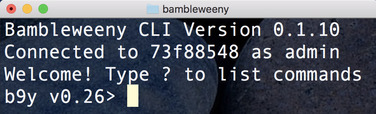
Type help to see the available commands. You can e.g. use get and set commands:
set foo bar
OK
get foo
bar
route foo text/html
/routes/485ecd97-3056-42e8-bdb2-79ced30e6853
PyPi
1 maintainer

Metadata
1 maintainer
Release files for b9y-cli 0.1.34
For a detailed explanation of source distributions (sdists) and built distributions (wheels), please see the package formats documentation.
Source distribution (sdist)
| File | Size | Uploaded | Provenance | |
|---|---|---|---|---|
| b9y_cli-0.1.34.tar.gz | 4.0 kB | Without provenance | Details |
Built distribution (wheel)
| File | Interpreter | ABI | Platform | Reset |
|---|---|---|---|---|
| b9y_cli-0.1.34-py2-none-any.whl | Python 2 | none | any | Details |
Total release size: 9.2 kB
Release files / b9y_cli-0.1.34.tar.gz
| Download URL | b9y_cli-0.1.34.tar.gz |
|---|---|
| Size | 4.0 kB |
| Tags | Source |
|
SHA-256 checksum How to use checksums |
d35b180baa05266bdc6a71bb242501cdfc5457ac430ce8183566f7d79d5be12e
|
|
BLAKE2b-256 checksum How to use checksums |
012bba1a3a0b40d88a3e7eb6d4212504ea7cc21f0c53b9adb25d6d2d4e7e151d
|
| Upload date | |
|
Uploaded using Trusted Publishing? What is trusted publishing? |
No |
| Uploaded via |
twine/1.12.1 pkginfo/1.4.2 requests/2.20.0 setuptools/40.4.3 requests-toolbelt/0.8.0 tqdm/4.28.1 CPython/2.7.10
|
Release files / b9y_cli-0.1.34-py2-none-any.whl
| Download URL | b9y_cli-0.1.34-py2-none-any.whl |
|---|---|
| Size | 5.2 kB |
| Tags | Python 2 |
|
SHA-256 checksum How to use checksums |
9f25bc2165d4281f35d7d74af1e2955f00192ef53e74fde24f4d697782e17069
|
|
BLAKE2b-256 checksum How to use checksums |
5936ba88a8344fa1e1030e9bddcd81bfce009ec3de2a025bbe9f935d9db27ede
|
| Upload date | |
|
Uploaded using Trusted Publishing? What is trusted publishing? |
No |
| Uploaded via |
twine/1.12.1 pkginfo/1.4.2 requests/2.20.0 setuptools/40.4.3 requests-toolbelt/0.8.0 tqdm/4.28.1 CPython/2.7.10
|
Security for b9y-cli 0.1.34
Provenance
Provenance describes where a file came from. On PyPI, provenance is shared via attestations, which provide a verifiable record of the build or publishing details. View details, limitations and caveats.
No provenance found
None of the files in this release were uploaded with provenance metadata.
A note on package security
PyPI is a repository for distributing packages, not a service for auditing them. While third-party security researchers and our staff do their best to detect and remove malicious packages, PyPI cannot guarantee the quality, security or suitability of any given package.














