






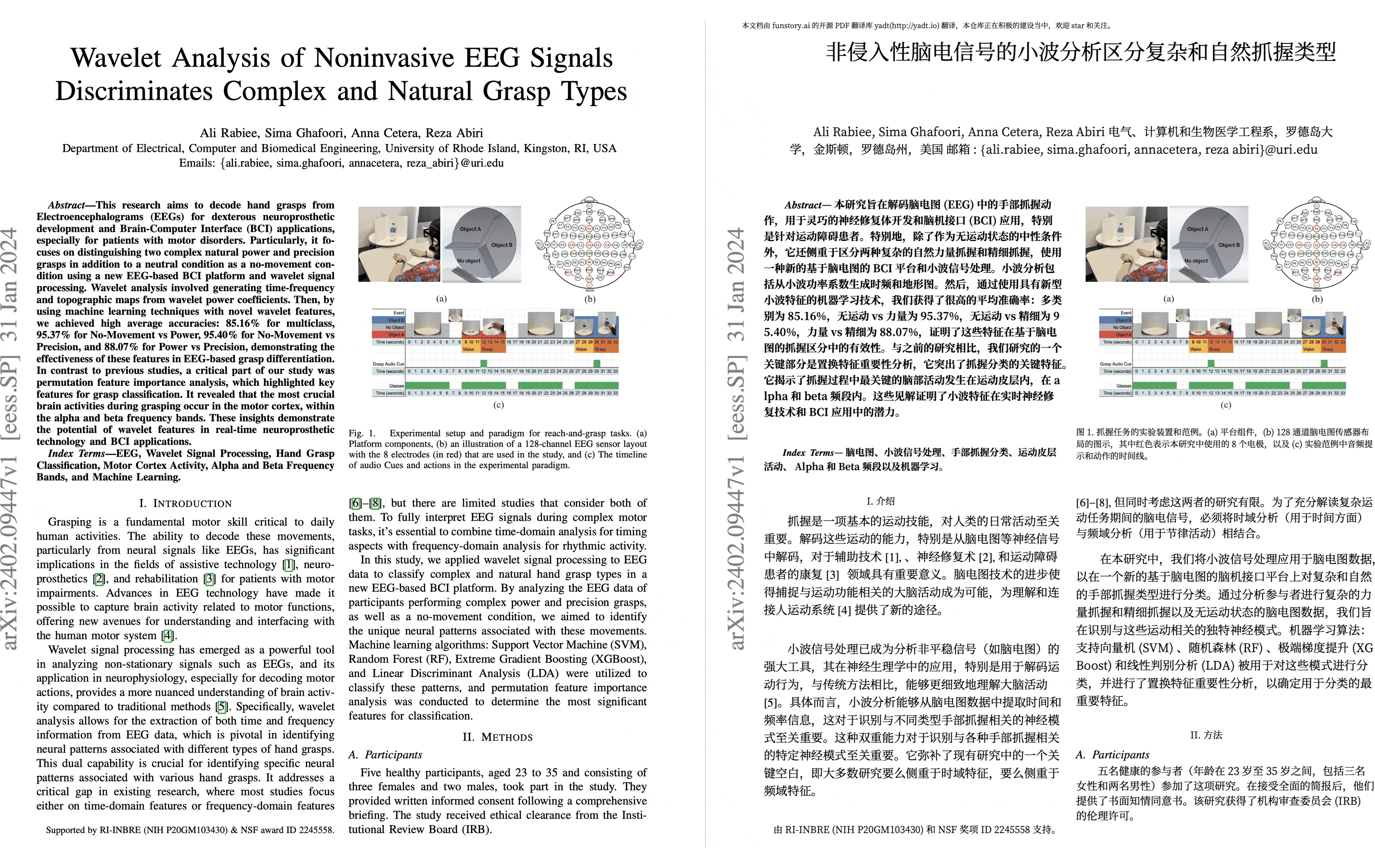
PDF scientific paper translation and bilingual comparison library.
- Online Service: Beta version launched Immersive Translate - BabelDOC Free usage quota is available; please refer to the FAQ section on the page for details.
- Self-deployment: PDFMathTranslate-next support for BabelDOC, available for self-deployment + WebUI with more translation services.
- Provides a simple command line interface.
- Provides a Python API.
- Mainly designed to be embedded into other programs, but can also be used directly for simple translation tasks.
Preview
We are hiring
Getting Started
Install from PyPI
We recommend using the Tool feature of uv to install BabelDOC.
-
First, you need to refer to uv installation to install uv and set up the
PATHenvironment variable as prompted. -
Use the following command to install BabelDOC:
uv tool install --python 3.12 babeldoc-stream

babeldoc-stream --help
- Use the
babeldoc-streamcommand. For example:
babeldoc-stream --openai --openai-model "gpt-4o-mini" --openai-base-url "https://api.openai.com/v1" --openai-api-key "your-api-key-here"  --files example.pdf

# multiple files
babeldoc-stream --openai --openai-model "gpt-4o-mini" --openai-base-url "https://api.openai.com/v1" --openai-api-key "your-api-key-here"  --files example1.pdf --files example2.pdf
Install from Source
We still recommend using uv to manage virtual environments.
-
First, you need to refer to uv installation to install uv and set up the
PATHenvironment variable as prompted. -
Use the following command to install BabelDOC:
# clone the project
git clone https://github.com/eeee0717/BabelDOC

# enter the project directory
cd BabelDOC

# install dependencies and run babeldoc-stream
uv run babeldoc-stream --help
- Use the
uv run babeldoc-streamcommand. For example:
uv run babeldoc-stream --files example.pdf --openai --openai-model "gpt-4o-mini" --openai-base-url "https://api.openai.com/v1" --openai-api-key "your-api-key-here"

# multiple files
uv run babeldoc-stream --files example.pdf --files example2.pdf --openai --openai-model "gpt-4o-mini" --openai-base-url "https://api.openai.com/v1" --openai-api-key "your-api-key-here"
Advanced Options
Language Options
--lang-in,-li: Source language code (default: en)--lang-out,-lo: Target language code (default: zh)
PDF Processing Options
-
--files: One or more file paths to input PDF documents. -
--pages,-p: Specify pages to translate (e.g., "1,2,1-,-3,3-5"). If not set, translate all pages -
--split-short-lines: Force split short lines into different paragraphs (may cause poor typesetting & bugs) -
--short-line-split-factor: Split threshold factor (default: 0.8). The actual threshold is the median length of all lines on the current page * this factor -
--skip-clean: Skip PDF cleaning step -
--dual-translate-first: Put translated pages first in dual PDF mode (default: original pages first) -
--disable-rich-text-translate: Disable rich text translation (may help improve compatibility with some PDFs) -
--enhance-compatibility: Enable all compatibility enhancement options (equivalent to --skip-clean --dual-translate-first --disable-rich-text-translate) -
--use-alternating-pages-dual: Use alternating pages mode for dual PDF. When enabled, original and translated pages are arranged in alternate order. When disabled (default), original and translated pages are shown side by side on the same page. -
--watermark-output-mode: Control watermark output mode: 'watermarked' (default) adds watermark to translated PDF, 'no_watermark' doesn't add watermark, 'both' outputs both versions. -
--max-pages-per-part: Maximum number of pages per part for split translation. If not set, no splitting will be performed. -
--no-watermark: [DEPRECATED] Use --watermark-output-mode=no_watermark instead. -
--translate-table-text: Translate table text (experimental, default: False) -
--formular-font-pattern: Font pattern to identify formula text (default: None) -
--formular-char-pattern: Character pattern to identify formula text (default: None) -
--show-char-box: Show character bounding boxes (debug only, default: False) -
--skip-scanned-detection: Skip scanned document detection (default: False). When using split translation, only the first part performs detection if not skipped. -
--ocr-workaround: Use OCR workaround (default: False). Only suitable for documents with black text on white background. When enabled, white rectangular blocks will be added below the translation to cover the original text content, and all text will be forced to black color. -
--auto-enable-ocr-workaround: Enable automatic OCR workaround (default: False). If a document is detected as heavily scanned, this will attempt to enable OCR processing and skip further scan detection. See "Important Interaction Note" below for crucial details on how this interacts with--ocr-workaroundand--skip-scanned-detection. -
--primary-font-family: Override primary font family for translated text. Choices: 'serif' for serif fonts, 'sans-serif' for sans-serif fonts, 'script' for script/italic fonts. If not specified, uses automatic font selection based on original text properties. -
--only-include-translated-page: Only include translated pages in the output PDF. This option is only effective when--pagesis used. (default: False) -
--merge-alternating-line-numbers: Enable post-processing to merge alternating line-number layouts (keep the number paragraph as an independent paragraph b; merge adjacent text paragraphs a and c across it whenlayout_idandxobj_idmatch, digits are ASCII and spaces only). Default: off. -
--skip-form-render: Skip form rendering (default: False). When enabled, PDF forms will not be rendered in the output. -
--skip-curve-render: Skip curve rendering (default: False). When enabled, PDF curves will not be rendered in the output. -
--only-parse-generate-pdf: Only parse PDF and generate output PDF without translation (default: False). This skips all translation-related processing including layout analysis, paragraph finding, style processing, and translation itself. Useful for testing PDF parsing and reconstruction functionality. -
--remove-non-formula-lines: Remove non-formula lines from paragraph areas (default: False). This removes decorative lines that are not part of formulas, while protecting lines in figure/table areas. Useful for cleaning up documents with decorative elements that interfere with text flow. -
--non-formula-line-iou-threshold: IoU threshold for detecting paragraph overlap when removing non-formula lines (default: 0.9). Higher values are more conservative and will remove fewer lines. -
--figure-table-protection-threshold: IoU threshold for protecting lines in figure/table areas when removing non-formula lines (default: 0.9). Higher values provide more protection for structural elements in figures and tables. -
--rpc-doclayout: RPC service host address for document layout analysis (default: None) -
--working-dir: Working directory for translation. If not set, use temp directory. -
--no-auto-extract-glossary: Disable automatic term extraction. If this flag is present, the step is skipped. Defaults to enabled. -
--save-auto-extracted-glossary: Save automatically extracted glossary to the specified file. If not set, the glossary will not be saved.
Translation Service Options
--qps: QPS (Queries Per Second) limit for translation service (default: 4)--ignore-cache: Ignore translation cache and force retranslation--no-dual: Do not output bilingual PDF files--no-mono: Do not output monolingual PDF files--min-text-length: Minimum text length to translate (default: 5)--openai: Use OpenAI for translation (default: False)--custom-system-prompt: Custom system prompt for translation.--add-formula-placehold-hint: Add formula placeholder hint for translation. (Currently not recommended, it may affect translation quality, default: False)--disable-same-text-fallback: Disable fallback translation when LLM output matches input text. (default: False)--pool-max-workers: Maximum number of worker threads for internal task processing pools. If not specified, defaults to QPS value. This parameter directly sets the worker count, replacing previous QPS-based dynamic calculations.--no-auto-extract-glossary: Disable automatic term extraction. If this flag is present, the step is skipped. Defaults to enabled.
OpenAI Specific Options
--openai-model: OpenAI model to use (default: gpt-4o-mini)--openai-base-url: Base URL for OpenAI API--openai-api-key: API key for OpenAI service--enable-json-mode-if-requested: Enable JSON mode for OpenAI requests (default: False)--term-pool-max-workers: Maximum number of worker threads dedicated to automatic term extraction. If not specified, this defaults to the value of--pool-max-workers, which itself defaults to the QPS value when unset.
Glossary Options
--glossary-files: Comma-separated paths to glossary CSV files.- Each CSV file should have the columns:
source,target, and an optionaltgt_lng. - The
sourcecolumn contains the term in the original language. - The
targetcolumn contains the term in the target language. - The
tgt_lngcolumn (optional) specifies the target language for that specific entry (e.g., "zh-CN", "en-US").- If
tgt_lngis provided for an entry, that entry will only be loaded and used if its (normalized)tgt_lngmatches the (normalized) overall target language specified by--lang-out. Normalization involves lowercasing and replacing hyphens (-) with underscores (_). - If
tgt_lngis omitted for an entry, that entry is considered applicable for any--lang-out.
- If
- The name of each glossary (used in LLM prompts) is derived from its filename (without the .csv extension).
- During translation, the system will check the input text against the loaded glossaries. If terms from a glossary are found in the current text segment, that glossary (with the relevant terms) will be included in the prompt to the language model, along with an instruction to adhere to it.
- Each CSV file should have the columns:
Output Control
--output,-o: Output directory for translated files. If not set, use current working directory.--debug: Enable debug logging level and export detailed intermediate results in~/.cache/babeldoc/working.--report-interval: Progress report interval in seconds (default: 0.1).--progress-json: Emit a stable JSON Lines protocol on stdout. This mode requires exactly one--filesargument; logs and tracebacks are written to stderr.--progress-json-version: Select protocol version1or2(default:1). Hosts must opt in to v2 explicitly so existing v1 integrations remain compatible.
JSON Lines progress protocol
Host applications should launch babeldoc-stream as a subprocess and read one
JSON object per stdout line. The protocol emits normalized progress, one terminal
error, or one terminal finish event:
{"schema":"babeldoc-stream/v1","type":"progress","stage":"Translate Paragraphs","progress":55.4}
{"schema":"babeldoc-stream/v1","type":"error","name":"ScannedPDFError","message":"Scanned PDF detected."}
{"schema":"babeldoc-stream/v1","type":"finish","result":{"original_pdf_path":"/path/input.pdf","mono_pdf_path":"/path/output.pdf","dual_pdf_path":null,"total_seconds":123.4}}
Progress values are finite numbers clamped to 0..100. A terminal error exits
non-zero; a successful run emits finish before exiting zero. SIGINT and SIGTERM
first request graceful cancellation through BabelDOC's translation configuration.
Version 2 covers initialization and asset transfers as well as translation:
{"schema":"babeldoc-stream/v2","type":"progress","stage":"downloading_assets","stage_progress":42.3,"overall_progress":2.1}
stage is one of checking_assets, downloading_assets, loading_model,
parsing, analyzing, extracting_terms, translating, typesetting, or
rendering. stage_progress is null when a stage cannot be measured without
fabricating progress. overall_progress is monotonic; initialization occupies
0..5 and translation occupies 5..100. Error and finish events retain their
v1 fields with the babeldoc-stream/v2 schema identifier.
General Options
--warmup: Only download and verify required assets then exit (default: False)
Offline Assets Management
--generate-offline-assets: Generate an offline assets package in the specified directory. This creates a zip file containing all required models and fonts.--restore-offline-assets: Restore an offline assets package from the specified file. This extracts models and fonts from a previously generated package.
Configuration File
--config,-c: Configuration file path. Use the TOML format.
Example Configuration:
[babeldoc]
# Basic settings
debug = true
lang-in = "en-US"
lang-out = "zh-CN"
qps = 10
output = "/path/to/output/dir"

# PDF processing options
split-short-lines = false
short-line-split-factor = 0.8
skip-clean = false
dual-translate-first = false
disable-rich-text-translate = false
use-alternating-pages-dual = false
watermark-output-mode = "watermarked"  # Choices: "watermarked", "no_watermark", "both"
max-pages-per-part = 50  # Automatically split the document for translation and merge it back.
only_include_translated_page = false # Only include translated pages in the output PDF. Effective only when `pages` is used.
# no-watermark = false  # DEPRECATED: Use watermark-output-mode instead
skip-scanned-detection = false  # Skip scanned document detection for faster processing
auto_extract_glossary = true # Set to false to disable automatic term extraction
formular_font_pattern = "" # Font pattern for formula text
formular_char_pattern = "" # Character pattern for formula text
show_char_box = false # Show character bounding boxes (debug)
ocr_workaround = false # Use OCR workaround for scanned PDFs
rpc_doclayout = "" # RPC service host for document layout analysis
working_dir = "" # Working directory for translation
auto_enable_ocr_workaround = false # Enable automatic OCR workaround for scanned PDFs. See docs for interaction with ocr_workaround and skip_scanned_detection.
skip_form_render = false # Skip form rendering (default: False)
skip_curve_render = false # Skip curve rendering (default: False)
only_parse_generate_pdf = false # Only parse PDF and generate output PDF without translation (default: False)
remove_non_formula_lines = false # Remove non-formula lines from paragraph areas (default: False)
non_formula_line_iou_threshold = 0.2 # IoU threshold for paragraph overlap detection (default: 0.2)
figure_table_protection_threshold = 0.3 # IoU threshold for figure/table protection (default: 0.3)

# Translation service
openai = true
openai-model = "gpt-4o-mini"
openai-base-url = "https://api.openai.com/v1"
openai-api-key = "your-api-key-here"
enable-json-mode-if-requested = false  # Enable JSON mode when requested (default: false)
disable_same_text_fallback = false # Disable fallback translation when LLM output matches input text (default: false)
pool-max-workers = 8  # Maximum worker threads for task processing (defaults to QPS value if not set)

# Glossary Options (Optional)
# glossary-files = "/path/to/glossary1.csv,/path/to/glossary2.csv"

# Output control
no-dual = false
no-mono = false
min-text-length = 5
report-interval = 0.5

# Offline assets management
# Uncomment one of these options as needed:
# generate-offline-assets = "/path/to/output/dir"
# restore-offline-assets = "/path/to/offline_assets_package.zip"
Python API
The current recommended way to call BabelDOC in Python is to call the high_level.do_translate_async_stream function of pdf2zh next.
Background
There are a lot projects and teams working on to make document editing and translating easier like:
There are also some solutions to solve specific parts of the problem like:
- layoutreader: the read order of the text block in a pdf
- Surya: the structure of the pdf
This project hopes to promote a standard pipeline and interface to solve the problem.
In fact, there are two main stages of a PDF parser or translator:
- Parsing: A stage of parsing means to get the structure of the pdf such as text blocks, images, tables, etc.
- Rendering: A stage of rendering means to render the structure into a new pdf or other format.
For a service like mathpix, it will parse the pdf into a structure may be in a XML format, and then render them using a single column reader order as layoutreader does. The bad news is that the original structure lost.
Some people will use Adobe PDF Parser because it will generate a Word document and it keeps the original structure. But it is somewhat expensive. And you know, a pdf or word document is not a good format for reading in mobile devices.
We offer an intermediate representation of the results from parser and can be rendered into a new pdf or other format. The pipeline is also a plugin-based system which everybody can add their new model, ocr, renderer, etc.
Roadmap
- Add line support
- Add table support
- Add cross-page/cross-column paragraph support
- More advanced typesetting features
- Outline support
- ...
Our first 1.0 version goal is to finish a translation from PDF Reference, Version 1.7 to the following language version:
- Simplified Chinese
- Traditional Chinese
- Japanese
- Spanish
And meet the following requirements:
- layout error less than 1%
- content loss less than 1%
Version Number Explanation
This project uses a combination of Semantic Versioning and Pride Versioning. The version number format is: "0.MAJOR.MINOR".
-
MAJOR: Incremented by 1 when API incompatible changes are made or when proud improvements are implemented.
-
MINOR: Incremented by 1 when any API compatible changes are made.
Known Issues
- Parsing errors in the author and reference sections; they get merged into one paragraph after translation.
- Lines are not supported.
- Does not support drop caps.
- Large pages will be skipped.
How to Contribute
BabelDOC is currently developed in a maintainer-led mode. Bug reports, reproducible PDFs, documentation fixes, and small compatibility fixes are welcome. For changes to parsing, rendering, translation, or service integration behavior, please open an issue for discussion before submitting a pull request.
Everyone interacting in BabelDOC and its sub-projects' codebases, issue trackers, chat rooms, and mailing lists is expected to follow the BabelDOC Code of Conduct.
Immersive Translation sponsors monthly Pro membership redemption codes for active contributors to this project, see details at: CONTRIBUTOR_REWARD.md
Acknowledgements
BabelDOC is still at an early stage of development, and many parts are not as polished as we would like yet. We sincerely appreciate every bug report, criticism, suggestion, reproducible PDF, downstream integration experience, and contribution from people working on BabelDOC and related upstream/downstream projects. We will keep iterating on BabelDOC, fixing bugs, and making it better step by step.
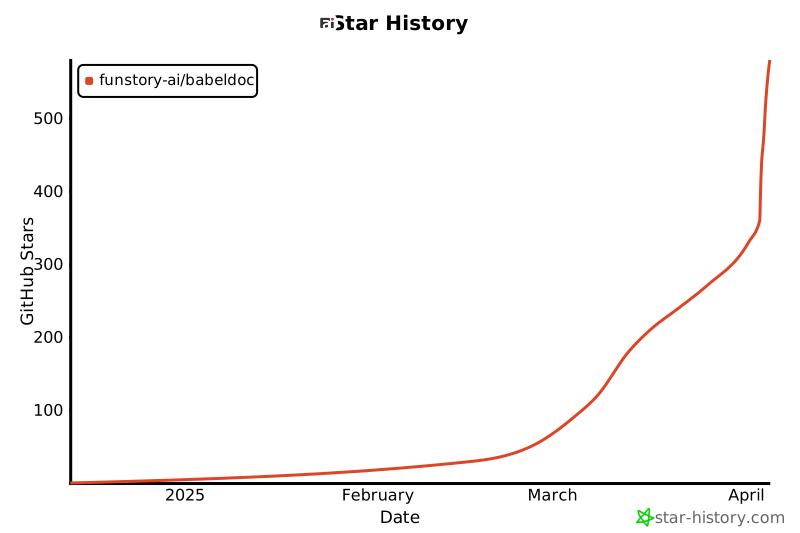
Star History
1 maintainer

Metadata
1 maintainer
Release files for babeldoc-stream 0.6.4.post2
For a detailed explanation of source distributions (sdists) and built distributions (wheels), please see the package formats documentation.
Source distribution (sdist)
| File | Size | Uploaded | |
|---|---|---|---|
| babeldoc_stream-0.6.4.post2.tar.gz | 16.4 MB | Details |
Built distribution (wheel)
| File | Interpreter | ABI | Platform | Reset |
|---|---|---|---|---|
| babeldoc_stream-0.6.4.post2-py3-none-any.whl | Python 3 | none | any | Details |
Total release size: 22.5 MB
Release files / babeldoc_stream-0.6.4.post2.tar.gz
| Download URL | babeldoc_stream-0.6.4.post2.tar.gz |
|---|---|
| Size | 16.4 MB |
| Tags | Source |
|
SHA-256 checksum How to use checksums |
7fdb064f290b2cb2a249a4d17bd03b5962eade99eb9a338d7b8486751a832da2
|
|
BLAKE2b-256 checksum How to use checksums |
c0309c03ce82c5524464669a5929f8815bc568e97d10cde2ff73fe69e94ef423
|
| Upload date | |
|
Uploaded using Trusted Publishing? What is trusted publishing? |
Yes |
| Uploaded via |
uv/0.12.3 {"installer":{"name":"uv","version":"0.12.3","subcommand":["publish"]},"python":null,"implementation":{"name":null,"version":null},"distro":{"name":"Ubuntu","version":"24.04","id":"noble","libc":null},"system":{"name":null,"release":null},"cpu":null,"openssl_version":null,"setuptools_version":null,"rustc_version":null,"ci":true}
|
Release files / babeldoc_stream-0.6.4.post2-py3-none-any.whl
| Download URL | babeldoc_stream-0.6.4.post2-py3-none-any.whl |
|---|---|
| Size | 6.1 MB |
| Tags | Python 3 |
|
SHA-256 checksum How to use checksums |
bd554460dfe9cd5b39ed142414b4e5f310e0740871082f4ec3492fd96592d5bc
|
|
BLAKE2b-256 checksum How to use checksums |
c2aea1e48c417b13028951a587a0a3fc6a9096dce9d64445e6bade3bb29f661a
|
| Upload date | |
|
Uploaded using Trusted Publishing? What is trusted publishing? |
Yes |
| Uploaded via |
uv/0.12.3 {"installer":{"name":"uv","version":"0.12.3","subcommand":["publish"]},"python":null,"implementation":{"name":null,"version":null},"distro":{"name":"Ubuntu","version":"24.04","id":"noble","libc":null},"system":{"name":null,"release":null},"cpu":null,"openssl_version":null,"setuptools_version":null,"rustc_version":null,"ci":true}
|














