
Backlog Atlas





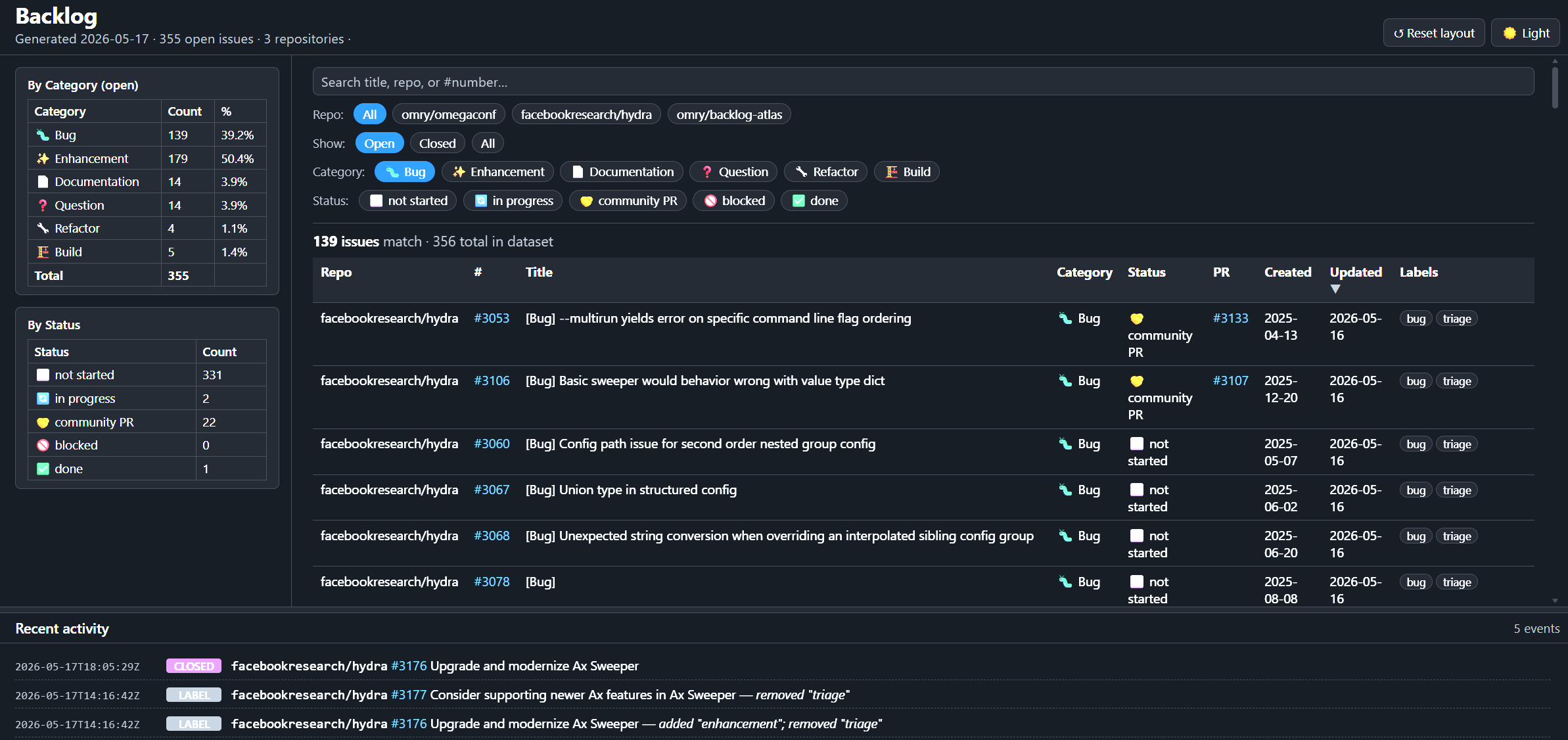
Backlog Atlas generates a self-hosted backlog snapshot and static dashboard for GitHub repository maintainers.
It keeps GitHub Issues as the source of truth, derives backlog state from open
issues and linked pull requests, and publishes the result to a dedicated
backlog-atlas branch. The generated branch is machine-owned and can be served
directly with GitHub Pages.
Documentation
- User Guide — install Backlog Atlas on a repository, enable the web UI, run updates, and uninstall.
- Maintainer Guide — local development, testing, packaging, and release prep for this package.
- Design Note — how snapshots, diffs, and the update log fit together.
- Changelog — user-facing release notes.
What It Produces
The backlog-atlas branch contains:
backlog.json— structured backlog data plus the recent activity tail used by the web UI.updates.jsonl— append-only structured activity history.last_snapshot.json— internal diff state for the next run.index.html— the static dashboard.favicon.svg— the dashboard icon.badge.svg— a README badge image that can link to the hosted dashboard.
The dashboard can also load a generated atlas.json manifest next to
index.html and federate multiple public backlog.json files in the browser.
Author the multi-repo source as YAML, then compile it to the browser manifest.
The default branch only needs the installed workflow, manifest, and config:
.github/workflows/update-backlog-atlas.yml.github/backlog-atlas/manifest.json.github/backlog-atlas/config.yaml— editable repository configuration
Quick Start
pip install backlog-atlas
cd /path/to/target-repo
backlog-atlas install --dry-run
backlog-atlas install
The dry run previews the files and install source before anything is written.
Install is safe to rerun: it first removes old Backlog Atlas hooks/manifests and
preserves config and generated dashboard history. When the previous install
manifest lists bundled wheels, it writes a temporary cleanup workflow that
removes those old wheels only after the new install lands.
The manifest is the cleanup source of truth: it records installed files and
which ones are removed only by clean uninstall. Review and push the install
commit that Backlog Atlas creates, then enable GitHub Pages from the
backlog-atlas branch. See the
User Guide for
the full local and remote install flows.
After the dashboard is hosted, add a Backlog Atlas badge to the repository
README by wrapping the generated badge image in a link to the dashboard.
Assuming the generated badge.svg is hosted alongside the dashboard, replace
DASHBOARD_URL with the dashboard URL:
[](DASHBOARD_URL)
For a conventional GitHub Pages dashboard, that is usually:
[](https://OWNER.github.io/REPO/)
CLI
# install the workflow and manifest in a repository
backlog-atlas install [flags]

# remove installed hooks/manifests; --clean also removes config and branch
backlog-atlas uninstall [flags]

# write the static web UI files for preview or packaging
backlog-atlas dump-web --output PATH

# compile YAML multi-repo config into atlas.json for the browser UI
backlog-atlas dump-atlas --config atlas.yaml --output PATH

# manage repos tracked by .github/backlog-atlas/atlas.yaml
backlog-atlas atlas list
backlog-atlas atlas add owner/name [--backlog-url URL]
backlog-atlas atlas remove owner/name
backlog-atlas atlas install --delivery pr|push
backlog-atlas atlas install --local --checkout-root PATH

# refresh backlog data; normally run by the installed GitHub Action
backlog-atlas update [flags]

# explain how one issue is classified by the active config
backlog-atlas classify ISSUE_NUMBER [--repo URL]
Development Checks
Maintainers can install local check tools with:
python -m pip install -e ".[dev]"
python -m black --check backlog_atlas tests tools
python -m pyflakes backlog_atlas tests tools
python -m mypy
python -m pytest
See the Maintainer Guide for the full development workflow.
License
MIT.
1 maintainer

Metadata
1 maintainer
Release files for backlog-atlas 0.19
For a detailed explanation of source distributions (sdists) and built distributions (wheels), please see the package formats documentation.
Source distribution (sdist)
| File | Size | Uploaded | |
|---|---|---|---|
| backlog_atlas-0.19.tar.gz | 71.9 kB | Details |
Built distribution (wheel)
| File | Interpreter | ABI | Platform | Reset |
|---|---|---|---|---|
| backlog_atlas-0.19-py3-none-any.whl | Python 3 | none | any | Details |
Total release size: 130.0 kB
Release files / backlog_atlas-0.19.tar.gz
| Download URL | backlog_atlas-0.19.tar.gz |
|---|---|
| Size | 71.9 kB |
| Tags | Source |
|
SHA-256 checksum How to use checksums |
6ddac7cde0a8ec0edc045e6d86fcf4a8ec01ad8f7a1cf852723671e995823b10
|
|
BLAKE2b-256 checksum How to use checksums |
87fc5f95b215fce0c9535314d75361830a0ab45cd551d8bf5227ef61797ed7bd
|
| Upload date | |
|
Uploaded using Trusted Publishing? What is trusted publishing? |
Yes |
| Uploaded via |
twine/7.0.0 CPython/3.13.14
|
Provenance
Provenance describes where a file came from. On PyPI, provenance is shared via attestations, which provide a verifiable record of the build or publishing details. View details, limitations and caveats.


PyPI Publish Attestation
PyPI verified that this artifact, at this checksum, originated from the publisher listed below.
Signed by GitHub Actions, verified by PyPI on Aug 13, 2026.
Transparency logRelease files / backlog_atlas-0.19-py3-none-any.whl
| Download URL | backlog_atlas-0.19-py3-none-any.whl |
|---|---|
| Size | 58.0 kB |
| Tags | Python 3 |
|
SHA-256 checksum How to use checksums |
60862108cc0305b16a87a0fcd7027ca3bf0870bcd35849ed4597da95e7957827
|
|
BLAKE2b-256 checksum How to use checksums |
933a4aa3608fffd5f731acd62a64931a2cf4b193aaa5736b74df992d49c53821
|
| Upload date | |
|
Uploaded using Trusted Publishing? What is trusted publishing? |
Yes |
| Uploaded via |
twine/7.0.0 CPython/3.13.14
|
Provenance
Provenance describes where a file came from. On PyPI, provenance is shared via attestations, which provide a verifiable record of the build or publishing details. View details, limitations and caveats.
PyPI Publish Attestation
PyPI verified that this artifact, at this checksum, originated from the publisher listed below.
Signed by GitHub Actions, verified by PyPI on Aug 13, 2026.
Transparency log













