
Simulates backoff strategies for contending writes over the network.

Project description
Backoff Simulator
Context
Many clients concurrently send requests over the network to a server. The server accepts or rejects requests, according to its concurrency control. Each client backs off and retries until its request is accepted.
You want to keep low:
- the time until all requests are accepted (duration)
- the total number of requests (work)
You can keep the duration low by making clients retry rapidly. But then the server often rejects requests, so the work is high.
You can keep the work low by making clients retry sporadically. But then the server is often idle, so the duration is high.
Tradeoff!
The cost is an overall performance measure, got via an exchange rate: work_to_duration * work + duration.
Which backoff strategy minimizes the cost?
There's a well-known aws blog post and simulation about this, focusing on optimistic concurrency control. This app is based on those. But I re-implemented the simulation and added more controls.
The blog post concludes:
The return on implementation complexity of using jittered backoff is huge, and it should be considered a standard approach for remote clients.
The post has been influential. For example, the widely-used Python package backoff defaults to full jitter, citing the post. But is it really the best strategy for your use case?
Let's explore.
How to use
Write a simulations.toml describing the simulations you want to run, e.g.
  [[simulation]]
  title = "Locking_Example"  # anything you like, but must be unique across [[simulation]] blocks
  max_clients = 100  # simulate various numbers of clients, up to this maximum
  repeat = 20  # simulate each (num_clients, strategy) combination this many times, to average out noise
  network_mu = 10.0  # network latency is modeled as max(0, N(mu, sigma))
  network_sigma = 2.0
  work_to_duration = 1.0
  control = "LockingServer"
  write_mu = 2.0  # write duration is modeled as max(0, N(mu, sigma))
  write_sigma = 1.0
  strategies = [  # one or more
    { type = "Constant", constant = 0.5 },
    { type = "FullJitteredExpo", base = 2.0, cap = 1000.0 },
    { type = "EqualJitteredExpo", base = 2.0, cap = 1000.0 },
  ]

  [[simulation]]
  title = "Read_Write_OCC_Example"
  max_clients = 100
  repeat = 30
  network_mu = 5.0
  network_sigma = 1.0
  write_mu = 0.0  # if write duration is negligible
  write_sigma = 0.0
  work_to_duration = 1.0
  control = "ReadWriteOCCServer"
  strategies = [
    { type = "Constant", constant = 0.0 },
    { type = "FullJitteredExpo", base = 5.0, cap = 2000.0 },
  ]
Then run:
backoff-simulator
You can name your config file something else and pass it via --config-file path/to/file.
For each [[simulation]] block, the app writes <title>_metrics.png, e.g.
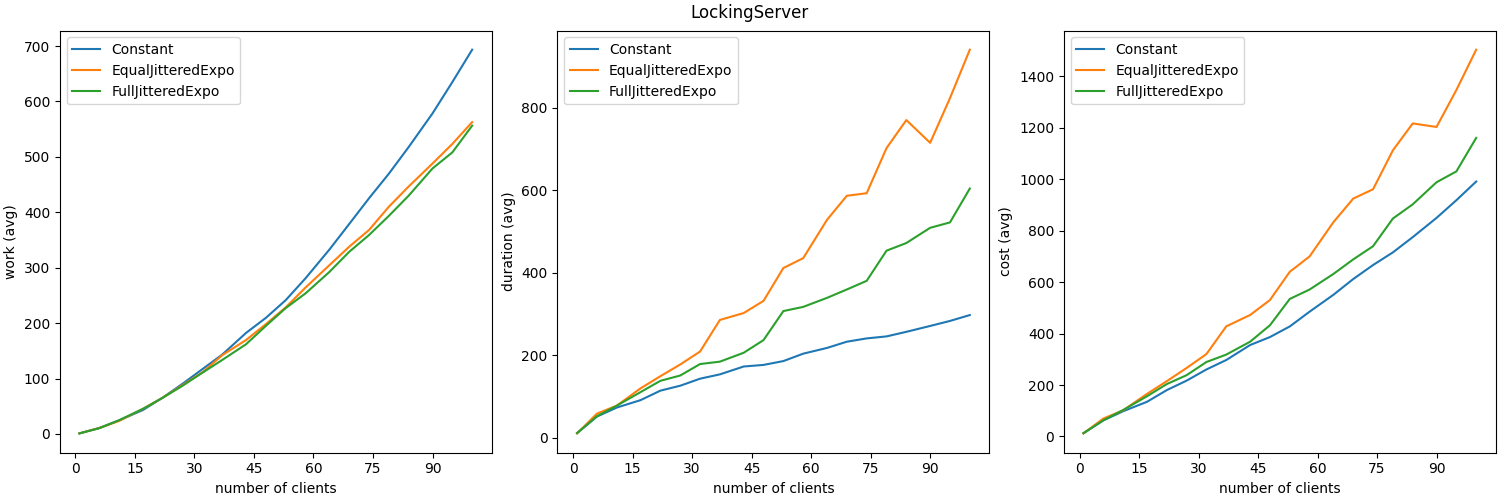
showing work, duration and cost against number of clients, averaging across repetitions.
It also writes <title>_scatter.png, e.g.
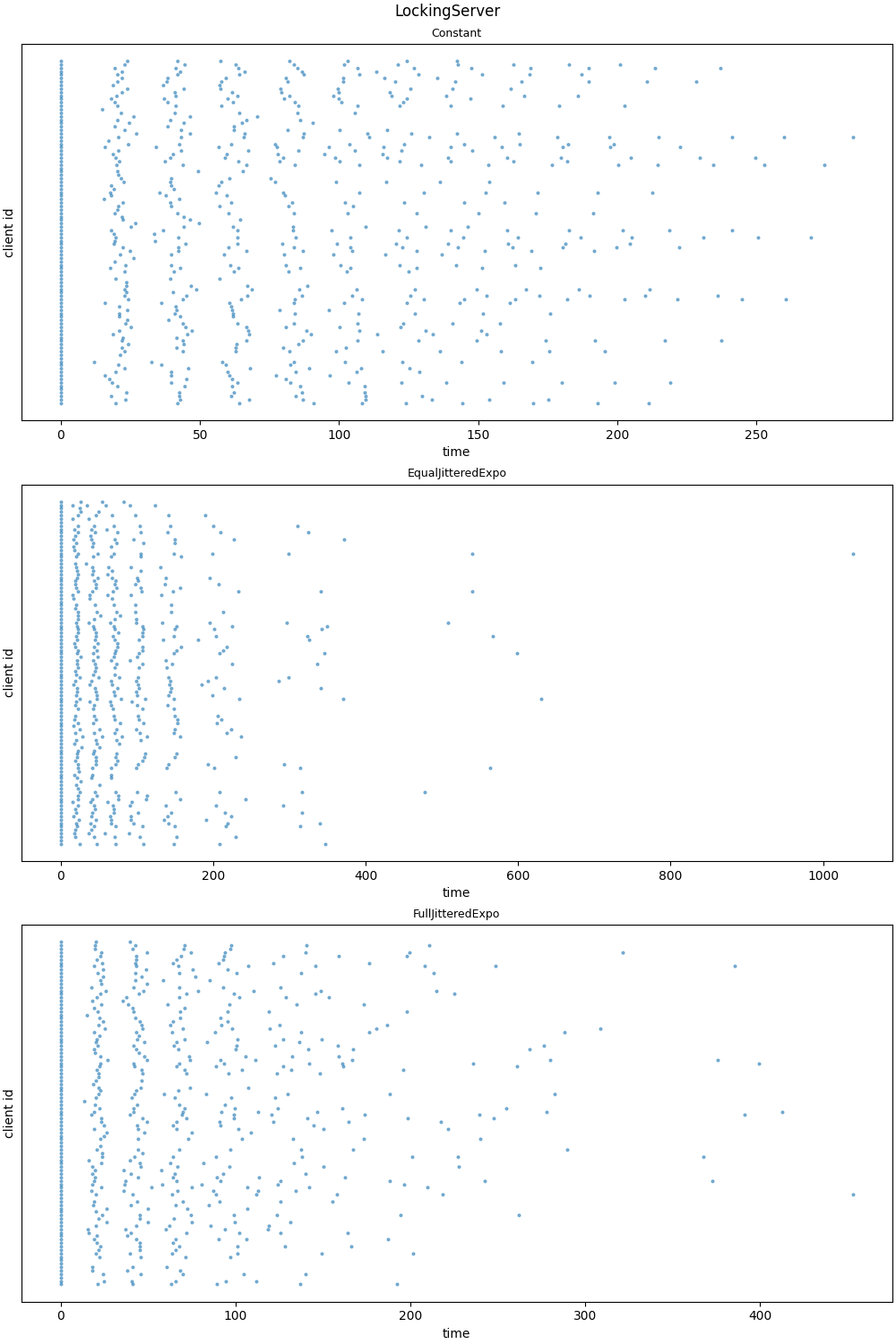
showing the distribution of client requests over time, for some repetition at max_clients.
And it writes representative event histories to stdout, e.g.
ReadWriteOCCServer + FullJitteredExpo

  time    client_id  event_type                 event_detail
------  -----------  -------------------------  --------------
  0               0  client_requests_version
  0               2  client_requests_version
  0               3  client_requests_version
  0               1  client_requests_version
  8.86            1  server_reports_version     version=0
  8.98            3  server_reports_version     version=0
 10.56            2  server_reports_version     version=0
 11.75            0  server_reports_version     version=0
 20.18            2  client_requests_write
 20.66            3  client_requests_write
 21.4             0  client_requests_write
 23.65            1  client_requests_write
 30.2             2  server_tentatively_writes
 31.68            0  server_tentatively_writes
 32.64            2  server_commits             version=1
 33.57            1  server_tentatively_writes
 34.56            3  server_tentatively_writes
 34.77            0  server_aborts
 36.53            1  server_aborts
 36.88            3  server_aborts
 43.65            1  client_backs_off
 44.07            1  client_requests_version
 44.74            0  client_backs_off
 45.34            0  client_requests_version
 46.26            3  client_backs_off
 47.69            3  client_requests_version
 54.71            1  server_reports_version     version=1
 54.99            0  server_reports_version     version=1
 58.69            3  server_reports_version     version=1
 61.39            1  client_requests_write
 65.63            0  client_requests_write
 70.46            1  server_tentatively_writes
 71.22            3  client_requests_write
 72.87            1  server_commits             version=2
 78.01            3  server_tentatively_writes
 78.26            0  server_tentatively_writes
 78.42            0  server_aborts
 81.39            3  server_aborts
 90.07            0  client_backs_off
 91.64            3  client_backs_off
 92.93            3  client_requests_version
 94.07            0  client_requests_version
103.78            3  server_reports_version     version=2
104.66            0  server_reports_version     version=2
116.85            0  client_requests_write
117.2             3  client_requests_write
125.87            0  server_tentatively_writes
127.3             0  server_commits             version=3
129.57            3  server_tentatively_writes
130.6             3  server_aborts
137.96            3  client_backs_off
144.12            3  client_requests_version
156.04            3  server_reports_version     version=3
166.02            3  client_requests_write
176.92            3  server_tentatively_writes
177.92            3  server_commits             version=4
Concurrency controls
The app can simulate various concurrency controls.
The following controls are designed to manage contending writes.
LockingServer
- Parameters:
write_duration,write_sigma. - When it receives a request:
- if available, it accepts it and becomes unavailable while writing.
- if unavailable, it rejects it immediately.
WriteOnlyOCCServer
- Parameters:
write_duration,write_sigma. - The server stores a version number.
- When it receives a request, it notes the version number and tentatively writes.
- Then it checks the version again:
- if different, it aborts
- if the same, it commits and increments the version
- The writes are variable-duration. (Else a write would succeed just if no write was in progress when it arrived. So we'd end up with a locking server except it knowably does doomed-to-abort work.)
ReadWriteOCCServer
- Parameters:
write_duration,write_sigma. - The server stores a version number.
- A client first reads the version, then requests a write, passing the version.
- The server tentatively writes.
- Then it checks the version again:
- if different, it aborts
- if the same, it commits and increments the version
The following control is designed to manage overload.
ThrottlingServer
- Parameters:
window,limit. - The server accepts up to a limited number of requests in a sliding window.
- Any further requests are rejected immediately.
Backoff strategies
The app can simulate various backoff strategies.
Constant
- e.g. for
constant = 3, the client backs off for 3, 3, 3, ... - this relies entirely on network and write variance to spread out requests
Expo
min(cap, base x 2^n)- e.g. for
cap = 10, b = 2the client backs off for 2, 4, 8, 10, 10, ...
FullJitteredExpo
U(0, min(cap, base x 2^n))- i.e. a value picked uniformly at random between 0 and the capped exponential backoff
EqualJitteredExpo
min(cap, base x 2^n)) / 2 + U(0, min(cap, base x 2^n) / 2)- i.e. half the capped exponential backoff, plus a value picked uniformly at random between 0 and half the capped exponential backoff


Download files
Download the file for your platform. If you're not sure which to choose, learn more about installing packages.
Source Distribution
Built Distribution
Filter files by name, interpreter, ABI, and platform.
If you're not sure about the file name format, learn more about wheel file names.
Copy a direct link to the current filters
File details
Details for the file backoff_simulator-0.2.1.tar.gz.
File metadata
- Download URL: backoff_simulator-0.2.1.tar.gz
- Upload date:
- Size: 10.3 kB
- Tags: Source
- Uploaded using Trusted Publishing? No
- Uploaded via: uv/0.10.2 {"installer":{"name":"uv","version":"0.10.2","subcommand":["publish"]},"python":null,"implementation":{"name":null,"version":null},"distro":{"name":"Ubuntu","version":"24.04","id":"noble","libc":null},"system":{"name":null,"release":null},"cpu":null,"openssl_version":null,"setuptools_version":null,"rustc_version":null,"ci":null}
File hashes
| Algorithm | Hash digest | |
|---|---|---|
| SHA256 |
d5d087827207011cb08467e68e5304b69af72036e40618ce344eeeecda9a3fe5
|
|
| MD5 |
a815631e1a5b5a5e1310786bcdb95cbf
|
|
| BLAKE2b-256 |
86c2bd11036901054953be2ea282a5dc9db3e2aa7340033dd68c7c2d07f3f761
|
File details
Details for the file backoff_simulator-0.2.1-py3-none-any.whl.
File metadata
- Download URL: backoff_simulator-0.2.1-py3-none-any.whl
- Upload date:
- Size: 12.6 kB
- Tags: Python 3
- Uploaded using Trusted Publishing? No
- Uploaded via: uv/0.10.2 {"installer":{"name":"uv","version":"0.10.2","subcommand":["publish"]},"python":null,"implementation":{"name":null,"version":null},"distro":{"name":"Ubuntu","version":"24.04","id":"noble","libc":null},"system":{"name":null,"release":null},"cpu":null,"openssl_version":null,"setuptools_version":null,"rustc_version":null,"ci":null}
File hashes
| Algorithm | Hash digest | |
|---|---|---|
| SHA256 |
42c3730cc919bd7e7d3a787927d981197288df581ccb5d03daee571aa3f33543
|
|
| MD5 |
b3c9f433a93687dd27172d6d0842152d
|
|
| BLAKE2b-256 |
7bb51aadba389d90289611e686dfad9c8367af44909266f5861e8d873775bb5a
|






