
Backup Docker volumes to local with rsync and optional DB dumps.

Project description
baudolo – Deterministic Backup & Restore for Docker Volumes 📦🔄







baudolo is a backup and restore system for Docker volumes with
mandatory file backups and explicit, deterministic database dumps.
It is designed for environments with many Docker services where:
- file-level backups must always exist
- database dumps must be intentional, predictable, and auditable
✨ Key Features
- 📦 Incremental Docker volume backups using
rsync --link-dest - 🗄 Optional SQL dumps for:
- PostgreSQL
- MariaDB / MySQL
- 🌱 Explicit database definition for SQL backups (no auto-discovery)
- 🧾 Backup integrity stamping via
dirval(Python API) - ⏸ Automatic container stop/start when required for consistency
- 🚫 Whitelisting of containers that do not require stopping
- ♻️ Modular, maintainable Python architecture
🧠 Core Concept (Important!)
baudolo separates file backups from database dumps.
- Docker volumes are always backed up at file level
- SQL dumps are created only for explicitly defined databases
This results in the following behavior:
| Database defined | File backup | SQL dump |
|---|---|---|
| No | ✔ yes | ✘ no |
| Yes | ✔ yes | ✔ yes |
📁 Backup Layout
Backups are stored in a deterministic, fully nested structure:
<backups-dir>/
└── <machine-hash>/
    └── <repo-name>/
        └── <timestamp>/
            └── <volume-name>/
                ├── files/
                └── sql/
                    └── <database>.backup.sql
Meaning of each level
-
<machine-hash>SHA256 hash of/etc/machine-id(host separation) -
<repo-name>Logical backup namespace (project / stack) -
<timestamp>Backup generation (YYYYMMDDHHMMSS) -
<volume-name>Docker volume name -
files/Incremental file backup (rsync) -
sql/Optional SQL dumps (only for defined databases)
🚀 Installation
Local (editable install)
python3 -m venv .venv
source .venv/bin/activate
pip install -e .
🌱 Database Definition (SQL Backup Scope)
How SQL backups are defined
baudolo creates SQL dumps only for databases that are explicitly defined
via configuration (e.g. a databases definition file or seeding step).
If a database is not defined:
- its Docker volume is still backed up (files)
- no SQL dump is created
No database definition → file backup only Database definition present → file backup + SQL dump
Why explicit definition?
baudolo does not inspect running containers to guess databases.
Databases must be explicitly defined to guarantee:
- deterministic backups
- predictable restore behavior
- reproducible environments
- zero accidental production data exposure
Required database metadata
Each database definition provides:
- database instance (container or logical instance)
- database name
- database user
- database password
This information is used by baudolo to execute
pg_dump, pg_dumpall, or mariadb-dump.
💾 Running a Backup
baudolo \
  --compose-dir /srv/docker \
  --databases-csv /etc/baudolo/databases.csv \
  --database-containers central-postgres central-mariadb \
  --images-no-stop-required alpine postgres mariadb mysql \
  --images-no-backup-required redis busybox
Common Backup Flags
| Flag | Description |
|---|---|
--everything |
Always stop containers and re-run rsync |
--dump-only-sql |
Skip file backups only for DB volumes when dumps succeed; non-DB volumes are still backed up; fallback to files if no dump. |
--shutdown |
Do not restart containers after backup |
--backups-dir |
Backup root directory (default: /Backups) |
--repo-name |
Backup namespace under machine hash |
♻️ Restore Operations
Restore Volume Files
baudolo-restore files \
  my-volume \
  <machine-hash> \
  <version> \
  --backups-dir /Backups \
  --repo-name my-repo
Restore into a different target volume:
baudolo-restore files \
  target-volume \
  <machine-hash> \
  <version> \
  --source-volume source-volume
Restore PostgreSQL
baudolo-restore postgres \
  my-volume \
  <machine-hash> \
  <version> \
  --container postgres \
  --db-name appdb \
  --db-password secret \
  --empty
Restore MariaDB / MySQL
baudolo-restore mariadb \
  my-volume \
  <machine-hash> \
  <version> \
  --container mariadb \
  --db-name shopdb \
  --db-password secret \
  --empty
baudoloautomatically detects whethermariadbormysqlis available inside the container
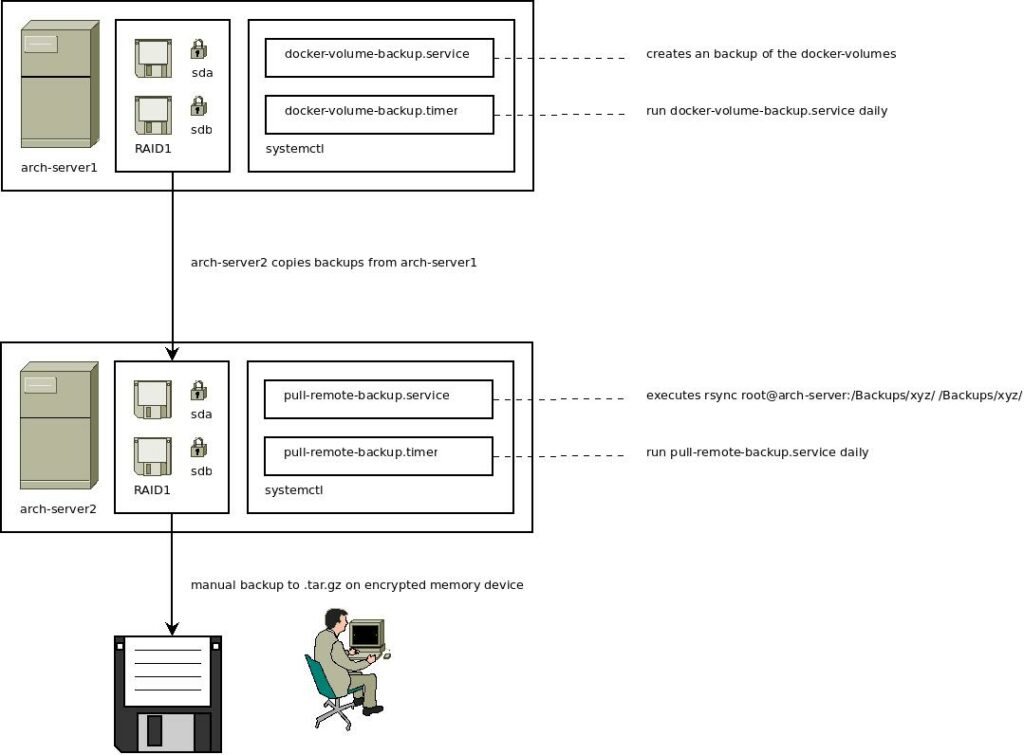
🔍 Backup Scheme
The backup mechanism uses incremental backups with rsync and stamps directories with a unique hash. For more details on the backup scheme, check out this blog post.
👨💻 Author
Kevin Veen-Birkenbach
📜 License
This project is licensed under the GNU Affero General Public License v3.0. See the LICENSE file for details.
🔗 More Information
Happy Backing Up! 🚀🔐
Release history Release notifications | RSS feed


Download files
Download the file for your platform. If you're not sure which to choose, learn more about installing packages.
Source Distribution
Built Distribution
Filter files by name, interpreter, ABI, and platform.
If you're not sure about the file name format, learn more about wheel file names.
Copy a direct link to the current filters
File details
Details for the file backup_docker_to_local-1.7.1.tar.gz.
File metadata
- Download URL: backup_docker_to_local-1.7.1.tar.gz
- Upload date:
- Size: 27.5 kB
- Tags: Source
- Uploaded using Trusted Publishing? No
- Uploaded via: twine/6.2.0 CPython/3.14.4
File hashes
| Algorithm | Hash digest | |
|---|---|---|
| SHA256 |
f4abd98bcffd0e0c40f50dcc48a48c786a38a940f4330878819755a4ef98d99d
|
|
| MD5 |
362c20aedb9fc4ae293353381288021d
|
|
| BLAKE2b-256 |
65b0df6e606297aeeaf543aa0bff49cec7c517955c8d8b06c37f20f4879c61e9
|
File details
Details for the file backup_docker_to_local-1.7.1-py3-none-any.whl.
File metadata
- Download URL: backup_docker_to_local-1.7.1-py3-none-any.whl
- Upload date:
- Size: 32.5 kB
- Tags: Python 3
- Uploaded using Trusted Publishing? No
- Uploaded via: twine/6.2.0 CPython/3.14.4
File hashes
| Algorithm | Hash digest | |
|---|---|---|
| SHA256 |
d932cd895ba6bfa331b018783b524011d952b713618ee18cad664b7eb6cef17b
|
|
| MD5 |
179f32950dc5cc04e5b1ad8db4cd7e45
|
|
| BLAKE2b-256 |
bec0ef00cbb493d09be08f499ea2f4d035b9dad0c10c1f009d80a62e7167a32a
|






