
BACnet MCP Server



A lightweight Model Context Protocol (MCP) server that connects LLM agents to BACnet devices in a secure, standardized way, enabling seamless integration of AI-driven workflows with Building Automation (BAS), Building Management (BMS) and Industrial Control (ICS) systems, allowing agents to monitor real-time sensor data, actuate devices, and orchestrate complex automation tasks.
Getting Started
Use uv to add and manage the BACnet MCP server as a dependency in your project, or install it directly via uv pip install or pip install. See the Installation section of the documentation for full installation instructions and more details.
uv add bacnet-mcp
The server can be embedded in and run directly from your application. By default, it exposes a Streamable HTTP endpoint at http://127.0.0.1:8000/mcp/.
# app.py
from bacnet_mcp import BACnetMCP

mcp = BACnetMCP()

if __name__ == "__main__":
    mcp.run(transport="http")
It can also be launched from the command line using the provided CLI without modifying the source code.
bacnet-mcp
Or in an ephemeral, isolated environment using uvx. Check out the Using tools guide for more details.
uvx bacnet-mcp
Configuration
For the use cases where most operations target a specific device, such as a Programmable Logic Controller (PLC) or BACnet gateway, its connection settings (host and port) can be specified at runtime using environment variables so that all prompts that omit explicit connection parameters will be routed to this device.
export BACNET_MCP_BACNET__HOST=10.0.0.1
export BACNET_MCP_BACNET__PORT=47808
These settings can also be specified in a .env file in the working directory.
# .env
bacnet_mcp_bacnet__host=10.0.0.1
bacnet_mcp_bacnet__port=47808
When interacting with multiple devices, each device’s connection parameters (host, port) can be defined with a unique name in a devices.json file in the working directory. Prompts can then refer to devices by name.
{
  "devices": [
    {"name": "Boiler", "host": "10.0.0.3", "port": 47808},
    {"name": "Valve", "host": "10.0.0.4", "port": 47808}
  ]
}
MCP Inspector
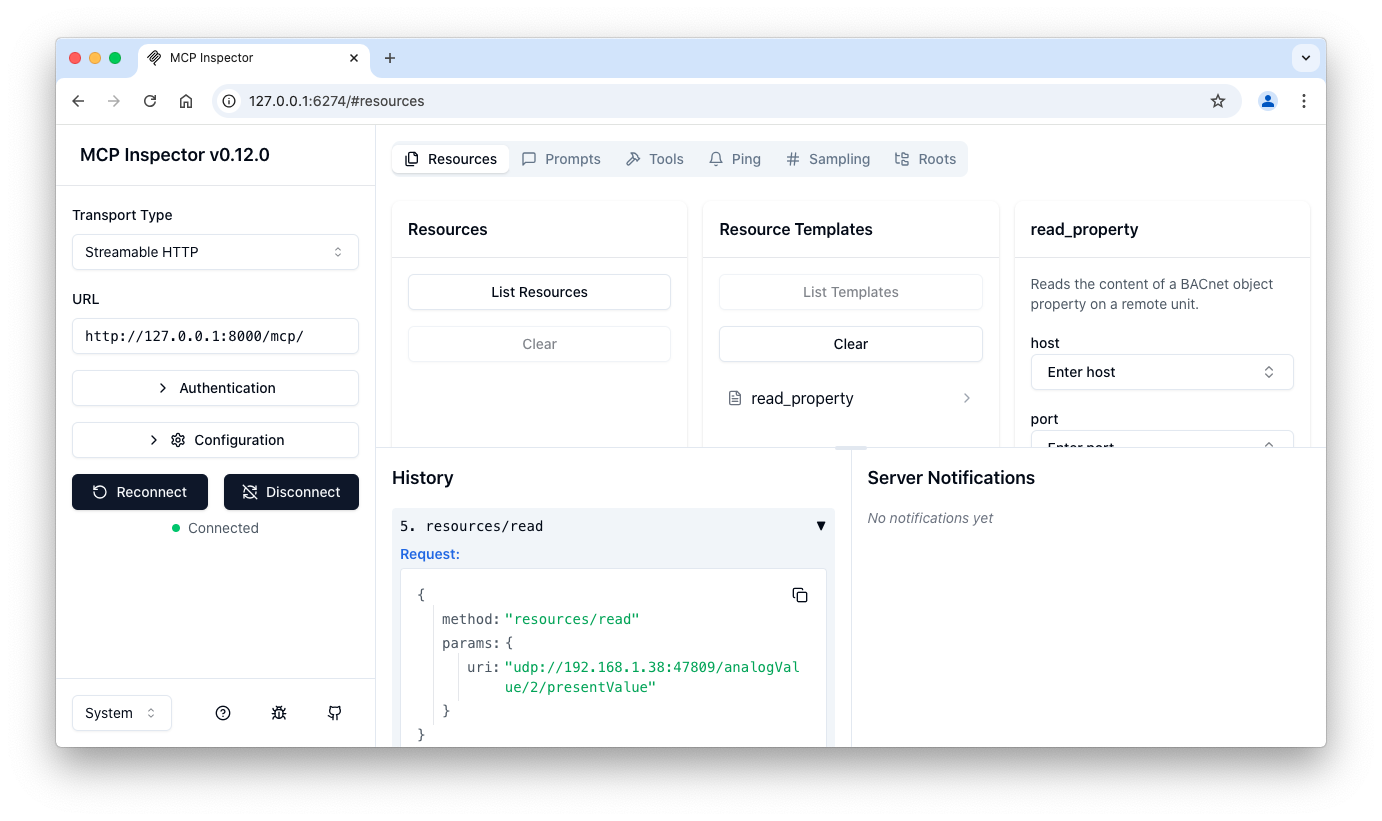
To confirm the server is up and running and explore available resources and tools, run the MCP Inspector and connect it to the BACnet MCP server at http://127.0.0.1:8000/mcp/. Make sure to set the transport to Streamable HTTP.
npx @modelcontextprotocol/inspector
Core Concepts
The BACnet MCP server leverages FastMCP's core building blocks - resource templates, tools, and prompts - to streamline BACnet read and write operations with minimal boilerplate and a clean, Pythonic interface.
Read Properties
Each object on a device is mapped to a resource (and exposed as a tool) and resource templates are used to specify connection details (host, port) and read parameters (instance, property).
@mcp.resource("udp://{host}:{port}/{obj}/{instance}/{prop}")
@mcp.tool(
    annotations={
        "title": "Read Property",
        "readOnlyHint": True,
        "openWorldHint": True,
    }
)
async def read_property(
    host: str = settings.bacnet.host,
    port: int = settings.bacnet.port,
    obj: str = "analogValue",
    instance: str = "1",
    prop: str = "presentValue",
) -> str:
    """Reads the content of a BACnet object property on a remote unit."""
    ...
Write Properties
Write operations are exposed as a tool, accepting the same connection details (host, port) and allowing to set the content of an object property in a single, atomic call.
@mcp.tool(
    annotations={
        "title": "Write Property",
        "readOnlyHint": False,
        "openWorldHint": True,
    }
)
async def write_property(
    host: str = settings.bacnet.host,
    port: int = settings.bacnet.port,
    obj: str = "analogValue,1",
    prop: str = "presentValue",
    data: str = "1.0",
) -> str:
    """Writes a BACnet object property on a remote device."""
    ...
Authentication
To enable authentication using the built-in AuthKit provider for the Streamable HTTP transport, provide the AuthKit domain and redirect URL in the .env file. Check out the AuthKit Provider section for more details.
Interactive Prompts
Structured response messages are implemented using prompts that help guide the interaction, clarify missing parameters, and handle errors gracefully.
@mcp.prompt(name="bacnet_help", tags={"bacnet", "help"})
def bacnet_help() -> list[Message]:
    """Provides examples of how to use the BACnet MCP server."""
    ...
Here are some example text inputs that can be used to interact with the server.
Read the presentValue property of analogInput,1 at 10.0.0.4.
Fetch the units property of analogInput 2.
Write the value 42 to analogValue instance 1.
Set the presentValue of binaryOutput 3 to True.
Examples
The examples folder contains sample projects showing how to integrate with the BACnet MCP server using various client APIs to provide tools and context to LLMs.
- openai-agents - shows how to connect to the BACnet MCP server using the OpenAI Agents SDK.
- openai - a minimal app leveraging remote MCP server support in the OpenAI Python library.
- pydantic-ai - shows how to connect to the BACnet MCP server using the PydanticAI Agent Framework.
Docker
The BACnet MCP server can be deployed as a Docker container as follows:
docker run -d \
  --name bacnet-mcp \
  --restart=always \
  -p 8080:8000 \
  --env-file .env \
  ghcr.io/ezhuk/bacnet-mcp:latest
This maps port 8080 on the host to the MCP server's port 8000 inside the container and loads settings from the .env file, if present.
License
The server is licensed under the MIT License.
1 maintainer

Metadata
1 maintainer
Release files for bacnet-mcp 0.4.0
For a detailed explanation of source distributions (sdists) and built distributions (wheels), please see the package formats documentation.
Source distribution (sdist)
| File | Size | Uploaded | |
|---|---|---|---|
| bacnet_mcp-0.4.0.tar.gz | 6.0 kB | Details |
Built distribution (wheel)
| File | Interpreter | ABI | Platform | Reset |
|---|---|---|---|---|
| bacnet_mcp-0.4.0-py3-none-any.whl | Python 3 | none | any | Details |
Total release size: 13.8 kB
Release files / bacnet_mcp-0.4.0.tar.gz
| Download URL | bacnet_mcp-0.4.0.tar.gz |
|---|---|
| Size | 6.0 kB |
| Tags | Source |
|
SHA-256 checksum How to use checksums |
885589b58a5abcff26df55128257ed1a372ed3911181e9b9e9eccbc0dd0407b4
|
|
BLAKE2b-256 checksum How to use checksums |
bffeffe86605083925cd3df708d2ee295694fc0d792e1cecbaf0e5fd12d19f77
|
| Upload date | |
|
Uploaded using Trusted Publishing? What is trusted publishing? |
Yes |
| Uploaded via |
twine/7.0.0 CPython/3.13.14
|
Provenance
Provenance describes where a file came from. On PyPI, provenance is shared via attestations, which provide a verifiable record of the build or publishing details. View details, limitations and caveats.


PyPI Publish Attestation
PyPI verified that this artifact, at this checksum, originated from the publisher listed below.
Signed by GitHub Actions, verified by PyPI on Sep 27, 2026.
Transparency logRelease files / bacnet_mcp-0.4.0-py3-none-any.whl
| Download URL | bacnet_mcp-0.4.0-py3-none-any.whl |
|---|---|
| Size | 7.9 kB |
| Tags | Python 3 |
|
SHA-256 checksum How to use checksums |
85af59261770d216d9f7db246a2cdcca68821d4a83ae8c4e1d1228b62d5e5a64
|
|
BLAKE2b-256 checksum How to use checksums |
89bd6a29df2438030e9d7f0fe9690beb94a05b817abb70a4fdb99afa9038ac1b
|
| Upload date | |
|
Uploaded using Trusted Publishing? What is trusted publishing? |
Yes |
| Uploaded via |
twine/7.0.0 CPython/3.13.14
|
Provenance
Provenance describes where a file came from. On PyPI, provenance is shared via attestations, which provide a verifiable record of the build or publishing details. View details, limitations and caveats.
PyPI Publish Attestation
PyPI verified that this artifact, at this checksum, originated from the publisher listed below.
Signed by GitHub Actions, verified by PyPI on Sep 27, 2026.
Transparency log













