







Why badgeshield instead of shields.io?
shields.io is great — but it makes an HTTP call to an external server on every CI run.
badgeshield generates badges entirely offline:
- No network calls — works in air-gapped CI, behind corporate proxies, and offline laptops
- No rate limits — generate thousands of badges in a single run
- No data sent externally — your version numbers, branch names, and repo stats stay local
- Reproducible — same inputs always produce the same SVG, no caching surprises
# Generate every standard badge for your Python project in one command
badgeshield preset --all --output_path ./badges/ --format markdown
Drop the output straight into your README. No account needed, no tokens, no network.
📋 Table of Contents
- Why badgeshield?
- Overview
- Features
- Badge Showcase
- Installation
- Quick Start
- Coverage Badge
- CLI Usage
- Batch Generation
- Contributing
📣 Overview
BadgeShield generates customizable SVG badges for GitLab, GitHub, and anywhere you can embed SVG. Five badge templates, four visual styles, 51 built-in colors, Pillow-powered font metrics, logo embedding with color tinting, automatic coverage badges from coverage.xml, and a Typer CLI with Rich progress bars and an SVG audit subcommand.
💡 Features
- 5 templates —
DEFAULT(two-part rectangular),PILL(fully rounded),CIRCLE,CIRCLE_FRAMEwith 11 PNG overlay frames, andBANNER(icon-zone + text). - 4 visual styles —
FLAT,ROUNDED,GRADIENT, andSHADOWEDviaBadgeStyleenum or--styleCLI flag. - 51 built-in colors —
BadgeColorenum or any#RRGGBBhex string. - Accurate text sizing — font widths measured via Pillow (DejaVuSans) with a fallback estimator when Pillow is absent.
- Logo support — embed PNG/JPEG logos with optional color tinting.
- Coverage badge — read
coverage.xmland auto-generate a correctly-colored badge in one command. - Concurrent batch — generate hundreds of badges in parallel from a JSON config; per-entry
styleoverrides the CLI flag. - Modern CLI — Typer + Rich: progress bar, error panels, summary table, and
auditsubcommand. - Python API — import and generate from any script or CI job.
🏅 Badge Showcase
These badges are generated by badgeshield itself — no shields.io, no network calls.
Project badges
| Badge | Preset |
|---|---|
 |
badgeshield preset version |
 |
badgeshield preset python |
 |
badgeshield preset branch |
 |
badgeshield preset ruff |
 |
badgeshield preset mypy |
 |
badgeshield preset maintained |
 |
badgeshield preset library |
 |
badgeshield preset cross-platform |
Templates
| Template | Preview |
|---|---|
DEFAULT |
 |
PILL |
 |
CIRCLE |
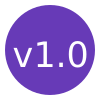 |
BANNER |
 |
Styles (DEFAULT template)
| Style | Preview |
|---|---|
FLAT |
 |
ROUNDED |
 |
GRADIENT |
 |
SHADOWED |
 |
📌 Installation
pip install badgeshield
With logo tinting support (requires Pillow):
pip install "badgeshield[image]"
Upgrade:
pip install --upgrade badgeshield
🚀 Quick Start
Python API — DEFAULT template
from badgeshield import BadgeGenerator, BadgeStyle, BadgeTemplate

generator = BadgeGenerator(template=BadgeTemplate.DEFAULT, style=BadgeStyle.GRADIENT)
generator.generate_badge(
    left_text="build",
    left_color="#555555",
    right_text="passing",
    right_color="#44cc11",
    badge_name="build.svg",
    output_path="./badges",
)
style is set at generator construction time and applies to all badges that instance generates. Options: FLAT (default), ROUNDED, GRADIENT, SHADOWED.
PILL template
from badgeshield import BadgeGenerator, BadgeTemplate

generator = BadgeGenerator(template=BadgeTemplate.PILL)
generator.generate_badge(
    left_text="build",
    left_color="#555555",
    right_text="passing",
    right_color="#44cc11",
    badge_name="build-pill.svg",
)
CIRCLE template
from badgeshield import BadgeGenerator, BadgeTemplate

generator = BadgeGenerator(template=BadgeTemplate.CIRCLE)
generator.generate_badge(
    left_text="v2.1",
    left_color="#673ab7",
    badge_name="version.svg",
)
CIRCLE_FRAME template
from badgeshield import BadgeGenerator, BadgeTemplate, FrameType

generator = BadgeGenerator(template=BadgeTemplate.CIRCLE_FRAME)
generator.generate_badge(
    left_text="MH",
    left_color="#FF0000",
    badge_name="initials.svg",
    frame=FrameType.FRAME1,
    logo="path/to/avatar.png",
    logo_tint="#ffffff",
)
BANNER template
from badgeshield import BadgeGenerator, BadgeTemplate

generator = BadgeGenerator(template=BadgeTemplate.BANNER)
generator.generate_badge(
    left_text="badgeshield",
    left_color="#1a1a2e",
    right_text="v1.0",
    right_color="#16213e",
    badge_name="banner.svg",
)
📊 Coverage Badge
Generate a correctly-colored badge directly from a coverage.xml report — no manual color selection needed.
CLI
badgeshield coverage coverage.xml \
  --badge-name coverage.svg \
  --output-path ./badges
The color is chosen automatically based on these thresholds:
| Coverage | Color |
|---|---|
| ≥ 90% |  green green |
| ≥ 80% |  yellow-green yellow-green |
| ≥ 70% |  yellow yellow |
| ≥ 60% |  orange orange |
| < 60% |  red red |
Use --metric branch to badge on branch coverage instead of line coverage.
Python API
from badgeshield import parse_coverage_xml, coverage_color
from badgeshield import BadgeGenerator, BadgeTemplate

pct = parse_coverage_xml("coverage.xml")          # e.g. 94.3
color = coverage_color(pct)                        # "#44cc11"

gen = BadgeGenerator(template=BadgeTemplate.DEFAULT)
gen.generate_badge(
    left_text="coverage",
    left_color="#555555",
    right_text=f"{pct:.0f}%",
    right_color=color,
    badge_name="coverage.svg",
    output_path="./badges",
)
🖥️ CLI Usage
Coverage badge
badgeshield coverage coverage.xml --badge-name coverage.svg --output-path ./badges
Use --metric branch for branch coverage, --left-text to change the label.
Single badge
badgeshield single \
  --left-text "coverage" \
  --left-color "#555555" \
  --right-text "94%" \
  --right-color "#44cc11" \
  --style gradient \
  --badge-name coverage.svg \
  --output-path ./badges
--style accepts flat (default), rounded, gradient, or shadowed (case-insensitive).
With a logo and links:
badgeshield single \
  --left-text "build" \
  --left-color "DARK_GREEN" \
  --right-text "passing" \
  --right-color "#44cc11" \
  --logo path/to/logo.png \
  --logo-tint "#ffffff" \
  --left-link "https://example.com/pipeline" \
  --badge-name build.svg
Framed circle:
badgeshield single \
  --left-text "MH" \
  --left-color "#673ab7" \
  --template CIRCLE_FRAME \
  --frame FRAME1 \
  --badge-name initials.svg
SVG audit
Verify that a generated SVG contains no external resource references:
badgeshield audit badges/build.svg          # exits 0 if clean, 1 if violations found
badgeshield audit badges/build.svg --json   # machine-readable JSON output
⚡ Batch Generation
CLI
badgeshield batch badges.json --output-path ./badges --max-workers 8
JSON config (badges.json)
[
  {
    "badge_name": "build.svg",
    "left_text": "build",
    "left_color": "GREEN"
  },
  {
    "badge_name": "coverage.svg",
    "left_text": "coverage",
    "left_color": "#555555",
    "right_text": "94%",
    "right_color": "#44cc11",
    "style": "gradient"
  },
  {
    "badge_name": "version.svg",
    "left_text": "v2.1.0",
    "left_color": "#673ab7"
  }
]
A per-entry "style" key overrides the CLI --style flag for that badge.
After the run, a Rich summary table shows which badges succeeded or failed.
Python API
from badgeshield import BadgeBatchGenerator, BadgeStyle, BadgeTemplate

batch = BadgeBatchGenerator(max_workers=4)
badges = [
    {"badge_name": "build.svg",    "left_text": "build",    "left_color": "GREEN", "output_path": "./out", "template": BadgeTemplate.DEFAULT, "style": BadgeStyle.FLAT},
    {"badge_name": "coverage.svg", "left_text": "coverage", "left_color": "#555",  "right_text": "94%", "right_color": "#44cc11", "output_path": "./out", "template": BadgeTemplate.DEFAULT, "style": BadgeStyle.GRADIENT},
]

try:
    batch.generate_batch(badges, progress_callback=lambda name: print(f"✓ {name}"))
except RuntimeError:
    for badge_name, error in batch._failures:
        print(f"✗ {badge_name}: {error}")
CI Pipeline
Every push to main and every pull request runs automatically via shared-workflows:
| Job | What it checks |
|---|---|
| Test | pytest on Python 3.9–3.12 x Ubuntu + Windows |
| Lint | ruff check + ruff format --check |
| Type Check | mypy src/ |
| Audit | pip-audit — all dependencies scanned for known CVEs |
| Coverage | pytest-cov — report posted to the Actions job summary |
👪 Contributing
All contributions are welcome. Fork the repo, make your changes, and open a pull request. You can also open an issue with the label enhancement.
Don't forget to ⭐ star the project!
📃 Full Docs · 🔧 Report a Bug
1 maintainer

Metadata
1 maintainer
Release files for badgeshield 0.2.4
For a detailed explanation of source distributions (sdists) and built distributions (wheels), please see the package formats documentation.
Source distribution (sdist)
| File | Size | Uploaded | |
|---|---|---|---|
| badgeshield-0.2.4.tar.gz | 2.9 MB | Details |
Built distribution (wheel)
| File | Interpreter | ABI | Platform | Reset |
|---|---|---|---|---|
| badgeshield-0.2.4-py3-none-any.whl | Python 3 | none | any | Details |
Total release size: 5.5 MB
Release files / badgeshield-0.2.4.tar.gz
| Download URL | badgeshield-0.2.4.tar.gz |
|---|---|
| Size | 2.9 MB |
| Tags | Source |
|
SHA-256 checksum How to use checksums |
89d6e7fdafa3cf60c8aecfd04c5f5b3b117e8fa8dcd9541188be8d68e730763c
|
|
BLAKE2b-256 checksum How to use checksums |
f2ee5068f69c815c83c23e23b881cf411c5edca0a7abfa109f55fd5333d6ed52
|
| Upload date | |
|
Uploaded using Trusted Publishing? What is trusted publishing? |
No |
| Uploaded via |
twine/6.2.0 CPython/3.11.15
|
Release files / badgeshield-0.2.4-py3-none-any.whl
| Download URL | badgeshield-0.2.4-py3-none-any.whl |
|---|---|
| Size | 2.6 MB |
| Tags | Python 3 |
|
SHA-256 checksum How to use checksums |
e4423bdd464364ac3b29e4d316ea46d98f6408012b662dc2455083e9f77295e2
|
|
BLAKE2b-256 checksum How to use checksums |
3ab49599fccd33deb9204e8294af01acb9fb8b78d1aedf63e35bbb01ca129f0f
|
| Upload date | |
|
Uploaded using Trusted Publishing? What is trusted publishing? |
No |
| Uploaded via |
twine/6.2.0 CPython/3.11.15
|














