
BahiaRT-GYM
The BahiaRT-GYM is a toolkit for developing OpenAI-Gym environments that can be directly used alongside the RCSSSERVER3D simulator with NAO agents. We primarily aim to ease the development of machine learning solutions for all the teams participating in the RoboCup 3D soccer league by creating a tool that can be used with any type of coding language, since all the connections here are TCP-based. Albeit, this toolkit can be easily adapted to work with any other type of simulator, as long as it sends and receives messages through TCP sockets.
Citation
Please, cite this software as Simōes, M.A.C., Mascarenhas, G., Fonseca, R., dos Santos, V.M.P., Mascarenhas, F., Nogueira, T., 2022. BahiaRT Setplays Collecting Toolkit and BahiaRT Gym. Software Impacts 14, 100401. !(https://doi.org/10.1016/j.simpa.2022.100401). BibTeX
Processes architecture example
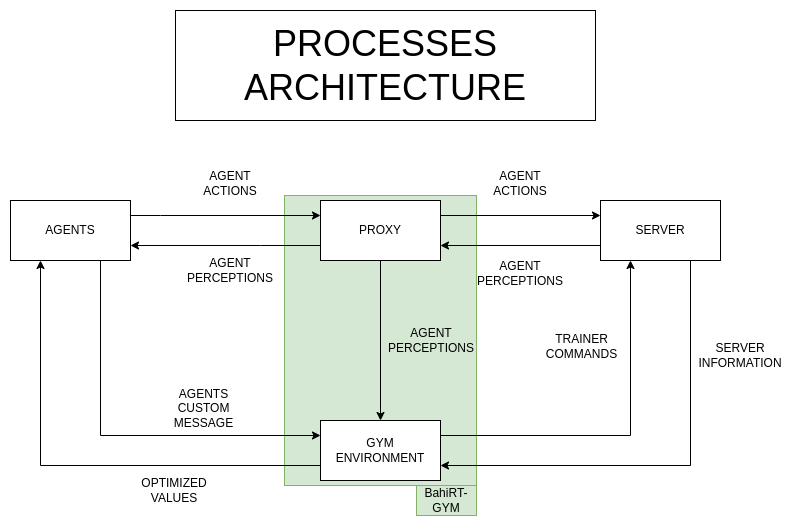
Here is a quick demonstration of what the process's architecture looks like. As you can see by the green box, the BahiaRT-Gym is composed of an environment, either yours or the demo one already present on this repository, and a proxy. The latter is responsible to connect the agents to the server and relay the perceptions sent back from the server to the gym environment, besides returning those to the agents as expected.
Requirements
1. Python 3.7
2. OpenAI Gym package
3. PyTorch
4. Stable-Baselines3
Requirements details
Stable-Baselines3 requires Python 3.7+ and PyTorch >= 1.8.1. As of today(April 5th, 2022), the most recent PyTorch version (1.11.0) does not support Python 3.8+, so we recommend keeping on Python 3.7.
Python 3.7 installation and Virtual Environment(venv) creation
To install the environment, we recommend using a python virtual environment(venv) to avoid any possible conflicts between libraries. The following tutorial explains how to install it using python 3.7
- Add python official repository and install 3.7:
sudo apt update
sudo apt install software-properties-common
sudo add-apt-repository ppa:deadsnakes/ppa
sudo apt install python3.7
- Create a virtual environment:
python3.7 -m venv venv
This will create a 'venv' folder on the current path. If you want to change the folder's name, simply alter the second "venv" on the command.
- Activate the virtual environment:
source venv/bin/activate
Now you're in the python 3.7 venv. If you want to leave, simply type:
deactivate
- Update pip inside the venv.
pip install --upgrade pip
From now on, every pip or python command should be used inside the venv. This way, any installed library won't cause any conflicts with your system.
Installing PyTorch (recommended)
We recommend using PyTorch to support reinforcement learning algorithms. If you want to run the demo example released with this package, you need PyTorch.
PyTorch's installation depends on your system's specifications.
If you use CUDA cores, the following command will install Torch 1.11.0 with support for CUDA 10.2 on Linux using PiP:
pip install torch torchvision torchaudio
If you use CPU only, the command to install the same Torch version is the following:
pip install torch==1.11.0+cpu torchvision==0.12.0+cpu torchaudio==0.11.0+cpu -f https://download.pytorch.org/whl/cpu/torch_stable.html
If you're interested in Torch for different specifications, check the official website: https://pytorch.org/get-started/locally/
Installing Gym (required) and Stable-Baselines3 (recommended)
We recommend using Stable-Baselines3 for reinforcement learning algorithms usage. If you want to run the demo example released with this package, you need Stable-Baselines3.
To install gym, use the following command:
pip install gym
The gym will be installed automatically if you use PiP to install bahiart-gym.
To install Stable-Baselines3, use the following command:
pip install stable-baselines3[extra]
The [extra] version is quite useful since it allows us to use things like tensorboard to monitor and evaluate the trained models.
Cloning and installing the BahiaRT-Gym
Option 1: Using PiP
To install the toolkit using pip simply make sure you have your venv activated and type the following on your terminal:
pip install bahiart_gym
Option 2: Using the source from the repository
To clone the repository, go to the same path where your 'venv' folder is located, then use the following command:
git clone https://bitbucket.org/bahiart3d/bahiart-gym.git
Now your directory should look like this:
   your-folder/
    venv/
    bahiart-gym/
Now, inside the bahiart-gym folder, use the following command to install the package:
pip install -e .
Now BahiaRT-Gym's package is installed and ready to use in your python's virtual environment.
Testing the BahiaRT-GYM demo environment.
On the "demo_test.py" file, you can check an example script to test the toolkit using a demonstration environment, along with explanations of every line of code.
Always remember to initiate the RCSSSERVER3D before running this script.
Feel free to explore and modify those lines as you wish to experiment on the toolkit.
Automated start and terminate
Requirement: lsof package
There are two methods to automate the process of using the BahiaRT Gym: startEnv() and killEnv()
You must create a config.ini file to define:
TRAINING_COMMAND = python3 ./{training_file}.py
TEAM_FOLDER = /home/{user}/{team_folder}
TEAM_COMMAND = ./{start_script}
SERVER_PORT = {proxy_to_server_port}
MONITOR_PORT = {monitor_to_server_port}
config.ini template available on https://bitbucket.org/bahiart3d/bahiart-gym.git
The startEnv() method returns the server, training and team PIDs. The killEnv() method can receive these as individual parameters.
Authors
Gabriel Mascarenhas, Marco A. C. Simões, Rafael Fonseca
Contact
1 maintainer

Metadata
1 maintainer
Release files for bahiart-gym 1.0.5
For a detailed explanation of source distributions (sdists) and built distributions (wheels), please see the package formats documentation.
Source distribution (sdist)
| File | Size | Uploaded | |
|---|---|---|---|
| bahiart_gym-1.0.5.tar.gz | 46.1 kB | Details |
Built distribution (wheel)
| File | Interpreter | ABI | Platform | Reset |
|---|---|---|---|---|
| bahiart_gym-1.0.5-py3-none-any.whl | Python 3 | none | any | Details |
Total release size: 102.7 kB
Release files / bahiart_gym-1.0.5.tar.gz
| Download URL | bahiart_gym-1.0.5.tar.gz |
|---|---|
| Size | 46.1 kB |
| Tags | Source |
|
SHA-256 checksum How to use checksums |
36b899bd50fc36bb6fc525e86dfc5c1f451a3e074678a971d4413a474d105810
|
|
BLAKE2b-256 checksum How to use checksums |
10ce8cb782e1be98aff3c38db690921c2dad37a0bc0dfb9b7041a1cfffa289c2
|
| Upload date | |
|
Uploaded using Trusted Publishing? What is trusted publishing? |
No |
| Uploaded via |
twine/4.0.1 CPython/3.7.13
|
Release files / bahiart_gym-1.0.5-py3-none-any.whl
| Download URL | bahiart_gym-1.0.5-py3-none-any.whl |
|---|---|
| Size | 56.6 kB |
| Tags | Python 3 |
|
SHA-256 checksum How to use checksums |
a4fa89cc5eb3c9e4ff83cc69db6640a2dde2591f79f1a79ae6c499acb58cd84d
|
|
BLAKE2b-256 checksum How to use checksums |
dd2234f2f78165cd697e24ebb7110893c8519210b2b790ea79a7b73e9bbe1a62
|
| Upload date | |
|
Uploaded using Trusted Publishing? What is trusted publishing? |
No |
| Uploaded via |
twine/4.0.1 CPython/3.7.13
|














