

Put real customer data through Claude Code and Codex without it ever reaching them.




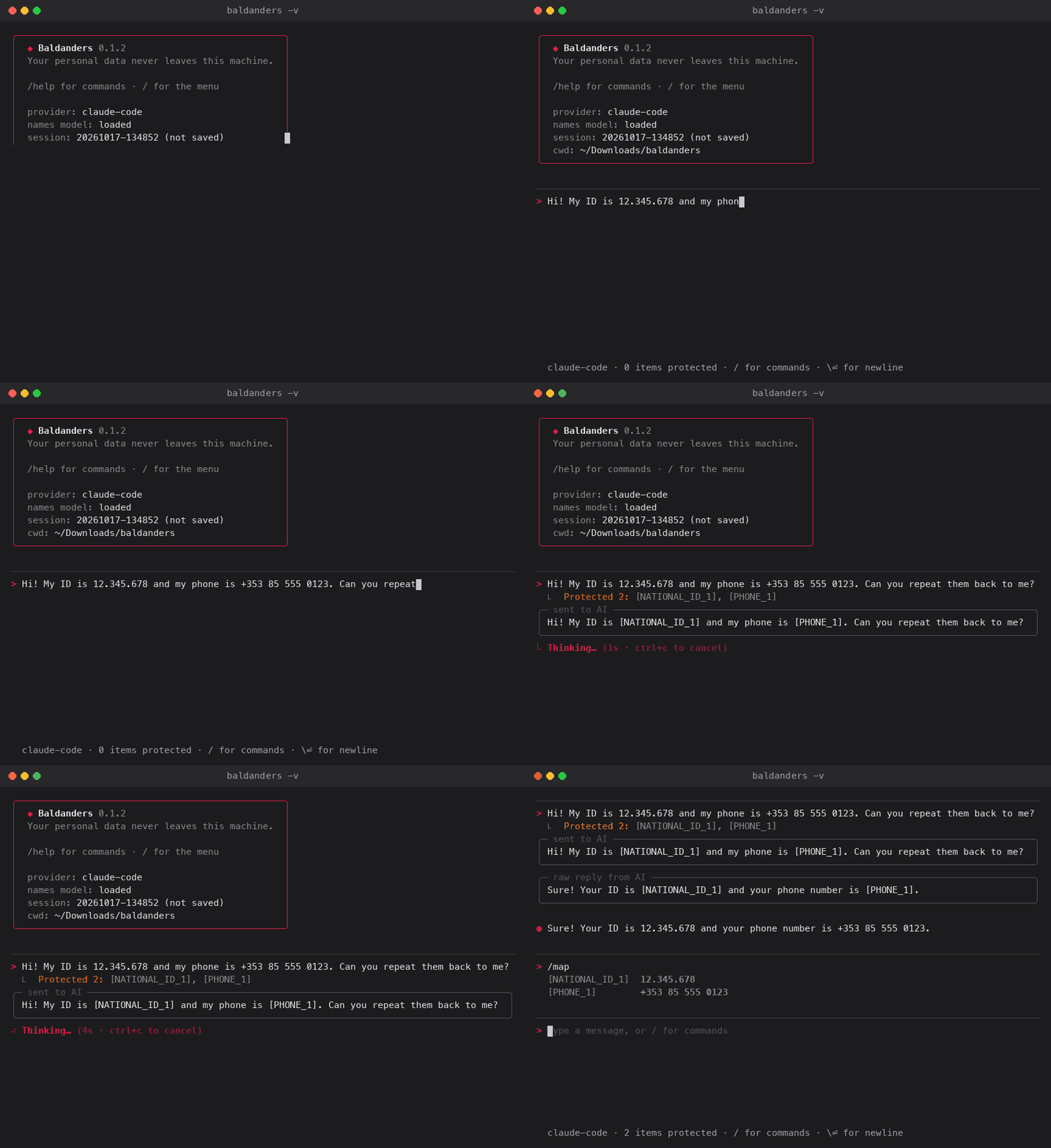
Baldanders is a local personal-data firewall for cloud LLMs. You use Claude Code, Codex or Grok as usual. Names, emails, ID numbers, bank details and secrets are swapped for tokens like [PERSON_1] before anything leaves your machine, and swapped back when the reply arrives. The AI never sees the data. The token map never leaves your computer.
Why
Most teams can't put customer or employee data into AI tools, because it would be sent to a third party. So the tools get used for harmless work only, or the company pays per token for a controlled API setup.
Baldanders removes that limit at the source. Staff keep using the seat licences you already pay for, on real work with real data, and personal data is stopped on the laptop before it goes out. Run with -v to see exactly what was sent.
Quick start
pip install "baldanders[all]"
baldanders download     # one-time, ~320 MB name & address model, runs offline afterwards
baldanders              # use Claude Code through your existing login
How it works
Detection runs locally, in three layers:
- Your rules. Terms and patterns from your config that must always be hidden.
- Deterministic detectors. Emails, phones from any country, cards, IBANs, 55+ national ID formats and secrets, each checksum-validated where the format has a checksum.
- A multilingual AI model (optional) for names and street addresses in 20+ languages.
Each match becomes a token. Only the cleaned text is sent, plus a short instruction asking the AI to keep the tokens intact. Tokens in the reply are replaced with the real values on your side.
Providers
Claude Code and Codex are coding agents: Baldanders talks to them through their command-line tools, so replies come from the models behind them with their coding-focused setup, not from the ChatGPT or Claude chat apps.
baldanders                      # Claude Code (default), via your Claude login (no API key)
baldanders -p codex             # OpenAI Codex CLI, via your ChatGPT login (no API key)
baldanders -p grok              # Grok, via grok-cli (SuperGrok / X Premium+, no API key)

baldanders -p anthropic-api     # Claude API (ANTHROPIC_API_KEY or `ant auth login`)
baldanders -p openai-api        # OPENAI_API_KEY
baldanders -p deepseek          # DEEPSEEK_API_KEY
baldanders -p groq              # GROQ_API_KEY
baldanders -p openai-api --base-url http://localhost:11434/v1 -m llama3   # any OpenAI-compatible API
Usage
baldanders -v                   # show exactly what leaves your machine
baldanders --no-save            # don't write this conversation to disk
baldanders sessions             # list saved sessions
baldanders --resume 20261002-143022
baldanders sessions --delete 20261002-143022
Inside the chat, type / for the command menu:
| Command | What it does |
|---|---|
/map |
Show which token stands for which real value |
/raw |
Toggle scrubbing off/on for messages with nothing sensitive |
/clear |
Start a fresh conversation (keeps the token map) |
/help |
Show commands and shortcuts |
/quit |
Exit |
Paste multi-line text straight into the prompt. \ then Enter (or Esc then Enter) adds a new line, Ctrl+C clears the input (twice to exit), Ctrl+D exits. The status line at the bottom shows the provider and how many items have been protected.
Scrub text without talking to any AI, for scripts and pipelines:
echo "Call me on +54 9 11 4567-8901" | baldanders scrub
# Call me on [PHONE_1]
baldanders scrub --json "IBAN DE89 3704 0044 0532 0130 00"
What gets scrubbed
- Contact details: emails (including non-Latin addresses), phone numbers from any country (Google's libphonenumber).
- Financial: credit cards (Luhn-checked), IBANs for 89 countries (length and mod-97 checked), crypto wallets.
- Identity: 55+ national ID and tax number formats, passport numbers next to a keyword, dates of birth.
- People and places: names and street addresses, with the model installed.
- Network: IPv4/IPv6 and MAC addresses.
- Secrets: API keys (AWS, GitHub, GitLab, Slack, Stripe, Google, OpenAI, Anthropic, Hugging Face, npm), JWTs, private keys, passwords in
password: …/contraseña = …/ database URLs.
All national ID and tax number formats
Validated with python-stdnum where a checksum exists.
| Region | Identifiers |
|---|---|
| Americas | US SSN/ITIN · Canada SIN · Brazil CPF/CNPJ · Argentina DNI/CUIT/CUIL · Chile RUT · Mexico CURP/RFC · Colombia NIT · Ecuador cédula · Uruguay RUT |
| Europe | UK NINO/NHS · Spain DNI/NIE · Portugal NIF · France NIR · Italy codice fiscale · Germany Steuer-ID · Netherlands BSN · Belgium national number · Poland PESEL · Sweden/Norway/Denmark/Finland personal numbers · Switzerland AHV · Austria SVNR · Ireland PPS · Czech/Slovak birth number · Romania CNP · Bulgaria EGN · Croatia OIB · Greece AMKA · Estonia · Lithuania · Turkey TC Kimlik · Russia INN · Ukraine RNTRC |
| Asia & Pacific | India Aadhaar/PAN · Pakistan CNIC · China resident ID · Hong Kong HKID · Taiwan ID · Japan My Number · South Korea RRN · Malaysia MyKad · Singapore NRIC · Indonesia NIK · Thailand ID · Israel ID · Australia TFN · New Zealand IRD |
| Africa | South Africa ID |
| Anywhere | Any ID-shaped number right after a keyword like DNI, cédula, ID number, Ausweis, 身份证, … |
Some IDs are just a run of digits with no distinctive shape, like a BSN, PESEL or Steuer-ID. Those are scrubbed when a keyword is nearby ("BSN 111222333"). With paranoid: true they're scrubbed on checksum alone.
Ordinary text is left alone: code, SQL, version numbers, order numbers, amounts, ordinary dates and city names. If something is over-scrubbed anyway, the AI only sees a token and you still get the real value back.
Configuration
~/.baldanders/config.yaml is created on first run:
regions: [AR, US]        # local phone formats to recognise; empty = guess from OS locale
paranoid: false          # scrub checksum-valid IDs even without a keyword nearby
# ner_threshold: 0.6     # name/address model confidence (default: names 0.7, addresses 0.4)
save_sessions: true

allowlist:               # never scrub these
  - my-s3-bucket-name

denylist:                # always scrub these (case-insensitive) as the given type
  "Project Falcon": PROJECT

custom_patterns:         # extra regexes; first capturing group is scrubbed if present
  customer_id: "CID-\\d{8}"
Use denylist and custom_patterns for anything specific to your organisation: client names, project code names, internal customer IDs.
Set BALDANDERS_HOME to keep config, sessions and the model somewhere other than ~/.baldanders.
Privacy notes
- What is sent: only the scrubbed text, plus a short instruction telling the AI to keep the tokens intact. Run with
-vto see every byte. - What stays local: the token map, the model, and your config.
- Nothing readable on disk: saved sessions (
~/.baldanders/sessions/) hold the real values so--resumeworks, so they are encrypted. The key lives in your system keychain (macOS Keychain, Windows Credential Manager, Linux Secret Service), never in a file or an environment variable. An AI agent that can read your files, including Codex or another coding assistant, only finds scrambled data. Without a secure keychain, sessions are simply not saved. Sessions from older versions are encrypted and wiped automatically. Turn saving off entirely with--no-saveorsave_sessions: false. - Subscription CLIs: Baldanders runs
claudeandcodexin an empty private directory. For Claude Code, all tools and MCP servers are disabled, so the AI can't read your files. Codex has no switch to turn file reading off: its read-only sandbox can still read files elsewhere on your computer, and Baldanders warns about this when you start it. Prefer-p claude-codeor an API provider for sensitive work. These CLIs add their own context to each request (OS, working directory path, and for Claude Code your personal~/.claude/CLAUDE.mdif you have one). Baldanders doesn't control that context. - Your config is plain text.
denylistentries (client names, project code names) are readable by anything that can read your files. Keep truly secret terms out of it. - No detector is perfect. Unusual names, free-form addresses, or IDs written in unexpected ways can slip through. Check
-voutput when it matters, and add anything specific to your work to thedenylist.
Install options
pip install baldanders                 # core: regex/checksum detectors, all providers except the API ones
pip install "baldanders[ner]"          # + name & address model (pulls in PyTorch, ~1 GB)
pip install "baldanders[anthropic]"    # + direct Claude API provider
pip install "baldanders[all]"          # everything
pipx keeps it isolated: pipx install "baldanders[all]".
Requirements: Python 3.10+, plus the CLI for the provider you use:
-p claude-code: Claude Code, logged in-p codex: Codex CLI (npm install -g @openai/codex, thencodex login)-p grok: grok-cli (grok-cli login)
Development
pip install -e ".[dev,ner,anthropic]"
baldanders download   # optional: enables the NER integration tests
pytest
Releasing
Releases go to PyPI from GitHub Actions via trusted publishing, so no API token is stored anywhere.
- One-time setup: on PyPI, add a pending publisher for project
baldanders, ownerNahuel990, repoBaldanders, workflowrelease.yml, environmentpypi. On GitHub, create an environment namedpypi. - Bump
__version__insrc/baldanders/__init__.pyand commit. - Tag and push:
git tag v0.1.0 && git push origin v0.1.0.
The name
Baldanders is the shape-shifter from Borges' Book of Imaginary Beings, taken from Grimmelshausen's Simplicissimus. The name means "soon different". Your data does the same: it leaves as a mask and comes back as itself.
License
MIT
1 maintainer

Metadata
1 maintainer
Release files for baldanders 0.1.4
For a detailed explanation of source distributions (sdists) and built distributions (wheels), please see the package formats documentation.
Source distribution (sdist)
| File | Size | Uploaded | Provenance | Actions |
|---|---|---|---|---|
| baldanders-0.1.4.tar.gz | 62.0 kB | With provenance | Details for baldanders-0.1.4.tar.gz |
Built distribution (wheel)
| File | Interpreter | ABI | Platform | Actions Reset |
|---|---|---|---|---|
| baldanders-0.1.4-py3-none-any.whl | Python 3 | none | any | Details for baldanders-0.1.4-py3-none-any.whl |
Total release size: 118.6 kB
Release files / baldanders-0.1.4.tar.gz
| Download URL | baldanders-0.1.4.tar.gz |
|---|---|
| Size | 62.0 kB |
| Tags | Source |
|
SHA-256 checksum How to use checksums |
99fc2d2a92e4b7e440c2a743946fe4429917b381d7245352f59194ee5213d32f
|
|
BLAKE2b-256 checksum How to use checksums |
55e64f38f1f5308f15e868ab1625262b3ba133f0ed41a862b52318fa7c8f268d
|
| Upload date | |
|
Uploaded using Trusted Publishing? What is trusted publishing? |
Yes |
| Uploaded via |
twine/7.0.0 CPython/3.13.14
|
Provenance
Provenance describes where a file came from. On PyPI, provenance is shared via attestations, which provide a verifiable record of the build or publishing details. View details, limitations and caveats.


PyPI Publish Attestation
PyPI verified that this artifact, at this checksum, originated from the publisher listed below.
Signed by GitHub Actions, verified by PyPI on Oct 17, 2026.
Transparency logRelease files / baldanders-0.1.4-py3-none-any.whl
| Download URL | baldanders-0.1.4-py3-none-any.whl |
|---|---|
| Size | 56.6 kB |
| Tags | Python 3 |
|
SHA-256 checksum How to use checksums |
737e6f44cf40df474538d6f41bcc4b2c717bd246219953fe7750aed064563df3
|
|
BLAKE2b-256 checksum How to use checksums |
9b577808c7bcd2b3c6806833f88bfaa90a81db607d28e5ad7cdb8a859cde17d6
|
| Upload date | |
|
Uploaded using Trusted Publishing? What is trusted publishing? |
Yes |
| Uploaded via |
twine/7.0.0 CPython/3.13.14
|
Provenance
Provenance describes where a file came from. On PyPI, provenance is shared via attestations, which provide a verifiable record of the build or publishing details. View details, limitations and caveats.
PyPI Publish Attestation
PyPI verified that this artifact, at this checksum, originated from the publisher listed below.
Signed by GitHub Actions, verified by PyPI on Oct 17, 2026.
Transparency logSecurity for baldanders 0.1.4
Provenance
Provenance describes where a file came from. On PyPI, provenance is shared via attestations, which provide a verifiable record of the build or publishing details. View details, limitations and caveats.
Full provenance
Both files in this release have been uploaded with provenance metadata.
Attestation for baldanders-0.1.4.tar.gz
PyPI Publish Attestation
PyPI verified that this artifact, at this checksum, originated from the publisher listed below.
Signed by GitHub Actions, verified by PyPI on Oct 17, 2026.
Transparency logA note on package security
PyPI is a repository for distributing packages, not a service for auditing them. While third-party security researchers and our staff do their best to detect and remove malicious packages, PyPI cannot guarantee the quality, security or suitability of any given package.
To learn more about protecting yourself from malicious actors, visit our package security documentation.














