
Automated poop sorting for Bambu Lab 3D printers
Verified details
These details have been verified by PyPIProject links
GitHub Statistics
Maintainers

Project description
bambu-poop-sorter is a utility that provides automated poop sorting for certain Bambu Lab 3D printers (tested successfully on a P2S).
- Overview
- Installation
- Configuration
- Running bambu-poop-sorter
- Software Dependencies
- Hardware Requirements
- Other Requirements
- 3D-Printed Assets
- Future Plans
- Additional Information
Overview
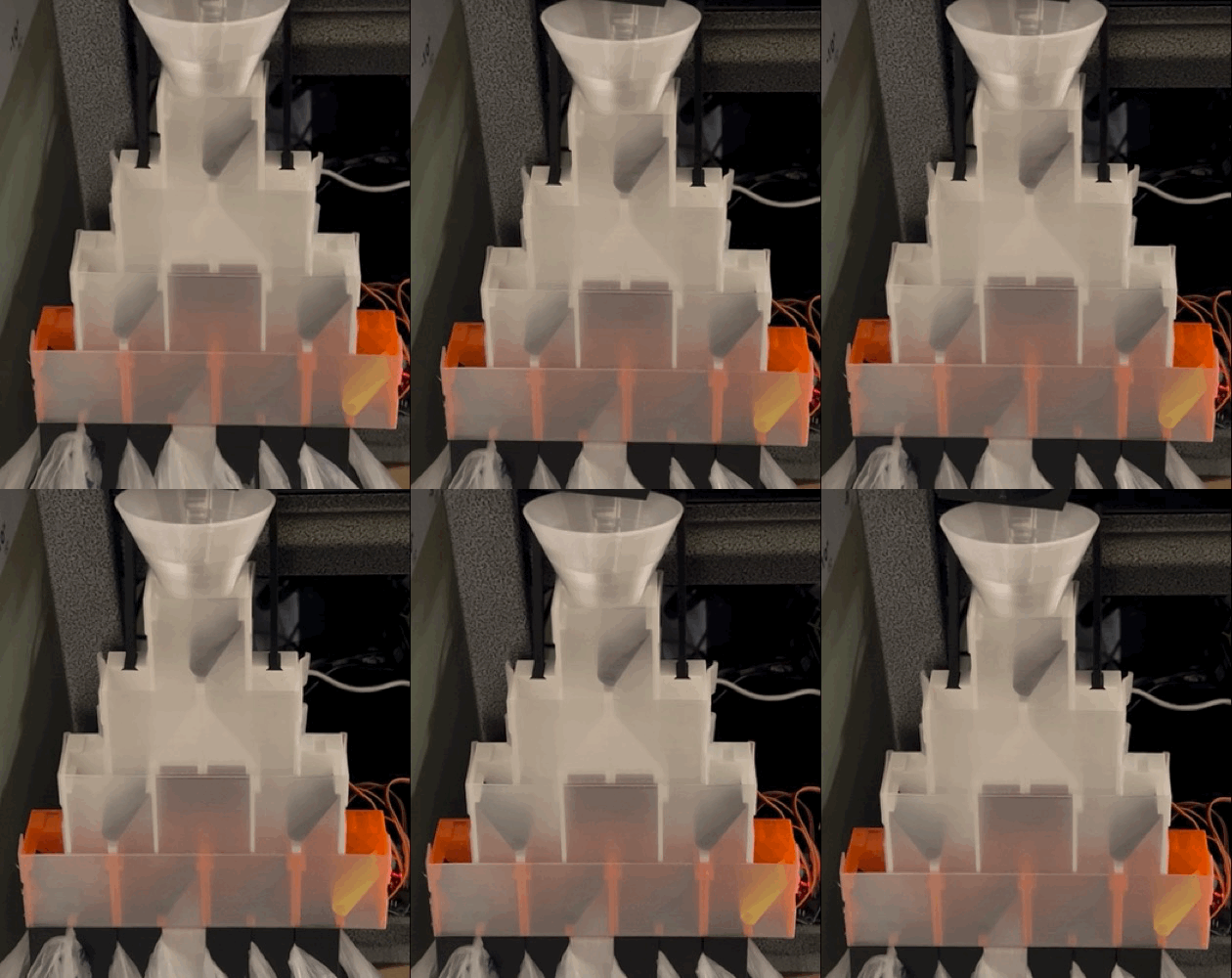
I wanted to create something that would help proactively sort the poop that is ejected from my Bambu Lab P2S 3D printer. My main driving need was to separate by type (e.g. PLA, ABS, PETG, etc.), but I also wanted to create more robust logic to separate by color. I'm intrigued by potential upcoming filament recycling solutions (such as the Creality Filament Maker M1 & Shredder R1 and loop) and wondered if sorting poop would help set the stage for success with these devices.
The good news is that the Bambu Lab P2S spits out all kinds of useful data via mqtt messages. It is this data that Bambu Studio uses to monitor print status, show printer telemetry data (e.g. bed temperature, nozzle temperature, etc.), and help manage filament that is loaded into your Bambu Lab AMS unit(s). More good news is that no printer settings need to be changed to consume this data.
bambu-poop-sorter is my solution. Along with some 3D-printed parts and some micro servos, it provides a basic mechanism to sort printer poop. In the video above, you can see a printer poop falling into a bin and then the machine changing its configuration to prepare for the next (differently colored) poop.
Installation
bambu-poop-sorter is available as a Python package on PyPI. To install:
-
Navigate to your project folder
cd /path/to/your/project
-
Create a virtual environment (named ".venv" by convention, but can be named anything)
python3 -m venv .venv
-
Activate the virtual environment
source .venv/bin/activate
-
Install the package from the (.venv) $ prompt
python3 -m pip install bambu-poop-sorter
Configuration
I highly recommend reading through the Hardware Requirements and Other Requirements sections of the servo-sorter package which is used by (and installed automatically by) bambu-poop-sorter. This will give you details you need to know about assembling the hardware necessary.
After installing the bambu-poop-sorter package, you will need to make some updates to the Bambu_Poop_Sorter.toml file that you will find in the project's src folder. Let's review section by section:
[printer_api]
machine_access_code = "12345678"
machine_ip_address = "192.168.1.111"
machine_local_user = "bblp"
machine_serial = "123456789012345"
Your printer's IP address and machine access code can be found via the "Settings" \ "LAN Only" screen on your printer. You'll want to ensure that your printer has a consistent IP address on your network. Most routers provide an address reservation mechanism to accomplish this. Do not change the local user value of "bblp", as that is baked into the printer. The machine serial number can be found via the "Settings" \ "Device and Serial Number" screen. Make sure you choose the printer's serial number and NOT that of any of your attached AMS units.
[pca9685_servo_driver]
# a driver's address can be changed by soldering jumpers on the pca9685 board
servo_driver_i2c_addresses = [0x40]
If you are using 15 servos or less, you can use a single PCA9685 driver on its default address of 0x40. If multiple servo drivers are to be used, you must solder the jumpers on the second driver (and beyond) to create unique i2c addresses for them. Refer to this Adafruit article for details on how to do that.
[servo_details]
actuation = [[90, 90, 90, 90, 90, 90, 90]]
angle_alt = [[50, 50, 50, 50, 50, 50, 50]]
angle_main = [[20,  20, 20, 20, 20, 20, 20]]
only_move_necessary_servos = true # toml requires this to be all lowercase: true or false
servo_count = 7
sleep_duration_between_servo_movements = 0.25 # toml requires a leading digit (even if zero) before the decimal
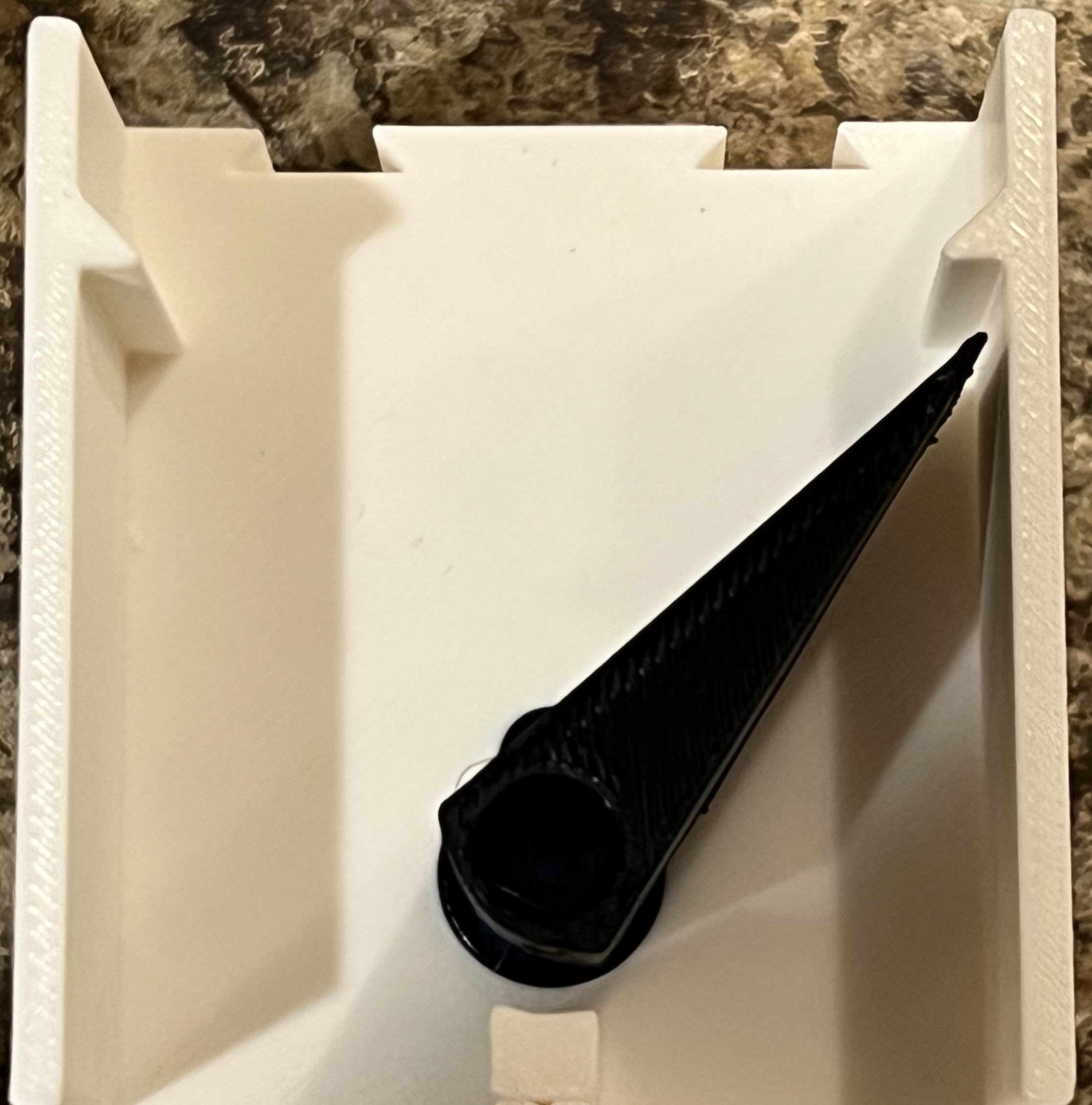
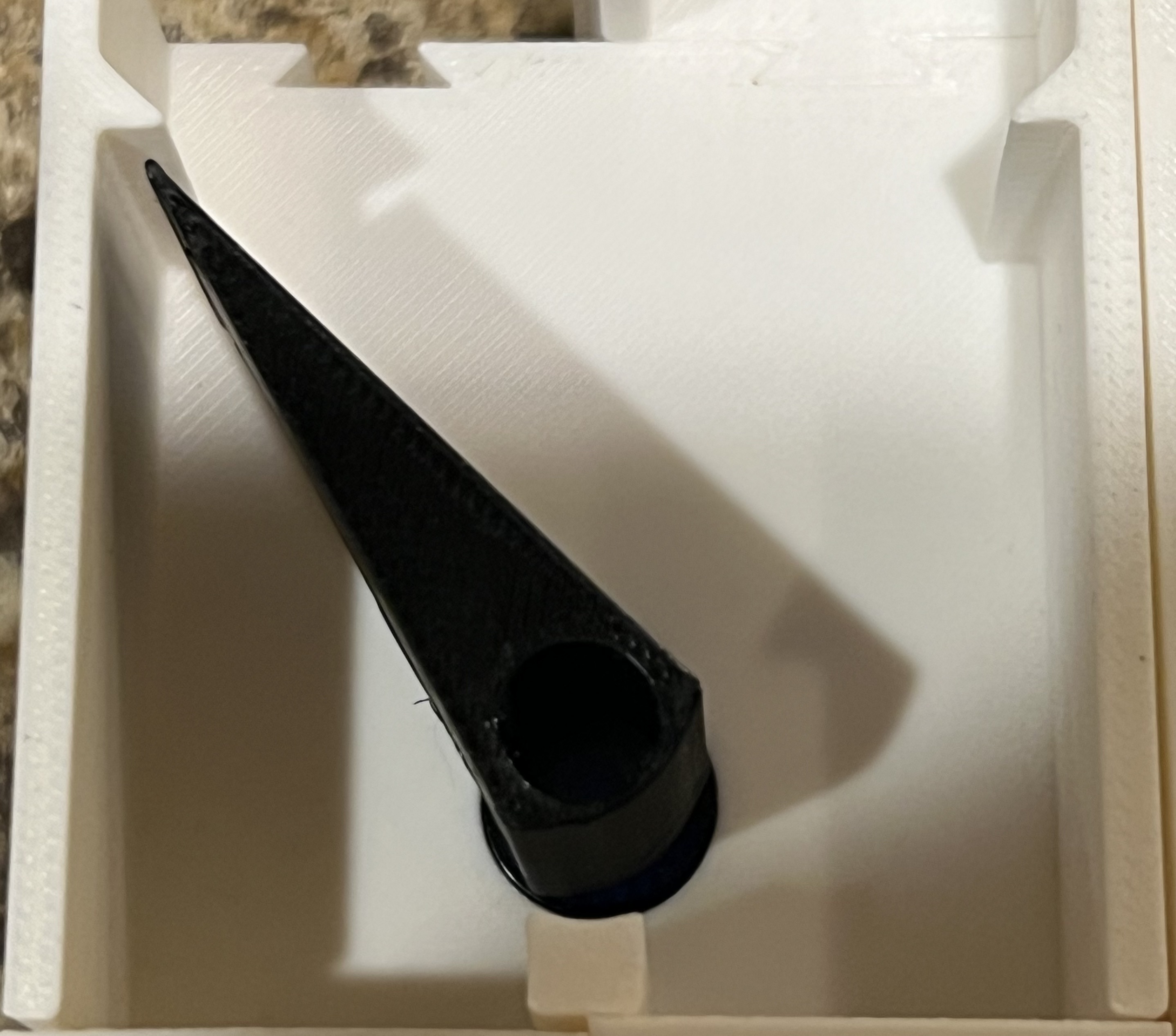
The example above assumes you have seven servos (all attached to a single driver) and that all servos have an actuation range of 90 degrees. The "alt" and "main" angles will need to be determined via calibration. At present I do not have any automated calibration tools to offer, but you can follow the guidance in the Other Requirements section of servo-sorter's documentation to determine these values. You are looking for the angles that make the arms lined up like the pictures below:
"MAIN"
"ALT"
[sorter_settings]
bin_mode = 1 # 1 = persistent; 2 = dynamic per print
cooling_fan_speed_threshold = 12
separation_mode = 1 # 1 = approximate; 2 = strict ; 3 = very strict
These settings control how bambu-poop-sorter behaves. I recommend leaving the bin mode as 1. If you change it to 2, the bin assignments will reset for every print. I also recommend leaving the cooling fan speed threshold at 12. This value helps determine when a printer poop has occurred. For separation mode, here is how the values will change behavior:
-
Mode 1 (Approximate): The first poop of a filament change cycle will be sent to the bin of the previous/outgoing filament and the second poop (and beyond) will be sent to the bin of the new/incoming filament. If the filament type is changing (e.g from PLA to PETG), the first poop of the filament change cycle will be sent into the "DEFAULT" (garbage) bin (always bin 1) and the second poop (and beyond) will be sent to the bin of the new/incoming filament.
-
Mode 2 (Strict): The first poop of a filament change cycle will be sent into a "mix" bin and the second poop (and beyond) will be sent to the bin of the new/incoming filament. If the filament type is changing, the first two poops of the filament change cycle will be sent to the "DEFAULT" bin and the third poop (and beyond) will be sent to the bin of the new/incoming filament.
-
Mode 3 (Very Strict): The first two poops of a filament change cycle will be sent into a "mix" bin and the third poop (and beyond) will be sent to the bin of the new/incoming filament. If the filament type is changing, the first three poops of the filament change cycle will be sent to the "DEFAULT" bin and the fourth poop (and beyond) will be sent to the bin of the new/incoming filament.
[logging]
console_log_level = "INFO"
file_log_level = "INFO"
Valid log levels are "DEBUG", "INFO", "WARNING", and "ERROR". It is recommended to leave the defaults ("INFO") unless you are having a problem, in which case "DEBUG" can be used (and which will spit out tons of information to the logs). The application log will be generated with the name "3d_printing_poop_sorter_bambu_[machine serial number].log". The content going into that log is controlled with the "file_log_level" setting. When running the application in an interactive mode (e.g. using a Python IDE like Thonny), you will see console level log entries which can be controlled with the "console_log_level" setting.
Running bambu-poop-sorter
When first attempting to run bambu-poop-sorter, I recommend just opening up the "pseries_poop_sorter.py" file in a Python IDE (e.g. Thonny on a Raspberry Pi) and running it from there. Note that you will need to configure a tool like Thonny to point to the virtual Python environment where you've installed bambu-poop-sorter. Specifically for Thonny, this can be done via the "Configure Interpreter" settings.
If you would like to run this process as a Linux service, the file you need to run is "pseries_poop_sorter.py". Lots of details about running a Python module as a service can be found online. Google "running a python script as a service using a virtual python environment" and it provides great guidance.
Software Dependencies
All dependencies listed below will be installed automatically as part of installing the bambu-poop-sorter package. You do NOT need to install these separately, but I wanted to point you to related documentation.
-
servo-sorter - This is another package that I recently developed. It is a generic solution that can be used to sort pretty much anything. Details about servo-sorter can be found here. I highly recommend reading through the details of this project, as most are directly related to the requirements of bambu-poop-sorter as well.
-
paho-mqtt - This is a package that provides the mqtt functionality that allows bambu-poop-sorter to consume data from the printer. Details can be found here.
-
webcolors - Although not yet used to provide end-user functionality in bambu-poop-sorter, I am planning to use it to provide additional sorting capabilities in the future. Details can be found here.
Hardware Requirements
Hardware requirements are identical to those of my servo-sorter solution, which can be found here. In a nutshell, you need a Python-running device such as a Raspberry Pi, some micro servos, and drivers to power those servos.
Other Requirements
Please refer to the Other Requirements section from the servo-sorter project.
3D-Printed Assets
Refer to this model on Maker World. This is what's shown in the above pictures/video (as well as the pictures/video in my referenced servo-sorter package).
The 3D-printed parts fit together with very tight tolerances. It can be difficult to slide the pieces into each other. This was all done with the goal of having a very smooth/flat surface so that the printer poops have nothing to catch on.
Future Plans
The following are being considered for future enhancements:
-
Use "webcolors" Python package to provide an ability to sort by more of a "color family" rather than strictly by exact colors of each filament.
-
Refer to the Future Plans section from the servo-sorter project.
Additional Information
Bin 1 is designated as a "DEFAULT" bin. You can think of it as a garbage bin. This will be used when the printer does not "know" what type of filament is being ejected (common at the beginning of prints) or when the filament type is changing (e.g. from PLA to PETG).
The total number of bins available to the process will always equal the number of servos being used + 1. So, for example, if you are using 7 servos, there will be 8 bins available.
Current bin assignments can be seen in the file named "3d_printing_poop_sorter_bambu_[machine serial number]_servosorter_db.json". Do not manually change the values in this file. Removing a filament from your AMS will automatically remove a bin assignment for that filament. If you wish to clear all bin assignments, stop the bambu-poop-sorter process and delete the aforementioned file. It will get regenerated automatically when the process starts back up.
When bambu-poop-sorter first starts up, you will see that the servos will be configured to point to bin 1 ("DEFAULT") and then they will adjust from there as the print progresses and the filaments change.
This logic has been tested up to the limits of my environment. This includes a Bambu Lab P2S with two AMS 2 Pro units attached and 2 AMS H/T units attached. If anyone has the "full compliment" of AMS units (i.e. 4 AMS 2 Pro, 4 AMS H/T) and would like to help me support all of those, please reach out via the Discussions area of this project. There are some things I need to see about how those additional AMS units are enumerated in the mqtt messages.
All development and testing was done on a Bambu Lab P2S. I suspect it will work on a P1S and also all the "fancier" Bambu Lab machines. I know for a fact that it will definitely NOT run on the A1 series (I have an A1 Mini and the mqtt output from that machine is completely different).
I'd be open to developing similar functionality for other models (even other printer brands), but I am limited by the printers I have available to me. Please reach out via Discussions if you'd like to collaborate on support for other printers.
I did my main development on a Raspberry Pi 5, but I have bambu-poop-sorter running perfectly fine on a Raspberry Pi Zero W.
Project details
Verified details
These details have been verified by PyPIProject links
GitHub Statistics
Maintainers


Download files
Download the file for your platform. If you're not sure which to choose, learn more about installing packages.
Source Distribution
Built Distribution
Filter files by name, interpreter, ABI, and platform.
If you're not sure about the file name format, learn more about wheel file names.
Copy a direct link to the current filters
File details
Details for the file bambu_poop_sorter-0.0.2.tar.gz.
File metadata
- Download URL: bambu_poop_sorter-0.0.2.tar.gz
- Upload date:
- Size: 12.5 kB
- Tags: Source
- Uploaded using Trusted Publishing? Yes
- Uploaded via: twine/6.1.0 CPython/3.13.12
File hashes
| Algorithm | Hash digest | |
|---|---|---|
| SHA256 |
368434fdb35c28ca327ba221b0cbe1e49c806551cc71da4d18d92a2d200692ed
|
|
| MD5 |
99790b3a8b8fec13d1d2bdb99279d3a4
|
|
| BLAKE2b-256 |
e27b283baed07d98dbe1a166512c2d05935c8b3ad15d80d664bf5469673932f9
|
Provenance
The following attestation bundles were made for bambu_poop_sorter-0.0.2.tar.gz:
Publisher:
publish.yml on billsidea/bambu-poop-sorter
-
Statement:
-
Statement type:
https://in-toto.io/Statement/v1 -
Predicate type:
https://docs.pypi.org/attestations/publish/v1 -
Subject name:
bambu_poop_sorter-0.0.2.tar.gz -
Subject digest:
368434fdb35c28ca327ba221b0cbe1e49c806551cc71da4d18d92a2d200692ed - Sigstore transparency entry: 1905253099
- Sigstore integration time:
-
Permalink:
billsidea/bambu-poop-sorter@8fc6ea112227f267fd1cc3cd1462893782892d96 -
Branch / Tag:
refs/tags/v0.0.2 - Owner: https://github.com/billsidea
-
Access:
public
-
Token Issuer:
https://token.actions.githubusercontent.com -
Runner Environment:
github-hosted -
Publication workflow:
publish.yml@8fc6ea112227f267fd1cc3cd1462893782892d96 -
Trigger Event:
push
-
Statement type:
File details
Details for the file bambu_poop_sorter-0.0.2-py3-none-any.whl.
File metadata
- Download URL: bambu_poop_sorter-0.0.2-py3-none-any.whl
- Upload date:
- Size: 14.2 kB
- Tags: Python 3
- Uploaded using Trusted Publishing? Yes
- Uploaded via: twine/6.1.0 CPython/3.13.12
File hashes
| Algorithm | Hash digest | |
|---|---|---|
| SHA256 |
7179c4d19c69e6ce517f8aafe2b8ace0c543b81b2b5c5af12bc12c0f15318a31
|
|
| MD5 |
e87bee866f0bf3476faa8e980b3b6a8b
|
|
| BLAKE2b-256 |
554cb8fb981a7fbf60cda72f02534ae61e193ca1079348e25d8f9b6ec2548abe
|
Provenance
The following attestation bundles were made for bambu_poop_sorter-0.0.2-py3-none-any.whl:
Publisher:
publish.yml on billsidea/bambu-poop-sorter
-
Statement:
-
Statement type:
https://in-toto.io/Statement/v1 -
Predicate type:
https://docs.pypi.org/attestations/publish/v1 -
Subject name:
bambu_poop_sorter-0.0.2-py3-none-any.whl -
Subject digest:
7179c4d19c69e6ce517f8aafe2b8ace0c543b81b2b5c5af12bc12c0f15318a31 - Sigstore transparency entry: 1905253221
- Sigstore integration time:
-
Permalink:
billsidea/bambu-poop-sorter@8fc6ea112227f267fd1cc3cd1462893782892d96 -
Branch / Tag:
refs/tags/v0.0.2 - Owner: https://github.com/billsidea
-
Access:
public
-
Token Issuer:
https://token.actions.githubusercontent.com -
Runner Environment:
github-hosted -
Publication workflow:
publish.yml@8fc6ea112227f267fd1cc3cd1462893782892d96 -
Trigger Event:
push
-
Statement type:






