
baml‑agents






Building Agents with LLM structured generation (BAML), MCP Tools, and 12-Factor Agents principles
This repository shares useful patterns I use when working with BAML. Note: The API may unexpectedly change with future minor versions; therefore, install with specific version constraints:
pip install "baml-agents>=0.46.1,<0.47.0"
Found this useful? Star the repo on GitHub to show support and follow for updates. Also, find me on Discord if you have questions or would like to join a discussion!


Disclaimer
This project is maintained independently by Elijas and is not affiliated with the official BAML project.
Repository Structure
/notebooks: Core Tutorials & Examples. Contains curated Jupyter notebooks demonstrating key features and recommended patterns. Start here to learnbaml-agents./explorations: Experimental & Niche Content. Holds prototypes, tests, and examples for specific or advanced use cases. Content may be less polished or stable. See the explorations README./baml_agents/devtools: Developer Utilities. Contains helper scripts for project maintenance, development workflows, and automating tasks (e.g., updating baml generator versions). See the devtools README.
Contents (Core Tutorials)
The primary tutorials are located in the /notebooks directory:
- Flexible LLM Client Management in BAML
- Effortlessly switch between different LLM providers (like OpenAI, Anthropic, Google) at runtime using simple helper functions.
- Bridge compatibility gaps: Connect to unsupported LLM backends or tracing systems (e.g., Langfuse, LangSmith) via standard proxy setups.
- Solve common configuration issues: Learn alternatives for managing API keys and client settings if environment variables aren't suitable.
- Introduction to AI Tool Use with BAML
- Learn how to define custom actions (tools) for your AI using Pydantic models, making your agents capable of doing things.
- See how to integrate these tools with BAML manually or dynamically using
ActionRunnerfor flexible structured outputs. - Understand how BAML translates goals into structured LLM calls that select and utilize the appropriate tool.
- Integrating Standardized MCP Tools with BAML
- Discover how to leverage the Model Context Protocol (MCP) to easily plug-and-play pre-built 3rd party tools (like calculators, web search) into your BAML agents.
- See
ActionRunnerin action, automatically discovering and integrating tools from MCP servers with minimal configuration. - Learn techniques to filter and select specific MCP tools to offer to the LLM, controlling the agent's capabilities precisely.
- Interactive BAML Development in Jupyter
- See BAML's structured data generation stream live into your Jupyter output cell as the LLM generates it.
- Interactively inspect the details: Use collapsible sections to view full LLM prompts and responses, optionally grouped by call or session, directly in the notebook.
- Chat with your agent: Interactive chat widget right in the notebook, allowing you to chat with your agent in real-time.
- Simple Agent Demonstration
- Putting it all together: Build a simple, functional agent capable of tackling a multi-step task.
- Learn how to combine custom Python actions (defined as
Actionclasses) with standardized MCP tools (like calculators or time servers) managed byActionRunner. - Follow the agent's decision-making loop driven by BAML's structured output generation (
GetNextAction), see it execute tools, and observe how it uses the results to progress. - Includes demonstration of
JupyterBamlMonitorfor transparent inspection of the underlying LLM interactions.
Simple example
Show code for the example below
def get_weather_info(city: str):
    return f"The weather in {city} is 63 degrees fahrenheit with cloudy conditions."

def stop_execution(final_answer: str):
    return f"Final answer: {final_answer}"

r = ActionRunner() # Doing an action means using a tool

# Adding a tool to allow the agent to do math
r.add_from_mcp_server(server="uvx mcp-server-calculator")

# Adding a tool to get the current time
r.add_from_mcp_server(server="uvx mcp-timeserver")  # Note: you can also add URLs

# Adding a tool to get the current weather
r.add_action(get_weather_info)

# Adding a tool to let the agent stop execution
r.add_action(stop_execution)

async def execute_task(llm, task: str) -> str:
    interactions = []
    while True:
        action = await llm.GetNextAction(task, interactions)
        if result := is_result_available(action):
            return result

        result = r.run(action)
        interactions.append(new_interaction(action, result))

llm = LLMClient("gpt-4.1-nano")
task = r.execute_task(llm, "State the current date along with avg temp between LA, NY, and Chicago in Fahrenheit.")
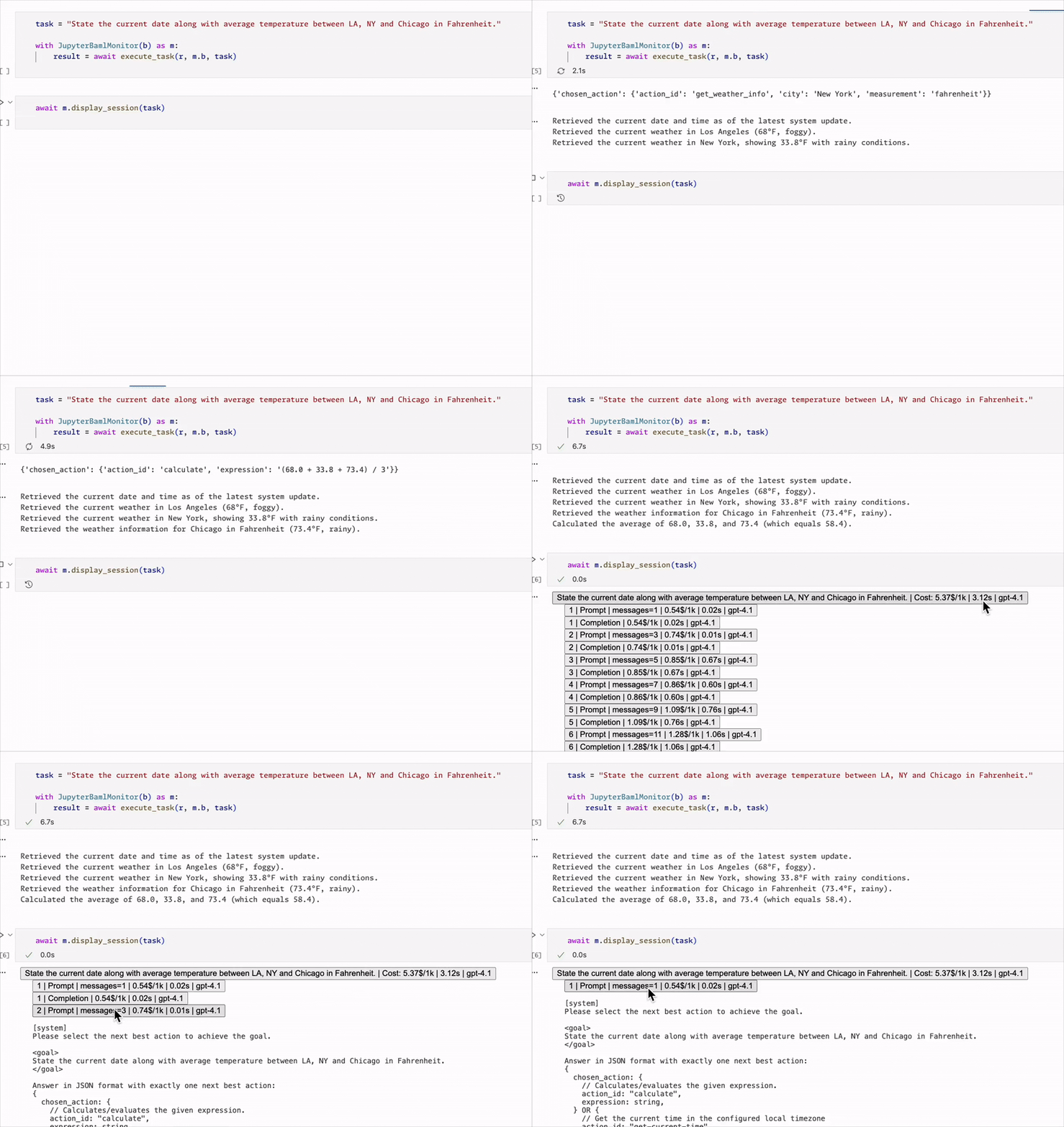
To try it yourself, check out the notebook Simple Agent Demonstration (notebooks/05_simple_agent_demo.ipynb).
But how does it work in detail?
Part 1
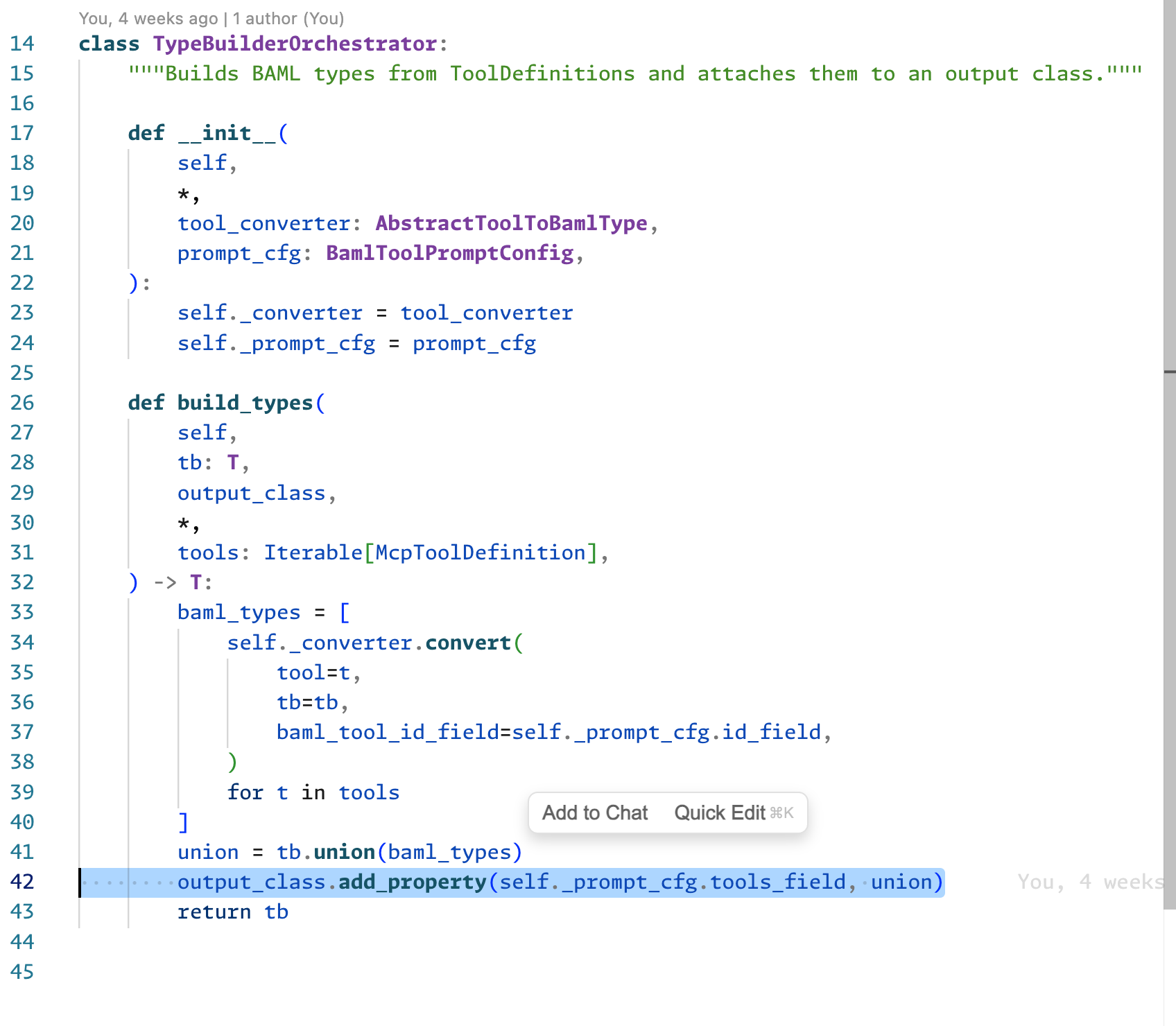
- It all starts with the Typebuilder: https://docs.boundaryml.com/ref/baml_client/type-builder
- we create a baml function output type
class NextAction {
    @@dynamic
}
- We'll use the typebuilder to make it during runtime into a
class NextAction {
    chosen_action MyTool1 | MyTool2 | MyTool3
}
- this happens right here with the add_property
pseudocode:
NextAction.add_property("chosen_action", MyTool1 | MyTool2 | MyTool3)
Part 2
- "ActionRunner" is basically a container which registers the tools
r = ActionRunner(TypeBuilder)
r.add_action(MyTool1)
r.add_action(MyTool2)
r.add_action(MyTool3)
or just
r.add_from_mcp_server(calculator_mcp)
to bulk-add all tools from some mcp server
- Then, r.tb just creates the typebuilder from Part1. according to baml docs, passing the typebuilder makes the baml modify the output classes according to the passed typebuilder in our case it adds the one field as described in part1
tb = r.tb(T.BamlCustomTools_NextAction)
action = b.BamlCustomTools_GetNextAction(
    question, baml_options={"tb": tb}
)
- returned variable action just contains the tool name and all arguments, for example
MyTool1and{"name": "John"} - therefore tool_output = r.run(action) is just a convenience method which just does
tool_output = MyTool1(name="John")
Running the Notebooks
To run code from the notebooks/ folder, you'll first need to:
- Install the
uvpython package manager. - Install all dependencies:
uv sync --dev - Generate necessary BAML code:
uv run baml-cli generate- Alternatively, you can use the VSCode extension to do it automatically every time you edit a
.bamlfile.
- Alternatively, you can use the VSCode extension to do it automatically every time you edit a
1 maintainer

Metadata
1 maintainer
Release files for baml-agents 0.46.1
For a detailed explanation of source distributions (sdists) and built distributions (wheels), please see the package formats documentation.
Source distribution (sdist)
| File | Size | Uploaded | |
|---|---|---|---|
| baml_agents-0.46.1.tar.gz | 62.0 kB | Details |
Built distribution (wheel)
| File | Interpreter | ABI | Platform | Reset |
|---|---|---|---|---|
| baml_agents-0.46.1-py3-none-any.whl | Python 3 | none | any | Details |
Total release size: 145.5 kB
Release files / baml_agents-0.46.1.tar.gz
| Download URL | baml_agents-0.46.1.tar.gz |
|---|---|
| Size | 62.0 kB |
| Tags | Source |
|
SHA-256 checksum How to use checksums |
67c8232562e2ff3ce5d3619ffb5e0a77a97fb8b97baaea69fe8b717d8b73749f
|
|
BLAKE2b-256 checksum How to use checksums |
ebb73dce99c6e711f18ea85153e78a5afffa56c746fe3ae13ec3443fd3140de2
|
| Upload date | |
|
Uploaded using Trusted Publishing? What is trusted publishing? |
No |
| Uploaded via |
uv/0.7.8
|
Release files / baml_agents-0.46.1-py3-none-any.whl
| Download URL | baml_agents-0.46.1-py3-none-any.whl |
|---|---|
| Size | 83.4 kB |
| Tags | Python 3 |
|
SHA-256 checksum How to use checksums |
80c8e856e2f724805dcff1db3a9b8b4ae1fc8e47d05422d9c344675071c2ad48
|
|
BLAKE2b-256 checksum How to use checksums |
ea35199633fe2b54fa8f9a0c9c7c7f8213b90c2da7a549275f1359b406f8b4f2
|
| Upload date | |
|
Uploaded using Trusted Publishing? What is trusted publishing? |
No |
| Uploaded via |
uv/0.7.8
|














