
Local-first agentic coding harness for small and local models.

Project description
Band-Aider

Small models. Scoped edits. Fewer repo fires.
Band-Aider is a local-first agentic coding harness for running coding tasks through small or local OpenAI-compatible models.
Band-Aider breaks coding work into scoped source edits, test edits, stabilization passes, retry loops, file metadata, failure evidence, and resume checkpoints. Instead of handing an agent the whole repo and hoping it develops professional ethics, Band-Aider keeps the model inside a narrower lane.
It is built for people who want to run agentic coding against real repositories without repeatedly swiping a credit card.
Local-first, resumable, and designed around source/test separation. Tiny model, big bore, bigger brakes.
What you get
Band-Aider inventories the repo and builds file metadata before creating scoped source or test work. Alpha handles source-side changes. Beta handles test-side validation and repair. Stabilization passes run targeted tests, collect failure evidence, and decide whether the next move belongs to source, tests, or retry.
Band-Aider runs its own editing protocol and patching routine. The harness determines which files are editable, which context is readonly, and how generated changes are validated before they are accepted:
- Scoped edits: the editing routine receives a focused editable file set and read-only context instead of casually feeding the entire repo to the model like a raccoon into a server room.
- Source/test separation: source edits and test edits are routed through different loops so repair work does not collapse into “just fix everything.”
- Failure evidence: failed tests are reduced into the root-cause message, relevant stack lines, and source clues before the next repair pass.
- Resume checkpoints: file metadata, change history, and workflow state are tracked so long runs can resume after interruption.
- Observability: the terminal UI shows the active task, backlog, stabilization target, frontier, loop, model escalation, and recent logs. Detailed logs cover model calls, prompts, edits, failures, and retries. They are part of the product; read them. They are where the machine confesses.
- Escalation: repeated answers or repeatedly revisited files can move through stronger configured models, then pause for human guidance if the run remains stuck.
- Local-first model support: local and remote OpenAI-compatible endpoints are supported.
This is useful when a small model can handle the edit, but not the chaos around the edit. Most agentic coding failures are not because the model cannot type code. They happen because the model gets too much context, too much permission, and too little accountability. Band-Aider exists to reduce that blast radius.
License
Band-Aider is available under the GNU Affero General Public License v3.0.
The AGPL license permits personal, open-source, and commercial use under its terms, including its source-disclosure requirements. Organizations that need to use, modify, distribute, or operate Band-Aider under different terms can purchase a commercial license.
Copyright © 2026 Art Sea LLC. All rights reserved except as granted under the applicable license.
Install
Install the alpha release from PyPI:
pip install --pre band-aider
To install from source for development:
git clone <your-band-aider-repo-url>
cd band-aider
pip install -e .
Band-Aider can optionally use model2vec==0.8.* as a local narrow-request parser prefilter. Install the optional accelerator with:
pip install --pre "band-aider[model2vec]"
For an editable source install with Model2Vec:
pip install -e ".[model2vec]"
If the package or local embedding model is unavailable, Band-Aider falls back to the full-file parser.
On the first interactive scripts/band-aider run with the optional dependency installed, the launcher asks before downloading the configured embedding model into ${XDG_CACHE_HOME:-~/.cache}/band-aider/model2vec unless BAND_AIDER_MODEL2VEC_CACHE_DIR is set.
Quick start
The current CLI entry point is band_aider/cli.py. Run Band-Aider from the harness directory and point it at a target repo.
band-aider --task "Describe the change you want"
Run with the terminal operator view:
band-aider --terminal-ui --task "Describe the change you want"
Resume the latest saved run:
band-aider --resume
Preview configuration and startup state without running the job:
band-aider --dry-run --task "Describe the change you want"
Startup behavior:
- startup performs a model health check
- startup can use the local Model2Vec gate when the optional package and cached embedding model are available
- when the optional embedding model cache is missing,
scripts/band-aidercan ask before downloading it - if Model2Vec is unavailable or declined, Band-Aider falls back to full-file parsing
--resumerestores checkpointed workflow state--dry-runshould show resolved roots, model configuration, and escalation config count--terminal-uiruns the workflow with a live operator view- editing and model configuration are resolved before edit loops begin
- runtime config should come from the invocation directory, not the resumed target repo
At startup, Band-Aider asks the configured model to reply with:
BAND_AIDER_READY
If the model check fails, Band-Aider exits before inventory, backlog creation, or file edits.
SWE-bench quickstart
If you want to run Band-Aider against a SWE-bench style checkout (e.g., the included SymPy sandbox), see docs/swe-bench.md for step-by-step instructions and the scripts/band-aider-swe-bench helper.
Terminal UX
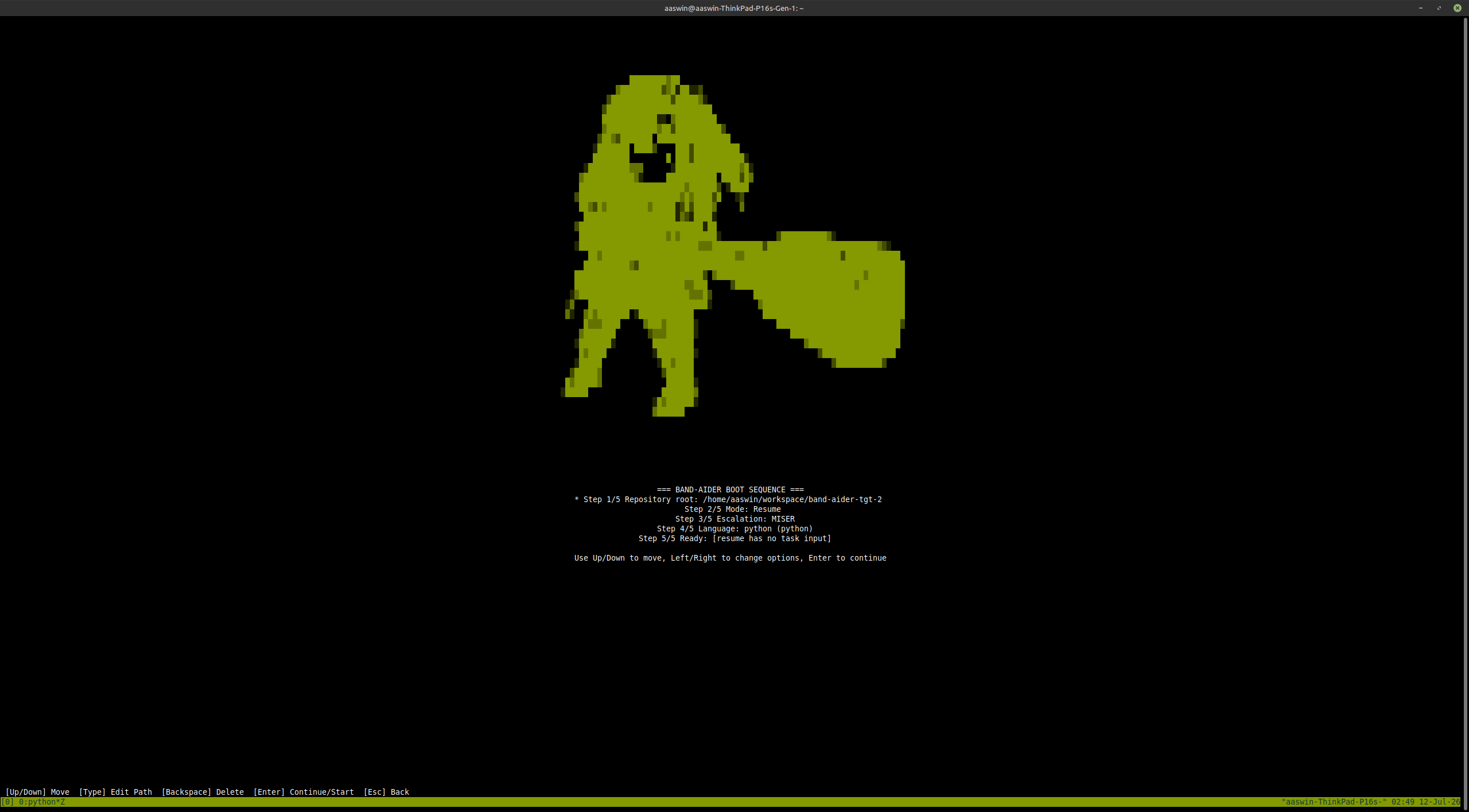
The terminal UI is the recommended way to watch longer runs. Use --terminal-ui when you want to know what Band-Aider is doing without digging through raw logs.
The view is organized around the questions you usually have during a run:
- which task is active
- what file or frontier is being stabilized
- how much backlog remains for inspection, tests, remediation, QA, and deferred work
- which loop is currently running
- what just happened in the recent logs
- whether the model is being escalated because it repeated itself
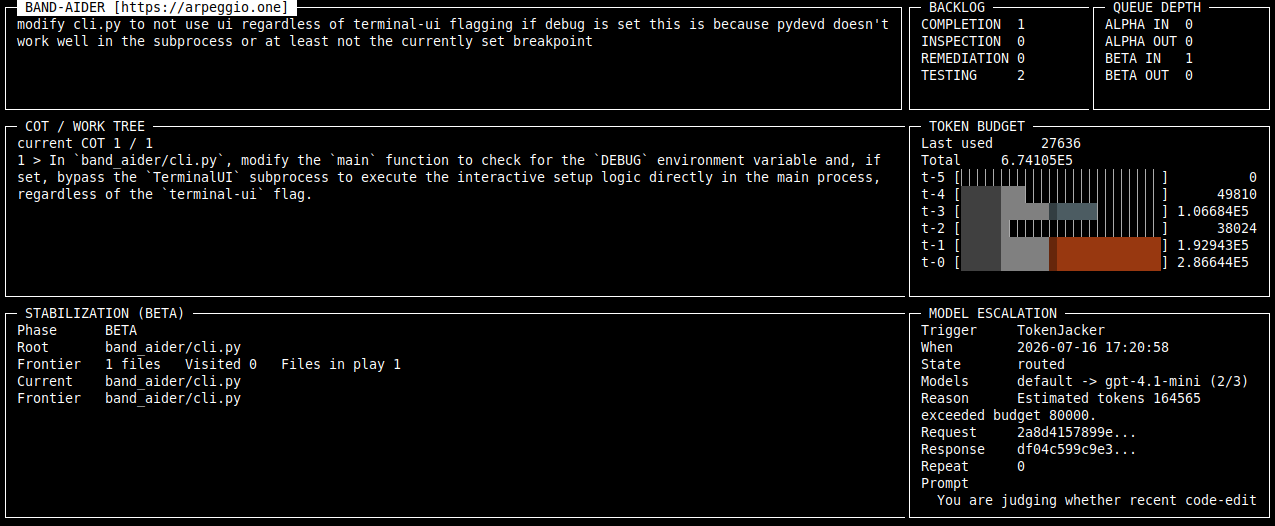
When the model repeats the same answer, Band-Aider first tries the configured escalation models. If escalation also repeats, the terminal UI asks for human guidance. Write a short correction that should be added to the original prompt, then press Enter to resend.
Example guidance:
The stale import is in judgement/search_replace_token_generator.py.
Do not add a package-level compatibility export.
Leave the guidance blank to defer the run. Use Ctrl-C if you want to abort from the terminal.
The terminal UI does not replace reviewing diffs and tests. It is there to keep the run observable while Band-Aider works.
Hotkeys
The terminal UI supports the following keyboard shortcuts:
General Navigation
- Tab / Shift-Tab: Cycle focus between UI panels (Header, Backlog, COT, Logs) and log controls.
- Up / Down: Scroll the content of the currently focused panel.
- F1: Show a brief help message in the status bar.
- Ctrl-C: Terminate the current run and exit.
Loop Control
- F5: Interrupt the next AI call. This requests human intervention before the next cycle begins, allowing you to provide guidance even if the model hasn't repeated itself yet.
Log Filtering & Search
- F3: Jump focus directly to the log Filter field (search logs by text).
- F4: Jump focus directly to the Logger namespace field.
- F6 or Ctrl-R: Reset all log filters and search text to defaults.
- Enter: When focused on a filter field, apply the filter or cycle through options (for Level and Logger).
- Escape: When focused on an input field, clear the current text.
- Backspace: Delete characters in the focused input field.
Human Intervention Mode
- F8: Send your guidance and resume the run.
- Enter: Add a new line to your guidance message.
- Escape: Resume the run without sending any additional guidance.
- Ctrl-C: Abort the intervention and the run.
Model and environment configuration
Band-Aider expects an OpenAI-compatible model endpoint.
For a local Iona-style endpoint:
export IONA_BASE_URL="https://your-local-openai-compatible-endpoint/api"
export IONA_API_KEY="<your-local-api-key>"
export IONA_MODEL="default"
For direct OpenAI-compatible configuration:
export OPENAI_API_BASE="https://api.openai.com/v1"
export OPENAI_API_KEY="<your-openai-api-key>"
export OPENAI_MODEL="gpt-4.1-mini"
For Band-Aider-specific overrides:
export BAND_AIDER_MODEL="openai/default"
export BAND_AIDER_API_BASE="https://your-local-openai-compatible-endpoint/api"
export BAND_AIDER_API_KEY="<your-api-key>"
Band-Aider supports the following model endpoint configuration families.
Model
BAND_AIDER_MODEL
OPENAI_MODEL
IONA_MODEL
BAND_AIDER_MODEL selects the primary model used by Band-Aider.
OPENAI_MODEL selects an OpenAI-compatible model, including models used for escalation.
IONA_MODEL selects the model exposed by a local Iona-style endpoint. The usual local default is default.
API base
BAND_AIDER_API_BASE
OPENAI_API_BASE
OPENAI_BASE_URL
IONA_BASE_URL
API key
BAND_AIDER_API_KEY
OPENAI_API_KEY
IONA_API_KEY
WEBUI_KEY
The key is passed only to the configured model endpoint. Logs should redact it.
Editing protocol
Band-Aider does not delegate edits to an external editing CLI. It uses its own editing protocol and patching routine to request bounded changes, apply them to the selected files, and validate the resulting patch.
Legacy Aider integration is deprecated and is no longer the supported editing path. Obsolete Aider command, wrapper, edit-format, and extra-argument settings should be removed from existing runtime configuration.
Escalation configs
Band-Aider can load numeric escalation configs from the directory where you launch the command or one of its ancestors up to your home directory.
For example, if you run Band-Aider from:
~/workspace/band-aider/subdir
then Band-Aider checks these directories in order:
~/workspace/band-aider/subdir
~/workspace/band-aider
~/workspace
~/
For each numeric tier, it looks for band-aider.N.env in those directories and uses the nearest matching ancestor. band-aider.1.env is resolved independently from band-aider.2.env, so different tiers can come from different ancestors within that home-bounded search.
These files are not discovered from the target repo merely because the run resumes against that target. The invocation path owns runtime config. The target repo owns edits. Mixing those two is how tools become haunted.
By default, an escalation config uses the completion client. Set CLIENT=response in that env file when the tier should be instantiated through the Responses client instead.
Example band-aider.1.env:
CLIENT=response
OPENAI_MODEL=gpt-5
OPENAI_API_BASE=https://api.openai.com/v1
OPENAI_API_KEY=<your-openai-api-key>
Example band-aider.2.env:
OPENAI_MODEL=gpt-4o
OPENAI_API_BASE=https://api.openai.com/v1
OPENAI_API_KEY=<your-openai-api-key>
The default config is used first. Numeric configs are used only when escalation is triggered.
Project layout
band_aider/
  ai_client/      OpenAI-compatible client code, logging, prompt helpers
  context/        persistent workflow state, checkpoints, metadata records
  judgement/      file metadata, graph logic, test execution, editing protocol
  loop/           Supreme, stabilization, Alpha, and Beta orchestration
  cli.py          argparse entry point and runtime wiring
Development notes
Run tests with:
pytest
Run a targeted test file:
pytest tests/band_aider/test_some_file.py
When changing workflow code, prefer small changes with clear ownership. Avoid broad rewrites unless the current abstraction is actively misleading the loop.
Philosophy
Band-Aider assumes small models can be useful if the harness does the adult supervision.
Do not ask the model to understand the whole repo at once. Do not let it edit everything. Do not treat one failed test as proof that the source is wrong. Do not confuse motion with progress.
Give the model a narrow task, relevant files, failure evidence, and a way to recover.
Small model. Scoped work. Smaller collateral.
Release history Release notifications | RSS feed


Download files
Download the file for your platform. If you're not sure which to choose, learn more about installing packages.
Source Distribution
Built Distribution
Filter files by name, interpreter, ABI, and platform.
If you're not sure about the file name format, learn more about wheel file names.
Copy a direct link to the current filters
File details
Details for the file band_aider-1.5.5b0.tar.gz.
File metadata
- Download URL: band_aider-1.5.5b0.tar.gz
- Upload date:
- Size: 275.8 kB
- Tags: Source
- Uploaded using Trusted Publishing? No
- Uploaded via: twine/6.2.0 CPython/3.12.13
File hashes
| Algorithm | Hash digest | |
|---|---|---|
| SHA256 |
78f739ab4009661b54c296b4b212ee548b856cfc6b4df3c8d5973023ccf49668
|
|
| MD5 |
8bc3b4397c0b154ec90664ecdae95247
|
|
| BLAKE2b-256 |
3681613d693be40e5468bc6a70c8b086e1200b3a8152ddbe21e61a45fe8c589e
|
File details
Details for the file band_aider-1.5.5b0-py3-none-any.whl.
File metadata
- Download URL: band_aider-1.5.5b0-py3-none-any.whl
- Upload date:
- Size: 350.9 kB
- Tags: Python 3
- Uploaded using Trusted Publishing? No
- Uploaded via: twine/6.2.0 CPython/3.12.13
File hashes
| Algorithm | Hash digest | |
|---|---|---|
| SHA256 |
7ca48309315288f3cac47b08b849b2f34f813b709a7a34e9886a857cae486caa
|
|
| MD5 |
f10d5b89e8f97176171a4f4a5c92e442
|
|
| BLAKE2b-256 |
b4c394217078c0085006125fefd3a47a8fa255247c1ac38254f9bc1a8decfc25
|






