
BandCamp Album Extractor
Download and organize your bandcamp library with ease!
Install
(preferred) from pip
pip install bandcamp_extract
From github repo
To install this package simply run
pip install .
in the root of this package
Setup
After installation the extractor's binary is called bcextr.
Breaking change (0.2.0):
bcextris now a command group. What used to bebcextr <zip>is nowbcextr extract <zip>.
bcextr extract works standalone with no setup. The bcextr api commands
pull albums directly from your Bandcamp collection, which requires a one-time
login first.
Bandcamp has no username/password API, so this reuses the same session cookie your browser already has after you log in on bandcamp.com.
1. Get your Bandcamp username
This is the name in the URL of your own collection page:
https://bandcamp.com/<username>. You can find it in the account menu on
bandcamp.com, or from the URL after clicking "Collection".
2. Get your identity cookie
- Log in to bandcamp.com in your browser.
- Open developer tools (
F12, orCmd+Opt+Ion macOS). - Go to the Application tab in Chrome/Edge (Storage tab in Firefox),
then Cookies →
https://bandcamp.comin the left sidebar. - Find the row named
identityand copy its Value column. It's a long opaque string — copy the whole thing.
This cookie is a live login credential for your account: don't share it,
paste it into chat tools, or commit it anywhere. bcextr only stores it
locally in ~/.config/bcextr/session.json (readable only by you).
3. Log in with bcextr
bcextr api login
You'll be prompted for your Bandcamp username and the cookie value from the steps above.
If your cookie later expires, just re-run bcextr api login with a fresh
value.
Shell completion (optional)
bcextr is built on Click, which
provides tab-completion for subcommands (extract, api, mv, etc.) and
file/directory paths (including for --pattern, which completes like a
regular folder path). Add the line for your shell to its startup file, then
restart your shell (or source the file):
bash (~/.bashrc):
eval "$(_BCEXTR_COMPLETE=bash_source bcextr)"
zsh (~/.zshrc):
eval "$(_BCEXTR_COMPLETE=zsh_source bcextr)"
fish: generate the completion file once (no eval-on-startup needed):
_BCEXTR_COMPLETE=fish_source bcextr > ~/.config/fish/completions/bcextr.fish
Usage
bcextr extract
Extract a zip you already downloaded:
bcextr extract ~/Downloads/album.zip --pattern ~/Music/{artist}/{album}/{title}
Default pattern if not provided is: ./{artist}/{album}/{title}
bcextr api list / bcextr api choose
List your collection:
bcextr api list
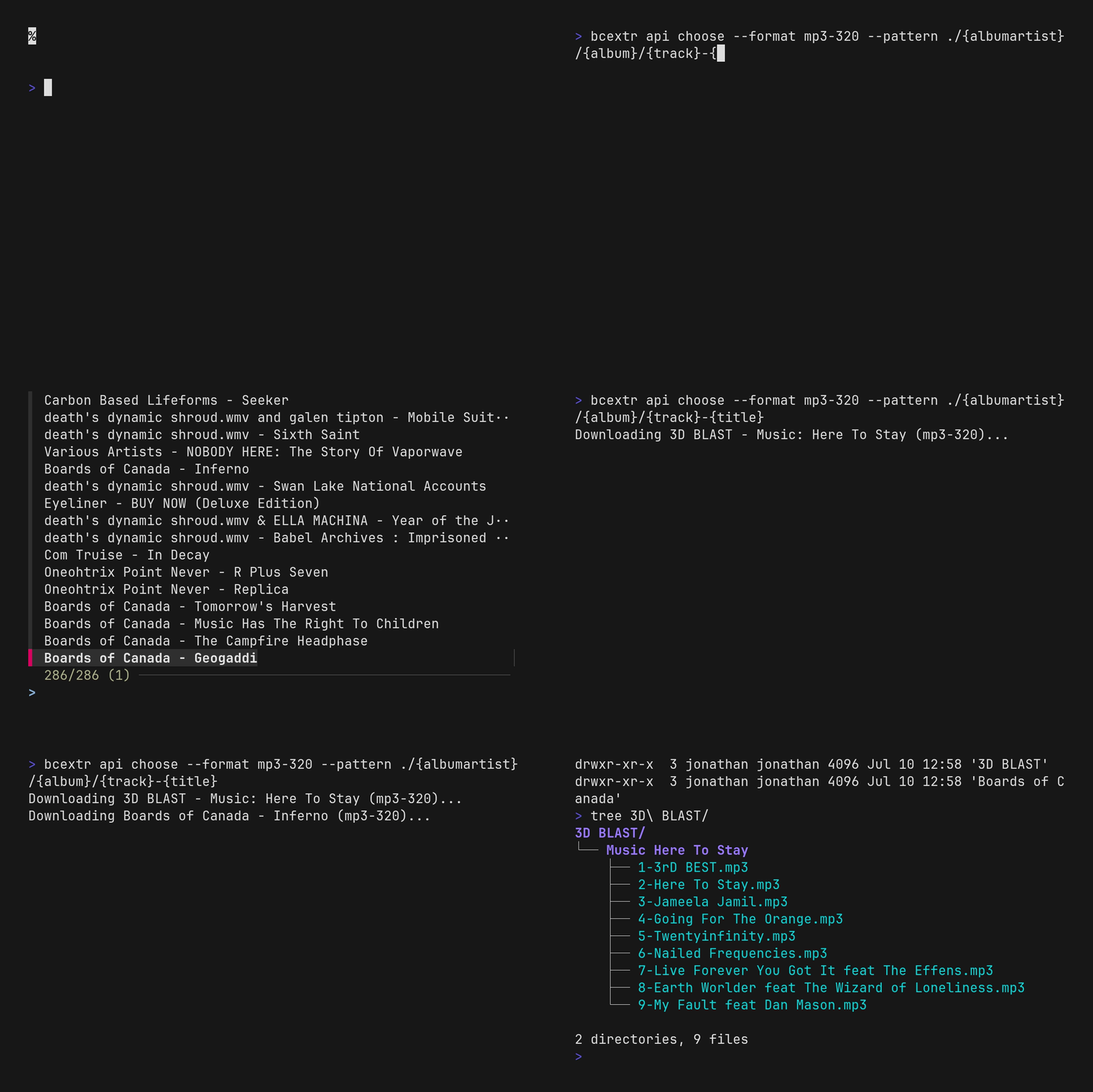
Pick albums and extract them straight to your library:
bcextr api choose --pattern ~/Music/{albumartist}/{album}/{title} --format flac
This opens an fzf multi-select over your collection, downloads each chosen
album in the requested format, and runs it through the same extract/rename
logic as bcextr extract.
In fzf there are two hot keys to keep in mind. Ctrl+a will select all and
Tab will toggle a selection in the list.
--format accepts one of mp3-320, mp3-v0, flac, aac-hi, vorbis,
alac, wav, aiff-lossless. If omitted, you'll get a format picker
(applied to the whole batch) instead.
This relies on Bandcamp's unofficial, undocumented collection API and may break if Bandcamp changes it.
bcextr sync
Incrementally synchronize your entire Bandcamp collection into your music library:
bcextr sync --pattern ~/Music/{albumartist,artist}/{album}/{track}-{title} --format flac
bcextr sync tracks your synced purchases in ~/.config/bcextr/sync.toml (or a custom file via --sync-file) and
only downloads what needs updating:
- New purchases: downloads albums and standalone tracks added to your Bandcamp collection since the last sync.
- Updated items: re-downloads items whose metadata or files were modified on Bandcamp after your last sync.
- Format changes: re-downloads in the new format if you switch
--format(e.g. frommp3-320toflac). - Pattern or flag changes: re-downloads and organizes into new paths if
--pattern,--strip-spaces,--no-track-padding, or--replacement-textchange. - Removed items: prints a warning if an album was previously synced but is no longer present in your Bandcamp collection, while preserving your local files.
Flags:
--pattern: destination pattern (default:./{artist}/{album}/{title}).--format: audio format (flac,mp3-320,mp3-v0,aac-hi,vorbis,alac,wav,aiff-lossless). Defaults to the previous sync's format, ormp3-320on first run.--sync-file: path to sync state TOML file (default:~/.config/bcextr/sync.toml). Automatically created if it doesn't exist. Useful for syncing different formats or destinations independently (e.g.--sync-file ./music/.sync.toml).--remove: interactive fuzzy-find multi-select (fzf) over synced items to delete their files and folders from disk and mark them as skipped so they are not re-downloaded.--strip-spaces: replace spaces in metadata with--replacement-text.--no-track-padding: disable track number zero-padding.--replacement-text: character used to replace path-unsafe characters (default: empty).
bcextr mv / bcextr cp
Reorganize an existing folder of music (searched recursively, however deep the
files are nested) into a pattern-based structure. mv moves the files (the
originals are gone); cp copies them, leaving the originals in place:
bcextr mv ~/Music --pattern ~/New_Music/{albumartist}/{album}/{title}
bcextr cp ~/Music --pattern ~/New_Music/{albumartist}/{album}/{title}
Pattern substitution
The pattern substitution will substitute any parameter it gets in tinytag
The file extension will also be added to the end of the pattern when moving
the song to it's destination
tag.album         # album as string
tag.albumartist   # album artist as string
tag.artist        # artist name as string
tag.audio_offset  # number of bytes before audio data begins
tag.bitrate       # bitrate in kBits/s
tag.comment       # file comment as string
tag.composer      # composer as string
tag.disc          # disc number
tag.disc_total    # the total number of discs
tag.duration      # duration of the song in seconds
tag.filesize      # file size in bytes
tag.genre         # genre as string
tag.samplerate    # samples per second
tag.title         # title of the song
tag.track         # track number as string
tag.track_total   # total number of tracks as string
tag.year          # year or data as string
It is important to note that any files that are not music (in the zip, or in the
source folder for bcextr mv/bcextr cp) are not moved or copied to the
destination folder.
Fallback fields
Some tags (like albumartist) aren't always set. Use {fieldA,fieldB} to fall
back to fieldB when fieldA is missing, and chain as many comma-separated
fields as you want:
bcextr extract ~/Downloads/album.zip --pattern ~/Music/{albumartist,artist}/{album}/{title}
bcextr api choose --pattern ~/Music/{albumartist,artist,genre}/{album}/{title} --format flac
Each field is tried in order and the first one with a real value wins. If none of them have a value, it resolves to an empty string rather than erroring. Referencing an unknown field name anywhere in the group (a typo, for example) still raises the usual "Param not found" error.
Path-unsafe symbols in metadata
Before substitution, every metadata value is run through
pathvalidate's replace_symbol to
strip characters that would otherwise break the destination path (e.g. /,
:, ?). By default these are removed entirely and spaces are left alone;
pass --replacement-text to substitute something else instead, and
--strip-spaces to also replace spaces:
bcextr extract ~/Downloads/album.zip --pattern ~/Music/{artist}/{album}/{title} --replacement-text "_" --strip-spaces
1 maintainer

Metadata
1 maintainer
Release files for bandcamp-extract 1.0.0
For a detailed explanation of source distributions (sdists) and built distributions (wheels), please see the package formats documentation.
Source distribution (sdist)
| File | Size | Uploaded | |
|---|---|---|---|
| bandcamp_extract-1.0.0.tar.gz | 32.9 kB | Details |
Built distribution (wheel)
| File | Interpreter | ABI | Platform | Reset |
|---|---|---|---|---|
| bandcamp_extract-1.0.0-py3-none-any.whl | Python 3 | none | any | Details |
Total release size: 62.5 kB
Release files / bandcamp_extract-1.0.0.tar.gz
| Download URL | bandcamp_extract-1.0.0.tar.gz |
|---|---|
| Size | 32.9 kB |
| Tags | Source |
|
SHA-256 checksum How to use checksums |
aa589a179cb092e097ea951f640db7391e06a7ce5d36c519740c9ee111b8b59d
|
|
BLAKE2b-256 checksum How to use checksums |
fc2281f9bf44735cfe7c293eb78a8e88c8f4319617c6132b280a603ef094479f
|
| Upload date | |
|
Uploaded using Trusted Publishing? What is trusted publishing? |
Yes |
| Uploaded via |
twine/7.0.0 CPython/3.13.14
|
Provenance
Provenance describes where a file came from. On PyPI, provenance is shared via attestations, which provide a verifiable record of the build or publishing details. View details, limitations and caveats.


PyPI Publish Attestation
PyPI verified that this artifact, at this checksum, originated from the publisher listed below.
Signed by GitHub Actions, verified by PyPI on Aug 28, 2026.
Transparency logRelease files / bandcamp_extract-1.0.0-py3-none-any.whl
| Download URL | bandcamp_extract-1.0.0-py3-none-any.whl |
|---|---|
| Size | 29.6 kB |
| Tags | Python 3 |
|
SHA-256 checksum How to use checksums |
02d03da13575c1e3267dad0c3dc27b9e7f13ba06088b2c432580001e387a79ce
|
|
BLAKE2b-256 checksum How to use checksums |
2acf01424cf0e61d281109774e21b85b2e07f3f8932ef78a921f714ad1d0be7d
|
| Upload date | |
|
Uploaded using Trusted Publishing? What is trusted publishing? |
Yes |
| Uploaded via |
twine/7.0.0 CPython/3.13.14
|
Provenance
Provenance describes where a file came from. On PyPI, provenance is shared via attestations, which provide a verifiable record of the build or publishing details. View details, limitations and caveats.
PyPI Publish Attestation
PyPI verified that this artifact, at this checksum, originated from the publisher listed below.
Signed by GitHub Actions, verified by PyPI on Aug 28, 2026.
Transparency log













