
A Python module and script to synchronise media purchased on bandcamp.com with a local directory. Fork of meeb/bandcampsync with Rich TUI and cross-platform improvements.

Project description
BandcampSync-TUI




🍴 Fork Notice: This is a fork of meeb/bandcampsync by @meeb. The original project provided the foundation for this work. This fork extends it with a modern TUI, improved cross-platform support, and enhanced download capabilities. See What's Different in This Fork for details.
BandcampSync-TUI is a Python module and command line script which synchronises media purchased on a Bandcamp (https://bandcamp.com/) account with a local directory.
You may use this to download media you have purchased from Bandcamp to a local media server, such as Plex or Jellyfin.
Most media items purchased on Bandcamp have high quality download options
available and BandcampSync-TUI defaults to flac.

✨ What's Different in This Fork
This fork introduces several significant improvements over the original:
| Feature | Original | This Fork |
|---|---|---|
| Package Name | bandcampsync |
bandcampsync-tui |
| User Interface | Plain text output | Rich TUI with progress bars, spinners, and colors |
| Download Speed | Single-stream | Multi-part parallel downloads (4 threads) |
| Windows Support | Basic | Full cross-platform with proper path sanitization |
| HTTP Client | requests |
curl_cffi (better anti-bot handling) |
| Ethics | — | ETHICAL.md statement included |
Key Improvements
- 🎨 Beautiful TUI: Progress bars with download speed/ETA, color-coded messages, spinner animations
- 🏷️ Download ID Visibility: The TUI now displays the download item ID (e.g.
[ID 123456]) in progress descriptions and status messages to make it easy to add items to the ignore file. - ⚡ Faster Downloads: Large files (>5MB) download in parallel chunks
- 🖥️ True Cross-Platform: Handles Windows-forbidden characters, reserved names, and temp file cleanup
- 🛡️ Better Reliability: Automatic retry with exponential backoff, graceful error handling
- 📜 Ethical Commitment: See our Ethical Statement for project values
For a complete list of changes, see the CHANGELOG.
How It Works
When called, bandcampsync-tui will:
- Authenticate to bandcamp.com as you using your exported session cookies
- Scan your local media directory for existing downloaded items
- Index a list of all of your purchased items in your Bandcamp collection
- Download the archive of missing items not downloaded already from your collection
- Unzip the archive and move the contents to the local media directory
The media directory will have the following format:
Docker
This fork does not provide or maintain a Docker image. If you need a containerised setup, please use the original project's Docker resources:
- Original project: https://github.com/meeb/bandcampsync
- Official image: ghcr.io/meeb/bandcampsync:latest
We recommend using the upstream project's image and examples for container deployments, as they maintain the Docker artifacts and runbook. This repository focuses on the interactive TUI and local improvements.
If you'd like, I can add a short compatibility note or a simple example showing how to adapt the upstream Dockerfile for this fork — tell me and I'll draft it.
Configuration
BandcampSync-TUI requires minimal configuration. First, it requires your session cookies from an authenticated Bandcamp account. The easiest way to get this is to go to https://bandcamp.com/ in your browser and log in with your account.
Next, open the developer tools in your browser (F12 button on most browsers, or select "developer tools" from the options menu).
Reload the index page and find the index page request in your network requests
tab of your browser. Go to the "Request Headers" section then select and copy
the string after the Cookie header. The string should look something like
this:
client_id=00B1F3C8EB48E181A185CCD041E40C0E8F; session=1%0893C88%570EE405455%%8DEC37B5BC393983DB983DD%%BDFD46C3B8A0%%580DA466D5CD; identity=1%HhehuehUFEUiuebn%%2ADB72300DAE573%BEEF389A1B526EA35AC38019FA0A6F%11B4BD5FBC18B83F720; js_logged_in=1; logout=%7B%22username%22%3A%22someuser%22%7D; download_encoding=401; BACKENDID3=some-sever-name
Save this string to a file called cookies.txt.
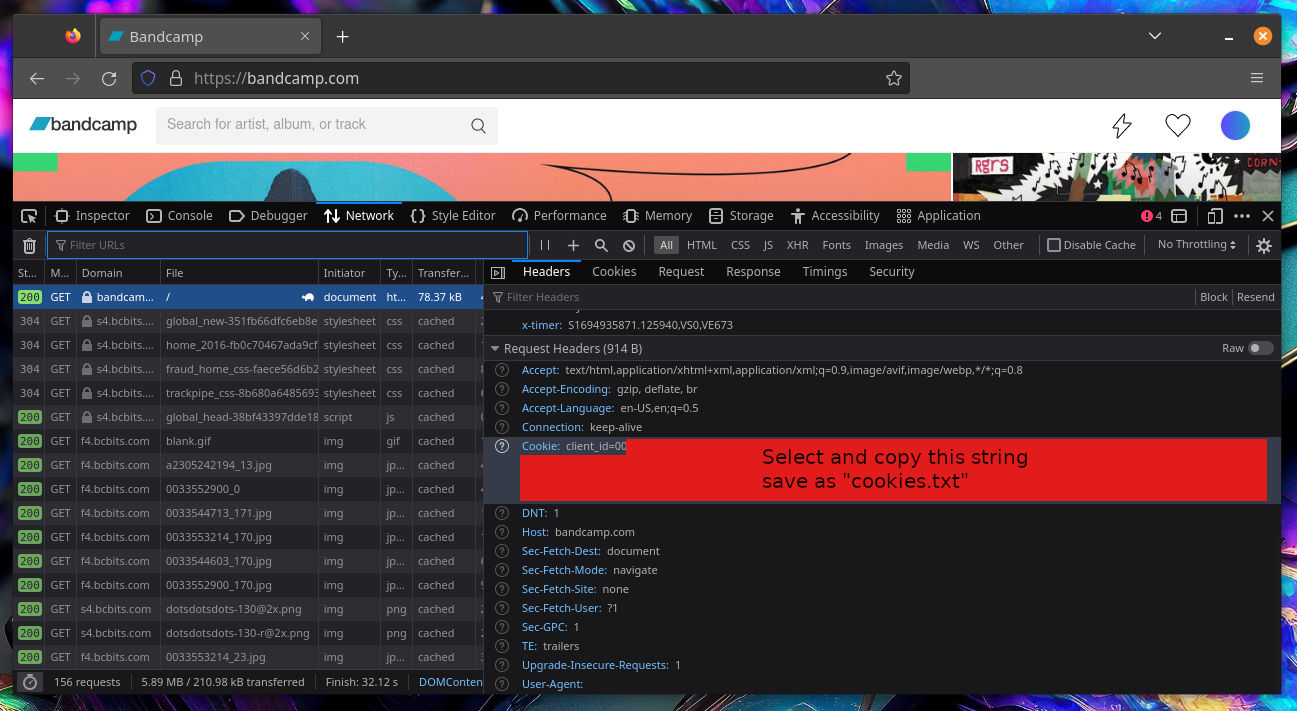
You need to save your session ID from cookies manually because Bandcamp has a captcha on the login form so BandcampSync-TUI can't log in with your username and password for you.
IMPORTANT NOTE: Keep the cookies.txt file safe! Anyone with access to this
file can log into your Bandcamp account, impersonate you, potentially make
purchases and generally have total access to your Bandcamp account!
You can also use Netscape formatted cookie export files if you have exported your cookies using a cookie exporter plugin or similar tool.
CLI usage
Once you have the Python bandcampsync-tui module installed you can call it
with the bandcampsync-tui command:
bandcampsync-tui --cookies cookies.txt --directory /path/to/music
or in shorthand:
bandcampsync-tui -c cookies.txt -d /path/to/music
You can use -t or --temp-dir to set the temporary download directory used.
You can use -i or --ignore to bypass artists that have data issues that your
OS can not handle.
See -h or --help for the full list of command line options.
bandcampsync-tui --cookies cookies.txt --directory /path/to/music --ignore "badband"
--ignore supports multiple strings space separated strings, for example
--ignore "band1 band2 band3".
You can use -I or --ignore-file to specify the path to a file containing
bandcamp ids of each item to skip.
1546934218  # Chrome Sparks / Sparks EP
1418240212  # Chrome Sparks / Goddess EP
If you do, the items downloaded will be appended to the file, so that the next time you run the script those items will not be re-downloaded. This means you can use media managers such as Lidarr to rename artist, album and track names automatically, rename the directory, or even move the items out of the download directory without issues.
You can notify an external HTTP server when new items have been loaded with -n
or --notify-url.
bandcampsync ... --notify-url "http://some.service.local/some-uri"
You can use this to call a "refresh" hook on media servers (for example rescan a
Plex or Jellyfin library). The --notify-url parameter, if set, simply makes an
HTTP GET request to the specified URL and confirms it returns a 2XX response.
For advanced notify URLs you can use the following --notify-url format:
method url headers body
method must be one of GET or POST. url is any URL. headers are a comma
separated list of key=value pairs and body is an body string to send if the
method is POST. You can use - for header and body values to leave them
unset. Some examples:
GET http://some.service.local/some-uri - -
GET http://some.service.local/some-uri header1=abc,header2 -
POST http://some.service.local/some-uri auth-header=abc somedata
Formats
By default, BandcampSync will download your music in the flac format. You can
specify another format with the --format argument. Common Bandcamp download
formats are:
| Name | Description |
|---|---|
mp3-v0 |
Variable bitrate MP3. Small file sizes. OK quality. |
mp3-320 |
High quality MP3. Medium file sizes. Good quality. |
flac |
Lossless audio. Large file sizes. Original Quality. |
aac-hi |
Apple variable bitrate format. Small file sizes. OK quality. |
aiff-lossless |
Uncompressed audio format. Biggest file size. Original quality. |
vorbis |
Open source lossy format. Small file sizes. OK quality. |
alac |
Apple lossless format. Large file sizes. Original quality. |
wav |
Uncompressed audio format. Biggest file size. Original quality. |
Contributing
All properly formatted and sensible pull requests, issues and comments are welcome.
Acknowledgments
This project is a fork of meeb/bandcampsync created by @meeb.
Thank you to the original author and all contributors for building the foundation that made this fork possible.
License
This project is licensed under the BSD 3-Clause License - see the LICENSE file for details.
The original project by @meeb is also licensed under the BSD 3-Clause License.
Ethical Commitment
This project includes an Ethical Statement that outlines our values and principles regarding the responsible use of this software. We encourage all users to read and consider these principles when using, modifying, or distributing this software.
Release history Release notifications | RSS feed


Download files
Download the file for your platform. If you're not sure which to choose, learn more about installing packages.
Source Distribution
Built Distribution
Filter files by name, interpreter, ABI, and platform.
If you're not sure about the file name format, learn more about wheel file names.
Copy a direct link to the current filters
File details
Details for the file bandcampsync_tui-0.7.0.tar.gz.
File metadata
- Download URL: bandcampsync_tui-0.7.0.tar.gz
- Upload date:
- Size: 26.6 kB
- Tags: Source
- Uploaded using Trusted Publishing? No
- Uploaded via: twine/6.2.0 CPython/3.14.2
File hashes
| Algorithm | Hash digest | |
|---|---|---|
| SHA256 |
89d40757f24b42f9b055fb337fc58cb3c421bdaf386c1b3f1ab881891dab2e33
|
|
| MD5 |
052a4e00dbbe3a95f6414e679d17aaaa
|
|
| BLAKE2b-256 |
4bdcb3b7d33356ddf9a1f620973ccbb6742a4adb7300e08d5f4052e328b05dcc
|
File details
Details for the file bandcampsync_tui-0.7.0-py3-none-any.whl.
File metadata
- Download URL: bandcampsync_tui-0.7.0-py3-none-any.whl
- Upload date:
- Size: 23.6 kB
- Tags: Python 3
- Uploaded using Trusted Publishing? No
- Uploaded via: twine/6.2.0 CPython/3.14.2
File hashes
| Algorithm | Hash digest | |
|---|---|---|
| SHA256 |
8a9007260ce427d05bef1484c98ed582d84894aebbe65729cf0ccc67f252cc13
|
|
| MD5 |
d2dbaf4f7e106baf3f673f9a2ec62b5d
|
|
| BLAKE2b-256 |
ea12af14c6e1bbdce59bcd5badc3cb369e8ac3e8fd904570a944768ae2b70537
|






