
barca
Run Python tasks. Cache assets. Recompute only the partitions that changed.
Start locally; add one server to manage runs across machines.
Docs · Guide · Changelog · Contributing


Status: pre-1.0. A breaking change to the CLI ships in a minor release with a "Breaking" line in the changelog.
Barca runs Python functions and keeps their results and run history together. Use @asset
for a cached result, @task for an action that runs every time, and partitions for work
that should be cached separately by customer, date or another key. Declare dependencies
with inputs={"parameter": upstream_function}.
| You want to | Start with |
|---|---|
| Get an asset and reuse unchanged results | barca get summary |
| Run a task and reuse its cached inputs | barca run publish |
| Get one partition | barca get report --partition customer=acme |
| Manage runs on one server | barca serve, then barca get summary --server http://host:8274 |
Local use needs no server or configuration. A server adds a shared run history, schedules and a web UI. Getting Started covers each path.
Why barca
- Discovers dependencies from source. The graph comes from parsing Python. Computed partition keys and batch groups can import your module to resolve their values.
- One install, no server.
uv add barcabrings the binary, the decorators and a Python API; the state is one directory,.barca/. - Recomputes only what changed. An asset runs again when its code, the project code it calls, or its inputs change; everything else comes from the cache.
- Milliseconds of overhead. A one-asset pipeline runs in 64 ms from process start to exit, against 1.07 s for Dagster and about 5 s for Prefect and Airflow on the same machine (comparison); 0.28.3 then cut barca's time for it from 86 to 47 ms.
Install
uv add barca # or: pip install barca
Python 3.12 or later. The wheel contains the barca binary, the decorators and a Python API;
wheels are published for macOS on Apple Silicon and for Linux on x86-64 and arm64, glibc and
musl. Barca runs your steps with the Python of the environment it is installed in, or python3
on PATH.
Optional extras: barca[parquet] (pyarrow, for DataFrames), barca[sql] (DuckDB, for
barca sql), barca[datadog], and barca[s3], barca[gcs], barca[azure] or
barca[remote] for a remote store.
Example
# pipeline.py
from barca import asset


@asset()
def raw_data() -> list[dict]:
    return [{"x": 1}, {"x": 2}, {"x": 3}]


@asset(inputs={"data": raw_data})
def summary(data: list[dict]) -> dict:
    return {"count": len(data), "total": sum(d["x"] for d in data)}
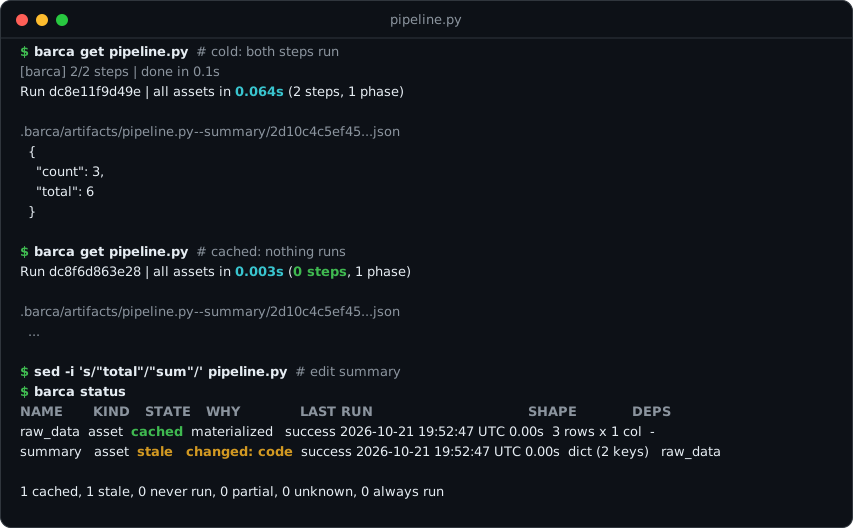
$ barca get pipeline.py
[barca] 2/2 steps | done in 0.1s
Run dc8e11f9d49e | all assets in 0.064s (2 steps, 1 phase)

.barca/artifacts/pipeline.py--summary/2d10c4c5ef45...json
  {
    "count": 3,
    "total": 6
  }

$ barca get pipeline.py
Run dc8f6d863e28 | all assets in 0.003s (0 steps, 1 phase)
...
get prints the path of each result, with a preview of a small json value in a terminal. The
second run executes 0 steps: both results come from the cache.
Change summary (say, "total" becomes "sum") and ask what is stale. status runs nothing:
$ barca status
NAME      KIND   STATE   WHY            LAST RUN                               SHAPE           DEPS
raw_data  asset  cached  materialized   success 2026-10-21 19:52:47 UTC 0.00s  3 rows x 1 col  -
summary   asset  stale   changed: code  success 2026-10-21 19:52:47 UTC 0.00s  dict (2 keys)   raw_data

1 cached, 1 stale, 0 never run, 0 partial, 0 unknown, 0 always run

$ barca get summary
[barca] 1/2 steps | done in 0.0s
Run dc8c75a5f03a | got 'summary' in 0.034s (1 step, 1 phase)
...
For partitioned chains, a changed key also limits planning to the affected keys after sensor discovery. No batching setting is required.
Only summary runs again; raw_data comes from the cache. To recompute by hand, name the
assets: barca get summary --refresh raw_data (and everything downstream of it), or
--refresh-all. Do not delete files under .barca/ to force a recompute.
An asset that reads a file, a bucket or a table in its own body has the same code and inputs
on every run, so it is served from cache even after the data changes. Data from outside comes
in through a @sensor, which runs every time and returns something identifying the current
version; the assets that take it as an input re-run only when that value changes:
import hashlib
from pathlib import Path

from barca import asset, sensor


@sensor()
def orders_version() -> str:
    return hashlib.md5(Path("orders.csv").read_bytes()).hexdigest()


@asset(inputs={"version": orders_version})
def orders(version: str) -> list:
    return Path("orders.csv").read_text().splitlines()[1:]
More: barca docs cache ("External data that changes in place"), which also lists what the
run hash does not see.
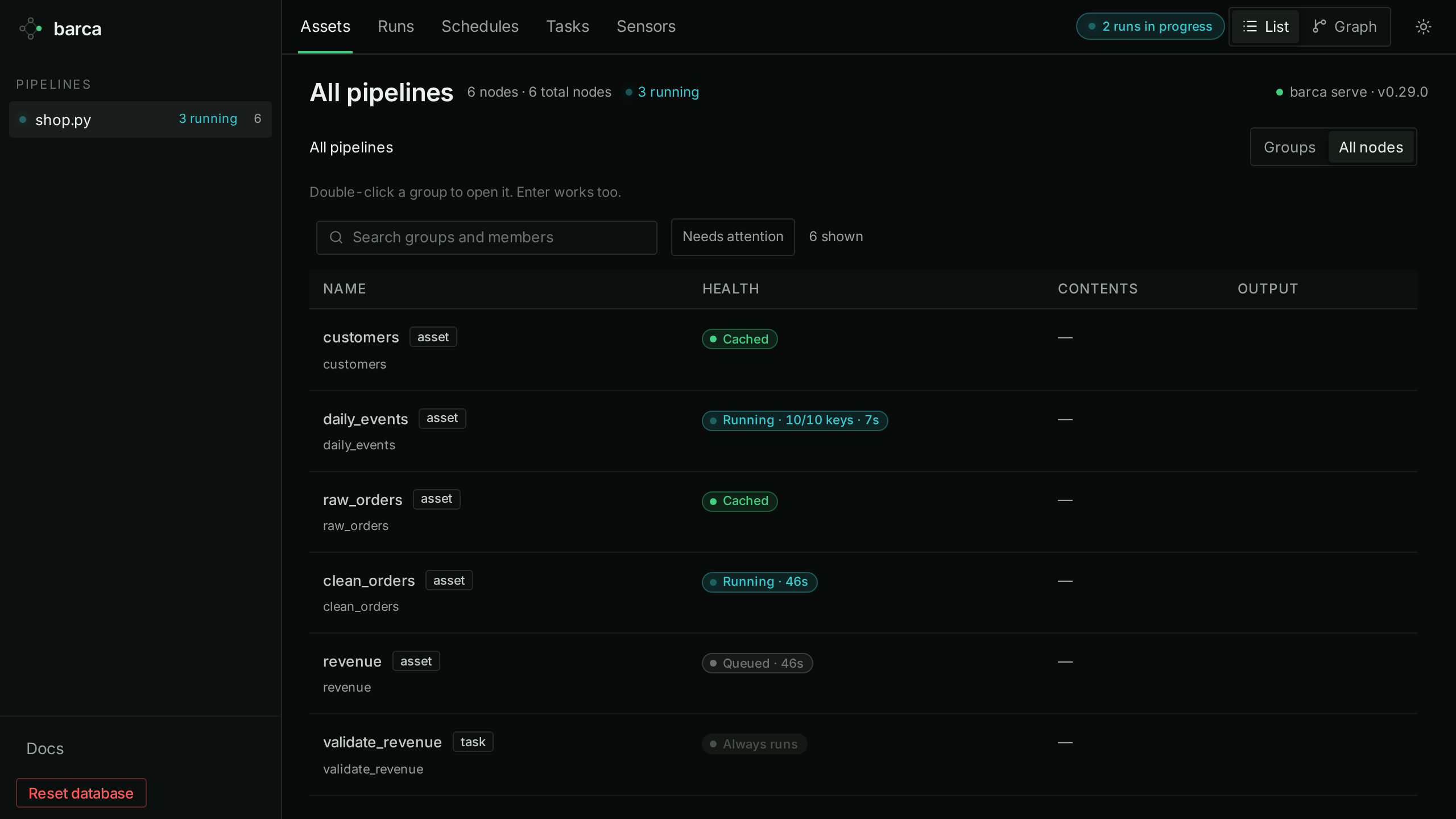
barca serve runs the same files on cron schedules, with an HTTP API and a web UI that shows
what is cached, running and queued:
From Python, barca.get("summary") returns the value, and the decorators return the function
unchanged, so steps can be called and unit tested as ordinary Python.
Commands
The target comes first, then files or directories. Both are optional: with no files, barca
reads every .py file under the project root that imports barca (barca docs discovery).
get is for assets and uses the cache; run is for tasks, which always run, and their
upstream assets come from the cache. Use barca <command> --help for concise usage, barca <command> --examples for the full
runnable example collection, and barca docs <topic> for detailed behavior.
| Command | What it does |
|---|---|
barca get [target] [files...] |
Bring assets up to date and print their artifact paths; -o value prints the values. No target: every asset and sensor. |
barca run <task> [files...] |
Run a task, or several (a,b), and what they depend on. |
barca list [files...] |
Every asset, sensor and task, with its kind, freshness and inputs. |
barca status [target] [files...] |
Per node: cached or stale and why, the last run (and its error), the artifact's rows and columns, and a schedule's state; --problems keeps what needs attention. |
barca logs [RUN_ID] |
A run's recorded step stdout and stderr, without progress messages; the most recent run without an id, -f to follow a running one, from a configured server too. |
barca history [RUN_ID] |
Recent runs, filtered by --status, --target, --triggered-by and --since, each failed one with its failing step and error; with a run id, its steps, peak memory, errors, tracebacks and a failed step's last output lines. |
barca stats <target> [files...] |
Timing, peak memory and re-execution statistics for one asset, with each recent run's id. |
barca sql "<query>" [files...] |
Query cached results with DuckDB; each asset is a view, barca's records are barca.runs, barca.materializations and barca.nodes; with a server, the team's results (experimental). |
barca doctor [files...] |
Check the project, Python, cache, metadata, stores and capacity without running steps, and a configured server: its version, store, load errors, schedules and the runs not posted to it. |
barca plan [files...] |
The execution plan as JSON, with the capacity and step weights (experimental). |
barca gc |
Evict cached results to keep .barca/ under its size limit (barca also does this after every run). |
barca serve [files...] |
Cron scheduler, HTTP API and web UI; --server on other commands runs them there. --capacity shares one weight budget between its runs, --run-timeout limits how long a run takes. |
barca tokens bootstrap |
On the deployed host, print a one-use bootstrap code for opt-in project token access (barca docs server-mode). |
barca queue [pause|resume] --server |
A server's run queue (kept across restarts); pause or resume it before a deploy. |
barca state backups / barca state restore / barca state reset |
List the metadata backups, put one back in place of the local database, or start it over (experimental; nothing is deleted). |
barca docs [topic] |
The manual, compiled into the binary. |
barca version |
Print the version (also barca --version). |
Common flags on get and run: --refresh a,b, --no-cascade, --refresh-all,
--batch all / --batch 1000 / --batch scored=none (override calls of nodes declaring batch=),
--dry-run, --env <name> (a separate cache and history), --partition key=value (only those
keys, across the whole run; also on barca plan).
Scripts and AI agents. Results go to stdout: a table or summary in a terminal, JSON when
piped or captured (--json and --pretty override). Progress and errors go to stderr; in JSON
mode an error is one JSON line with error, code, kind and remediation. Exit codes: 0
ok, 1 a step failed, 2 usage error, 3 barca or infrastructure failure, 130 cancelled.
An agent should load SKILL.md, also printed by barca docs skill.
More
barca docs lists the manual's topics and barca docs <topic> prints one; start with
overview. The site, barca.sh, has the same material plus a guide and
patterns.
| Topic | Manual | Site |
|---|---|---|
| What is cached, the run hash, artifacts, environments, disk use | barca docs cache |
Guide |
| Decorators, inputs, freshness, retries | barca docs assets, barca docs tasks |
Decorators API |
| Output formats and large inputs (parquet, CSV, lazy DuckDB and polars) | barca docs types, barca docs big-inputs |
Guide: large inputs |
| DuckDB 1.x and 2.x: what a pipeline changes for duckdb 2 | barca docs duckdb |
DuckDB Versions |
Partitions: fan-out over keys, fan-in with collect |
barca docs partitions |
Guide: partitions |
Schedules, barca serve and its HTTP API |
barca docs scheduling |
Scheduling, Deploying |
| Server mode: one server as the team's ledger | barca docs server-mode |
Share with a team, Server mode |
| A remote store (S3, GCS, Azure): this machine's backup and read-through cache | barca docs remote |
Remote storage |
| Datadog traces, Slack notifications, JSON logs | barca docs telemetry |
Telemetry |
| Inspecting results: status, logs, sql | barca docs status, barca docs logs, barca docs sql |
SQL |
| Scripts and AI agents | barca docs skill, barca docs agents |
Agent skill |
| The CLI contract: commands, flags, JSON schemas, exit codes, stability | barca docs contract |
CLI contract |
Development
git clone https://github.com/barca-orc/barca.git
cd barca
uv venv
source .venv/bin/activate
uv pip install maturin
maturin develop --uv --release --extras test   # builds the binary and installs it into .venv
cargo test
See Architecture and
Contributing. benchmarks/ holds the same
pipelines written for barca, Dagster, Prefect and Airflow;
benchmarks/RESULTS.md records measurements with their date and
machine.
License
1 maintainer

Metadata
1 maintainer
Release files for barca 0.37.1
For a detailed explanation of source distributions (sdists) and built distributions (wheels), please see the package formats documentation.
Source distribution (sdist)
| File | Size | Uploaded | Provenance | Actions |
|---|---|---|---|---|
| barca-0.37.1.tar.gz | 2.3 MB | Without provenance | Details for barca-0.37.1.tar.gz |
Built distributions (wheels)
| File | Actions Reset | |||
|---|---|---|---|---|
| barca-0.37.1-py3-none-musllinux_1_2_x86_64.whl | Python 3 | none | Linux musl 1.2+ x86-64 | Details for barca-0.37.1-py3-none-musllinux_1_2_x86_64.whl |
| barca-0.37.1-py3-none-musllinux_1_2_aarch64.whl | Python 3 | none | Linux musl 1.2+ ARM64 | Details for barca-0.37.1-py3-none-musllinux_1_2_aarch64.whl |
| barca-0.37.1-py3-none-manylinux2014_x86_64.manylinux_2_17_x86_64.whl | Python 3 | none | Linux glibc 2.17+ x86-64 | Details for barca-0.37.1-py3-none-manylinux2014_x86_64.manylinux_2_17_x86_64.whl |
| barca-0.37.1-py3-none-manylinux2014_aarch64.manylinux_2_17_aarch64.whl | Python 3 | none | Linux glibc 2.17+ ARM64 | Details for barca-0.37.1-py3-none-manylinux2014_aarch64.manylinux_2_17_aarch64.whl |
| barca-0.37.1-py3-none-macosx_11_0_arm64.whl | Python 3 | none | macOS 11.0+ ARM64 | Details for barca-0.37.1-py3-none-macosx_11_0_arm64.whl |
Total release size: 43.2 MB
Release files / barca-0.37.1.tar.gz
| Download URL | barca-0.37.1.tar.gz |
|---|---|
| Size | 2.3 MB |
| Tags | Source |
|
SHA-256 checksum How to use checksums |
8a49b488dd37d4ed5cc0d760cb65dc632f762332af9e7352c14a865c9b71e234
|
|
BLAKE2b-256 checksum How to use checksums |
3b96a63966da50d0f1cdde0a4366a08bb5f30ba636e84ccc1f1b255fdd489bb2
|
| Upload date | |
|
Uploaded using Trusted Publishing? What is trusted publishing? |
No |
| Uploaded via |
twine/7.0.0 CPython/3.13.16
|
Release files / barca-0.37.1-py3-none-musllinux_1_2_x86_64.whl
| Download URL | barca-0.37.1-py3-none-musllinux_1_2_x86_64.whl |
|---|---|
| Size | 8.5 MB |
| Tags | Linux musl 1.2+ x86-64 Python 3 |
|
SHA-256 checksum How to use checksums |
77ff94c7d17688d56a200fdfc517be82f67faed83038b7d67ec7f88ef808db5d
|
|
BLAKE2b-256 checksum How to use checksums |
bbc856de0351db83f7b5f5de5d6c487d288d242fa74c2dfa2efdb5f300cb5616
|
| Upload date | |
|
Uploaded using Trusted Publishing? What is trusted publishing? |
No |
| Uploaded via |
twine/7.0.0 CPython/3.13.16
|
Release files / barca-0.37.1-py3-none-musllinux_1_2_aarch64.whl
| Download URL | barca-0.37.1-py3-none-musllinux_1_2_aarch64.whl |
|---|---|
| Size | 8.0 MB |
| Tags | Linux musl 1.2+ ARM64 Python 3 |
|
SHA-256 checksum How to use checksums |
c1bd75a1c9a5c696bdddb6450c6c77982a128ba542a2a59e27038544aae2c72e
|
|
BLAKE2b-256 checksum How to use checksums |
eca1a5f41527a951045a4f831973c013223945952225cdc7dc0b8eb0a67f4ae8
|
| Upload date | |
|
Uploaded using Trusted Publishing? What is trusted publishing? |
No |
| Uploaded via |
twine/7.0.0 CPython/3.13.16
|
Release files / barca-0.37.1-py3-none-manylinux2014_x86_64.manylinux_2_17_x86_64.whl
| Download URL | barca-0.37.1-py3-none-manylinux2014_x86_64.manylinux_2_17_x86_64.whl |
|---|---|
| Size | 8.4 MB |
| Tags | Linux glibc 2.17+ x86-64 Python 3 |
|
SHA-256 checksum How to use checksums |
ea3a624d552f10515c397591c7c64c21afbd58b5bc0c152a4b211e1704141de6
|
|
BLAKE2b-256 checksum How to use checksums |
7a6e9119cbf5a4f1ad2c525da638773879f5aafec6bd30ec677f1f447083e143
|
| Upload date | |
|
Uploaded using Trusted Publishing? What is trusted publishing? |
No |
| Uploaded via |
twine/7.0.0 CPython/3.13.16
|
Release files / barca-0.37.1-py3-none-manylinux2014_aarch64.manylinux_2_17_aarch64.whl
| Download URL | barca-0.37.1-py3-none-manylinux2014_aarch64.manylinux_2_17_aarch64.whl |
|---|---|
| Size | 8.0 MB |
| Tags | Linux glibc 2.17+ ARM64 Python 3 |
|
SHA-256 checksum How to use checksums |
f29431d319954a38499d10e6ec6c8be0fbe577330082d3116c1375e3ab97f2a2
|
|
BLAKE2b-256 checksum How to use checksums |
b593d6e40a8781f884dcb8f35cf357e76977d82c7d6351f1fe999405c9333001
|
| Upload date | |
|
Uploaded using Trusted Publishing? What is trusted publishing? |
No |
| Uploaded via |
twine/7.0.0 CPython/3.13.16
|
Release files / barca-0.37.1-py3-none-macosx_11_0_arm64.whl
| Download URL | barca-0.37.1-py3-none-macosx_11_0_arm64.whl |
|---|---|
| Size | 8.0 MB |
| Tags | Python 3 macOS 11.0+ ARM64 |
|
SHA-256 checksum How to use checksums |
b9bf80bfacb4922cd357895fb2841153fa73ca10c716e8f8d4a693ed01e95584
|
|
BLAKE2b-256 checksum How to use checksums |
cdfc1400dac22d09cbb028dd076c04abf8af8e6dc303857326a72ea9e158b24d
|
| Upload date | |
|
Uploaded using Trusted Publishing? What is trusted publishing? |
No |
| Uploaded via |
twine/7.0.0 CPython/3.13.16
|
Security for barca 0.37.1
Provenance
Provenance describes where a file came from. On PyPI, provenance is shared via attestations, which provide a verifiable record of the build or publishing details. View details, limitations and caveats.
No provenance found
None of the files in this release were uploaded with provenance metadata.
A note on package security
PyPI is a repository for distributing packages, not a service for auditing them. While third-party security researchers and our staff do their best to detect and remove malicious packages, PyPI cannot guarantee the quality, security or suitability of any given package.
To learn more about protecting yourself from malicious actors, visit our package security documentation.














