
Barcode and QR code scanning SDK for Python

Project description
Python 1D/2D Barcode SDK
A Python wrapper for the Dynamsoft Barcode Reader SDK, providing simple and user-friendly APIs across Windows, Linux, and macOS. Compatible with desktop PCs, embedded devices, Raspberry Pi, and Jetson Nano.
Note: This is an unofficial, community-maintained wrapper. For official support and full feature coverage, consider the Dynamsoft Capture Vision Bundle on PyPI.
🚀 Quick Links
📊 Comparison: Community vs Official
| Feature | Community Wrapper | Official Dynamsoft SDK |
|---|---|---|
| Support | Community-driven | ✅ Official Dynamsoft support |
| Documentation | Basic README and limited examples | ✅ Comprehensive online documentation |
| API Coverage | Core features only | ✅ Full API coverage |
| Updates | May lag behind | ✅ Always includes the latest features |
| Testing | Tested in limited environments | ✅ Thoroughly tested |
| API Usage | ✅ Simple and intuitive | More complex and verbose |
🔧 Installation
Requirements
-
Python 3.x
-
OpenCV (for UI display)
pip install opencv-python
-
Dynamsoft Capture Vision Bundle SDK
pip install dynamsoft-capture-vision-bundle
Build from Source
# Source distribution
python setup.py sdist

# Build wheel
python setup.py bdist_wheel
🎯 Quick Start
🔑 Initialize License
import barcodeQrSDK

# Initialize with trial license
error_code, error_msg = barcodeQrSDK.initLicense("LICENSE-KEY")

if error_code != 0:
    print(f"License error: {error_msg}")
    exit()
📷 Basic Image Processing
# Create reader instance
reader = barcodeQrSDK.createInstance()

# Decode from file
results = reader.decodeFile("barcode_image.jpg")

# Process results
for barcode in results:
    print(f"Format: {barcode.format}")
    print(f"Text: {barcode.text}")
    print(f"Location: ({barcode.x1}, {barcode.y1}), ({barcode.x2}, {barcode.y2}), ({barcode.x3}, {barcode.y3}), ({barcode.x4}, {barcode.y4})")
🎥 Real-time Camera Processing
import cv2
import numpy as np

detected_barcodes = []

def on_barcode_detected(barcodes):
    """Callback function for async detection"""
    global detected_barcodes
    detected_barcodes = barcodes
    for barcode in barcodes:
        print(f"Detected: {barcode.text} ({barcode.format})")

def main():
    # Initialize
    barcodeQrSDK.initLicense("YOUR_LICENSE_KEY")
    reader = barcodeQrSDK.createInstance()

    # Start async detection
    reader.addAsyncListener(on_barcode_detected)

    # Camera capture loop
    cap = cv2.VideoCapture(0)

    while True:
        ret, frame = cap.read()
        if not ret:
            break

        # Send frame for async processing
        reader.decodeMatAsync(frame)

        # Draw detection results
        for barcode in detected_barcodes:
            # Draw bounding box
            points = np.array([
                [barcode.x1, barcode.y1], [barcode.x2, barcode.y2],
                [barcode.x3, barcode.y3], [barcode.x4, barcode.y4]
            ], dtype=np.int32)

            cv2.drawContours(frame, [points], -1, (0, 255, 0), 2)
            cv2.putText(frame, barcode.text, (barcode.x1, barcode.y1),
                       cv2.FONT_HERSHEY_SIMPLEX, 0.8, (0, 255, 0), 2)

        cv2.imshow('Barcode Scanner', frame)

        if cv2.waitKey(1) & 0xFF == ord('q'):
            break

    # Cleanup
    reader.clearAsyncListener()
    cap.release()
    cv2.destroyAllWindows()

if __name__ == '__main__':
    main()
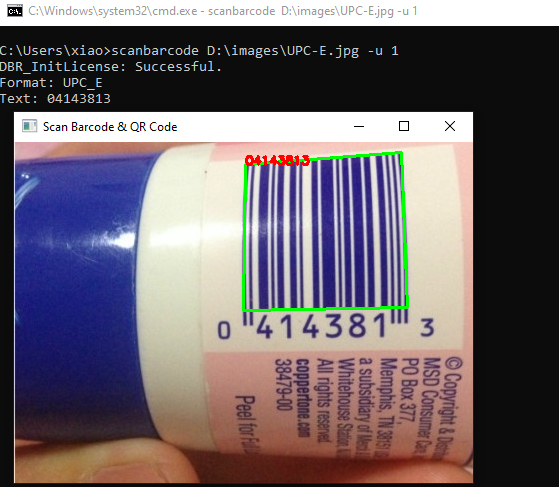
📱 Command Line Usage
# Basic scanning
scanbarcode image.jpg -l YOUR_LICENSE_KEY

# With visual display
scanbarcode image.jpg -u 1 -l YOUR_LICENSE_KEY
📚 API Reference
🏗️ Core Functions
initLicense(licenseKey: str) -> tuple
Initialize the SDK with your license key.
error_code, error_msg = barcodeQrSDK.initLicense("YOUR_LICENSE_KEY")
Returns: (error_code: int, error_message: str)
createInstance() -> BarcodeReader
Create a new barcode reader instance.
reader = barcodeQrSDK.createInstance()
🔍 BarcodeReader Class
Synchronous Detection
decodeFile(file_path: str) -> list
Decode barcodes from an image file.
results = reader.decodeFile("path/to/image.jpg")
Supported formats: JPEG, PNG, BMP, TIFF, GIF
decodeMat(mat) -> list
Decode barcodes from an OpenCV image matrix.
import cv2
image = cv2.imread("image.jpg")
results = reader.decodeMat(image)
decodeBytes(bytes, width, height, stride, pixel_format) -> list
Decode barcodes from raw image bytes.
from dynamsoft_capture_vision_bundle import EnumImagePixelFormat

results = reader.decodeBytes(
    image_bytes, 640, 480, 1920,
    EnumImagePixelFormat.IPF_RGB_888
)
Asynchronous Detection
addAsyncListener(callback) -> None
Start real-time barcode detection with callback.
def on_detection(barcodes):
    for barcode in barcodes:
        print(f"Found: {barcode.text}")

reader.addAsyncListener(on_detection)
decodeMatAsync(mat) -> None
Process OpenCV image asynchronously.
reader.decodeMatAsync(camera_frame)
decodeBytesAsync(bytes, width, height, stride, pixel_format) -> None
Process raw bytes asynchronously.
reader.decodeBytesAsync(raw_bytes, width, height, stride, pixel_format)
clearAsyncListener() -> None
Stop async detection and cleanup.
reader.clearAsyncListener()
Configuration
getParameters() -> str
Get current detection parameters as JSON.
params_json = reader.getParameters()
setParameters(params: str) -> tuple
Set detection parameters from JSON.
error_code, error_msg = reader.setParameters(modified_params)
📦 BarcodeResult Class
Each detected barcode returns a BarcodeResult object with:
class BarcodeResult:
    text: str           # Decoded text content
    format: str         # Barcode format (e.g., "QR_CODE", "CODE_128")

    # Corner coordinates
    x1, y1: float
    x2, y2: float
    x3, y3: float
    x4, y4: float
🛠️ Utility Functions
convertMat2ImageData(mat) -> ImageData
Convert OpenCV matrix to SDK format.
image_data = barcodeQrSDK.convertMat2ImageData(cv_image)
Supported Barcode Symbologies
-
Linear Barcodes (1D)
- Code 39 (including Code 39 Extended)
- Code 93
- Code 128
- Codabar
- Interleaved 2 of 5
- EAN-8
- EAN-13
- UPC-A
- UPC-E
- Industrial 2 of 5
-
2D Barcodes:
- QR Code (including Micro QR Code)
- Data Matrix
- PDF417 (including Micro PDF417)
- Aztec Code
- MaxiCode (mode 2-5)
-
Patch Code
-
GS1 Composite Code
Release history Release notifications | RSS feed


Download files
Download the file for your platform. If you're not sure which to choose, learn more about installing packages.
Source Distribution
Built Distribution
Filter files by name, interpreter, ABI, and platform.
If you're not sure about the file name format, learn more about wheel file names.
Copy a direct link to the current filters
File details
Details for the file barcode_qr_code_sdk-11.2.1000.tar.gz.
File metadata
- Download URL: barcode_qr_code_sdk-11.2.1000.tar.gz
- Upload date:
- Size: 12.2 kB
- Tags: Source
- Uploaded using Trusted Publishing? No
- Uploaded via: twine/6.2.0 CPython/3.9.24
File hashes
| Algorithm | Hash digest | |
|---|---|---|
| SHA256 |
9827c09faa6d72aa76f87d11998b55488067b4142140b3e6019136c3d8f21ee3
|
|
| MD5 |
82a26e64112e2b7b22f27f82a4d3e139
|
|
| BLAKE2b-256 |
5bc1ad3f15597cd98fcee126da99c3fa531f9a5a71e76dfb2cf6238285934b69
|
File details
Details for the file barcode_qr_code_sdk-11.2.1000-py3-none-any.whl.
File metadata
- Download URL: barcode_qr_code_sdk-11.2.1000-py3-none-any.whl
- Upload date:
- Size: 11.0 kB
- Tags: Python 3
- Uploaded using Trusted Publishing? No
- Uploaded via: twine/6.2.0 CPython/3.9.24
File hashes
| Algorithm | Hash digest | |
|---|---|---|
| SHA256 |
18c889ead97b380a62b8b30b812dfa545803eea91f99225252cf2156a1a84b79
|
|
| MD5 |
f86c0c1f7df94b412f72a15dde1fbadb
|
|
| BLAKE2b-256 |
eec0d87234f2af751d663ccf71c92b8e50c5c8dd9b017ddcfc5fc848d5415258
|






