
BareCLI
May your CLI code be semantic and your text output beautifully bare.
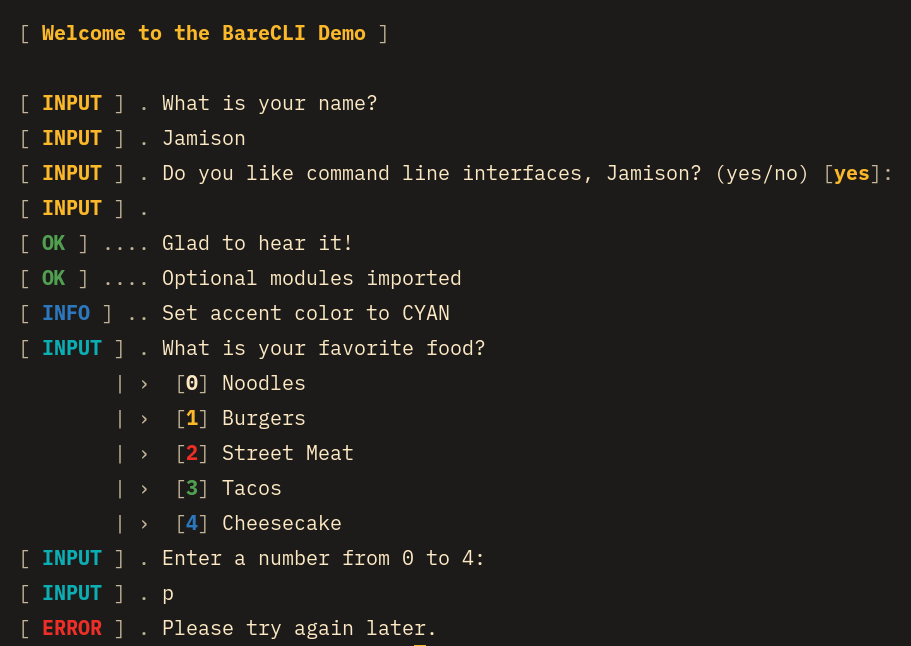
BareCLI is a slim Python package designed to keep your CLI code semantic by providing beautiful text output styling. BareCLI features a status sidebar on the left so an entire execution of a program can be quickly verified at a glance.
BareCLI's API is basically lifted from Symfony's Command style helpers. The aesthetic is inspired by systemd's service log that is displayed when some Linux distros perform a system shutdown.
Usage
Install the package with pip or uv:
pip install bare-cli // uv add bare-cli
Import the following and construct a BareCLI instance with an optional accent Color:
from bare_cli import BareCLI, Color, InvalidChoiceError

io = BareCLI() # default accent color
io = BareCLI(Color.CYAN) # use desired accent color
Text Output Methods
io.title()
Display a title in accent color sandwiched by newlines.
io.info()
Display a blue info status sidebar and a main content message.
io.info(f"Process finished in {time} ms")

# Outputs the following:
[ INFO ] .. Process finished in 102 ms
io.success()
Display a green success status sidebar and a main content message.
io.success("We did it!")

# Outputs the following:
[ OK ] .... We did it!
io.error()
Display a red error status sidebar and a main content message.
io.error(f"Process failed with error code {code}")

# Outputs the following:
[ ERROR ] . Process failed with error code 422
User Input Methods
All user input method statuses (i.e. the INPUT in the sidebar) are displayed in the accent color.
io.ask()
Prompt the user for input. Basically just wraps Python's input() function.
answer: str = io.ask("How are you?")
io.confirm()
Prompt the user to answer a boolean question.
The default value can be toggled by using the permissive_by_default
kwarg, so the user can just hit the Enter key instead of typing in an answer.
answer: bool = io.confirm("Do you like programming?, permissive_by_default=False")

# Outputs the following:
[ INPUT ] . Do you like programming? (yes/no) [no]:
io.choice()
Prompt the user to choose a value from a list of choices and return a tuple with chosen index and value.
The default behavior for this method is to give the user multiple chances
to choose a valid option and in the case they don't choose one BareCLI will exit the program.
This behavior can be changed by setting the allow_chances kwarg to False to not allow multiple
chances. Likewise, setting the exit_early kwarg to False will instead
raise an InvalidChoiceError so you can handle how you want.
choice: tuple[int, str] = io.choice("What food to do you like?", ["Hot dogs", "Noodes", "Pickles"])
1 maintainer

Release files for bare-cli 1.0.1
For a detailed explanation of source distributions (sdists) and built distributions (wheels), please see the package formats documentation.
Source distribution (sdist)
| File | Size | Uploaded | |
|---|---|---|---|
| bare_cli-1.0.1.tar.gz | 12.8 kB | Details |
Built distribution (wheel)
| File | Interpreter | ABI | Platform | Reset |
|---|---|---|---|---|
| bare_cli-1.0.1-py3-none-any.whl | Python 3 | none | any | Details |
Total release size: 27.1 kB
Release files / bare_cli-1.0.1.tar.gz
| Download URL | bare_cli-1.0.1.tar.gz |
|---|---|
| Size | 12.8 kB |
| Tags | Source |
|
SHA-256 checksum How to use checksums |
0e9e9a2ff3536fb81ef0775d3f40c26c22c3bbc001f3d689088c96330ae53f3b
|
|
BLAKE2b-256 checksum How to use checksums |
630d88a5ee649ea08c23651c0ce046f24e726b2b55a925b9371bda4485d1748a
|
| Upload date | |
|
Uploaded using Trusted Publishing? What is trusted publishing? |
No |
| Uploaded via |
uv/0.8.13
|
Release files / bare_cli-1.0.1-py3-none-any.whl
| Download URL | bare_cli-1.0.1-py3-none-any.whl |
|---|---|
| Size | 14.3 kB |
| Tags | Python 3 |
|
SHA-256 checksum How to use checksums |
f8352abd2317e5e4c6179f9b02c013274e3ce24a094b17bd886ed2f1c0018c27
|
|
BLAKE2b-256 checksum How to use checksums |
a0f8dfd8eced3fe5e8bd91fb0d6e34d65b91ee00fdc3be62a452626767850ef0
|
| Upload date | |
|
Uploaded using Trusted Publishing? What is trusted publishing? |
No |
| Uploaded via |
uv/0.8.13
|













