
May your CLI code be semantic and your text output beautifully bare.

Project description
BareCLI
May your CLI code be semantic and your text output beautifully bare.
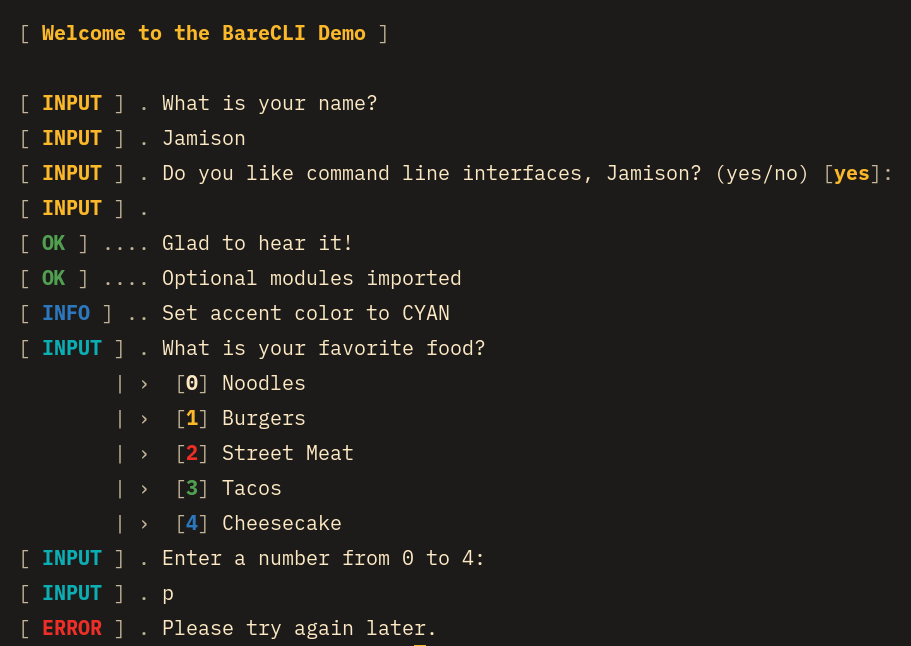
BareCLI is a slim Python package designed to keep your CLI code semantic by providing beautiful text output styling. BareCLI features a status sidebar on the left so an entire execution of a program can be quickly verified at a glance.
BareCLI's API is basically lifted from Symfony's Command style helpers. The aesthetic is inspired by systemd's service log that is displayed when some Linux distros perform a system shutdown.
Usage
Install the package with pip or uv:
pip install bare-cli // uv add bare-cli
Import the following and construct a BareCLI instance with an optional accent Color:
from bare_cli import BareCLI, Color, InvalidChoiceError

io = BareCLI() # default accent color
io = BareCLI(Color.CYAN) # use desired accent color
Text Output Methods
io.title()
Display a title in accent color sandwiched by newlines.
io.info()
Display a blue info status sidebar and a main content message.
io.info(f"Process finished in {time} ms")

# Outputs the following:
[ INFO ] .. Process finished in 102 ms
io.success()
Display a green success status sidebar and a main content message.
io.success("We did it!")

# Outputs the following:
[ OK ] .... We did it!
io.error()
Display a red error status sidebar and a main content message.
io.error(f"Process failed with error code {code}")

# Outputs the following:
[ ERROR ] . Process failed with error code 422
User Input Methods
All user input method statuses (i.e. the INPUT in the sidebar) are displayed in the accent color.
io.ask()
Prompt the user for input. Basically just wraps Python's input() function.
answer: str = io.ask("How are you?")
io.confirm()
Prompt the user to answer a boolean question.
The default value can be toggled by using the permissive_by_default
kwarg, so the user can just hit the Enter key instead of typing in an answer.
answer: bool = io.confirm("Do you like programming?, permissive_by_default=False")

# Outputs the following:
[ INPUT ] . Do you like programming? (yes/no) [no]:
io.choice()
Prompt the user to choose a value from a list of choices and return a tuple with chosen index and value.
The default behavior for this method is to give the user multiple chances
to choose a valid option and in the case they don't choose one BareCLI will exit the program.
This behavior can be changed by setting the allow_chances kwarg to False to not allow multiple
chances. Likewise, setting the exit_early kwarg to False will instead
raise an InvalidChoiceError so you can handle how you want.
choice: tuple[int, str] = io.choice("What food to do you like?", ["Hot dogs", "Noodes", "Pickles"])
Release history Release notifications | RSS feed

Download files
Download the file for your platform. If you're not sure which to choose, learn more about installing packages.
Source Distribution
Built Distribution
Filter files by name, interpreter, ABI, and platform.
If you're not sure about the file name format, learn more about wheel file names.
Copy a direct link to the current filters
File details
Details for the file bare_cli-1.0.1.tar.gz.
File metadata
- Download URL: bare_cli-1.0.1.tar.gz
- Upload date:
- Size: 12.8 kB
- Tags: Source
- Uploaded using Trusted Publishing? No
- Uploaded via: uv/0.8.13
File hashes
| Algorithm | Hash digest | |
|---|---|---|
| SHA256 |
0e9e9a2ff3536fb81ef0775d3f40c26c22c3bbc001f3d689088c96330ae53f3b
|
|
| MD5 |
58e9cb7294dd45fdd4b04a20f7451ffe
|
|
| BLAKE2b-256 |
630d88a5ee649ea08c23651c0ce046f24e726b2b55a925b9371bda4485d1748a
|
File details
Details for the file bare_cli-1.0.1-py3-none-any.whl.
File metadata
- Download URL: bare_cli-1.0.1-py3-none-any.whl
- Upload date:
- Size: 14.3 kB
- Tags: Python 3
- Uploaded using Trusted Publishing? No
- Uploaded via: uv/0.8.13
File hashes
| Algorithm | Hash digest | |
|---|---|---|
| SHA256 |
f8352abd2317e5e4c6179f9b02c013274e3ce24a094b17bd886ed2f1c0018c27
|
|
| MD5 |
12ffb72b2eaac94e4c2940ae8a665451
|
|
| BLAKE2b-256 |
a0f8dfd8eced3fe5e8bd91fb0d6e34d65b91ee00fdc3be62a452626767850ef0
|






