
A pure Python terminal code agent — pluggable LLM providers, fine-grained permissions, multi-agent coordination, and an extensible skill system.
Verified details
These details have been verified by PyPIProject links
GitHub Statistics
Maintainers

Project description
BareAgent
纯 Python 终端代码智能体 — 可插拔 LLM、细粒度权限、多智能体协调、可扩展技能系统


✨ 核心特性
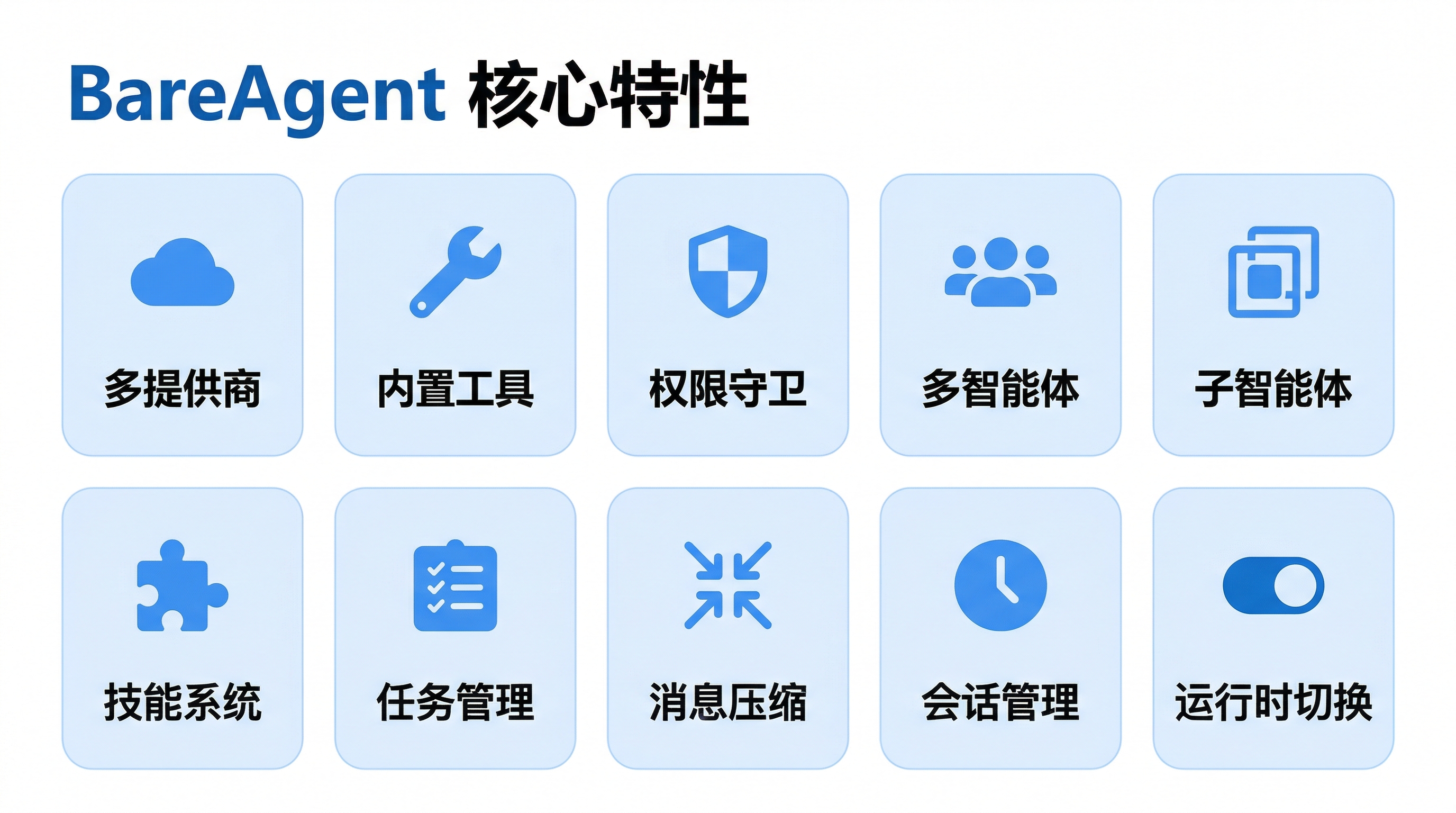
| 特性 | 说明 |
|---|---|
| 多提供商支持 | Anthropic / OpenAI / DeepSeek,统一接口,流式与非流式输出自由切换 |
| 内置工具 | bash、文件读写编辑、glob、grep 等开箱即用,延迟加载按需注册 |
| 权限守卫 | 四种模式(DEFAULT / AUTO / PLAN / BYPASS),危险命令自动拦截 |
| 多智能体协调 | 基于 JSONL 邮箱的消息总线,守护进程式自治智能体,请求-响应协议 |
| 子智能体委派 | 隔离上下文、递归深度限制、类型化智能体(explore/plan/code-review)、后台异步执行 |
| 技能系统 | 从 skills/*/SKILL.md 自动发现,按需加载(code-review、git、test) |
| 任务管理 | 持久化任务 + 会话级 TODO,支持依赖追踪和优先级 |
| 消息压缩 | 微压缩 + LLM 摘要,基于 token 阈值(50k)触发,支撑超长对话 |
| 会话管理 | 会话转录持久化,支持列出历史会话和恢复上下文 |
| 运行时切换 | 斜杠命令或 Shift+Tab 快捷键实时切换权限模式,无需重启 |
🏗️ 架构概览
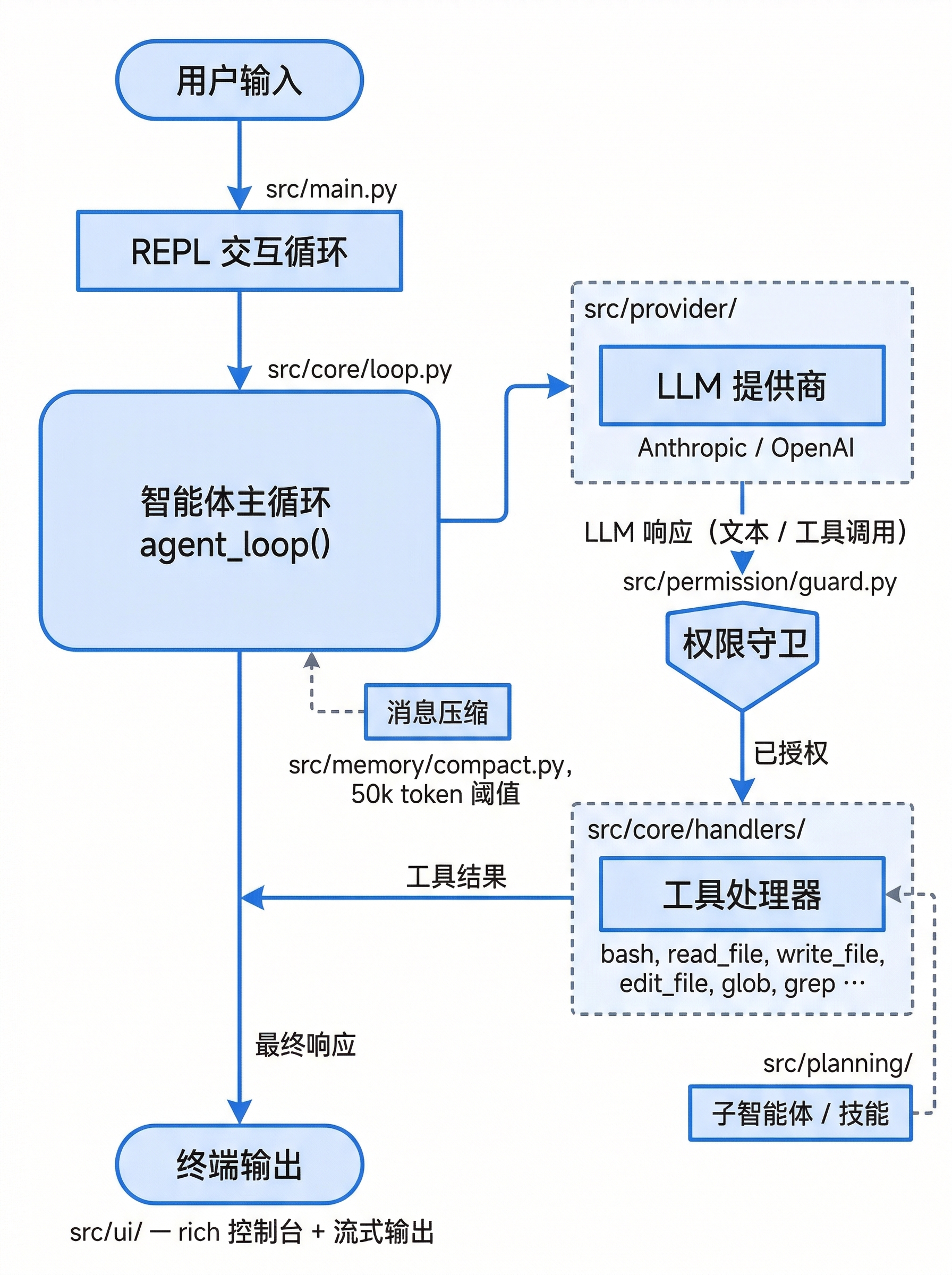
核心循环 agent_loop() 是中央调度器:调用 LLM → 解析工具调用 → 权限检查 → 执行处理器 → 收集结果,最多迭代 200 次。支持流式输出和长对话消息自动压缩。
🚀 快速开始
环境要求
- Python 3.12+
- uv(推荐)
安装
作为命令行工具使用(推荐,隔离安装,安装后全局可用 bareagent):
uv tool install bareagent-cli # 或: pipx install bareagent-cli
从源码开发(可编辑安装):
uv pip install -e ".[dev]"
发布到 PyPI / 自动发布流程见
docs/releasing.md。
配置
API Key 设置
# Linux / macOS
export OPENAI_API_KEY="your-key-here"
# Windows PowerShell(当前会话)
$env:OPENAI_API_KEY="your-key-here"

# Windows PowerShell(永久生效)
[Environment]::SetEnvironmentVariable("OPENAI_API_KEY", "your-key-here", "User")
配置文件
默认配置随包内置(只读),本地覆盖写入当前工作目录的 config.local.toml(已 git-ignore;
bareagent init 会帮你生成)。也可用 --config <path> / BAREAGENT_CONFIG 指定其他配置文件:
[provider]
name = "openai"
model = "gpt-4.1"
api_key_env = "OPENAI_API_KEY"

[permission]
mode = "default"

[ui]
stream = true
theme = "dark"

[thinking]
mode = "adaptive"
budget_tokens = 10000

[subagent]
max_depth = 3
default_type = "general-purpose"
环境变量
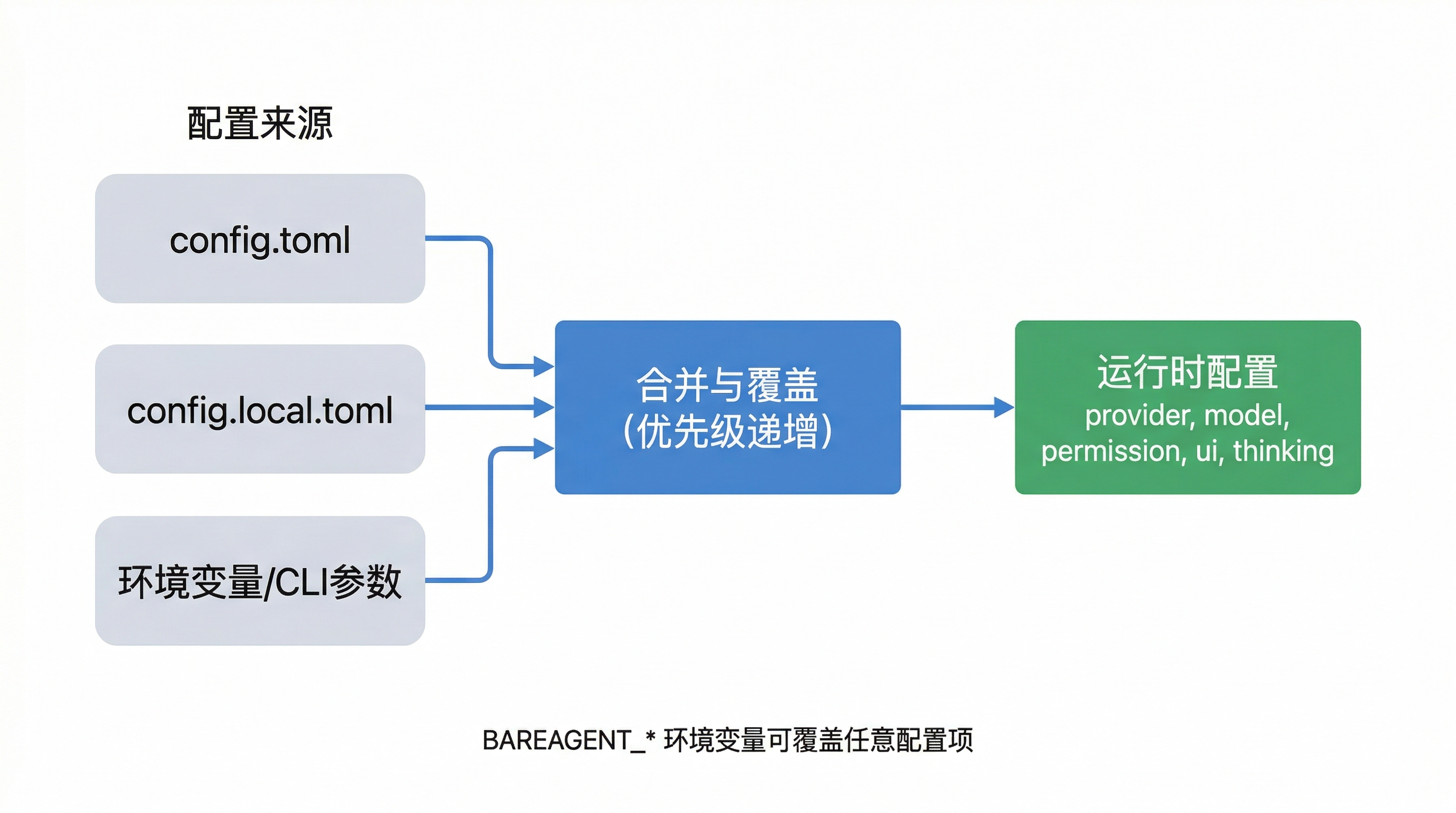
配置优先级:config.toml → config.local.toml → 环境变量 / CLI 参数(优先级递增)。
| 环境变量 | 说明 | 默认值 |
|---|---|---|
BAREAGENT_PROVIDER |
提供商名称 | openai |
BAREAGENT_MODEL |
模型名称 | gpt-4.1 |
BAREAGENT_API_KEY |
明文 API 密钥(优先于 api_key_env) |
— |
BAREAGENT_API_KEY_ENV |
API 密钥环境变量名 | 按提供商自动设置 |
BAREAGENT_BASE_URL |
自定义 API 基础 URL | — |
BAREAGENT_PERMISSION_MODE |
权限模式 | default |
BAREAGENT_UI_STREAM |
是否流式输出 | true |
BAREAGENT_UI_THEME |
UI 主题 | dark |
BAREAGENT_THINKING_MODE |
思考模式(adaptive/enabled/disabled) | adaptive |
BAREAGENT_THINKING_BUDGET_TOKENS |
思考 token 预算 | 10000 |
BAREAGENT_SKILLS_DIR |
技能目录路径 | 自动发现 |
BAREAGENT_SUBAGENT_MAX_DEPTH |
子智能体最大递归深度 | 3 |
BAREAGENT_SUBAGENT_DEFAULT_TYPE |
子智能体默认类型 | general-purpose |
运行
bareagent
# 或
python -m bareagent.main
CLI 参数
bareagent --provider anthropic --model claude-sonnet-4-20250514
bareagent --provider openai --model gpt-4.1
bareagent --config ~/my_config.toml
| 参数 | 说明 |
|---|---|
--provider |
覆盖配置文件中的 LLM 提供商(anthropic / openai / deepseek) |
--model |
覆盖配置文件中的模型名称 |
--config |
指定 TOML 配置文件路径(默认 config.toml,支持 ~ 扩展) |
💻 REPL 命令速查
| 命令 | 说明 |
|---|---|
/help |
显示帮助信息,列出所有可用命令 |
/exit |
退出 BareAgent,广播关闭信号给所有团队成员 |
/clear |
清屏并启动新对话(重置消息历史和会话 ID) |
/new |
启动新对话(仅重置消息,不清屏) |
/compact |
压缩对话上下文,生成 LLM 摘要释放 token |
/default |
切换到 DEFAULT 权限模式 |
/auto |
切换到 AUTO 权限模式 |
/plan |
切换到 PLAN 权限模式(只读) |
/bypass |
切换到 BYPASS 权限模式(无确认) |
/mode |
交互式权限模式选择菜单 |
/sessions |
列出已保存的历史会话 |
/resume [id] |
恢复上一个会话(可选指定会话 ID) |
/team |
管理团队智能体(子命令:list、spawn <name>、send <name> <msg>) |
快捷键:
| 按键 | 功能 |
|---|---|
Shift+Tab |
循环切换权限模式(DEFAULT → AUTO → PLAN → BYPASS) |
Ctrl+C |
中断当前操作(按两次退出) |
Ctrl+Z |
立即退出 REPL |
🔐 权限模式
| 模式 | 行为 | 适用场景 |
|---|---|---|
| DEFAULT | 写操作需用户确认,安全工具自动批准 | 日常使用(默认) |
| AUTO | 安全命令(ls、cat、git status、pytest 等)自动通过,仅拦截危险命令 | 信任环境下的高效开发 |
| PLAN | 只允许只读工具,所有写操作被阻止 | 代码审查、方案设计 |
| BYPASS | 所有操作自动批准,无任何确认 | 完全信任的自动化场景 |
切换方式:/default、/auto、/plan、/bypass、/mode 或 Shift+Tab。
📁 项目结构
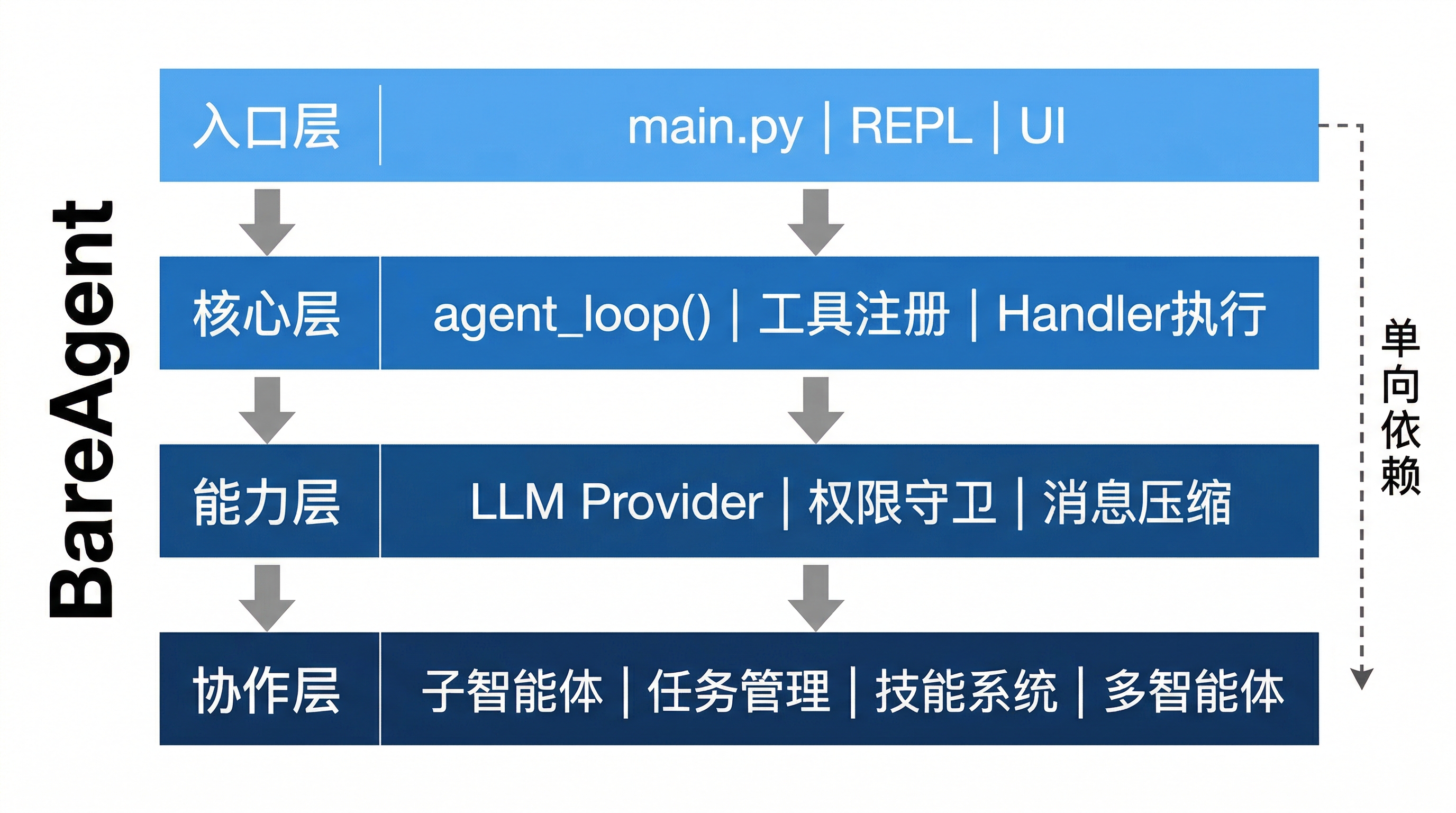
src/
├── main.py                # 入口与 REPL 循环
├── core/                  # 智能体循环、工具注册、Schema、沙箱
│   ├── loop.py            #   核心 agent_loop()
│   ├── tools.py           #   工具注册与分发
│   ├── schema.py          #   工具 Schema 定义
│   ├── context.py         #   系统提示组装
│   ├── sandbox.py         #   路径安全检查
│   ├── fileutil.py        #   文件工具函数
│   └── handlers/          #   各工具处理器实现
├── provider/              # LLM 提供商抽象
│   ├── base.py            #   BaseLLMProvider
│   ├── anthropic.py       #   Anthropic 实现
│   ├── openai.py          #   OpenAI 实现
│   └── factory.py         #   工厂
├── permission/            # 权限守卫
│   ├── guard.py           #   PermissionGuard(4 种模式)
│   └── rules.py           #   权限规则解析
├── memory/                # 消息压缩与会话管理
│   ├── compact.py         #   Compactor(微压缩 + LLM 摘要)
│   ├── token_counter.py   #   Token 估算
│   └── transcript.py      #   会话转录管理
├── planning/              # 任务、TODO、技能、子智能体
│   ├── agent_types.py     #   智能体类型系统
│   ├── subagent.py        #   子智能体委派
│   ├── tasks.py           #   持久化任务管理
│   ├── todo.py            #   会话级 TODO
│   └── skills.py          #   技能发现与加载
├── team/                  # 多智能体协调
│   ├── mailbox.py         #   JSONL 消息总线
│   ├── autonomous.py      #   自治智能体守护进程
│   ├── manager.py         #   TeammateManager
│   └── protocols.py       #   请求-响应协议
├── concurrency/           # 后台执行与通知
│   ├── background.py      #   BackgroundManager
│   └── notification.py    #   后台通知
└── ui/                    # 终端 UI(rich + 流式)
    ├── console.py         #   AgentConsole
    └── stream.py          #   StreamPrinter
skills/                    # 可扩展技能模块
tests/                     # pytest 测试
🔗 完整文档
项目提供基于 VitePress 的完整文档,涵盖架构设计、模块详解、开发指南等 15 个章节:
cd docs
npm install
npm run docs:dev
文档源码位于 docs/ 目录。
🛠️ 开发
# 测试
pytest                             # 全部测试
pytest tests/test_loop.py          # 单个文件
pytest tests/test_loop.py -k "test_name"  # 单个测试

# 代码检查与格式化
ruff check src tests               # 检查
ruff check --fix src tests          # 自动修复
ruff format src tests               # 格式化
提交信息遵循 Conventional Commits:Fix:、Feat:、Refactor:、Test:、Docs:
📄 许可证
Project details
Verified details
These details have been verified by PyPIProject links
GitHub Statistics
Maintainers
Release history Release notifications | RSS feed

Download files
Download the file for your platform. If you're not sure which to choose, learn more about installing packages.
Source Distribution
Built Distribution
Filter files by name, interpreter, ABI, and platform.
If you're not sure about the file name format, learn more about wheel file names.
Copy a direct link to the current filters
File details
Details for the file bareagent_cli-0.1.0.tar.gz.
File metadata
- Download URL: bareagent_cli-0.1.0.tar.gz
- Upload date:
- Size: 383.7 kB
- Tags: Source
- Uploaded using Trusted Publishing? Yes
- Uploaded via: twine/6.1.0 CPython/3.13.12
File hashes
| Algorithm | Hash digest | |
|---|---|---|
| SHA256 |
385bacfbb7cb07f4b4316f3efdf9e290f1ef9eda7c0af93918cd49b1c589da61
|
|
| MD5 |
985fef82109acb8b207c2a5ca4e426cc
|
|
| BLAKE2b-256 |
d66ef33e1aa0fc0183157e61eec629e5c067513c6a90830f069d5584fc8b7782
|
Provenance
The following attestation bundles were made for bareagent_cli-0.1.0.tar.gz:
Publisher:
release.yml on 525300887039/BareAgent
-
Statement:
-
Statement type:
https://in-toto.io/Statement/v1 -
Predicate type:
https://docs.pypi.org/attestations/publish/v1 -
Subject name:
bareagent_cli-0.1.0.tar.gz -
Subject digest:
385bacfbb7cb07f4b4316f3efdf9e290f1ef9eda7c0af93918cd49b1c589da61 - Sigstore transparency entry: 1812965219
- Sigstore integration time:
-
Permalink:
525300887039/BareAgent@02c1b9c36ac1618152cd49862497ef7df7ebe717 -
Branch / Tag:
refs/tags/v0.1.0 - Owner: https://github.com/525300887039
-
Access:
public
-
Token Issuer:
https://token.actions.githubusercontent.com -
Runner Environment:
github-hosted -
Publication workflow:
release.yml@02c1b9c36ac1618152cd49862497ef7df7ebe717 -
Trigger Event:
push
-
Statement type:
File details
Details for the file bareagent_cli-0.1.0-py3-none-any.whl.
File metadata
- Download URL: bareagent_cli-0.1.0-py3-none-any.whl
- Upload date:
- Size: 295.4 kB
- Tags: Python 3
- Uploaded using Trusted Publishing? Yes
- Uploaded via: twine/6.1.0 CPython/3.13.12
File hashes
| Algorithm | Hash digest | |
|---|---|---|
| SHA256 |
2fef10054c5a8a932ce0196e5853f0f3a7c9b549c99561a1ad27639b3be907fd
|
|
| MD5 |
6865f5de906fafe80ee430af158fed60
|
|
| BLAKE2b-256 |
b5e15b8f40b56fe3b52a611eb5aeaa62eb9337aec1fc2e8d22c8a936e98ebc24
|
Provenance
The following attestation bundles were made for bareagent_cli-0.1.0-py3-none-any.whl:
Publisher:
release.yml on 525300887039/BareAgent
-
Statement:
-
Statement type:
https://in-toto.io/Statement/v1 -
Predicate type:
https://docs.pypi.org/attestations/publish/v1 -
Subject name:
bareagent_cli-0.1.0-py3-none-any.whl -
Subject digest:
2fef10054c5a8a932ce0196e5853f0f3a7c9b549c99561a1ad27639b3be907fd - Sigstore transparency entry: 1812965288
- Sigstore integration time:
-
Permalink:
525300887039/BareAgent@02c1b9c36ac1618152cd49862497ef7df7ebe717 -
Branch / Tag:
refs/tags/v0.1.0 - Owner: https://github.com/525300887039
-
Access:
public
-
Token Issuer:
https://token.actions.githubusercontent.com -
Runner Environment:
github-hosted -
Publication workflow:
release.yml@02c1b9c36ac1618152cd49862497ef7df7ebe717 -
Trigger Event:
push
-
Statement type:






