






bartorch puts BART, the Berkeley Advanced Reconstruction Toolbox, inside your
Python process. You hand it PyTorch tensors, on the CPU or on a CUDA device,
and BART works on them where they are: no .cfl files, no bart executable,
no subprocess. What comes back is a tensor, so a BART reconstruction can sit
inside any PyTorch code, including the training loop of an unrolled network.
You use BART in one of three ways, from the most ready-made to the most flexible:
- Tools. Every BART command is a Python function:
bt.ecalib(kspace),bt.phantom(128),bt.traj(...). If you know BART's command line, you already know them. - Apps. BART's reconstructions (
pics,moba,mobafit, POCSENSE) are functions that take k-space and return an image. - Operators and solvers. You write the encoding yourself,
A = P F Sor anything else, compose it with@and+, and solve it with one of BART's iterations. This is where a reconstruction BART has no command for lives, and it is differentiable.
The three are the same library underneath: apps.pics is an encoding
operator and a solver, built for you.
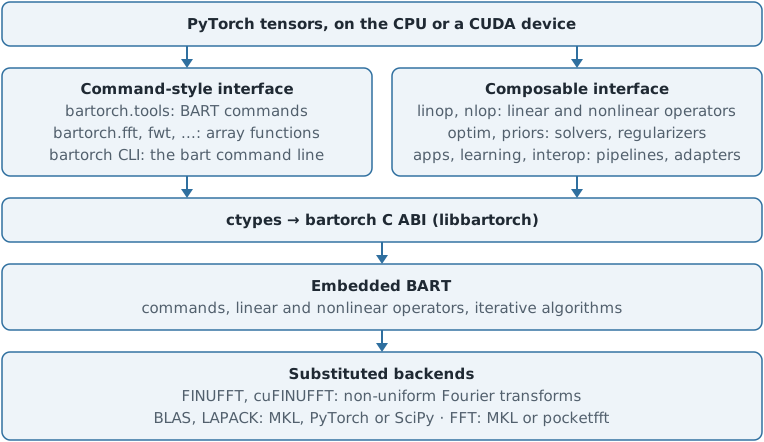
How it works
- You pass a tensor. A C-order tensor of shape
(coils, z, y, x)holds the same bytes as a BART array of dimensions[x, y, z, coils], so bartorch reverses the shape and hands BART the tensor's memory. Nothing is copied. - BART runs in the same process, compiled into the package. When BART
reports an error, you get a Python exception (
bartorch.BartError) with BART's message, and your interpreter keeps running. - A few parts of BART are swapped for faster ones: every non-uniform FFT is FINUFFT (cuFINUFFT on a card), and the FFT, BLAS and LAPACK come from MKL, PyTorch's own library or SciPy. The numbers are BART's everywhere else.
- A CUDA tensor stays on its card. The operators and solvers run there directly, and a tool runs on the card when that has been checked to be safe; otherwise its result is copied back to the card for you.
- An operator applied to a tensor that requires a gradient is recorded by autograd, and its backward pass is its adjoint. You can train through a reconstruction.
Tools: BART's commands
import bartorch.tools as bt

kspace = bt.phantom(128, coils=8, kspace=True)  # (coils, z, y, x)
compressed = bt.cc(kspace, p=4)
maps = bt.ecalib(compressed, maps=1)
- Options are keyword arguments, under BART's long name or its one-letter flag.
- Where BART takes a bitmask of dimensions, you pass tensor axes:
bartorch.fft(x, axes=(-2, -1)). - Every command BART has is here, as a function or, for the few with a reason not to be, listed as such in the documentation.
Apps: BART's reconstructions
from bartorch import apps, priors

image = apps.pics(compressed, maps, regularizers=priors.Wavelet((-1, -2), 0.005))
- A regularization term is an object from
bartorch.priors, not a-Rstring; its axes are tensor axes. apps.picsgives the same bits as BART'spicscommand, and the documentation's tests hold it to that.
Operators and solvers: custom reconstruction
import torch

from bartorch import linop, optim, priors

A = linop.CartesianSense(maps, (128, 128), pattern)  # A = P F S
image = optim.FISTA(priors.Wavelet((-1, -2), 0.005), maxiter=100)(kspace, A)

B = A @ linop.Diagonal(phase)  # one more factor, still one BART operator
loss = (B(x) - kspace).abs().pow(2).sum()
loss.backward()  # x.grad is 2 B^H (B x - y)
A(x)applies the operator,A.H(y)its adjoint, andA.H @ Aits normal. A composition is handed to BART as one operator, so a solver iterating on it never comes back to Python.A.plantells you how BART will run what you composed: which transform, which factors were fused, and whether it fell back to a slower path.- An operator you write in Python (a forward and an adjoint) joins a composition like any other.
Command line
The bartorch command takes the same arguments as bart, so a script written
for BART runs with the name changed and no BART installation:
bartorch phantom -k -s 8 kspace
bartorch ecalib -m 1 kspace maps
bartorch pics -R W:3:0:0.005 kspace maps image
Installation
pip install bartorch
pip install "bartorch[cu12]"  # with CUDA 12; use cu13 for CUDA 13
Wheels are built for Linux x86-64, macOS arm64 and Windows x86-64; the CUDA build is Linux x86-64 only. The other extras are listed under Optional dependencies, GPU builds under Installation, and source builds in the developer guide.
Learn more
- Course: from k-space to an image, then parallel imaging, regularization, non-Cartesian and model-based reconstruction, and learned regularization. Every lesson opens in Colab.
- Documentation, for every function, operator and option.
How to cite
bartorch has no publication of its own. Please cite BART (Uecker et al., doi:10.5281/zenodo.592960) and the papers behind the methods you used (ESPIRiT, compressed sensing, nonlinear inversion, ...), and report the bartorch version. Contributors and citation lists the references.
License
MIT. The embedded BART (BSD-3-Clause), FINUFFT (Apache-2.0) and the other bundled code keep their own licenses; see License and third-party notices. bartorch is an independent project, not affiliated with or endorsed by the BART developers, the PyTorch Foundation or The Linux Foundation. The logo combines BART's mark with the PyTorch logo's flame; PyTorch, the PyTorch logo and any related marks are trademarks of The Linux Foundation.
1 maintainer

Metadata
1 maintainer
Release files for bartorch 0.0.16
For a detailed explanation of source distributions (sdists) and built distributions (wheels), please see the package formats documentation.
Source distribution (sdist)
| File | Size | Uploaded | |
|---|---|---|---|
| bartorch-0.0.16.tar.gz | 7.3 MB | Details |
Built distributions (wheels)
| File | Interpreter | ABI | Platform | Reset |
|---|---|---|---|---|
| bartorch-0.0.16-py3-none-win_amd64.whl | Python 3 | none | Windows x86-64 | Details |
| bartorch-0.0.16-py3-none-manylinux_2_28_x86_64.whl | Python 3 | none | Linux glibc 2.28+ x86-64 | Details |
| bartorch-0.0.16-py3-none-macosx_11_0_arm64.whl | Python 3 | none | macOS 11.0+ ARM64 | Details |
Total release size: 31.1 MB
Release files / bartorch-0.0.16.tar.gz
| Download URL | bartorch-0.0.16.tar.gz |
|---|---|
| Size | 7.3 MB |
| Tags | Source |
|
SHA-256 checksum How to use checksums |
7651202a73c284c740d1d2da4874f1763cfddb9b03cd07dc196e3736b9dd9e8c
|
|
BLAKE2b-256 checksum How to use checksums |
c19845f28b13b58e6d54ea97e09e3e32157a310f5e3ef8152aff930f99b7d07d
|
| Upload date | |
|
Uploaded using Trusted Publishing? What is trusted publishing? |
Yes |
| Uploaded via |
twine/7.0.0 CPython/3.13.14
|
Provenance
Provenance describes where a file came from. On PyPI, provenance is shared via attestations, which provide a verifiable record of the build or publishing details. View details, limitations and caveats.


PyPI Publish Attestation
PyPI verified that this artifact, at this checksum, originated from the publisher listed below.
Signed by GitHub Actions, verified by PyPI on Oct 14, 2026.
Transparency logRelease files / bartorch-0.0.16-py3-none-win_amd64.whl
| Download URL | bartorch-0.0.16-py3-none-win_amd64.whl |
|---|---|
| Size | 7.7 MB |
| Tags | Python 3 Windows x86-64 |
|
SHA-256 checksum How to use checksums |
0447bc18f442e8e54d76b0672b9f9de78d1faf882ea80e58c60d3b8053bddf5d
|
|
BLAKE2b-256 checksum How to use checksums |
7165f296b27e4766f73d881475c57f409feaa9957492297368bbdfc4f21ba307
|
| Upload date | |
|
Uploaded using Trusted Publishing? What is trusted publishing? |
Yes |
| Uploaded via |
twine/7.0.0 CPython/3.13.14
|
Provenance
Provenance describes where a file came from. On PyPI, provenance is shared via attestations, which provide a verifiable record of the build or publishing details. View details, limitations and caveats.
PyPI Publish Attestation
PyPI verified that this artifact, at this checksum, originated from the publisher listed below.
Signed by GitHub Actions, verified by PyPI on Oct 14, 2026.
Transparency logRelease files / bartorch-0.0.16-py3-none-manylinux_2_28_x86_64.whl
| Download URL | bartorch-0.0.16-py3-none-manylinux_2_28_x86_64.whl |
|---|---|
| Size | 13.1 MB |
| Tags | Linux glibc 2.28+ x86-64 Python 3 |
|
SHA-256 checksum How to use checksums |
e61339e20941710b4a41a8a84696f9f8f5b3422f3410711cb8af38d56342b5ef
|
|
BLAKE2b-256 checksum How to use checksums |
7d4a41048c2f3159f69a93a5d813fa70c558178999e54d9899d5abb62856a9bc
|
| Upload date | |
|
Uploaded using Trusted Publishing? What is trusted publishing? |
Yes |
| Uploaded via |
twine/7.0.0 CPython/3.13.14
|
Provenance
Provenance describes where a file came from. On PyPI, provenance is shared via attestations, which provide a verifiable record of the build or publishing details. View details, limitations and caveats.
PyPI Publish Attestation
PyPI verified that this artifact, at this checksum, originated from the publisher listed below.
Signed by GitHub Actions, verified by PyPI on Oct 14, 2026.
Transparency logRelease files / bartorch-0.0.16-py3-none-macosx_11_0_arm64.whl
| Download URL | bartorch-0.0.16-py3-none-macosx_11_0_arm64.whl |
|---|---|
| Size | 3.0 MB |
| Tags | Python 3 macOS 11.0+ ARM64 |
|
SHA-256 checksum How to use checksums |
4631c11d9792b060f4313d4226e1f9869e451c11eb6c3442a8bb939a74f74956
|
|
BLAKE2b-256 checksum How to use checksums |
a0c789f5e6b87639564b65d81deb428379a3205ac32c6353e8b9a74a5072a28c
|
| Upload date | |
|
Uploaded using Trusted Publishing? What is trusted publishing? |
Yes |
| Uploaded via |
twine/7.0.0 CPython/3.13.14
|
Provenance
Provenance describes where a file came from. On PyPI, provenance is shared via attestations, which provide a verifiable record of the build or publishing details. View details, limitations and caveats.
PyPI Publish Attestation
PyPI verified that this artifact, at this checksum, originated from the publisher listed below.
Signed by GitHub Actions, verified by PyPI on Oct 14, 2026.
Transparency log













