
bas-remote-python



bas-remote-python - Python library, which allows you to automate Google Chrome browser.
In order to make it possible, BrowserAutomationStudio application is used. bas-remote-python allows you to call and control execution of functions created in BAS. Consider following example, you have a BAS function, which executes specified Google search query and returns result as a list of urls. Using this library, you can call that function in any Python application and obtain result. You can distribute applications written with bas-remote-python library as well.
BrowserAutomationStudio
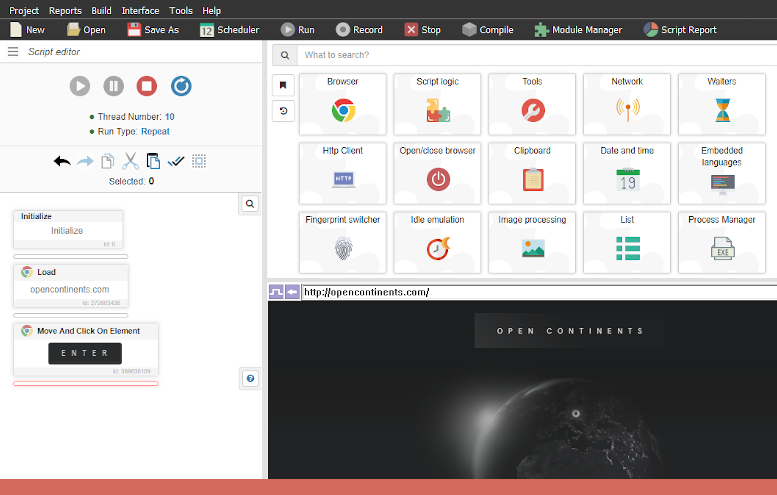
BAS - is application that allows you to automate any activities in Google Chrome browser with a help of visual programming and without knowing of any programming language. You can think of it as IDE created especially for browser automation:
Check following link for more info:
https://bablosoft.com/shop/BrowserAutomationStudio
Installation
pip install bas-remote-python
Quick example
Following code will search for cats query in Google and output result into console. You can just copy paste this code and run it.
import asyncio

from bas_remote import BasRemoteClient
from bas_remote import Options


async def main():
    # Set script name, and optionally auth details (login, password).
    options = Options(script_name='TestRemoteControl')

    # Create client.
    script_client = BasRemoteClient(options)

    # Start application, this may take some time.
    await script_client.start()

    # Set parameters for function.
    script_params = {'Query': 'cats'}

    # Run function and wait for result.
    # Following function will return list of strings.
    result = await script_client.run_function(
        'GoogleSearch',  # or 'YourFunctionName'
        script_params)

    # Iterate and output results.
    for link in result:
        print(link)

    await script_client.close()


if __name__ == '__main__':
    asyncio.run(main())
Checkout wiki for more examples.
Running custom code
Previous example used TestRemoteControl project and GoogleSearch function defined in it. In most cases you want to use your own projects and functions. In order to do it:
- Install BAS. Download using following link. IMPORTANT You need to be a premium user in order to create project with custom functions.
- Start record mode and create new function by using function manager. BAS functions works like functions in any other languages. They can be called with parameters and can return value as a result. Functions help to incapsulate and reuse your code.
- Implement it. On following step you need to implement required functionality. Place code into the function that you have created on previous step. They will be called from Python code later. Function parameters will be sent from Python to BAS, while return value will be sent from BAS to Python. Working with BAS is out of scope of this article, check BAS wiki for more info.
- Compile it and give it a name. Check this article more more instruction for compilation.
- Finally, allow remote function execution flag for script must be set. You can do that on following page. See screenshot for more details.
After project with function is prepared, you can use it from Python. In order to do that, change script and function name in example above.
How it works
Following diagram will explain project architecture:
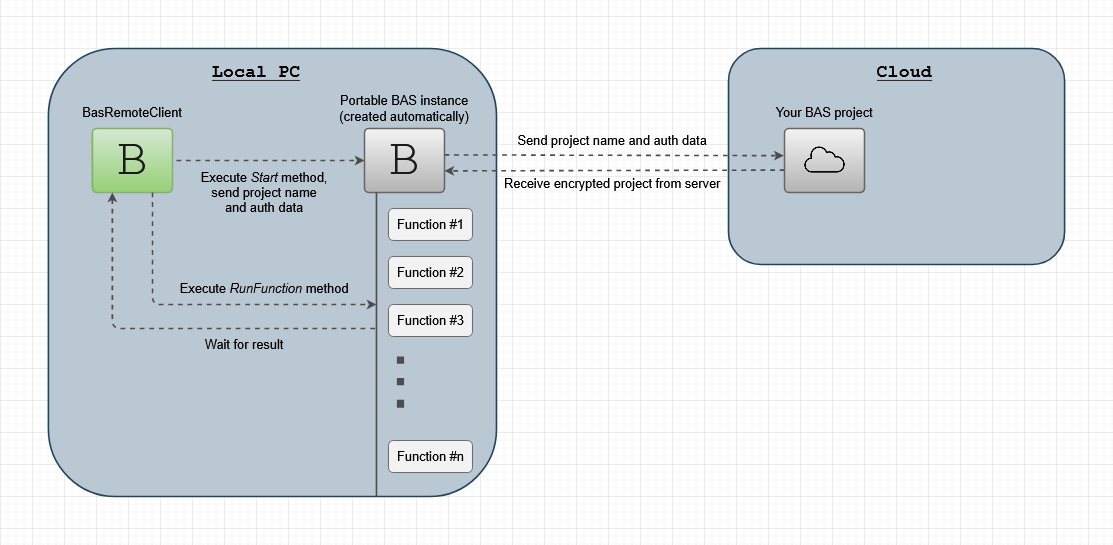
Running custom code section explains how to prepare your project and upload it into the cloud. Portable BAS instance is downloaded and started automatically, it is also closed automatically when BasRemoteClient gets closed. Folder, where portable BAS instance is located by default is data folder relative to executable. It can be customized by using options.working_dir setting.
Project example
You can use TestRemoteControl project in order to test bas-remote-python library. It is already uploaded into the cloud and can be used without authentication. List of available functions:
Add(X,Y)- adds two numbers and return their sum.SetProxy(Proxy,IsSocks5)- sets proxy for current thread. Proxy param is proxy string, IsSocks5 is string("true", "false") value indicates if proxy type is socks5. No return value.CheckIp()- returns remote IP of current thread. Uses ip.bablosoft.com service to test. Can be combined with SetProxy function.GoogleSearch(Query)- performs Google query, returns result as a list of urls.
Project source code can be downloaded here
License
bas-remote-python has MIT license.
You can distribute applications using bas-remote-python library, including commercial, to user, who don't have BAS premium subscription without any fees.
In order to create project with custom functions you need to have a BAS premium subscription.
In other words, only developers must have BAS premium subscription, not users.
1 maintainer

Metadata
1 maintainer
Release files for bas-remote-python 1.7
For a detailed explanation of source distributions (sdists) and built distributions (wheels), please see the package formats documentation.
Source distribution (sdist)
| File | Size | Uploaded | |
|---|---|---|---|
| bas_remote_python-1.7.tar.gz | 15.5 kB | Details |
Built distribution (wheel)
| File | Interpreter | ABI | Platform | Reset |
|---|---|---|---|---|
| bas_remote_python-1.7-py3-none-any.whl | Python 3 | none | any | Details |
Total release size: 34.6 kB
Release files / bas_remote_python-1.7.tar.gz
| Download URL | bas_remote_python-1.7.tar.gz |
|---|---|
| Size | 15.5 kB |
| Tags | Source |
|
SHA-256 checksum How to use checksums |
900c3fbdf54f32c730986172f6d2549a474780ec24d3b4a3ed04d9a387288e22
|
|
BLAKE2b-256 checksum How to use checksums |
2e278aa1f10cad78a2b901d100178ee7e691356a4fbb25612519413eeba9d4fc
|
| Upload date | |
|
Uploaded using Trusted Publishing? What is trusted publishing? |
No |
| Uploaded via |
twine/6.1.0 CPython/3.13.2
|
Release files / bas_remote_python-1.7-py3-none-any.whl
| Download URL | bas_remote_python-1.7-py3-none-any.whl |
|---|---|
| Size | 19.1 kB |
| Tags | Python 3 |
|
SHA-256 checksum How to use checksums |
5e13dfa563f3f909819311d88774e06236f8ab0860d5e91d40dd1248de099713
|
|
BLAKE2b-256 checksum How to use checksums |
5835ffba1d3b6a9f9374014fa91c2ab87e2482f26450f7e034a14cb0d48799ec
|
| Upload date | |
|
Uploaded using Trusted Publishing? What is trusted publishing? |
No |
| Uploaded via |
twine/6.1.0 CPython/3.13.2
|

















