
🐳 image-inspector — select • inspect • pin

A CLI for finding official container base images, showing precomputed vulnerability counts, and generating digest-pinned FROM lines — without pulling images, running Docker, or scanning locally.




⚡ Try it in 5 seconds
No install, no Docker daemon, no local scanner — just uv:
uvx --from base-image-inspector image-inspector
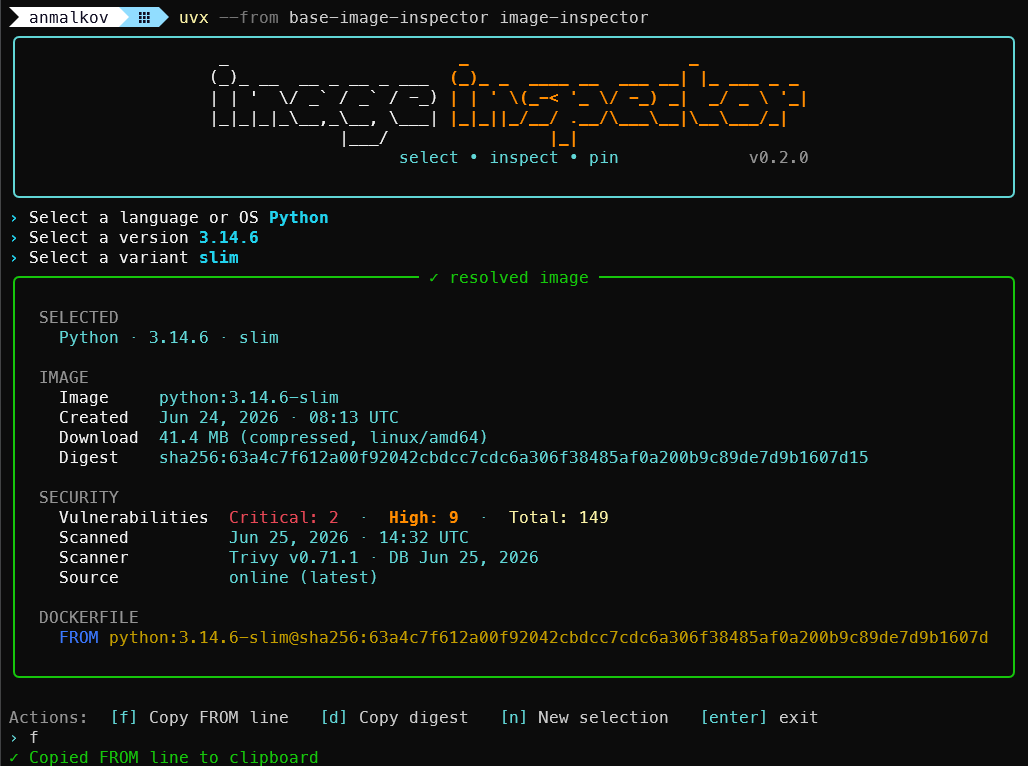
Pick a base image with the arrow keys and copy the digest-pinned FROM line. That's it.
Why this exists
| Tool | Great at | The gap it leaves |
|---|---|---|
docker pull + trivy scan |
Accurate, thorough scanning | Slower, and runs locally — you pull the image first |
| Renovate | Keeping base images up to date | Helps after you've already chosen a base image |
| image-inspector | Choose + inspect + pin before you write FROM |
Approximate counts from precomputed nightly data (fetched from GitHub Pages, bundled offline fallback), not a live scan |
Who is this for?
Use image-inspector if you:
- write Dockerfiles often
- want reproducible base images
- want quick vulnerability context before choosing a base image
- don't want to pull images or run a scanner locally
What is this?
When you write a Dockerfile, you start from a base image like python:3.13 or node:22.
The problem: tags like python:3.13 are moving targets — the image behind that tag changes over
time. So a build that works today might pull a different image tomorrow, and "it works on my machine"
quietly breaks.
image-inspector fixes that. You pick a language or OS, a version, and a variant — all with the
arrow keys — and it gives you a base image pinned to an immutable digest plus a
ready-to-paste FROM line:
FROM python:3.13.14-slim@sha256:205e60d0b78f024817...
It also shows you, up front, how many known security vulnerabilities that image has, its size, and when it was built — so you can choose a good base image with confidence.
What's that
@sha256:...part? It's the image's digest — a unique fingerprint of the exact image contents. Pinning to a digest means everyone who builds yourDockerfilegets the identical base image, every time. That's what makes a build reproducible.
Vulnerability counts come from precomputed nightly Trivy data — fetched from GitHub Pages when online, with a copy bundled in the package as an offline fallback. Images are not pulled or scanned locally at runtime. No Docker daemon or local scanner is required.
Quick start
1. Already tried it with uvx? Install it permanently (pick whichever you have):
uv tool install base-image-inspector     # recommended
# or
pipx install base-image-inspector
# or
pip install base-image-inspector
Package vs. command: the PyPI package is
base-image-inspector, but the installed CLI command isimage-inspector.
Prefer one-shot usage? Use uv:
uvx --from base-image-inspector image-inspector
2. Run it:
image-inspector
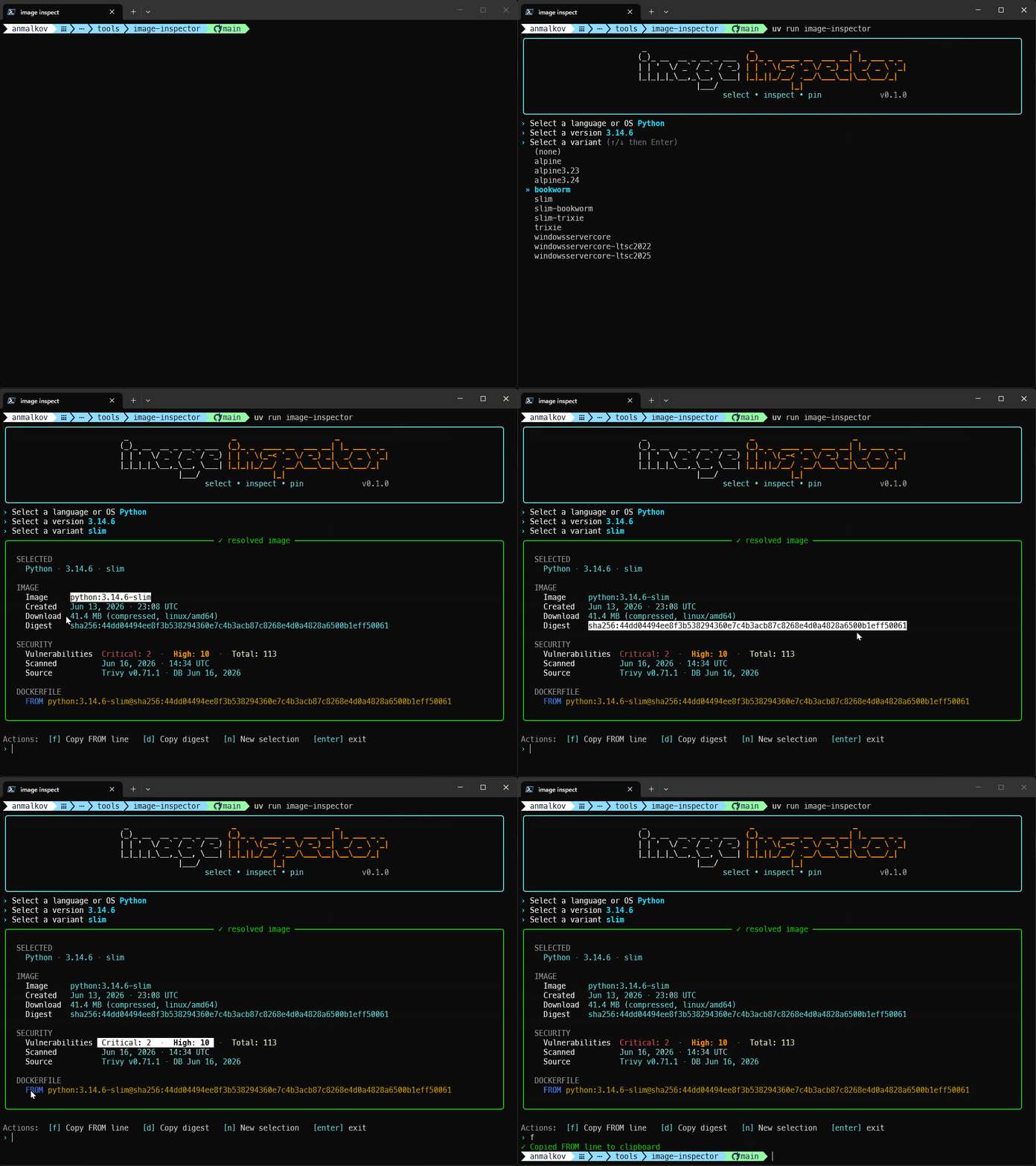
3. Pick with the arrow keys — language/OS → version → variant — and copy the FROM line it
prints. That's it. 🎉
New here and want the full walkthrough? See the Getting started guide.
Features
- 📌 Digest pinning — outputs a
name:tag@sha256:…reference for reproducible builds. - 🛡️ Security at a glance — critical / high / total vulnerability counts for the chosen image, from precomputed nightly Trivy data fetched from GitHub Pages (with a bundled offline fallback).
- 🧱 Many ecosystems, one interface — Python, .NET, Java, Go, Node, Rust, C/C++, plus Ubuntu, Debian and Alpine base images.
- 🤖 Automation-friendly —
--jsonfor non-interactive use and--plain/NO_COLORsupport. - 🎨 Modern UI — branded banner, themed menus, spinners, and a syntax-highlighted result panel.
- ⌨️ Arrow-key everything — language, version, and variant are all pick-from-list menus. No typing.
- 📋 Quick actions — after a result, copy the
FROMline or digest to your clipboard.
Supported images
Languages & runtimes
| Language | Registry | Repository | Versioning |
|---|---|---|---|
| Python | Docker Hub | library/python |
semver (latest 5 minors) |
| .NET | MCR | mcr.microsoft.com/dotnet/sdk |
semver (latest 5 minors) |
| Java | Docker Hub | library/eclipse-temurin |
feature release (8 / 11 / 17 / 21 / 25 / 26) |
| Go | Docker Hub | library/golang |
semver (latest minors) |
| Node.js | Docker Hub | library/node |
semver (latest 5 minors) |
| Rust | Docker Hub | library/rust |
semver (latest 5 minors) |
| C / C++ | Docker Hub | library/gcc |
semver (latest 5 minors) |
OS base images
| Image | Registry | Repository | Versioning |
|---|---|---|---|
| Ubuntu | Docker Hub | library/ubuntu |
calver YY.MM (latest 5 releases, LTS marked) |
| Debian | Docker Hub | library/debian |
major (11 / 12 / 13) + -slim variant |
| Alpine | Docker Hub | library/alpine |
semver (latest 5 minors) |
Per-image details (Java feature releases, the gcc compiler image, Ubuntu LTS, Debian variants) are
covered in the Getting started guide.
Examples
# Interactive — pick everything with the arrow keys:
image-inspector

# Non-interactive, machine-readable output for scripts/CI:
image-inspector --json -l ubuntu --version 24.04
A --json run prints a single object describing the resolved image. For example:
image-inspector --json -l python --version 3.13 --variant slim
{
  "source": "Docker Hub",
  "language": "python",
  "version": "3.13",
  "variant": "slim",
  "image": "python:3.13.14-slim",
  "pinned_reference": "python:3.13.14-slim@sha256:205e60d0b78f024817...",
  "digest": "sha256:205e60d0b78f024817...",
  "size_bytes": 44912345,
  "from_line": "FROM python:3.13.14-slim@sha256:205e60d0b78f024817...",
  "vulnerabilities": {
    "critical": 0,
    "high": 1,
    "total": 23,
    "scanned_at": "2026-06-22T02:14:07+00:00"
  },
  "scanner": { "name": "trivy", "version": "0.71.1", "db_updated_at": "2026-06-22T00:00:00+00:00" }
}
(Some fields are omitted above for brevity.) When no scan data exists for the image,
vulnerabilities is null.
The full list of flags lives in the Getting started guide.
Vulnerability data
The critical / high / total counts come from precomputed nightly Trivy
data. Nothing is scanned locally at runtime — image-inspector doesn't run Trivy
on your machine, pull images, or talk to a scanner. That keeps it fast and means no Docker daemon or
scanner is required. A GitHub Actions workflow regenerates this data nightly and publishes it to
GitHub Pages. At runtime the tool is
online-first: it fetches that live report when online (short timeout, ETag-cached) and falls
back to the copy bundled with the package when offline or if the fetch fails. The SECURITY
panel's Source row shows which you're seeing (online (latest) vs offline (bundled copy)). Set
IMAGE_INSPECTOR_OFFLINE=1 to force the bundled copy, or IMAGE_INSPECTOR_REPORT_URL to point at a
different report. Because the data is precomputed, counts reflect the most recent snapshot rather
than a live, on-the-spot scan.
Limitations
- Vulnerability counts come from the precomputed nightly dataset (online from GitHub Pages, or the bundled offline fallback), not a live scan.
- Counts are for the selected base image only, not your final application image.
- Digest pinning improves reproducibility, but you still need a process for updating pinned images.
- Only selected official images are supported.
Why not just use Trivy, Docker Scout, or Renovate?
image-inspector is not a replacement for full image scanning, Docker Scout, Trivy, or dependency automation tools like Renovate.
It is meant for the moment before you write a FROM line: choosing among official base
images, seeing approximate vulnerability counts, and pinning the exact digest without
pulling images locally or running a scanner.
You should still scan your final built image in CI.
Documentation
- 📖 Getting started guide — full usage, all flags, JSON output, and vulnerability data.
- 🛠️ Development guide — set up locally, run the tool from source, lint, type-check, and test.
- 🚀 Releasing guide — how releases are built and published.
Community & support
- Bug reports and feature requests: GitHub Issues
- Questions and ideas: GitHub Discussions
- Quick chat: Discord
🤝 Contributing
Contributions are welcome! Please read CONTRIBUTING.md for the branch/PR flow, local checks, and where to ask questions.
License
Released under the MIT License.
1 maintainer

Download files
Download the file for your platform. If you're not sure which to choose, learn more about installing packages.
Source Distribution
Built Distribution
Filter files by name, interpreter, ABI, and platform.
If you're not sure about the file name format, learn more about wheel file names.
Copy a direct link to the current filters
File details
Details for the file base_image_inspector-0.3.0.tar.gz.
File metadata
- Download URL: base_image_inspector-0.3.0.tar.gz
- Upload date:
- Size: 160.1 kB
- Tags: Source
- Uploaded using Trusted Publishing? Yes
- Uploaded via:
uv/0.11.25 {"installer":{"name":"uv","version":"0.11.25","subcommand":["publish"]},"python":null,"implementation":{"name":null,"version":null},"distro":{"name":"Ubuntu","version":"24.04","id":"noble","libc":null},"system":{"name":null,"release":null},"cpu":null,"openssl_version":null,"setuptools_version":null,"rustc_version":null,"ci":true}
File hashes
| Algorithm | Hash digest | |
|---|---|---|
| SHA256 |
d4260342dcd0ad7ecd8f766a60d9ac2ad34e7be8097af48b281e9e5316043a35
|
|
| MD5 |
3b1ff74c4b0db9ff3ed2f7bdd8ca527a
|
|
| BLAKE2b-256 |
fa8ae83d0651c5e7d0dd17c776ed2a3f52523081d278ba4fe27ce19f69b766b6
|
File details
Details for the file base_image_inspector-0.3.0-py3-none-any.whl.
File metadata
- Download URL: base_image_inspector-0.3.0-py3-none-any.whl
- Upload date:
- Size: 165.3 kB
- Tags: Python 3
- Uploaded using Trusted Publishing? Yes
- Uploaded via:
uv/0.11.25 {"installer":{"name":"uv","version":"0.11.25","subcommand":["publish"]},"python":null,"implementation":{"name":null,"version":null},"distro":{"name":"Ubuntu","version":"24.04","id":"noble","libc":null},"system":{"name":null,"release":null},"cpu":null,"openssl_version":null,"setuptools_version":null,"rustc_version":null,"ci":true}
File hashes
| Algorithm | Hash digest | |
|---|---|---|
| SHA256 |
d35616e7e189846ae14c836d2f4f6325b724f98d932f84da780945592c4224ce
|
|
| MD5 |
fb0cb03a23590ddb670dc1bcda260c93
|
|
| BLAKE2b-256 |
a786e599d254fedee1836ad88d463a524a47a7c4e67f5876fec53c62f059163b
|














