
Basecamp MCP Server




Connect Claude, Cursor, Codex and other AI assistants to your Basecamp 3 or 4 account. Ask in plain language to find, read, create and update projects, to-dos, messages, card tables, schedules, documents and more: 210 Basecamp operations in all.
"What's overdue across all my projects?" · "Summarise this week's messages in the Website project." · "Move this card to Done and comment that it shipped."
Contents
- Quick start
- Add it to your AI app
- What it can do
- All 210 tools
- Settings and sign-in
- Troubleshooting
- Run from a git checkout
- Security
Quick start
You need uv (it installs Python for you) and a Basecamp 3 or 4 account. Setup takes about five minutes.
1. Install uv, if you don't have it:
# macOS and Linux
curl -LsSf https://astral.sh/uv/install.sh | sh
# Windows
powershell -ExecutionPolicy ByPass -c "irm https://astral.sh/uv/install.ps1 | iex"
2. Sign in to Basecamp:
uvx basecamp-mcp-server login
The first time, it walks you through registering a free Basecamp app at launchpad.37signals.com/integrations (set its Redirect URI to http://localhost:8000/auth/callback), then asks for the Client ID and Client Secret it shows you. Your browser then opens for Basecamp sign-in, and the token is saved for you. Tokens refresh automatically after that.
3. Add the server to your AI app, using the snippet from the next section, and restart the app.
Check everything is working at any time:
uvx basecamp-mcp-server status
Add it to your AI app
uvx basecamp-mcp-server config <app> prints the exact snippet for your machine. The app can be claude-desktop, cursor, claude-code, codex or generic.
Claude Desktop
Open Settings → Developer → Edit Config and add:
{
  "mcpServers": {
    "basecamp": {
      "command": "uvx",
      "args": ["basecamp-mcp-server"]
    }
  }
}
Quit Claude Desktop completely and reopen it. If it says it can't find uvx, use the full path that uvx basecamp-mcp-server config claude-desktop prints.
Claude Code
claude mcp add basecamp -- uvx basecamp-mcp-server
Cursor
Add the same JSON as Claude Desktop to ~/.cursor/mcp.json (or .cursor/mcp.json in a project), then restart Cursor and check Settings → MCP.
Codex
Add to ~/.codex/config.toml:
[mcp_servers.basecamp]
command = "uvx"
args = ["basecamp-mcp-server"]
Any other MCP client
Run uvx basecamp-mcp-server as a local (stdio) MCP server. The JSON above works for most clients.
Four tools or all 210?
By default the server shows your AI app four small tools that find and run the right Basecamp operation on demand. That keeps the app's context small, and it can still reach all 210 operations. Reading and changing data are separate tools, so apps that ask before making changes still do.
To list all 210 tools up front instead, add --full: "args": ["basecamp-mcp-server", "--full"].
What it can do
- Projects and people: list, create and update projects and templates; see who's on a project and grant or revoke access.
- To-dos: read, create, assign, complete, move and archive to-dos and to-do lists; see what's assigned to anyone and what's overdue.
- Messages and comments: read and post messages (or save drafts), pin them, manage categories, and comment on anything.
- Chat and check-ins: read and post in Campfire chats; create, pause and read automatic check-in questions and answers.
- Schedules: read, create and update events, including recurring ones.
- Card tables: work with columns, cards and card steps; move cards between columns.
- Files and documents: list, read and create documents; download uploads and inline attachments straight into the conversation.
- Search and activity: search the whole account; browse activity timelines and account-wide feeds of messages, files, to-dos and cards.
- Time and progress: timesheets, progress gauges and Hill Charts.
- Personal and admin: notifications, bookmarks, your private note, subscriptions, webhooks and project tools.
Big lists (projects, to-dos, comments, messages, cards, assignments) come back as compact summaries so they fit in the AI's context. Those tools take detail: "full" when you need every field, or set BASECAMP_MCP_FULL_RESPONSES=1 to make that the default.
All 210 tools
Grouped the same way the server groups them for discovery. Click a group to expand it.
Projects and people (18 tools)
create_project— Create a Basecamp projectcreate_project_from_template— Start constructing a project from a Basecamp templatecreate_template— Create a Basecamp project templateget_assignable_people— Get all people who can have to-dos assigned to themget_people— Get people available in the authenticated Basecamp accountget_person— Get one Basecamp person's profileget_pingable_people— Get Basecamp people who can be pingedget_project— Get one project's details, including its dock IDsget_project_construction— Get the status of a project being constructed from a templateget_project_people— Get active people on a Basecamp projectget_projects— List Basecamp projects. Returns a compact summary by defaultget_template— Get a Basecamp project templateget_templates— List visible Basecamp project templatestrash_project— Move a Basecamp project to the trashtrash_template— Move a Basecamp project template to the trashupdate_project— Update a project's name, description, access policy, or date rangeupdate_project_people— Grant, revoke, or invite people on a Basecamp projectupdate_template— Update a Basecamp project template
Todos and assignments (25 tools)
archive_todo— Archive a todo itemcomplete_todo— Mark a todo item as completecreate_todo— Create a new todo item in a todo listcreate_todolist— Create a new todo list in a projectcreate_todolist_group— Create a new group inside a todo listdelete_todo— Move a todo item to the trashdeprioritize_assignment— Remove an assignment from the authenticated user's Up Next listget_completed_assignments— Get the authenticated user's completed assignmentsget_due_assignments— Get the authenticated user's assignments by due-date scopeget_my_assignments— Get the authenticated user's active assignments grouped by priorityget_overdue_todos— Get overdue to-dos for the WHOLE ACCOUNT, grouped by how late they areget_person_assignments— Get all active, pending to-dos assigned to a specific personget_todo— Get a single todo item by its IDget_todolist— Get a specific todo list by IDget_todolist_groups— Get all groups in a todo listget_todolists— Get todo lists for a projectget_todos— Get todos from a todo listprioritize_assignment— Add an assignment to the authenticated user's Up Next listreorder_priority— Move an assignment to a position in the authenticated user's Up Next listreposition_todo— Reposition a todo within its list, or move it to another list or groupreposition_todolist_group— Reposition a todo list group to a new location within its listtrash_todolist— Move a todo list to the trashuncomplete_todo— Mark a todo item as incompleteupdate_todo— Update an existing todo itemupdate_todolist— Update an existing todo list
Messages and comments (24 tools)
create_comment— Create a comment on a Basecamp itemcreate_draft_message— Create a draft message on a project's message board without publishing itcreate_message— Create a new message on a project's message boardcreate_message_category— Create a message type/categorydelete_comment— Delete a comment by moving it to the project's trash (Basecamp has no hard delete)delete_message_category— Delete a message type/categoryget_comment— Get a specific comment by IDget_comments— Get comments for a Basecamp itemget_forward— Get a specific forwarded email by IDget_forwards— Get all forwarded emails from a project's inboxget_inbox— Get the inbox for a project (for email forwards)get_inbox_replies— Get all replies to a forwarded emailget_inbox_reply— Get a specific reply to a forwarded emailget_message— Get a specific message by IDget_message_board— Get the message board for a projectget_message_categories— Get message categories (types) for a projectget_message_category— Get one message type/categoryget_messages— Get all messages from a project's message boardpin_message— Pin a message to the top of its message boardtrash_forward— Move a forwarded email to trashunpin_message— Remove a message from the top of its message boardupdate_comment— Update a comment's contentupdate_message— Update one or more fields on a messageupdate_message_category— Update a message type/category
Campfires and check-ins (17 tools)
create_campfire_line— Create a plain-text line in a Basecamp campfirecreate_question— Create a question in a Basecamp automatic check-ins questionnairedelete_campfire_line— Permanently delete a line from a Basecamp campfireget_campfire_line— Get one line from a Basecamp campfireget_campfire_lines— Get recent messages from a Basecamp campfire (chat room)get_campfires— List campfire/chat rooms enabled in a projectget_daily_check_ins— Get project's daily checking questionnaireget_question— Get one automatic check-in questionget_question_answer— Get one automatic check-in answerget_question_answerers— List people who have answered a Basecamp automatic check-in questionget_question_answers— Get answers on daily check-in questionget_question_reminders— Get pending automatic check-in reminders for the authenticated userget_questionnaire— Get the automatic check-ins questionnaire for a projectget_questions— Get questions from an automatic check-ins questionnairepause_question— Pause a Basecamp automatic check-in questionresume_question— Resume a paused Basecamp automatic check-in questionupdate_question— Update selected fields on a Basecamp automatic check-in question
Schedules and calendars (13 tools)
create_lineup_marker— Create an account-wide Basecamp Lineup markercreate_schedule_entry— Create a schedule entry in a Basecamp project's scheduledelete_lineup_marker— Delete an account-wide Basecamp Lineup markerget_calendar— Get a Basecamp calendar by IDget_lineup_markers— List account-wide Basecamp Lineup markersget_schedule— Get the schedule for a Basecamp projectget_schedule_entries— Get schedule entries for a Basecamp projectget_schedule_entry— Get one schedule entry from a Basecamp projectget_schedule_entry_occurrence— Get one occurrence of a recurring schedule entryget_upcoming_schedule— Get upcoming events and due work across all accessible projectsupdate_calendar— Update a Basecamp calendar's display colorupdate_lineup_marker— Update an account-wide Basecamp Lineup markerupdate_schedule_entry— Update one or more fields on a Basecamp schedule entry
Card tables (29 tools)
complete_card— Mark a card as completecomplete_card_step— Mark a card step as completecreate_card— Create a new card in a columncreate_card_step— Create a new step (sub-task) for a cardcreate_card_table_wormhole— Create a cross-project card-table wormholecreate_column— Create a new column in a card tabledelete_card_step— Delete a card stepdelete_card_table_wormhole— Delete a card-table wormholeget_card— Get details for a specific cardget_card_step— Get details for a specific card stepget_card_steps— Get all steps (sub-tasks) for a cardget_card_table— Get the card table details for a project, including its columnsget_card_tables— Get all card tables for a projectget_cards— Get all cards in a columnget_column— Get details for a specific columnget_columns— Get all columns in a card tablemove_card— Move a card to a column or linked cross-project wormholemove_column— Move a column to a new positionput_column_on_hold— Put a column on hold (freeze work)remove_column_hold— Remove hold from a column (unfreeze work)uncomplete_card— Mark a card as incompleteuncomplete_card_step— Mark a card step as incompleteunwatch_column— Unsubscribe from notifications for a columnupdate_card— Update a cardupdate_card_step— Update a card stepupdate_card_table_wormhole— Change a card-table wormhole's destination columnupdate_column— Update a column titleupdate_column_color— Update a column colorwatch_column— Subscribe to notifications for changes in a column
Files and documents (20 tools)
archive_recording— Archive any Basecamp recordingcreate_attachment— Upload a file as an attachmentcreate_document— Create a document in a vaultcreate_draft_document— Create a draft document in a vault without publishing itcreate_upload_version— Replace an upload's file while preserving its recording URLdownload_attachment— Download an inline comment/message attachment as MCP contentdownload_upload— Download the binary content of an upload (PDF, image, document, ...)get_document— Get a single documentget_documents— List documents in a vaultget_recordings— List every recording of one supported type in a project or accountget_upload— Get details for a specific uploadget_upload_versions— Get raw version events for an upload, optionally filtered by actionget_uploads— List uploads in a project or vaultget_vaults— List child vaults in a vaultrestore_recording— Restore an archived Basecamp recording to active statustrash_document— Move a document to trashtrash_recording— Move any Basecamp recording to the trashupdate_document— Update a documentupdate_recording_visibility— Toggle client visibility for a Basecamp recordingupdate_upload— Update an upload's metadata without replacing its file
Search, activity, and reports (15 tools)
get_events— Get events for a recordingget_everything_cards— Get filtered cards grouped by project across the whole accountget_everything_checkins— Get automatic check-in answers across every accessible projectget_everything_comments— Get recent comments across every accessible Basecamp projectget_everything_files— Get files across every accessible project, optionally filtered by kind or creatorget_everything_forwards— Get inbox forwards across every accessible Basecamp projectget_everything_messages— Get recent messages across every accessible Basecamp projectget_everything_todos— Get filtered to-dos grouped by project across the whole accountget_person_timeline— Get timeline activity created by one Basecamp personget_project_timeline— Get recent activity within one Basecamp projectget_search_metadata— Get the valid filters and content types for native Basecamp searchget_timeline— Get recent activity across every accessible Basecamp projectglobal_search— Search projects, todos and campfire messages across all projectssearch_basecamp— Search across Basecamp projects, todos, and messagessearch_recordings— Search Basecamp content, returning one page or at mostlimitresults
Timesheets and progress (17 tools)
create_gauge_needle— Record a new progress update for a Basecamp project gaugecreate_timesheet_entry— Log time against a Basecamp timesheetable recordingdelete_gauge_needle— Permanently delete a Basecamp gauge needledelete_timesheet_entry— Permanently delete a Basecamp timesheet entryget_gauge_needle— Get one Basecamp gauge needleget_gauge_needles— Get a project's gauge history, newest firstget_gauges— List project gauges across the authenticated Basecamp accountget_hill_chart— Get the Basecamp Hill Chart for a to-do setget_project_hill_chart— Resolve and get a project's Basecamp Hill Chartget_project_timesheet— Get paginated timesheet entries for a Basecamp projectget_recording_timesheet— Get paginated timesheet entries for a Basecamp recordingget_timesheet_entry— Get one Basecamp timesheet entryget_timesheet_report— Get the account-wide, non-paginated Basecamp timesheet reporttoggle_gauge— Enable or disable a Basecamp project's gaugeupdate_gauge_needle— Update the description of a Basecamp gauge needleupdate_hill_chart_settings— Track or untrack to-do lists on a Basecamp Hill Chartupdate_timesheet_entry— Update selected fields on a Basecamp timesheet entry
Notifications and personal tools (16 tools)
create_bookmark— Bookmark a Basecamp recording for the authenticated userdelete_bookmark— Remove a recording from the authenticated user's bookmarksget_bookmark_status— Get the authenticated user's bookmark status for a recordingget_bubble_ups— Get the authenticated user's current and scheduled bubble-upsget_my_bookmarks— Get recordings bookmarked by the authenticated userget_my_drafts— Get unpublished drafts owned by the authenticated userget_my_note— Get the authenticated user's personal Basecamp noteget_my_profile— Get the authenticated person's Basecamp profileget_notifications— Get the authenticated user's grouped Basecamp notification inboxget_subscription— Get subscription state and subscribers for a Basecamp recordingmark_notifications_read— Mark notification readable SGIDs as readsubscribe_to_recording— Subscribe the authenticated user to a Basecamp recordingunsubscribe_from_recording— Unsubscribe the authenticated user from a Basecamp recordingupdate_my_note— Replace the authenticated user's personal Basecamp noteupdate_question_notification_settings— Update the authenticated user's automatic check-in notification settingsupdate_subscription— Add or remove people from a recording's subscriber list
Administration and integrations (16 tools)
create_dock_tool— Add a tool to a Basecamp project's dockcreate_webhook— Create a webhookdelete_webhook— Delete a webhookdisable_dock_tool— Hide a recording from a Basecamp project's dock without deleting itenable_dock_tool— Enable a recording in a Basecamp project's dockget_account— Get the Basecamp account associated with the current access tokenget_dock_tool— Get one Basecamp project dock toolget_webhook— Get one project webhook and its recent deliveriesget_webhooks— List webhooks for a projectremove_account_logo— Remove the account logo (administrator/owner only)reposition_dock_tool— Move a Basecamp project dock tool to a one-based positiontrash_dock_tool— Permanently delete a Basecamp dock tool and its contentupdate_account_logo— Upload or replace the account logo (administrator/owner only)update_account_name— Rename the current Basecamp account (owner only)update_dock_tool— Rename a Basecamp project dock toolupdate_webhook— Update a project webhook destination, event types, or active state
Reading files in chat.
download_uploadanddownload_attachmentreturn files as MCP content. Claude Code passes PDFs, images and other files to the model. Claude Desktop and claude.ai currently pass images only; other file types are rejected by the app, not by this server.
Settings and sign-in
The installed server keeps its settings in one folder:
| System | Folder |
|---|---|
| macOS and Linux | ~/.config/basecamp-mcp-server/ (or $XDG_CONFIG_HOME/basecamp-mcp-server/) |
| Windows | %APPDATA%\basecamp-mcp-server\ |
It holds .env (your Basecamp app's Client ID and Secret), oauth_tokens.json (your sign-in) and log files. The .env and token files are readable only by you. To use a different folder, set BASECAMP_MCP_HOME.
Several Basecamp accounts? login asks which one to use, or you can pass --account-id 1234567. The ID is the number in your Basecamp URL: https://3.basecamp.com/1234567/projects.
Signing in on a machine without a browser? Run uvx basecamp-mcp-server login --no-browser, open the printed link on any browser that can reach localhost on that machine, and approve.
Other settings go in the environment or as lines in the settings .env file. BASECAMP_MCP_HOME is the exception: it says where that file is, so set it in the environment, or in your AI app's env block (config adds it for you).
| Variable | What it does |
|---|---|
BASECAMP_MCP_HOME |
Settings folder (see above). Environment only. |
BASECAMP_MCP_TOKEN_FILE |
Token file location, for example on a mounted volume. |
BASECAMP_REDIRECT_URI |
Must match your Basecamp app. Default http://localhost:8000/auth/callback. |
BASECAMP_ACCOUNT_ID |
Fallback account if the token doesn't record one. |
USER_AGENT |
Name sent to Basecamp's API. Basecamp asks for contact details; the default points to this project. |
BASECAMP_MCP_FULL_RESPONSES |
1 returns full records instead of compact summaries. |
Troubleshooting
| Problem | Fix |
|---|---|
| The Basecamp tools don't appear in your app | Quit the app completely and reopen it. Check the JSON is valid. |
| "spawn uvx ENOENT" or "command not found: uvx" | Desktop apps may not see your shell's PATH. Use the full path from uvx basecamp-mcp-server config claude-desktop. |
| "Authentication required" or "token expired" | Run uvx basecamp-mcp-server login again. |
| Login says the address is already in use | Something else is using port 8000 (often an old oauth_app.py). Stop it and retry. |
| Login says there's no Basecamp 3 or 4 account | You signed in as a user who isn't in a Basecamp 3/4 account. Sign in with a different user. |
| Basecamp shows "redirect_uri mismatch" | Your Basecamp app's Redirect URI must be exactly http://localhost:8000/auth/callback (or whatever BASECAMP_REDIRECT_URI is set to). |
| 403 errors on some tools | Some Basecamp features (Lineup, account settings, timesheets) need an account admin or owner, or need the feature turned on. |
Still stuck? uvx basecamp-mcp-server status shows where settings live and checks your sign-in. Logs are in the settings folder. Claude Desktop's own logs are in ~/Library/Logs/Claude/ (macOS) or %APPDATA%\Claude\logs\ (Windows). Please open an issue with what you ran and the error.
Run from a git checkout
Use this for development, or if you'd rather not install from PyPI. A checkout keeps its settings in the repository folder, as before.
git clone https://github.com/georgeantonopoulos/Basecamp-MCP-Server.git
cd Basecamp-MCP-Server
uv venv --python 3.12 venv
source venv/bin/activate     # Windows: venv\Scripts\activate
uv pip install -r requirements.txt
cp .env.example .env        # then fill in your Basecamp app details
python oauth_app.py         # sign in at http://localhost:8000
Then point your app at the checkout. These scripts write the config for you:
python generate_claude_desktop_config.py # or generate_cursor_config.py, generate_codex_config.py
Each accepts --full for all 210 tools, or --legacy for the older JSON-RPC server.
Run the tests with python -m pytest tests/.
How the code is organised
| File | Role |
|---|---|
basecamp_mcp_server/cli.py |
The installed command: login, status, config and running the server. |
basecamp_retrieval_mcp.py |
Default server: four tools that discover and run the others. |
basecamp_tool_retrieval.py |
Categories, read/write split, and ranking for discovery. |
basecamp_fastmcp.py |
All 210 tool definitions; also the --full server. |
basecamp_client.py |
Basecamp API client. |
payload_shaping.py |
Compact summaries for large responses. |
basecamp_oauth.py, auth_manager.py, token_storage.py |
Sign-in, automatic token refresh, and token storage. |
oauth_app.py |
Browser sign-in page for git checkouts. |
mcp_server_cli.py |
Older JSON-RPC server, kept for compatibility. |
Security
- Your Basecamp app's secret and your token stay on your machine, in files only you can read. Never commit
.envoroauth_tokens.json. - Sign-in uses a one-time random check value, and the local sign-in page only accepts the response it's waiting for.
- Write tools are marked as such, so MCP apps that ask before making changes will ask.
- This server is built to run locally for one person. Read the design notes before hosting it for a team.
License
MIT. See LICENSE.
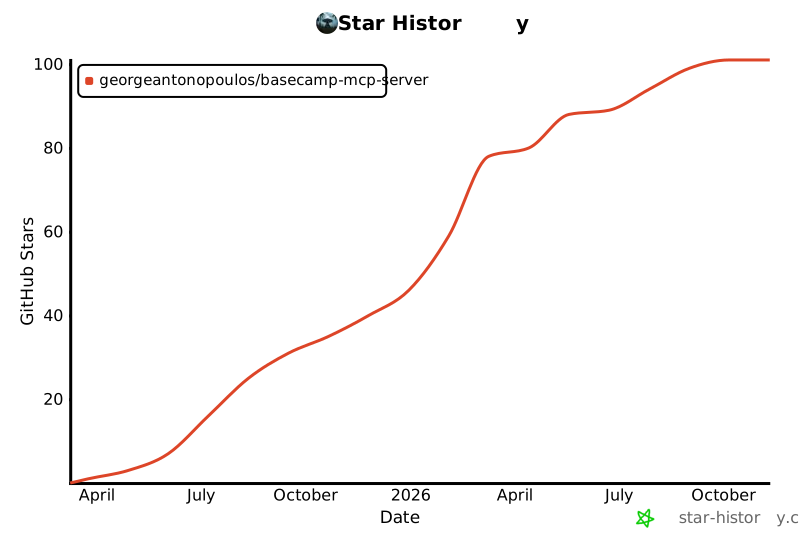
Star History
1 maintainer

Metadata
1 maintainer
Release files for basecamp-mcp-server 1.0.0
For a detailed explanation of source distributions (sdists) and built distributions (wheels), please see the package formats documentation.
Source distribution (sdist)
| File | Size | Uploaded | Provenance | Actions |
|---|---|---|---|---|
| basecamp_mcp_server-1.0.0.tar.gz | 143.6 kB | With provenance | Details for basecamp_mcp_server-1.0.0.tar.gz |
Built distribution (wheel)
| File | Interpreter | ABI | Platform | Actions Reset |
|---|---|---|---|---|
| basecamp_mcp_server-1.0.0-py3-none-any.whl | Python 3 | none | any | Details for basecamp_mcp_server-1.0.0-py3-none-any.whl |
Total release size: 231.8 kB
Release files / basecamp_mcp_server-1.0.0.tar.gz
| Download URL | basecamp_mcp_server-1.0.0.tar.gz |
|---|---|
| Size | 143.6 kB |
| Tags | Source |
|
SHA-256 checksum How to use checksums |
3dbb71c3cd7d6c4035a90196cbd0e70f437f03b69a2d15df46d6bd65a68107fe
|
|
BLAKE2b-256 checksum How to use checksums |
0420c14e609b7eabf0df754c5dd296e2cfd35ce1e1340c2b829c9e7a6568c87b
|
| Upload date | |
|
Uploaded using Trusted Publishing? What is trusted publishing? |
Yes |
| Uploaded via |
twine/7.0.0 CPython/3.13.16
|
Provenance
Provenance describes where a file came from. On PyPI, provenance is shared via attestations, which provide a verifiable record of the build or publishing details. View details, limitations and caveats.


PyPI Publish Attestation
PyPI verified that this artifact, at this checksum, originated from the publisher listed below.
Signed by GitHub Actions, verified by PyPI on Nov 9, 2026.
Transparency logRelease files / basecamp_mcp_server-1.0.0-py3-none-any.whl
| Download URL | basecamp_mcp_server-1.0.0-py3-none-any.whl |
|---|---|
| Size | 88.2 kB |
| Tags | Python 3 |
|
SHA-256 checksum How to use checksums |
b1213e1e1477da525a13e93a4502941a5c888bae8b82c88122f06cc24dec7734
|
|
BLAKE2b-256 checksum How to use checksums |
d0f0799003880c7606b3c56d84a8e3194cd2ff266c17538d795ef8f9bae1ebb5
|
| Upload date | |
|
Uploaded using Trusted Publishing? What is trusted publishing? |
Yes |
| Uploaded via |
twine/7.0.0 CPython/3.13.16
|
Provenance
Provenance describes where a file came from. On PyPI, provenance is shared via attestations, which provide a verifiable record of the build or publishing details. View details, limitations and caveats.
PyPI Publish Attestation
PyPI verified that this artifact, at this checksum, originated from the publisher listed below.
Signed by GitHub Actions, verified by PyPI on Nov 9, 2026.
Transparency logSecurity for basecamp-mcp-server 1.0.0
Provenance
Provenance describes where a file came from. On PyPI, provenance is shared via attestations, which provide a verifiable record of the build or publishing details. View details, limitations and caveats.
Full provenance
Both files in this release have been uploaded with provenance metadata.
Attestation for basecamp_mcp_server-1.0.0.tar.gz
PyPI Publish Attestation
PyPI verified that this artifact, at this checksum, originated from the publisher listed below.
Signed by GitHub Actions, verified by PyPI on Nov 9, 2026.
Transparency logA note on package security
PyPI is a repository for distributing packages, not a service for auditing them. While third-party security researchers and our staff do their best to detect and remove malicious packages, PyPI cannot guarantee the quality, security or suitability of any given package.
To learn more about protecting yourself from malicious actors, visit our package security documentation.














