
Basecamp API
This package allows simple interaction with Basecamp API using Python.
Table of contents
- Installation
- Initial authentication: Getting your refresh token
- Authentication with Refresh token
- Message Boards
- Campfires
- Attachments
- To-dos
- Comments
- Chatbots
- Custom Request Method
1. Installation
The package can be installed from your terminal by typing:
pip install basecampapi
You need to have python 3.7 or higher installed.
2. Initial authentication: Getting your refresh token
You only need to do this the first time. Once you get your Refresh token you should pass it with your credentials to gain access.
If you already have a Refresh token you should skip this step.
To be able to interact with Basecamp's API, we need to provide an access token upon each API request. Basecamp's access tokens are set to expire 2 weeks after being generated, which is why we need to generate a refresh token.
Refresh token allows us to automate the process of generating an access token. We only have to generate the refresh token once and after that we can use it to gain access to Basecamp each time we run our script.
To gain access you need a developer app on Basecamp. App can be created on https://launchpad.37signals.com/integrations, after which you need to use the generated Client ID, Client Secret and the Redirect URI which you provided for initial authentication. You can read more about the authentication process on Basecamp API Authentication page.
To begin the authentication process, you need to create a dictionary with your app credentials and use it in the Basecamp object:
from basecampapi import Basecamp

your_credentials = {
	"account_id": "your-account-id",
	"client_id": "your-client-id",
	"client_secret": "your-client-secret",
	"redirect_uri": "your-redirect-uri"
}

bc = Basecamp(credentials=your_credentials)
Your account ID can be found on your Basecamp home page, in the URL address:
https://3.basecamp.com/YOUR-ACCOUNT-ID/projects
If your credentials dictionary does not contain a "refresh_token", an error will be raised which contains a link for the authorization of your app. You need to open that link on the browser where you are logged into your Basecamp account and click on "Yes, I'll allow access":
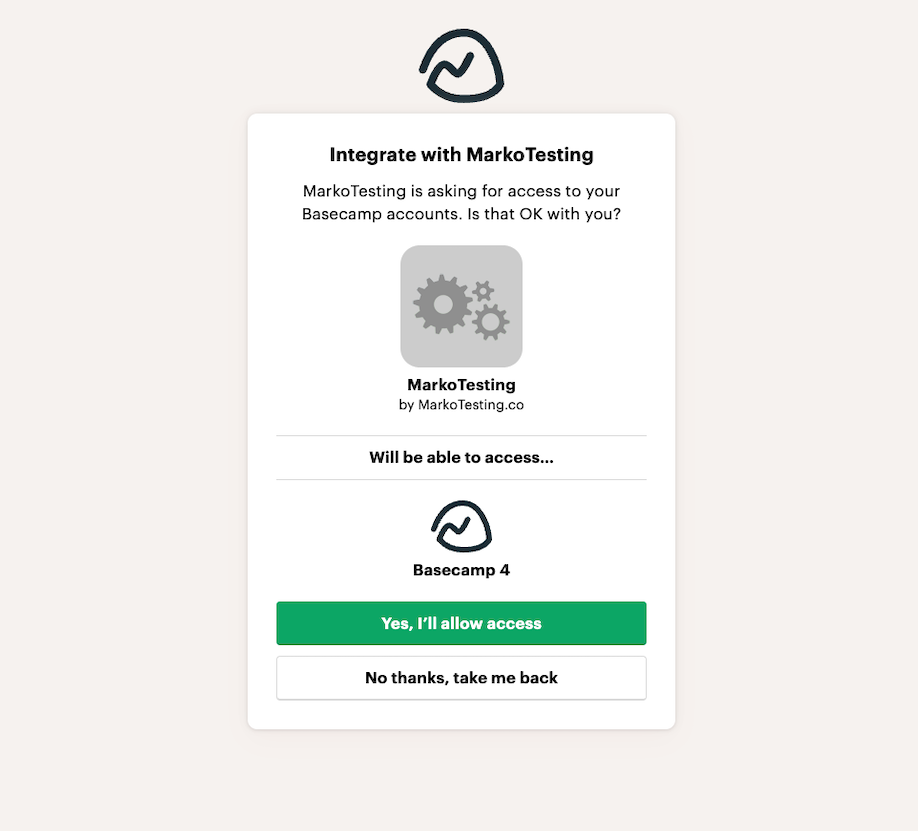
Clicking that button will redirect you to the link you provided as Redirect URI in your credentials, but it will have the verification code in the url address. Save that verification code:
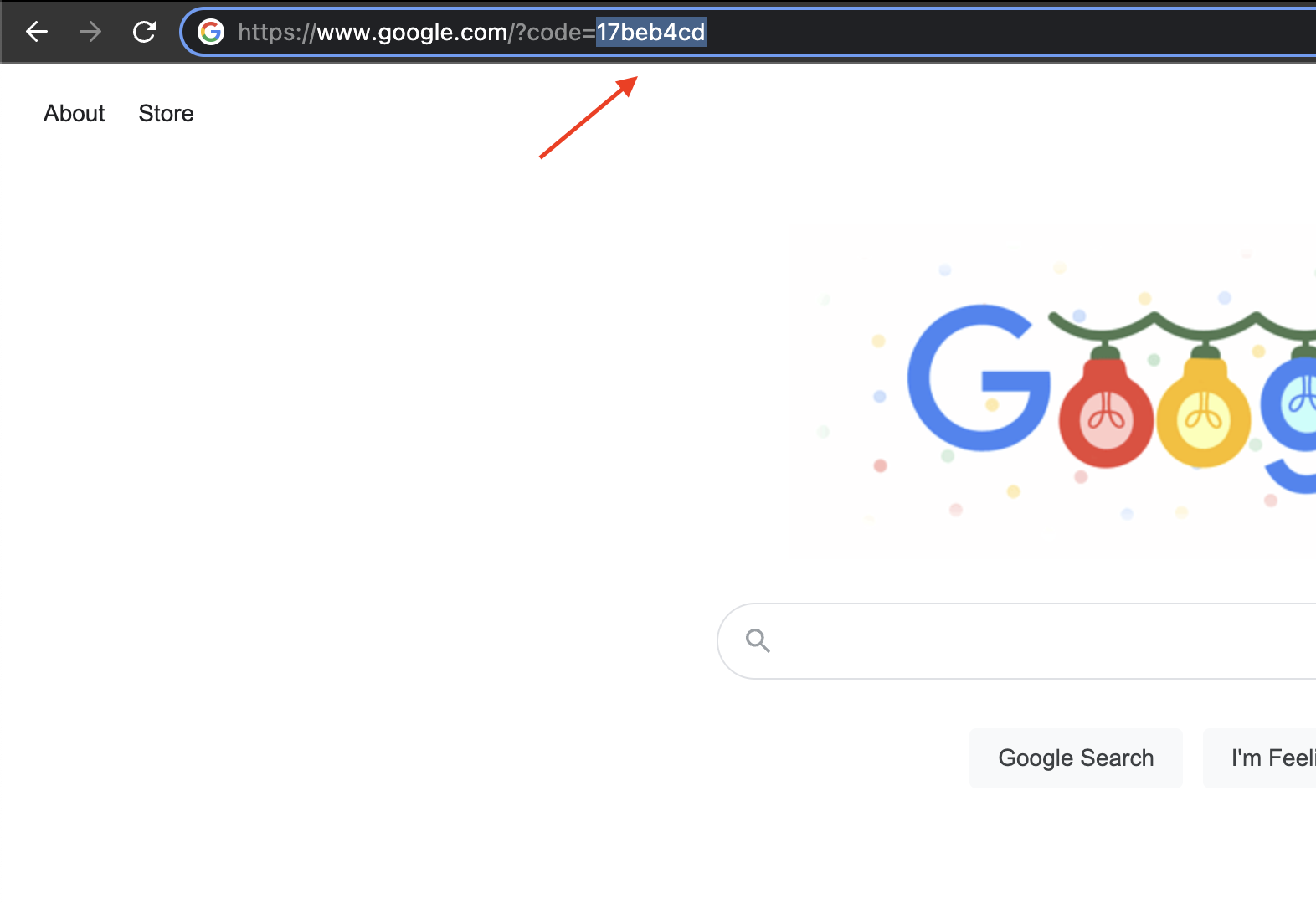
Initiate the Basecamp object again, and provide the code you gathered via the verification_code parameter:
# Verification code variable
your_verification_code = "17beb4cd"

bc = Basecamp(credentials=your_credentials, verification_code=your_verification_code)
This will generate your Refresh token and use that token right away to generate the Access token for your current session. You need to generate your Refresh token only once, but that Refresh token will be used to generate Access token each time you initialize the Basecamp object.
3. Authentication with Refresh token
To interact with objects on Basecamp you have to initialize the Basecamp object. This object will generate your access token and allow you to interact with other Basecamp objects.
from basecampapi import Basecamp

your_credentials = {
	"account_id": "your-account-id",
	"client_id": "your-client-id",
	"client_secret": "your-client-secret",
	"redirect_uri": "your-redirect-uri",
	"refresh_token": "your-refresh-token"
}

bc = Basecamp(credentials=your_credentials)
This generates the Access token which is then used in objects that interact with Basecamp.
4. Message Boards
Message Boards allow you to create, read, and update messages. They are useful for team announcements, discussions, and documentation. For working with comments on messages, use the dedicated Comments module (see section 8).
# Create a MessageBoard resource
message_board = bc.message_board(project_id=123456, message_board_id=123456)

# Get all messages
messages = message_board.get_all_messages()

# Create a new message
new_message = message_board.create_message(
    data={
        "subject": "Team update",
        "content": "<p>Important announcement</p>",
        "status": "active"
    }
)

# Get a specific message
message = message_board.get_message(message_id=new_message['id'])
5. Campfires
Campfires are Basecamp's chat rooms for quick, informal communication. You can read past messages and post new ones.
# Create a Campfire resource
campfire = bc.campfire(project_id=123456, campfire_id=123456)

# Get all messages
messages = campfire.get_lines()

# Send a message
campfire.write(data={"content": "Hello from Python!"})
6. Attachments
Upload files to Basecamp and attach them to messages, comments, or other objects. Files are uploaded to Basecamp's server and given an attachable_sgid that can be used in rich text content.
# Create an Attachments resource
attachments = bc.attachments()

# Upload a file
response = attachments.upload_file(file_path="folder/image.png", name="my_image")

# Create HTML for embedding an attachment
html = attachments.create_attachment_html(name="my_image", caption="My image")

# Use in a message
message_board = bc.message_board(project_id=123456, message_board_id=123456)
message_board.create_message(
    data={
        "subject": "Test message with attachment",
        "content": f"Hello world! <br> {html} <br> This is an image.",
        "status": "active"
    }
)
7. To-dos
Manage to-do lists and to-dos in Basecamp projects. Access to-do sets, create and update to-do lists, and manage individual to-dos.
# Access a to-do set
todoset = bc.todoset(project_id=123456, todoset_id=123456)

# Create a to-do list
todolist = todoset.create_todolist(
    data={
        "name": "Launch checklist",
        "description": "What we need to do before launch"
    }
)

# Access a to-do list directly
todolist = bc.todolist(project_id=123456, todolist_id=123456)

# Create a to-do
todo = todolist.create_todo(
    data={
        "content": "Design signup form",
        "description": "Make it simple and clean",
        "due_on": "2022-12-31"
    }
)

# Complete a to-do
todolist.complete_todo(todo_id=todo['id'])
8. Comments
The Basecamp API wrapper provides a dedicated Comments module for working with comments on any commentable resource in Basecamp, such as messages, to-dos, documents, and more.
# Create a Comments resource
comments = bc.comments(project_id=123456)

# Get all comments on any recording (message, to-do, etc.)
message_comments = comments.get_all_comments(recording_id=789012)

# Get a specific comment
comment = comments.get_comment(comment_id=345678)

# Create a comment on any recording
new_comment = comments.create_comment(
    recording_id=789012,  # This could be a message_id, todo_id, etc.
    data={"content": "<p>This is a comment</p>"}
)

# Update a comment
updated_comment = comments.update_comment(
    comment_id=new_comment['id'],
    data={"content": "<p>Updated comment</p>"}
)

# Trash a comment
comments.trash_comment(comment_id=new_comment['id'])
Benefits of the Comments Module
- Universal compatibility: Works with comments on any commentable resource in Basecamp
- Consistent interface: Provides a standardized way to interact with comments across different resource types
- Complete functionality: Includes all comment operations (get, create, update, trash)
- Separation of concerns: Keeps comment functionality separate from other resource-specific operations
9. Chatbots
Post messages to Campfire chats programmatically using chatbots. Useful for integrating Basecamp with other systems like CI/CD pipelines or monitoring tools.
# Create a chatbot
new_chatbot = bc.request(
    method='POST',
    path=f'/buckets/{project_id}/chats/{campfire_id}/integrations.json',
    data={
        "service_name": "deploy",
        "command_url": "https://example.com/webhook"
    }
)
chatbot_key = new_chatbot['lines_url'].split('/integrations/')[1].split('/')[0]

# Create a Chatbot resource
chatbot = bc.chatbot(chatbot_key=chatbot_key)

# Post a message
chatbot.write(
    project_id=123456,
    campfire_id=789012,
    data={"content": "Deployment completed successfully!"}
)
10. Custom Request Method
Access any Basecamp API endpoint directly, even those not yet implemented in the wrapper. Useful for new API features or custom integrations.
# List all projects
projects = bc.request(
    method='GET',
    path='/projects.json'
)

# Create a to-do
new_todo = bc.request(
    method='POST',
    path=f'/buckets/{project_id}/todolists/{todolist_id}/todos.json',
    data={
        "content": "Research new API features",
        "due_on": "2023-12-31"
    }
)
1 maintainer

Metadata
1 maintainer
Release files for basecampapi 2.0.0
For a detailed explanation of source distributions (sdists) and built distributions (wheels), please see the package formats documentation.
Source distribution (sdist)
| File | Size | Uploaded | |
|---|---|---|---|
| basecampapi-2.0.0.tar.gz | 15.4 kB | Details |
Built distribution (wheel)
| File | Interpreter | ABI | Platform | Reset |
|---|---|---|---|---|
| basecampapi-2.0.0-py3-none-any.whl | Python 3 | none | any | Details |
Total release size: 34.2 kB
Release files / basecampapi-2.0.0.tar.gz
| Download URL | basecampapi-2.0.0.tar.gz |
|---|---|
| Size | 15.4 kB |
| Tags | Source |
|
SHA-256 checksum How to use checksums |
8a76a777f34a6d941df6cc5cc6f6c2085f485b889d2c938e0ede32355f6bb9d0
|
|
BLAKE2b-256 checksum How to use checksums |
e335348c652189ac8706beaa265f4de64e8039118399aafd3f7348b0db83dca8
|
| Upload date | |
|
Uploaded using Trusted Publishing? What is trusted publishing? |
No |
| Uploaded via |
poetry/1.8.5 CPython/3.13.0 Darwin/24.5.0
|
Release files / basecampapi-2.0.0-py3-none-any.whl
| Download URL | basecampapi-2.0.0-py3-none-any.whl |
|---|---|
| Size | 18.8 kB |
| Tags | Python 3 |
|
SHA-256 checksum How to use checksums |
f0ad45cdad9495d48a3ac4e7767e436b5d47f476785b094e1faa73c6dee134c3
|
|
BLAKE2b-256 checksum How to use checksums |
c2dfdbee3c64350b5ce509ce2b80c8448190f2fa6a1e016ba916273275312996
|
| Upload date | |
|
Uploaded using Trusted Publishing? What is trusted publishing? |
No |
| Uploaded via |
poetry/1.8.5 CPython/3.13.0 Darwin/24.5.0
|














