
baseweb plugin template
How to create extensions/plugins to baseweb, and create a more complete application setup...




Rationale
To avoid implementing too much personal taste into baseweb, adding application-specifics should and can be done by following a plugin-approach, where these additions are packaged as additions, wrapping and extending the core basewen functionality.
This repository acts as a guide on how to extend baseweb in such a non-intrusive way, by creating a partial baseweb application that implements additional functionality on top of baseweb one commonly would like to have, thus avoiding a lot of boilerplate coding during the first commit phase of a new project.
This repository can therefore be considered a complement/sibbling of the baseweb-demo repository, showing how to create your own baseweb plugin.
The Actual Steps
Let's start with my standard Python-based project setup:
% mkdir baseweb-plugin-template
% cd baseweb-plugin-template
% git init
% pyenv virtualenv baseweb-plugin-template
% pyenv local baseweb-plugin-template
% pip install -U pip
Next, since I want this to be a Python package, installable from https://pypi.org, I use my own https://pypi.org/project/pypi-template/ to setup all the boilerplate:
% pip install pypi-template
% pypi-template init
A description for the package: an example baseweb plugin
Select classifiers: Programming Language :: Python
Select classifiers: Programming Language :: Python :: 3
Select classifiers: Intended Audience :: Developers
Select classifiers: Development Status :: 4 - Beta
Select classifiers: License :: OSI Approved :: MIT License
Select classifiers: Environment :: Plugins
Select classifiers: Environment :: Web Environment
Select classifiers:
Select console scripts:
First year of publication: 2023
Github account: christophevg
Github repo name: baseweb-plugin-template
Keywords describing the package: example baseweb plugin
License: MIT
Package module name: baseweb_plugin_template
Package name: basweb-plugin-template
Package tagline: an example baseweb plugin
Package title: an example baseweb plugin
Select requires: baseweb
...
That gives us a complete project setup. For this repo, I'm going to exclude some of the baseweb-managed parts, since I'll be documenting it simply in this README, won't be implementing any tests, and of course I'll be changing the module itself:
% pypi-template ignore docs ignore .readthedocs.yaml ignore .github ignore tests ignore tox.ini ignore "(package_module_name)" ignore MANIFEST.in apply
The Plugin
This Template plugin will implement some typical boilerplate every baseweb app requires, thus avoiding the tedious work. The __init__.py of the plugin looks like this:
__version__ = "0.0.1"

import logging
logger = logging.getLogger(__name__)

import os

LOG_LEVEL = os.environ.get("LOG_LEVEL") or "INFO"
FORMAT    = "[%(name)s] [%(levelname)s] %(message)s"
DATEFMT   = "%Y-%m-%d %H:%M:%S %z"

logging.basicConfig(level=LOG_LEVEL, format=FORMAT, datefmt=DATEFMT)
formatter = logging.Formatter(FORMAT, DATEFMT)
logging.getLogger().handlers[0].setFormatter(formatter)

# "silence" lower-level modules
for module in [ "gunicorn.error", "baseweb.socketio", "baseweb.web", "baseweb.interface" ]:
  module_logger = logging.getLogger(module)
  module_logger.setLevel(logging.WARN)
  if len(module_logger.handlers) > 0:
    module_logger.handlers[0].setFormatter(formatter)

from baseweb.interface import register_component, register_static_folder

HERE = os.path.dirname(__file__)

register_static_folder(os.path.join(HERE, "static"))

COMPONENTS = os.path.join(HERE, "components")
for component in [
  "page",
]:
  register_component(f"{component}.js", COMPONENTS)

# expose baseweb server and perform additional configuration
from baseweb.web import server

server.config["TEMPLATES_AUTO_RELOAD"] = True
server.config["SECRET_KEY"] = os.environ.get("APP_SECRET_KEY", default="local")

logger.info("✅ everything loaded...")
In the static folder, we add and images folder, with baseball.png in it and we create a components folder with page.js, containing:
Vue.component("Page", {
  template: `
<div style="margin:20px;">
  <img src="/app/static/images/baseball.png" style="float:left"/>
  <slot/>
</div>`
});
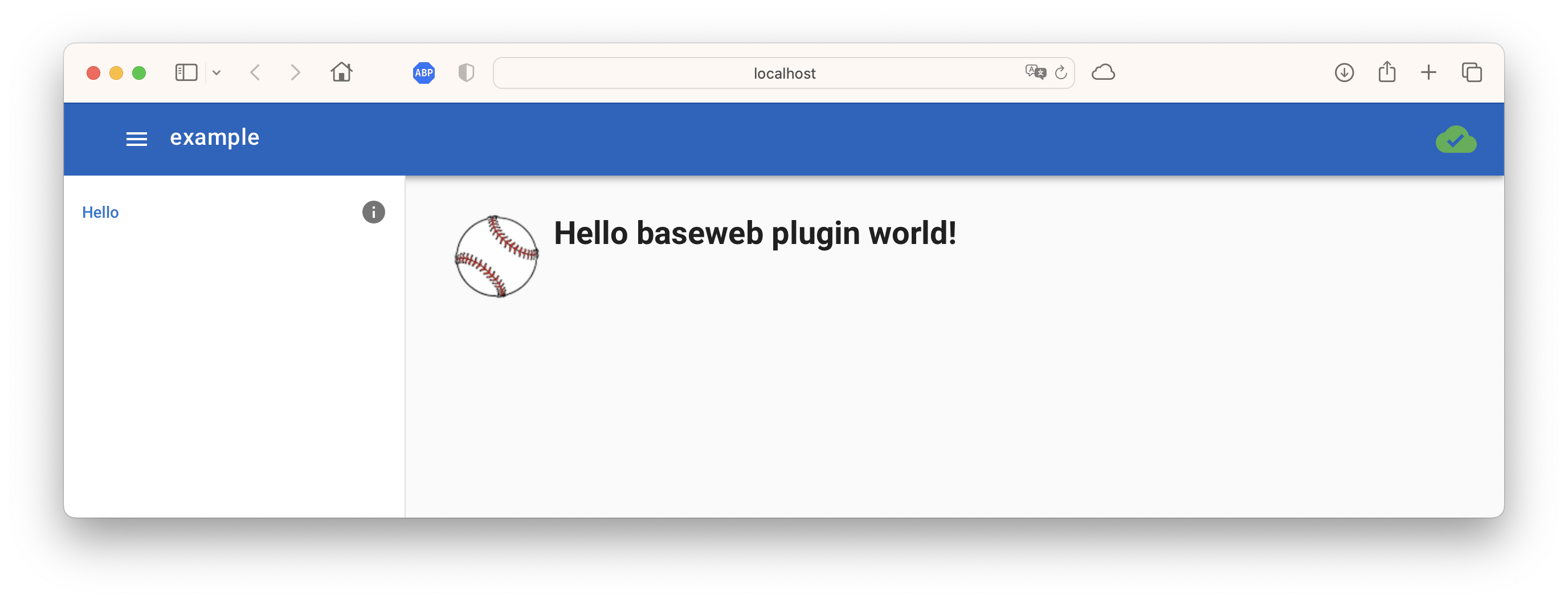
So, all in all, this plugin provides some basic logging setup and a Page component that adds an image of a baseball to your wrapped content.
don't forget to include the
componentsandstaticfolders in yourMANIFEST.in, else these not-py files won't be included - this is also the reason why we asked pypi-template to ignore the MANIFEST.in file, since we need to apply our own changes to it:
include .github/README.md
recursive-include baseweb_plugin_template/components *
recursive-include baseweb_plugin_template/static *
global-exclude __pycache__
global-exclude *.py[co]
Testing the template
We can now test our plugin by using it to implement a simple "Hello World"-style baseweb application, consisting of an app.py:
import os

from baseweb_plugin_template import server
from baseweb.interface import register_component

register_component("hello.js", os.path.dirname(__file__))
and a hello.js:
var Hello = {
  template : `
<Page>
  <h1>Hello baseweb plugin world!</h1>
</Page>
`,
  navigation: {
    icon:    "info",
    text:    "Hello",
    path:    "/",
    index:   1
  }
};

Navigation.add(Hello);
You can find these files also in the example folder. Running it consists of setting up a local virtual environment, installing the plugin and running it...
% cd example
% pyenv virtualenv baseweb-plugin-template-test
% pyenv local baseweb-plugin-template-test
(baseweb-plugin-template-test) % pip install -r requirements.txt
(baseweb-plugin-template-test) % pip install ../
(baseweb-plugin-template-test) % gunicorn -w1 -k eventlet app:server
[2023-09-17 10:11:06 +0200] [21992] [INFO] Starting gunicorn 20.1.0
[2023-09-17 10:11:06 +0200] [21992] [INFO] Listening at: http://127.0.0.1:8000 (21992)
[2023-09-17 10:11:06 +0200] [21992] [INFO] Using worker: eventlet
[2023-09-17 10:11:06 +0200] [22019] [INFO] Booting worker with pid: 22019
[baseweb] [INFO]
 _                                 _
| |__   __ _ ___  _____      _____| |__
| '_ \ / _` / __|/ _ \ \ /\ / / _ \ '_ \
| |_) | (_| \__ \  __/\ V  V /  __/ |_) |
|_.__/ \__,_|___/\___| \_/\_/ \___|_.__/  0.1.4
[baseweb.config] [INFO] {
  "version": "0.1.4",
  "name": "example",
  "short_name": "Example",
  "author": "Unknown Author",
  "description": "A baseweb app",
  "color_scheme": "dark",
  "color": "rgb(21, 101, 192)",
  "color_name": "blue darken-3",
  "background_color": "rgb(21, 101, 192)",
  "style": "web",
  "icon": null,
  "socketio": true,
  "favicon_support": false,
  "favicon_mask_icon_color": null,
  "favicon_msapp_tile_color": null
}
[baseweb_plugin_template] [INFO] ✅ everything loaded...
1 maintainer

Metadata
1 maintainer
Release files for baseweb-plugin-template 0.1.0
For a detailed explanation of source distributions (sdists) and built distributions (wheels), please see the package formats documentation.
Source distribution (sdist)
| File | Size | Uploaded | Provenance | |
|---|---|---|---|---|
| baseweb-plugin-template-0.1.0.tar.gz | 19.1 kB | Without provenance | Details |
Built distribution (wheel)
| File | Interpreter | ABI | Platform | Reset |
|---|---|---|---|---|
| baseweb_plugin_template-0.1.0-py3-none-any.whl | Python 3 | none | any | Details |
Total release size: 35.8 kB
Release files / baseweb-plugin-template-0.1.0.tar.gz
| Download URL | baseweb-plugin-template-0.1.0.tar.gz |
|---|---|
| Size | 19.1 kB |
| Tags | Source |
|
SHA-256 checksum How to use checksums |
70ee8b80456e555ee0e06d3855a4175cf800cf7a05f1033cded623be298590a6
|
|
BLAKE2b-256 checksum How to use checksums |
18b2ca4482c87d685612250c543bf43e22b4b8884ca1703846da7cf4bd285da4
|
| Upload date | |
|
Uploaded using Trusted Publishing? What is trusted publishing? |
No |
| Uploaded via |
twine/4.0.2 CPython/3.8.12
|
Release files / baseweb_plugin_template-0.1.0-py3-none-any.whl
| Download URL | baseweb_plugin_template-0.1.0-py3-none-any.whl |
|---|---|
| Size | 16.7 kB |
| Tags | Python 3 |
|
SHA-256 checksum How to use checksums |
86dcb578edcf20a0d0cb66ab5d067982d9568cc62056aa2d54a374d5d849a7ec
|
|
BLAKE2b-256 checksum How to use checksums |
af39b09b9e7b2746f66cf9e35abba5a4563d02469fd697743182229419158749
|
| Upload date | |
|
Uploaded using Trusted Publishing? What is trusted publishing? |
No |
| Uploaded via |
twine/4.0.2 CPython/3.8.12
|
Security for baseweb-plugin-template 0.1.0
Provenance
Provenance describes where a file came from. On PyPI, provenance is shared via attestations, which provide a verifiable record of the build or publishing details. View details, limitations and caveats.
No provenance found
None of the files in this release were uploaded with provenance metadata.
A note on package security
PyPI is a repository for distributing packages, not a service for auditing them. While third-party security researchers and our staff do their best to detect and remove malicious packages, PyPI cannot guarantee the quality, security or suitability of any given package.
To learn more about protecting yourself from malicious actors, visit our package security documentation.














