
baseweb plugin template
How to create extensions/plugins to baseweb, and create a more complete application setup...




Rationale
To avoid implementing too much personal taste into baseweb, adding application-specifics should and can be done by following a plugin-approach, where these additions are packaged as additions, wrapping and extending the core basewen functionality.
This repository acts as a guide on how to extend baseweb in such a non-intrusive way, by creating a partial baseweb application that implements additional functionality on top of baseweb one commonly would like to have, thus avoiding a lot of boilerplate coding during the first commit phase of a new project.
This repository can therefore be considered a complement/sibbling of the baseweb-demo repository, showing how to create your own baseweb plugin.
The Actual Steps
Let's start with my standard Python-based project setup:
% mkdir baseweb-plugin-template
% cd baseweb-plugin-template
% git init
% pyenv virtualenv baseweb-plugin-template
% pyenv local baseweb-plugin-template
% pip install -U pip
Next, since I want this to be a Python package, installable from https://pypi.org, I use my own https://pypi.org/project/pypi-template/ to setup all the boilerplate:
% pip install pypi-template
% pypi-template init
A description for the package: an example baseweb plugin
Select classifiers: Programming Language :: Python
Select classifiers: Programming Language :: Python :: 3
Select classifiers: Intended Audience :: Developers
Select classifiers: Development Status :: 4 - Beta
Select classifiers: License :: OSI Approved :: MIT License
Select classifiers: Environment :: Plugins
Select classifiers: Environment :: Web Environment
Select classifiers:
Select console scripts:
First year of publication: 2023
Github account: christophevg
Github repo name: baseweb-plugin-template
Keywords describing the package: example baseweb plugin
License: MIT
Package module name: baseweb_plugin_template
Package name: basweb-plugin-template
Package tagline: an example baseweb plugin
Package title: an example baseweb plugin
Select requires: baseweb
...
That gives us a complete project setup. For this repo, I'm going to exclude some of the baseweb-managed parts, since I'll be documenting it simply in this README, won't be implementing any tests, and of course I'll be changing the module itself:
% pypi-template ignore docs ignore .readthedocs.yaml ignore .github ignore tests ignore tox.ini ignore "(package_module_name)" ignore MANIFEST.in apply
The Plugin
This Template plugin will implement some typical boilerplate every baseweb app requires, thus avoiding the tedious work. The __init__.py of the plugin looks like this:
__version__ = "0.0.1"

import logging
logger = logging.getLogger(__name__)

import os

LOG_LEVEL = os.environ.get("LOG_LEVEL") or "INFO"
FORMAT    = "[%(name)s] [%(levelname)s] %(message)s"
DATEFMT   = "%Y-%m-%d %H:%M:%S %z"

logging.basicConfig(level=LOG_LEVEL, format=FORMAT, datefmt=DATEFMT)
formatter = logging.Formatter(FORMAT, DATEFMT)
logging.getLogger().handlers[0].setFormatter(formatter)

# "silence" lower-level modules
for module in [ "gunicorn.error", "baseweb.socketio", "baseweb.web", "baseweb.interface" ]:
  module_logger = logging.getLogger(module)
  module_logger.setLevel(logging.WARN)
  if len(module_logger.handlers) > 0:
    module_logger.handlers[0].setFormatter(formatter)

from baseweb.interface import register_component, register_static_folder

HERE = os.path.dirname(__file__)

register_static_folder(os.path.join(HERE, "static"))

COMPONENTS = os.path.join(HERE, "components")
for component in [
  "page",
]:
  register_component(f"{component}.js", COMPONENTS)

# expose baseweb server and perform additional configuration
from baseweb.web import server

server.config["TEMPLATES_AUTO_RELOAD"] = True
server.config["SECRET_KEY"] = os.environ.get("APP_SECRET_KEY", default="local")

logger.info("✅ everything loaded...")
In the static folder, we add and images folder, with baseball.png in it and we create a components folder with page.js, containing:
Vue.component("Page", {
  template: `
<div style="margin:20px;">
  <img src="/app/static/images/baseball.png" style="float:left"/>
  <slot/>
</div>`
});
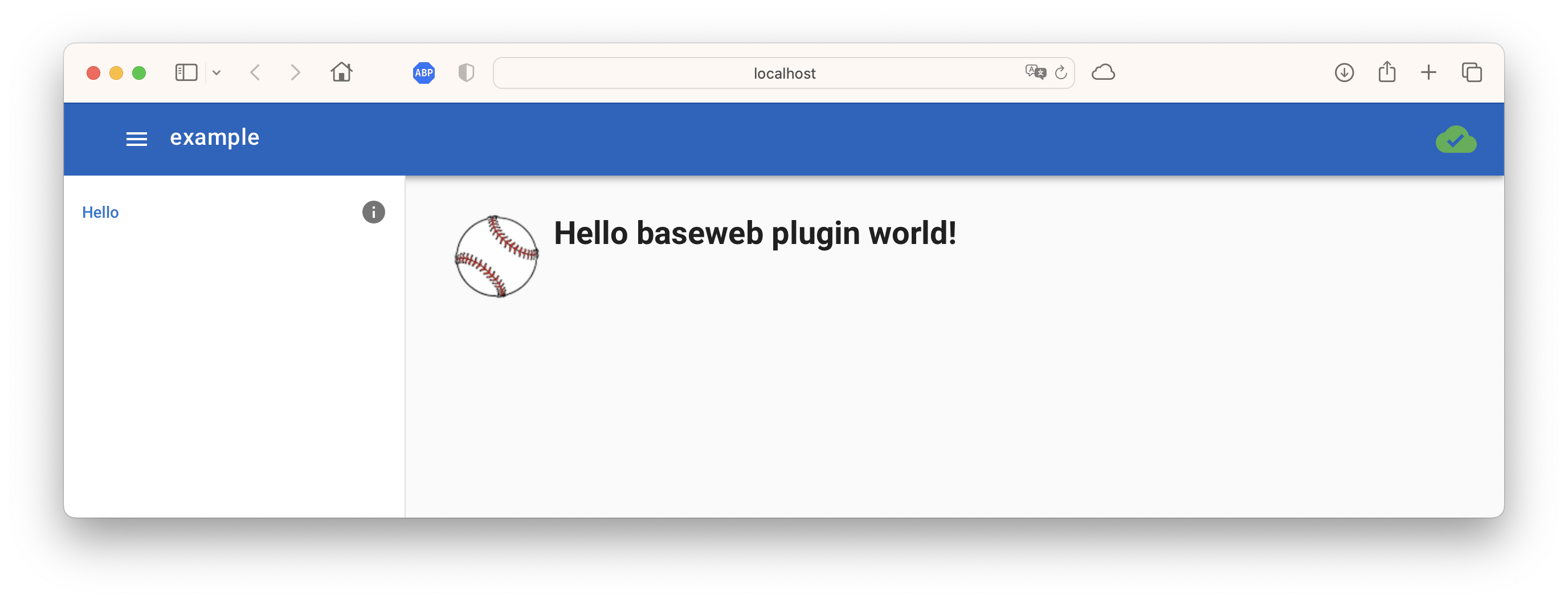
So, all in all, this plugin provides some basic logging setup and a Page component that adds an image of a baseball to your wrapped content.
don't forget to include the
componentsandstaticfolders in yourMANIFEST.in, else these not-py files won't be included - this is also the reason why we asked pypi-template to ignore the MANIFEST.in file, since we need to apply our own changes to it:
include .github/README.md
recursive-include baseweb_plugin_template/components *
recursive-include baseweb_plugin_template/static *
global-exclude __pycache__
global-exclude *.py[co]
Testing the template
We can now test our plugin by using it to implement a simple "Hello World"-style baseweb application, consisting of an app.py:
import os

from baseweb_plugin_template import server
from baseweb.interface import register_component

register_component("hello.js", os.path.dirname(__file__))
and a hello.js:
var Hello = {
  template : `
<Page>
  <h1>Hello baseweb plugin world!</h1>
</Page>
`,
  navigation: {
    icon:    "info",
    text:    "Hello",
    path:    "/",
    index:   1
  }
};

Navigation.add(Hello);
You can find these files also in the example folder. Running it consists of setting up a local virtual environment, installing the plugin and running it...
% cd example
% pyenv virtualenv baseweb-plugin-template-test
% pyenv local baseweb-plugin-template-test
(baseweb-plugin-template-test) % pip install -r requirements.txt
(baseweb-plugin-template-test) % pip install ../
(baseweb-plugin-template-test) % gunicorn -w1 -k eventlet app:server
[2023-09-17 10:11:06 +0200] [21992] [INFO] Starting gunicorn 20.1.0
[2023-09-17 10:11:06 +0200] [21992] [INFO] Listening at: http://127.0.0.1:8000 (21992)
[2023-09-17 10:11:06 +0200] [21992] [INFO] Using worker: eventlet
[2023-09-17 10:11:06 +0200] [22019] [INFO] Booting worker with pid: 22019
[baseweb] [INFO]
 _                                 _
| |__   __ _ ___  _____      _____| |__
| '_ \ / _` / __|/ _ \ \ /\ / / _ \ '_ \
| |_) | (_| \__ \  __/\ V  V /  __/ |_) |
|_.__/ \__,_|___/\___| \_/\_/ \___|_.__/  0.1.4
[baseweb.config] [INFO] {
  "version": "0.1.4",
  "name": "example",
  "short_name": "Example",
  "author": "Unknown Author",
  "description": "A baseweb app",
  "color_scheme": "dark",
  "color": "rgb(21, 101, 192)",
  "color_name": "blue darken-3",
  "background_color": "rgb(21, 101, 192)",
  "style": "web",
  "icon": null,
  "socketio": true,
  "favicon_support": false,
  "favicon_mask_icon_color": null,
  "favicon_msapp_tile_color": null
}
[baseweb_plugin_template] [INFO] ✅ everything loaded...
1 maintainer

Metadata
1 maintainer
Release files for baseweb-plugin-template 0.1.0
For a detailed explanation of source distributions (sdists) and built distributions (wheels), please see the package formats documentation.
Source distribution (sdist)
| File | Size | Uploaded | |
|---|---|---|---|
| baseweb-plugin-template-0.1.0.tar.gz | 19.1 kB | Details |
Built distribution (wheel)
| File | Interpreter | ABI | Platform | Reset |
|---|---|---|---|---|
| baseweb_plugin_template-0.1.0-py3-none-any.whl | Python 3 | none | any | Details |
Total release size: 35.8 kB
Release files / baseweb-plugin-template-0.1.0.tar.gz
| Download URL | baseweb-plugin-template-0.1.0.tar.gz |
|---|---|
| Size | 19.1 kB |
| Tags | Source |
|
SHA-256 checksum How to use checksums |
70ee8b80456e555ee0e06d3855a4175cf800cf7a05f1033cded623be298590a6
|
|
BLAKE2b-256 checksum How to use checksums |
18b2ca4482c87d685612250c543bf43e22b4b8884ca1703846da7cf4bd285da4
|
| Upload date | |
|
Uploaded using Trusted Publishing? What is trusted publishing? |
No |
| Uploaded via |
twine/4.0.2 CPython/3.8.12
|
Release files / baseweb_plugin_template-0.1.0-py3-none-any.whl
| Download URL | baseweb_plugin_template-0.1.0-py3-none-any.whl |
|---|---|
| Size | 16.7 kB |
| Tags | Python 3 |
|
SHA-256 checksum How to use checksums |
86dcb578edcf20a0d0cb66ab5d067982d9568cc62056aa2d54a374d5d849a7ec
|
|
BLAKE2b-256 checksum How to use checksums |
af39b09b9e7b2746f66cf9e35abba5a4563d02469fd697743182229419158749
|
| Upload date | |
|
Uploaded using Trusted Publishing? What is trusted publishing? |
No |
| Uploaded via |
twine/4.0.2 CPython/3.8.12
|














