
Bashhub.com python client
Verified details
These details have been verified by PyPIProject links
GitHub Statistics
Maintainers

Project description

Bashhub saves every terminal command entered across all sessions and systems and provides powerful querying across all commands.


Features
- Super command search by using context about how commands are executed.
- e.g. the directory, session, system, exit status, etc.
- Unlimited detailed terminal history stored in the cloud.
- Support across systems. Access your terminal history from anywhere!
- Support for Bash and Zsh with a sweet cli for everything.
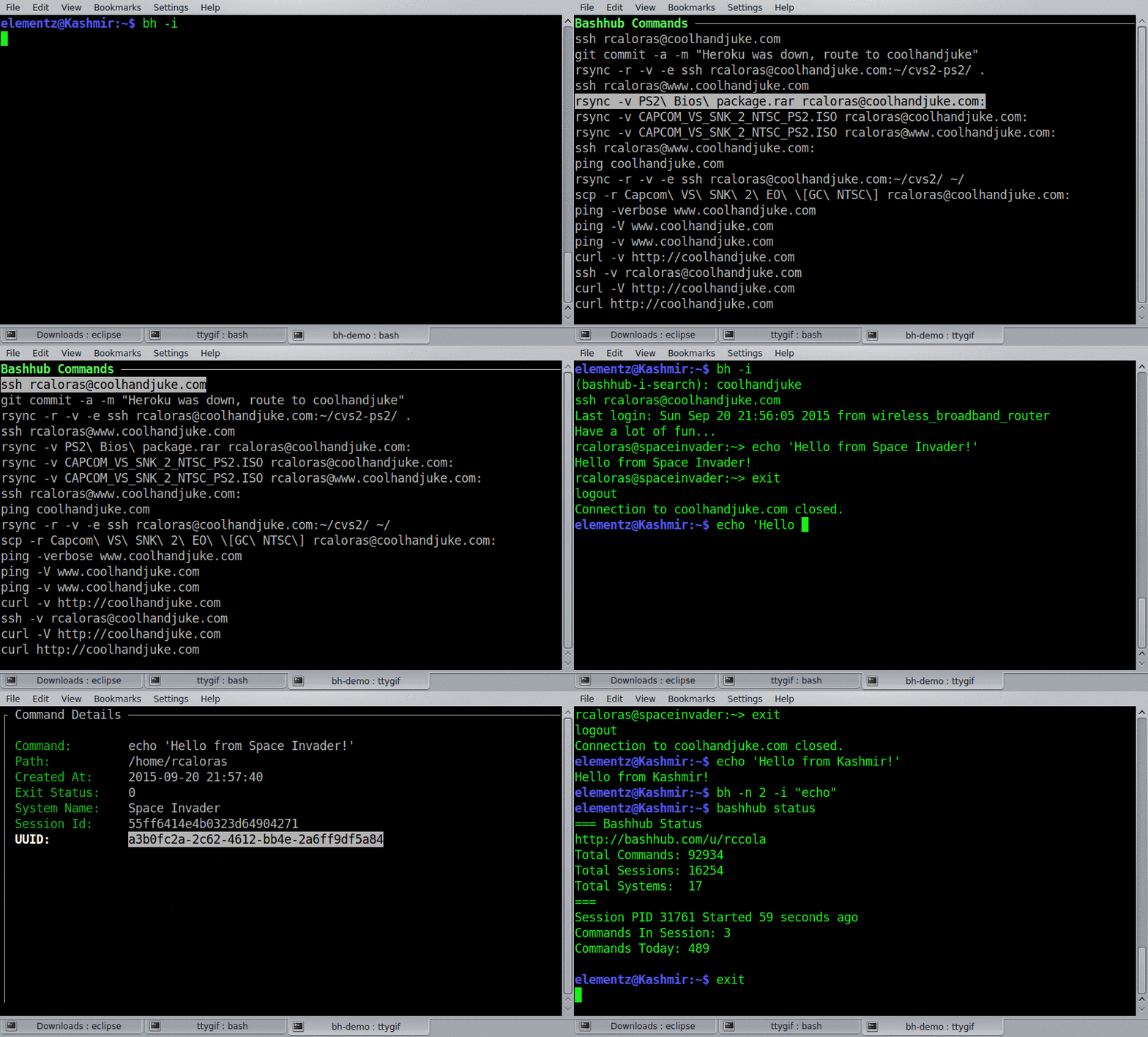
Quick Install
curl -OL https://bashhub.com/setup && $SHELL setup
For non default login shells, just specify the shell e.g. (bash setup, zsh setup, fish setup)
Detailed installation instructions can be found at https://github.com/rcaloras/bashhub-client/wiki/Install
Usage
Bashhub can be accessed from the command line in a couple ways:
bhfor searchingbashhubfor everything else
It also provides a key binding of ctrl + b for quickly dropping into interactive search.
Search
You can search through your commands in a lot of different ways. Check bh --help for more specifics. By default bh will output the most recently used unique commands to standard out. Adding the -i argument to any bh search will make it interactive. There are also several arguments to pass to filter, query, and get more specific about your searches!
Examples
The last 100 commands you executed anywhere. (100 is default limit without -n)
$ bh
The last 20 files I've grep'd.
$ bh -n 20 "grep"
Find that wget command with interactive search to execute it again :P
$ bh -i "wget github"
Directory-specific Searching
The last commands you executed in this directory.
$ bh -d
The last 10 things you vim'd in this directory
$ bh -d -n 10 "vim"
System-specific Searching
The last 10 curl commands you produced on this system
$ bh -sys -n 10 "curl"
How Search Results are Ordered
By default results are sorted by most recently used, and are unique. This means frequent commands like git status or ls will only appear once in the position they were most recently invoked.
This can be altered by using the -dups command to include duplicates
Your git commands including duplicates.
$ bh -dups "git"
Interactive Search
One of the most useful features is interactive search which is accessed via bh -i or ctrl + b. This is similar to reverse search i.e. ctrl + r. Interactive search drops you into a small menu where you can select a command to run on the command line.
Enter interactive search for all the rsync commands executed in this directory
$ bh -i -d
(bashhub-i-search): rsync
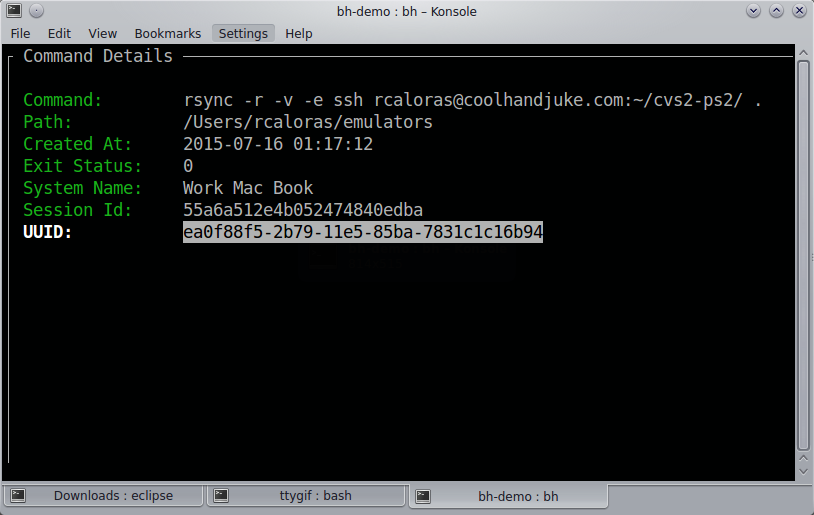
Command Details
From interactive search you can also access detailed information on each command by hitting i or space on any listed command.
Bashhub Status
You can get a summary of your user's stats/status by using the status command.
bashhub status
Most of this information is also displayed on the user profile page.
=== Bashhub Status
http://bashhub.com/u/rccola
Total Commands: 94965
Total Sessions: 16400
Total Systems:  18
===
Session PID 15311 Started 9 days ago
Commands In Session: 3
Commands Today: 47
Search with Fuzzy Finder
An efficient way of searching is using bashhub in combination with fzf. Put this in your .bashrc.
function my_alias {
  eval $(bh | fzf)
}
This will make the function available globally in your terminal.
Filtering Commands
You can filter commands from being recorded to Bashhub via a regex set to the environment variable BH_FILTER. These commands will be ignored and omittted from Bashhub.
# Filter out any commands for postgres or ssh
export BH_FILTER="(psql|ssh)"
ssh rcaloras@some-ip-address # will not be saved
You can check the configuration of this command via the bashhub filter subcommand.
# Check if a command is filtered by my regex
export BH_FILTER="(-p)"
bashhub filter "mysql -u root -p plain-text-password"
BH_FILTER=(-p)
mysql -u root -p plain-text-password
Is Filtered. Matched ['-p']
Disabling Recording Commands
You can turn on/off recording to Bashhub via bashhub on and bashhub off. By default this only affects the current bash session.
$ bashhub off
$ echo "Recording is now disabled for this session. This command won't be saved."
....
$ bashhub on
$ echo "Recording commands is now re-enabled"
You can disable for all sessions by setting bashhub off --global this sets save_commands = False in your bashhub config.
Ignoring Commands
#ignore added to any command will omit it from being saved. Simply add it to the end of any command and it won't be recorded in Bashhub.
$ echo "this command won't be saved" #ignore
Deleting Commands
You can delete commands from Bashhub through interactive search by pressing Delete or Backspace while a command is highlighted. A small dialog box will open to confirm the commands deletion. If a command is deleted, it is permanently removed from Bashhub.

Feature Requests, Bugs, and Issues
Feel free to post in: https://github.com/rcaloras/bashhub-client/issues
You can also get support and follow updates @Bashhub on Twitter.
Project details
Verified details
These details have been verified by PyPIProject links
GitHub Statistics
Maintainers
Release history Release notifications | RSS feed


Download files
Download the file for your platform. If you're not sure which to choose, learn more about installing packages.
Source Distribution
Built Distribution
Filter files by name, interpreter, ABI, and platform.
If you're not sure about the file name format, learn more about wheel file names.
Copy a direct link to the current filters
File details
Details for the file bashhub-3.0.3.tar.gz.
File metadata
- Download URL: bashhub-3.0.3.tar.gz
- Upload date:
- Size: 42.0 kB
- Tags: Source
- Uploaded using Trusted Publishing? Yes
- Uploaded via: twine/6.1.0 CPython/3.13.12
File hashes
| Algorithm | Hash digest | |
|---|---|---|
| SHA256 |
f220ba95a0be709c023f1f03e4ffd7cb32e6a47fdd240628c2070f31bf330174
|
|
| MD5 |
47203a100756a874b97f72074a3c80ec
|
|
| BLAKE2b-256 |
5c133dc664d997ea8995704512ab0bc3839b55bbca58513a12838e782eafcd80
|
Provenance
The following attestation bundles were made for bashhub-3.0.3.tar.gz:
Publisher:
publish.yml on rcaloras/bashhub-client
-
Statement:
-
Statement type:
https://in-toto.io/Statement/v1 -
Predicate type:
https://docs.pypi.org/attestations/publish/v1 -
Subject name:
bashhub-3.0.3.tar.gz -
Subject digest:
f220ba95a0be709c023f1f03e4ffd7cb32e6a47fdd240628c2070f31bf330174 - Sigstore transparency entry: 1311240985
- Sigstore integration time:
-
Permalink:
rcaloras/bashhub-client@c3259dcc0f6b4bb9f347e4ee980023864fa2bfc9 -
Branch / Tag:
refs/tags/3.0.3 - Owner: https://github.com/rcaloras
-
Access:
public
-
Token Issuer:
https://token.actions.githubusercontent.com -
Runner Environment:
github-hosted -
Publication workflow:
publish.yml@c3259dcc0f6b4bb9f347e4ee980023864fa2bfc9 -
Trigger Event:
release
-
Statement type:
File details
Details for the file bashhub-3.0.3-py3-none-any.whl.
File metadata
- Download URL: bashhub-3.0.3-py3-none-any.whl
- Upload date:
- Size: 38.9 kB
- Tags: Python 3
- Uploaded using Trusted Publishing? Yes
- Uploaded via: twine/6.1.0 CPython/3.13.12
File hashes
| Algorithm | Hash digest | |
|---|---|---|
| SHA256 |
f31e1c7a6bd53f5d3e80eaf4cea5c92b086528a0a5a8d3fcec57a6f22b5b972e
|
|
| MD5 |
36a889e86aa376d51c795ef6b362873c
|
|
| BLAKE2b-256 |
3ba60f6b2f57ae388dc279b4f5a2859fc2c4369dcbaffd8c3f2a243f2e08a6c4
|
Provenance
The following attestation bundles were made for bashhub-3.0.3-py3-none-any.whl:
Publisher:
publish.yml on rcaloras/bashhub-client
-
Statement:
-
Statement type:
https://in-toto.io/Statement/v1 -
Predicate type:
https://docs.pypi.org/attestations/publish/v1 -
Subject name:
bashhub-3.0.3-py3-none-any.whl -
Subject digest:
f31e1c7a6bd53f5d3e80eaf4cea5c92b086528a0a5a8d3fcec57a6f22b5b972e - Sigstore transparency entry: 1311241093
- Sigstore integration time:
-
Permalink:
rcaloras/bashhub-client@c3259dcc0f6b4bb9f347e4ee980023864fa2bfc9 -
Branch / Tag:
refs/tags/3.0.3 - Owner: https://github.com/rcaloras
-
Access:
public
-
Token Issuer:
https://token.actions.githubusercontent.com -
Runner Environment:
github-hosted -
Publication workflow:
publish.yml@c3259dcc0f6b4bb9f347e4ee980023864fa2bfc9 -
Trigger Event:
release
-
Statement type:






