
Local-first knowledge management combining Zettelkasten with knowledge graphs
Verified details
These details have been verified by PyPIProject links
GitHub Statistics
Maintainers

Project description






Skip the install — try Basic Memory in the cloud
Claude, Codex, or Cursor connected in 30 seconds. No Python, no JSON, no
terminal. $14.25/mo locked in for life (regular price $19). 7-day free
trial — cancel any time before day 7 if it's not for you. Beta pricing —
sign up now and your rate never goes up. OSS users: code BMFOSS takes
another 20% off for 3 months.
Basic Memory
Your AI never forgets again.
Pick up right where you left off — in Claude, Codex, Cursor, ChatGPT, or anything that speaks MCP. Your knowledge lives as Markdown files that both you and your AI can read, write, and search.
- Local-first. Plain text on your disk. Forever.
- Two-way. AI and humans write to the same files; sync keeps them in step.
- A real knowledge graph. Observations and wikilinks compound into context.
- Semantic search. Find notes by meaning, not just keywords.
- MCP-native. Works with every major AI client and IDE.
- Progressive tool discovery. Every tool is tagged with behavior hints (read-only, destructive, idempotent) so agents pick the right tool on demand — no wasted context trying things to see what they do.
- Cloud, optional. Sync across devices when you want — never required.
Get started
Pick the path that fits you. Both run the same product on the same Markdown.
| ☁️ Cloud | 💻 Local install |
|---|---|
|
30 seconds. Sign up, connect your AI client, done.
$14.25/mo locked for life · 7-day free trial · cancel any time |
2 minutes. Install, configure your AI client, run.
uv tool install basic-memory
|
What people are saying
Basic Memory changed my whole relationship with LLMs. I switched from GPT and Gemini to exclusively Claude and Claude Code because of this integration and am completely revamping all our company's processes around a Basic Memory workflow.
— Alex, TrainerDay
Basic Memory is the missing 'wow' factor in AI chatbots. Now I can't imagine Claude or Claude Code without it.
— Caleb, Caleb Picker Consulting
I don't code without Basic Memory anymore. It's such a time saver to be able to refer to projects I don't currently have active and keep a running log of all my learnings and ProTips.
— @groksrc, Developer
More on basicmemory.com.
Basic Memory Cloud
The hosted version of Basic Memory. Same product, same Markdown files, same MCP tools — we just host the database, run the sync, and put it on your phone.
What you get
- Every device, same brain. Your knowledge graph on web, mobile, and desktop. No copy-paste between machines.
- Connect any MCP client. Claude Desktop, Claude Code, Codex, Cursor, ChatGPT (Custom GPTs), VS Code — one-click connect from the web app.
- Bidirectional sync to local. Edit on your phone, see it in Obsidian on your laptop. rclone-powered with conflict resolution.
- Snapshots and backups. Point-in-time restore. Browse history. Never lose a note.
- No lock-in. Your notes are plain Markdown. Export to local Markdown any time — same files, same format, same wikilinks. Cancel anytime, your data stays yours.
Built on WorkOS AuthKit, Neon Postgres, and Tigris S3. Platform source at basic-memory-cloud.
Pricing
$14.25/mo, locked in for the life of your subscription (regular price $19). Sign up during beta and the rate never goes up — as long as you stay subscribed, you keep the price. One plan, no tiers, no surprise upgrades. Unlimited notes, unlimited projects, every feature.
- 7-day free trial. Cancel any time before day 7 if it's not for you.
- Cancel anytime after that too — export your notes whenever you want.
- OSS users: code
BMFOSSfor another 20% off for 3 months (~$11.40/mo).
Cloud vs. local
| Cloud | Local | |
|---|---|---|
| Setup time | 30 seconds | 2 minutes (requires Python) |
| Cost | $14.25/mo, locked for life (7-day trial) | Free |
| Storage | We host (Tigris S3) | Your disk |
| Cross-device sync | Built in | Manual (Git, Syncthing, etc.) |
| Mobile access | Yes (web + app) | No |
| Air-gapped | No | Yes |
| Your data stays yours | Yes — export anytime | Yes — already there |
| Source code | AGPL-3.0 | AGPL-3.0 |
| Snapshots & backups | Built in | Roll your own |
Both paths use the same OSS engine and the same Markdown files. There's no lock-in either way — flip between them when your needs change.
Works with the tools you already use
| Client | Transport | Notes |
|---|---|---|
| Cloud web app | https | Sign in at basicmemory.com — no install |
| Claude Desktop | stdio/https | macOS / Windows / Linux |
| Claude Code | stdio/https | claude mcp add |
| Codex | stdio/https | OpenAI's coding agent |
| Cursor | stdio/https | .cursor/mcp.json |
| VS Code | stdio/https | Native MCP support |
| ChatGPT | https | Custom GPT actions (search / fetch) |
| Obsidian | — | Reads/writes the same Markdown directly |
| Anything MCP | stdio/https | If it speaks MCP, it works |
Pick up where you left off
https://github.com/user-attachments/assets/a55d8238-8dd0-454a-be4c-8860dbbd0ddc
Connect your AI client
If you went the Cloud route, the web app walks you through client connect. The snippets below are for local installs.
Claude Desktop
Edit ~/Library/Application Support/Claude/claude_desktop_config.json:
{
  "mcpServers": {
    "basic-memory": {
      "command": "uvx",
      "args": ["basic-memory", "mcp"]
    }
  }
}
Restart Claude Desktop. Notes live in ~/basic-memory by default.
Claude Code, Codex CLI, Cursor, VS Code, ChatGPT, Obsidian
Claude Code
claude mcp add basic-memory -- uvx basic-memory mcp
Codex CLI
Add to ~/.codex/config.toml:
[mcp_servers.basic-memory]
command = "uvx"
args = ["basic-memory", "mcp"]
Cursor
Add to .cursor/mcp.json (project) or ~/.cursor/mcp.json (global):
{
  "mcpServers": {
    "basic-memory": {
      "command": "uvx",
      "args": ["basic-memory", "mcp"]
    }
  }
}
VS Code
Add to your User Settings (JSON):
{
  "mcp": {
    "servers": {
      "basic-memory": {
        "command": "uvx",
        "args": ["basic-memory", "mcp"]
      }
    }
  }
}
ChatGPT
Basic Memory exposes OpenAI-compatible search and fetch tools for Custom
GPT actions. See the ChatGPT integration
guide.
Obsidian
No setup. Point Obsidian at ~/basic-memory (or your project folder) and the
same wikilinks, frontmatter, and Markdown your AI writes appear in your graph
view. Edit either side — sync handles the rest.
Try a prompt:
"Create a note about our project architecture decisions."
"Find information about JWT auth in my notes."
"What have I been working on this week?"
What's New
- Automatic updates. Basic Memory keeps itself up to date for
uv tooland Homebrew installs;bm updatetriggers a manual check. - Semantic vector search. Find notes by meaning, not just keywords. Hybrid full-text + vector ranking with FastEmbed embeddings, on SQLite or Postgres.
- Schema system. Infer, validate, and diff the structure of your
knowledge base with
schema_infer,schema_validate,schema_diff. - Per-project cloud routing. Route individual projects through the cloud
while others stay local, via API key (
bm project set-cloud). - Smarter editing.
edit_noteappend/prepend auto-creates notes when missing;write_noteguards against accidental overwrites. - Richer search results. Matched chunk text is included so the LLM gets context, not just hits.
- FastMCP 3.0 + tool annotations. Every tool ships with MCP behavior
hints (
readOnlyHint,destructiveHint,idempotentHint,openWorldHint) so agents can discover capabilities progressively at runtime instead of guessing or burning tokens. - CLI overhaul.
--jsonoutput for scripting, workspace-aware commands, and an htop-inspired project dashboard.
Full CHANGELOG for v0.18 → v0.20.
Why Basic Memory
Most LLM conversations are ephemeral. You ask a question, get an answer, then everything is forgotten. Workarounds have limits:
- Chat history captures conversations but isn't structured knowledge.
- RAG lets the LLM query your documents but not write back to them.
- Vector DBs need complex infra and usually live in someone else's cloud.
- Knowledge graphs need specialized tooling to maintain.
Basic Memory takes a simpler path: structured Markdown files that humans and LLMs both read and write.
- All knowledge stays in plain files you control.
- Both sides read and write to the same files.
- Familiar Markdown with semantic patterns — no new format to learn.
- A traversable graph the LLM can follow link by link.
- Works with the editors you already use (Obsidian, VS Code, anything).
- Just files plus a local SQLite index. No servers required.
How it works
You're chatting normally about coffee:
I've been experimenting with brewing methods. Pour over gives more clarity than French press, water at 205°F seems best, and freshly ground beans make a huge difference.
Ask the LLM to capture it:
"Make a note on coffee brewing methods."
A Markdown file appears in your project directory in real time:
---
title: Coffee Brewing Methods
permalink: coffee-brewing-methods
tags: [coffee, brewing]
---

# Coffee Brewing Methods

## Observations
- [method] Pour over highlights subtle flavors over body
- [technique] Water at 205°F (96°C) extracts optimal compounds
- [principle] Freshly ground beans preserve aromatics

## Relations
- relates_to [[Coffee Bean Origins]]
- requires [[Proper Grinding Technique]]
- affects [[Flavor Extraction]]
Next session, the LLM picks up the thread. It follows the relations to surface what you already know about Ethiopian beans and burr grinders, and builds on it instead of starting over. You see the same files in Obsidian or your editor. Edit them by hand — the AI sees your changes too.
Real two-way flow: humans edit Markdown, LLMs read/write through MCP, sync keeps everything consistent, and the source of truth is always your files.
The Markdown format
Each file is an Entity. Entities have Observations (facts about them) and
Relations (links to other entities). That's the whole grammar.
Frontmatter
---
title: <Entity title>
type: note
permalink: <uri-slug>
tags: [optional, list]
---
Observations
Facts about the entity. Categories in [brackets], tags with #, optional
context in parens.
- [method] Pour over highlights subtle flavors
- [tip] Grind medium-fine for V60 #brewing
- [fact] Lighter roasts contain more caffeine than dark
- [resource] James Hoffmann's V60 technique on YouTube
- [question] How does temperature affect compound extraction?
Relations
Wiki-style links that form the graph. Single-token relation types, or quote multi-word ones.
- pairs_well_with [[Chocolate Desserts]]
- grown_in [[Ethiopia]]
- requires [[Burr Grinder]]
- "pairs well with" [[Dark Chocolate]]
Bare - [[Target]] and prose - Worth checking out [[Target]] index as
links_to. Full reference in the
docs.
MCP tools
Basic Memory exposes these tools to any MCP client. Every tool is annotated with MCP behavior hints (read-only, destructive, idempotent, open-world) so agents can pick the right one without trial-and-error:
- Content:
write_note,read_note,edit_note,move_note,delete_note,read_content,view_note - Search & discovery:
search,search_notes,recent_activity,list_directory - Knowledge graph:
build_context(navigatesmemory://URLs),canvas(Obsidian canvas generation) - Projects:
list_memory_projects,create_memory_project,get_current_project,sync_status - Schema:
schema_infer,schema_validate,schema_diff - Cloud:
cloud_info,release_notes
All MCP tools default to text output; pass output_format="json" for
structured responses. Full tool reference in the
docs.
CLI essentials
# Projects
basic-memory project list
basic-memory project add research ~/research
basic-memory project set-cloud research   # route through cloud
basic-memory project set-local research   # revert

# Health & maintenance
basic-memory status
basic-memory doctor              # file <-> DB consistency check
basic-memory tool edit-note ...  # CLI access to MCP tools
basic-memory update              # check for and install updates

# Imports
basic-memory import claude conversations
basic-memory import chatgpt
basic-memory import memory-json
Routing flags (--local / --cloud) force a target when you're in mixed
mode. Full CLI reference in the
docs.
Auto-updates
CLI installs check for updates every 24 hours by default and apply them silently (so the MCP server keeps responding).
- Supported install sources:
uv tool, Homebrew - Skipped for
uvx(ephemeral runtime managed by uv) - Manual:
bm update(check + apply) orbm update --check(check only)
Disable in ~/.basic-memory/config.json:
{ "auto_update": false }
Telemetry
Minimal, anonymous events to understand the CLI-to-cloud conversion funnel.
What we collect: cloud promo impressions, cloud login attempts and outcomes, promo opt-out events.
What we don't: file contents, note titles, knowledge base data, PII, IP addresses, per-command or per-tool tracking.
Events go to our Umami Cloud instance (open-source, privacy-focused) on a background thread — never blocks the CLI.
Opt out:
export BASIC_MEMORY_NO_PROMOS=1
This disables promos and all telemetry.
Logging
Basic Memory uses Loguru. Defaults vary by entry point:
| Entry point | Default | Why |
|---|---|---|
| CLI commands | File only | Doesn't interfere with command output |
| MCP server | File only | Stdout would corrupt JSON-RPC |
| API server | File (local) or stdout (cloud) | Docker/cloud uses stdout |
Log file: ~/.basic-memory/basic-memory.log (10MB rotation, 10 days
retention).
Environment variables
| Variable | Default | Description |
|---|---|---|
BASIC_MEMORY_LOG_LEVEL |
INFO |
DEBUG / INFO / WARNING / ERROR |
BASIC_MEMORY_CLOUD_MODE |
false |
API logs to stdout with structured context |
BASIC_MEMORY_FORCE_LOCAL |
false |
Force local API routing |
BASIC_MEMORY_FORCE_CLOUD |
false |
Force cloud API routing |
BASIC_MEMORY_EXPLICIT_ROUTING |
false |
Mark route selection as explicit |
BASIC_MEMORY_ENV |
dev |
Set to test for test mode (stderr only) |
BASIC_MEMORY_NO_PROMOS |
false |
Disable cloud promos and telemetry |
BASIC_MEMORY_IMPORT_UPLOAD_MAX_BYTES |
104857600 |
Max uploaded import size |
BASIC_MEMORY_LOG_LEVEL=DEBUG basic-memory sync
tail -f ~/.basic-memory/basic-memory.log
Development
Basic Memory supports SQLite (default, fast, no Docker) and Postgres (via testcontainers — Docker required).
just install          # Install with dev dependencies
just test-sqlite      # All tests, SQLite
just test-postgres    # All tests, Postgres (testcontainers)
just test             # Both backends
just fast-check       # fix/format/typecheck + impacted tests + smoke
just doctor           # File <-> DB consistency check (temp config)
just lint
just typecheck        # Pyright (primary)
just typecheck-ty     # ty (supplemental)
just format
just check            # All quality checks
just migration "msg"  # New Alembic migration
Tests use pytest markers: windows, benchmark, smoke. See
justfile for the full list.
Contributions welcome — see CONTRIBUTING.md.
License
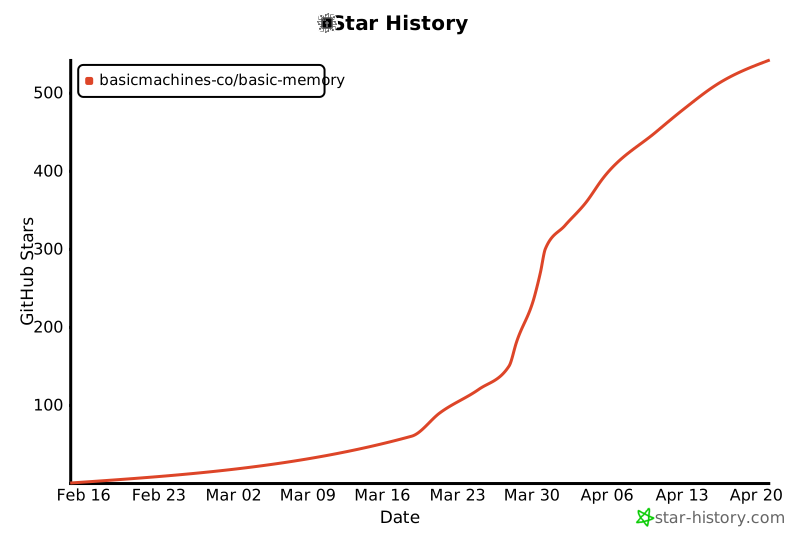
Star History
Built with ♥️ by Basic Machines
Project details
Verified details
These details have been verified by PyPIProject links
GitHub Statistics
Maintainers
Release history Release notifications | RSS feed


Download files
Download the file for your platform. If you're not sure which to choose, learn more about installing packages.
Source Distribution
Built Distribution
Filter files by name, interpreter, ABI, and platform.
If you're not sure about the file name format, learn more about wheel file names.
Copy a direct link to the current filters
File details
Details for the file basic_memory-0.21.0.tar.gz.
File metadata
- Download URL: basic_memory-0.21.0.tar.gz
- Upload date:
- Size: 1.9 MB
- Tags: Source
- Uploaded using Trusted Publishing? Yes
- Uploaded via: twine/6.1.0 CPython/3.13.12
File hashes
| Algorithm | Hash digest | |
|---|---|---|
| SHA256 |
dd2bad713783976853057fccbb906cf1079178fe47b619e5e4477135260bccab
|
|
| MD5 |
1c1f35ed77ab6034491e8f486e6dae2b
|
|
| BLAKE2b-256 |
d49c0754dbf8a29ee9d723c08a71e2681039f3a566a6b91f750abd65a4615025
|
Provenance
The following attestation bundles were made for basic_memory-0.21.0.tar.gz:
Publisher:
release.yml on basicmachines-co/basic-memory
-
Statement:
-
Statement type:
https://in-toto.io/Statement/v1 -
Predicate type:
https://docs.pypi.org/attestations/publish/v1 -
Subject name:
basic_memory-0.21.0.tar.gz -
Subject digest:
dd2bad713783976853057fccbb906cf1079178fe47b619e5e4477135260bccab - Sigstore transparency entry: 1554755194
- Sigstore integration time:
-
Permalink:
basicmachines-co/basic-memory@214a54d7404847bc5eb10f64c7ce3a6e1263723c -
Branch / Tag:
refs/tags/v0.21.0 - Owner: https://github.com/basicmachines-co
-
Access:
public
-
Token Issuer:
https://token.actions.githubusercontent.com -
Runner Environment:
github-hosted -
Publication workflow:
release.yml@214a54d7404847bc5eb10f64c7ce3a6e1263723c -
Trigger Event:
push
-
Statement type:
File details
Details for the file basic_memory-0.21.0-py3-none-any.whl.
File metadata
- Download URL: basic_memory-0.21.0-py3-none-any.whl
- Upload date:
- Size: 868.3 kB
- Tags: Python 3
- Uploaded using Trusted Publishing? Yes
- Uploaded via: twine/6.1.0 CPython/3.13.12
File hashes
| Algorithm | Hash digest | |
|---|---|---|
| SHA256 |
2cbc23cbcee5493a61dca07443d2672ea2aad6139508c9c6f5f1b73fa01623db
|
|
| MD5 |
3f8e8e7bb5baf49f24f5af6773b72802
|
|
| BLAKE2b-256 |
5a502571a66f83d7eac418fcc44dc5986098caefade7fdaabbdb2619dea0b490
|
Provenance
The following attestation bundles were made for basic_memory-0.21.0-py3-none-any.whl:
Publisher:
release.yml on basicmachines-co/basic-memory
-
Statement:
-
Statement type:
https://in-toto.io/Statement/v1 -
Predicate type:
https://docs.pypi.org/attestations/publish/v1 -
Subject name:
basic_memory-0.21.0-py3-none-any.whl -
Subject digest:
2cbc23cbcee5493a61dca07443d2672ea2aad6139508c9c6f5f1b73fa01623db - Sigstore transparency entry: 1554755642
- Sigstore integration time:
-
Permalink:
basicmachines-co/basic-memory@214a54d7404847bc5eb10f64c7ce3a6e1263723c -
Branch / Tag:
refs/tags/v0.21.0 - Owner: https://github.com/basicmachines-co
-
Access:
public
-
Token Issuer:
https://token.actions.githubusercontent.com -
Runner Environment:
github-hosted -
Publication workflow:
release.yml@214a54d7404847bc5eb10f64c7ce3a6e1263723c -
Trigger Event:
push
-
Statement type:






