
Basin Ledger
A basin's water, quantity and quality, balanced day by day across coupled models.
The code was written with AI assistance (Claude, by Anthropic), designed and directed by Andrew Sommerlot. See AI use.
Basin Ledger couples a watershed model, a groundwater model and the models of large water users through BMI, and steps them together one day at a time with one Python driver:
- SWAT+ through swatplus-bmi (doi:10.5281/zenodo.23963201), which runs stock SWAT+ 62.0.1 under outside control;
- NextGen, as finished NextGen In A Box runs replayed day by day, with results keyed to hydrofabric ids;
- MODFLOW 6 through its own BMI/XMI (
libmf6), from Python with USGS's modflowapi; - water users as BMI components from
waterledger-models, starting with data center cooling
(
CoolingWaterBmi).
Every volume and mass that moves between models is entered in a ledger twice, as sent and as received. A day where they differ stops the run. Basin Ledger is a sibling of Water Ledger. Water Ledger estimates one campus's water from public data. Basin Ledger follows that water through a basin's streams and aquifers.
Status: early (0.1.0). Built and tested:
- the water-user interface, with controls a rule can set (a withdrawal limit, dry mode);
- routes: MODFLOW 6 wells, SWAT+ water allocation intakes and point sources, outfalls, water from and to outside the basin;
- the utility chain: sources, losses, sewer, plant outfall;
- feedback rules: curtailment, dry mode, drawdown limit;
- SWAT+ recharge into MODFLOW 6 (one-way), and the two-way stream-aquifer exchange through MODFLOW 6's river package;
- NextGen as the surface model: a finished NGIAB run replayed day by day, with users on its own hourly forcing;
- restarts from a saved day that match unbroken runs bit for bit;
- the ledger and the command line;
- calibration records per model, and the calibration module's structure. An example is a screening run unless every model it runs is calibrated.
Examples:
- synthetic: SWAT+'s Osu_1hru with small MODFLOW 6 models, for the tests;
- Plaster Creek, Michigan: calibrated NextGen streamflow at USGS 04119055 (KGE 0.87 calibration, 0.81 validation, from nextgen-michigan), with an assumed campus on utility water. Only the streamflow at the gage is calibrated.
Still to come (docs/design.md):
- SWAT+ built on the NextGen hydrofabric, for water quality on the same catchments;
- MODFLOW 6 recharge from NextGen (CFE's percolation);
- AORC forcing;
- applying calibration parameters, and PEST++ IES.
How it works
flowchart LR
  U["water users (BMI)<br/>hourly: withdrawal, consumption,<br/>return, loads, power"] -- "day's volumes" --> D
  D["driver<br/>one day at a time"] -- "update()" --> S["SWAT+<br/>(swatplus-bmi)"]
  S -- "aquifer recharge, m/s" --> D
  D -- "recharge by cell, well rates<br/>(set between prepare and solve)" --> M["MODFLOW 6<br/>(libmf6, modflowapi)"]
  M -- "simulated flows, heads" --> D
  D --> L[("ledger<br/>sent = received,<br/>every day")]
A NextGen run takes SWAT+'s place as a replay. It gives calibrated flows on NextGen geography, but without feedback (see docs/design.md).
Places are examples, not code. Each example (examples/<place>/) is one config file that wires real models for one
basin and its users, plus a script that fetches its public data and a short write-up. The engine knows nothing about
any place or any kind of water user.
Install
Needs Python 3.11 or later, and gfortran for SWAT+ (on macOS, Homebrew's gcc).
pip install "basinledger[users,nextgen]" # or: uv add "basinledger[users,nextgen]"
The extras:
users: the water-user models fromwaterledger-models(CoolingWaterBmi);nextgen: netCDF4, for reading NextGen runs.
Two model programs aren't Python packages, and come separately:
-
SWAT+ is built by swatplus-bmi, which is installed with Basin Ledger. It fetches SWAT+ 62.0.1, patches it and builds it, in a few minutes:
swatplus-bmi build -
MODFLOW 6's shared library (
libmf6) comes from USGS's release through flopy'sget-modflow, also installed with Basin Ledger. Basin Ledger looks for it where:flopyputs it, or at$LIBMF6:get-modflow :flopy --repo modflow6 --subset mf6,libmf6.dylib # libmf6.so on Linux
From a source checkout, for development and the tests, with uv:
git clone https://github.com/northlinehydrology/basin-ledger && cd basin-ledger
uv sync
uv run python examples/synthetic/fetch.py --get     # builds SWAT+ (swatplus-bmi build) and fetches libmf6 (get-modflow)
uv run pytest                                       # about a minute on one core; -m "not slow" takes about 10 s
uv run --group examples marimo edit examples/synthetic/notebook.py
Continuous testing:
- On every push: CI runs the whole suite on Ubuntu and macOS (
.github/workflows/test.yml). - Every night: a run checks against the newest releases of swatplus-bmi, waterledger-models, flopy and
MODFLOW 6 (
nightly.yml).
Use
uv run python -m basinledger run examples/synthetic/surface.toml              # writes ledger.csv, series.csv, summary.json
uv run python -m basinledger run examples/synthetic/surface.toml --baseline   # the same without its water users
uv run python -m basinledger run examples/synthetic/two_way.toml --save-at 365 --save runs/warm
uv run python -m basinledger run examples/synthetic/two_way.toml --restart runs/warm --run scenario
uv run python -m basinledger status examples/synthetic/surface.toml           # calibrated, or a screening run
Or from Python:
from basinledger.driver import Basin

b = Basin.from_config("examples/synthetic/basin.toml", run="pumping")
b.run()                       # every day of the SWAT+ project; the ledger checks each day
print(b.ledger.totals())      # m3 (and kg, MWh) per account for the whole run
b.finalize()
An example's config (abridged; the full schema is in src/basinledger/config.py):
[swatplus]
project = "{swatplus_refdata}/Osu_1hru"

[modflow6]
builder = "model:build"        # model.py writes the MODFLOW 6 simulation for the run's days

[recharge]
map = "all:aqu001"             # SWAT+ aquifers to MODFLOW 6 cells by area, or a CSV map

[[wells]]
name = "pw1"
cell = [0, 20, 28]

[[utilities]]
name = "city"
sources = [{route = "well:pw1", share = 1.0}]
losses = 0.10
outfall = "swat:point_source:wwtp"

[[users]]
name = "plant"
component = "basinledger.testing:SyntheticUser"   # or waterledger_models.datacenter.bmi:CoolingWaterBmi
withdrawal = "utility:city"
return = "utility:city"

[[rules]]
name = "plant well limit"
kind = "drawdown_limit"
user = "plant"
cell = [0, 20, 28]
head_min = 88.3
limit = 0.002
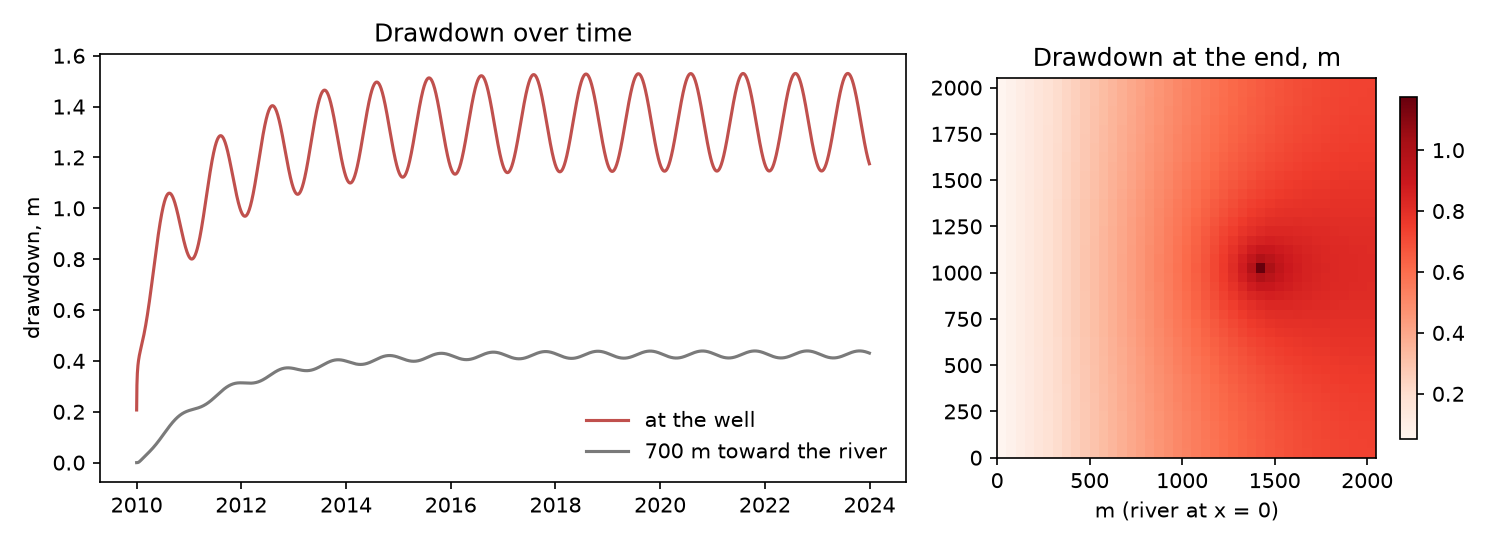
The synthetic example: SWAT+'s Osu_1hru recharge drives a small MODFLOW 6 aquifer, and a synthetic user pumps one well. Drawdown is the difference from the same run without the user.
Water users
Any BMI component that reports its withdrawal, consumption and return can be a water user. Its gain, storage, constituent loads, return temperature and electricity are optional. A component that uses its own variable names is mapped role by role in the config. The engine checks each user's balance every step: withdrawal + gain = consumption + return + change in storage. It then integrates the hourly rates into the daily volumes the hydrologic models take. See docs/design.md.
What the tests check
| What | How |
|---|---|
| Hourly to daily | daily volumes equal hourly rates integrated by hand; masses summed, temperature flow-weighted |
| A user's balance | closes every hour; a component that loses water is refused |
| Any component plugs in | a renamed component with other units, and CoolingWaterBmi, mapped by role |
| Area maps | volume kept exactly; over-covered cells and mismatched areas refused |
| MODFLOW 6 control | values set between prepare and solve are the ones MODFLOW 6 uses; daily steps enforced |
| Recharge | sent = received every day, against MODFLOW 6's budget file and SWAT+'s own printed recharge |
| Wells | pumped = requested = the user's withdrawal, every day |
| MODFLOW 6's budget | closes every day to 1e-7 of the gross flow, with and without pumping |
| Physics | pumping draws down most at the well, and depletes the river by less than it pumps, more over time |
| Surface routes | SWAT+ takes what was asked (or reports the shortfall); the channel's flow changes the same day by what the users put in and took out |
| Utility chain | production = delivery + losses = the sum of its sources; sewer = plant outfall |
| Rules | act on exactly the days after the trigger; a curtailed user takes nothing; dry mode uses less water and more electricity |
| Two-way exchange | SWAT+'s aquifer returns nothing and stores exactly its recharge; each day's river exchange reaches SWAT+ the next day, whole |
| Restarts | saved after a warm-up and carried on, runs match unbroken runs bit for bit |
| Command line, calibration | outputs and status written; statistics on known values; the forward model writes simulated values at observations |
Prior work
Earlier SWAT and SWAT+ couplings with MODFLOW either compile MODFLOW-NWT into one program (SWAT-MODFLOW, SWAT+MODFLOW) or use SWAT+'s own gwflow module. See docs/prior-art.md.
Citing
Cite the archived software (Zenodo; the DOI will be listed here once the first release is archived) and, where SWAT+ is used, swatplus-bmi (doi:10.5281/zenodo.23963201). Details in CITATION.cff.
AI use
Basin Ledger was designed and directed by Andrew Sommerlot and built with an AI coding assistant (Claude, by Anthropic), which wrote most of the code, tests and documentation under his direction and review. Whether it is right rests on the tests: each model's own budget closes, and every transfer is checked against what the other model received.
License
BSD 3-Clause (LICENSE). SWAT+ is under the GNU LGPL 2.1 and runs as its own process through swatplus-bmi. MODFLOW 6 is public domain (USGS).
1 maintainer

Metadata
1 maintainer
Release files for basinledger 0.1.0
For a detailed explanation of source distributions (sdists) and built distributions (wheels), please see the package formats documentation.
Source distribution (sdist)
| File | Size | Uploaded | Provenance | Actions |
|---|---|---|---|---|
| basinledger-0.1.0.tar.gz | 356.0 kB | With provenance | Details for basinledger-0.1.0.tar.gz |
Built distribution (wheel)
| File | Interpreter | ABI | Platform | Actions Reset |
|---|---|---|---|---|
| basinledger-0.1.0-py3-none-any.whl | Python 3 | none | any | Details for basinledger-0.1.0-py3-none-any.whl |
Total release size: 407.3 kB
Release files / basinledger-0.1.0.tar.gz
| Download URL | basinledger-0.1.0.tar.gz |
|---|---|
| Size | 356.0 kB |
| Tags | Source |
|
SHA-256 checksum How to use checksums |
a716283f405652d43db8c524b5d817a2ee96cd224eb2293ebe53b273572c51ba
|
|
BLAKE2b-256 checksum How to use checksums |
99852e0c0247914a1529fe1486728bef9ae365c3d94da244d7459edb692b3f82
|
| Upload date | |
|
Uploaded using Trusted Publishing? What is trusted publishing? |
Yes |
| Uploaded via |
twine/7.0.0 CPython/3.13.16
|
Provenance
Provenance describes where a file came from. On PyPI, provenance is shared via attestations, which provide a verifiable record of the build or publishing details. View details, limitations and caveats.


PyPI Publish Attestation
PyPI verified that this artifact, at this checksum, originated from the publisher listed below.
Signed by GitHub Actions, verified by PyPI on Nov 5, 2026.
Transparency logRelease files / basinledger-0.1.0-py3-none-any.whl
| Download URL | basinledger-0.1.0-py3-none-any.whl |
|---|---|
| Size | 51.3 kB |
| Tags | Python 3 |
|
SHA-256 checksum How to use checksums |
6746618f2cccfe0e7fc3bbd073170bc33fa95aaa6e7b1bfda1ea45d5ce0f3295
|
|
BLAKE2b-256 checksum How to use checksums |
bafb6bacbcaf162d7e484f105e31e4dadbe260fcbb1f51b77a433021019670f0
|
| Upload date | |
|
Uploaded using Trusted Publishing? What is trusted publishing? |
Yes |
| Uploaded via |
twine/7.0.0 CPython/3.13.16
|
Provenance
Provenance describes where a file came from. On PyPI, provenance is shared via attestations, which provide a verifiable record of the build or publishing details. View details, limitations and caveats.
PyPI Publish Attestation
PyPI verified that this artifact, at this checksum, originated from the publisher listed below.
Signed by GitHub Actions, verified by PyPI on Nov 5, 2026.
Transparency logSecurity for basinledger 0.1.0
Provenance
Provenance describes where a file came from. On PyPI, provenance is shared via attestations, which provide a verifiable record of the build or publishing details. View details, limitations and caveats.
Full provenance
Both files in this release have been uploaded with provenance metadata.
Attestation for basinledger-0.1.0.tar.gz
PyPI Publish Attestation
PyPI verified that this artifact, at this checksum, originated from the publisher listed below.
Signed by GitHub Actions, verified by PyPI on Nov 5, 2026.
Transparency logA note on package security
PyPI is a repository for distributing packages, not a service for auditing them. While third-party security researchers and our staff do their best to detect and remove malicious packages, PyPI cannot guarantee the quality, security or suitability of any given package.
To learn more about protecting yourself from malicious actors, visit our package security documentation.














