

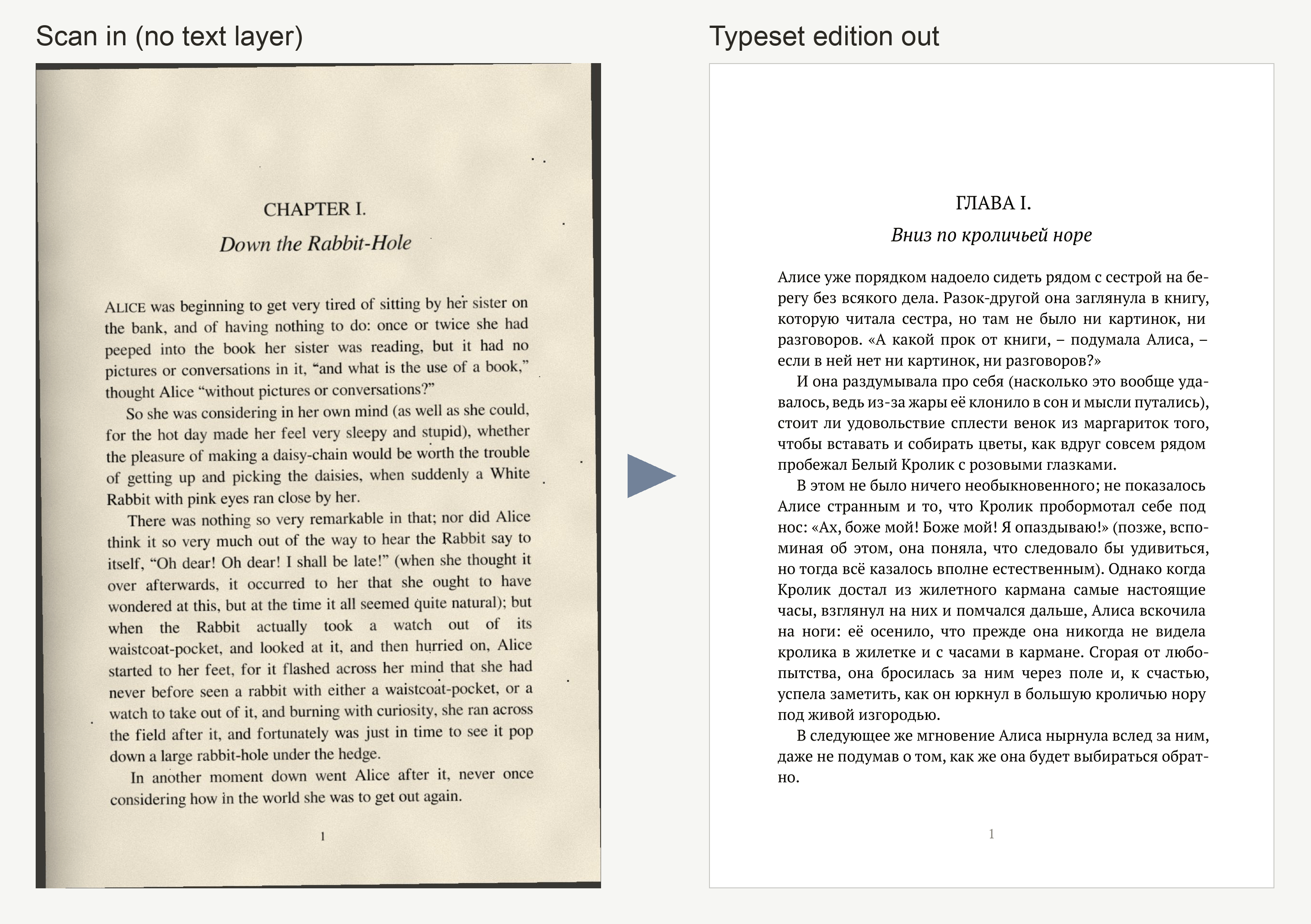
Scanned book in, a new edition in your language out


Basira Vision is a command-line tool that turns a scanned book into a typeset PDF in another language. A vision model reads every page image, the text is translated page by page with the previous page as context, and Pandoc + Typst lay it out as a book. Between the steps you get plain markdown files to review and fix.
How it works

basira ocrrenders each page to an image and has a vision model read it. This works where classic OCR struggles: no text layer, skewed or noisy scans, complex scripts, diacritics, less common languages. Per-language prompts handle details such as reading direction or letters models tend to confuse.basira translatetranslates one page at a time with a one-page sliding window: the finished translation of the previous page goes along as context, so each page is translated as a continuation of the text, not as an isolated fragment. A failed page clears the window, so one bad page never affects the next.basira typsttypesets the result as an A5 book: title page, optional translator's preface, table of contents, running heads, footnotes, and an even page count for printing. Everything comes from one editable Typst template.
Every stage saves after each page and can resume where it stopped.
Install
You need Python 3.10+, Pandoc and
Typst (Pandoc and Typst are
only used by the typst step).
# macOS
brew install pandoc typst
# Debian/Ubuntu (Typst from its releases page or `cargo install typst-cli`)
sudo apt install pandoc
# Windows
winget install JohnMacFarlane.Pandoc Typst.Typst
The book is set in PT Serif. It comes with macOS; on Linux and Windows download it from Google Fonts.
Then install the CLI with uv or pipx:
uv tool install basira-vision        # or: pipx install basira-vision
# latest development version:
uv tool install git+https://github.com/gushmazuko/basira-vision
Quick start
Get an API key from Google AI Studio and
export it, or put it in a .env file in the directory you run from:
export GEMINI_API_KEY=your_key
# 1. OCR: writes workspace/mybook/mybook.md
basira ocr mybook.pdf --source-language english

# review and fix workspace/mybook/mybook.md, then

# 2. Translate: writes workspace/mybook/mybook_russian.md
basira translate workspace/mybook/mybook.md --target-language russian

# review the translation, then

# 3. Typeset: writes workspace/mybook/mybook_russian.pdf
basira typst workspace/mybook/mybook_russian.md --title "Title" --author "Author"
Title and author can also go into the YAML frontmatter at the top of the
markdown file, so plain basira typst book.md is enough.
For a long book, work in chunks or stop at any time. --resume keeps the
finished pages and processes only the missing or failed ones:
basira ocr mybook.pdf --page-range 1-100
basira ocr mybook.pdf --page-range 101-200 --resume
basira ocr mybook.pdf --resume              # retry pages that failed
Nothing you have is ever replaced silently: running a command again when
its output already exists stops and asks for --resume (keep it, including
your edits) or --force-restart (delete it and start over).
What you see while it runs

- The progress bar is a map of the book: every cell is a page (or a slice of a long book), so you see where pages failed, not just how many. Pages finished in an earlier run are shown dimmer.
- Below it: what is happening right now, including retry countdowns and
rate-limit waits; for
translate, which page is used as context. - Only failures are printed permanently, and repeated failures collapse into one line. If the endpoint goes down, the run stops after 5 failed pages in a row instead of failing the rest of the book.
- At the end: a summary with the exact command to retry, continue or run the next step.
- Ctrl-C once finishes the page in progress (its request is already
sent) and pauses; press it again to stop at once. Either way nothing is
lost: continue with
--resume.
A page that fails is recorded with its reason in the marker and no text,
<!-- Page 9 - Error: HTTP 500 INTERNAL -->, so it never ends up in the
book. --resume retries it, or you can write the text under the marker
yourself: a page with text counts as done.
When the output is not a terminal (nohup, | tee, CI), each event becomes
one timestamped line, easy to tail -f and grep:
2026-10-27 20:44:31 ocr ok      page=5 progress=5/300 took=2.1s eta=9:58
2026-10-27 20:44:33 ocr retry   page=6 attempt=1/2 wait=1s reason="HTTP 500 INTERNAL"
--log-format json writes one JSON object per event instead. Progress and
messages go to stderr; stdout gets only the path of the result, so steps can
be chained: basira translate "$(basira ocr book.pdf)" --target-language russian.
Exit codes: 0 done, 3 done but some pages failed, 1 error or stopped,
2 invalid usage, 130 paused with Ctrl-C.
Why not just…
- …use Tesseract or another classic OCR engine? They need clean scans and good language data. A vision model copes much better with noise, skew, unusual fonts and complex scripts, and it outputs markdown with headings and lists instead of raw lines.
- …use a PDF-to-markdown tool such as Marker or olmOCR? They are good at extraction, but they stop at markdown. Basira Vision is about the whole edition: translation in which every page continues the one before, and typesetting.
- …upload the PDF to a chatbot? That works for a few pages. For a whole book you lose page structure, the thread of the text between sessions, the ability to resume, and a reviewable file between the steps.
Accuracy
A hard case for OCR: scanned pages of a printed book in Chechen, a low-resource language written in Cyrillic with the palochka (Ӏ), a letter that looks like a plain vertical bar and that most engines misread. The pages mix prose, a dictionary page, a captioned illustration and a table.
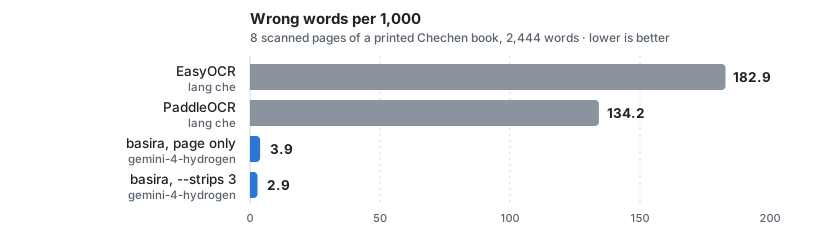
| Setup | Wrong words per 1,000 |
|---|---|
EasyOCR 1.7.2 (che) |
182.9 |
PaddleOCR 3.7.0 (che) |
134.2 |
basira, gemini-4-hydrogen, page only |
3.9 |
basira, gemini-4-hydrogen, --strips 3 |
2.9 |
Scored word by word against a transcription checked by a native speaker; formatting is ignored, spelling counts. 2,444 words, 5 runs per basira setup (the model does not give the same answer twice; the table shows the mean). One book and one language: your scans will give other numbers. Method, ranges and limits: docs/benchmark.md.
Local models and gateways
The client speaks the Gemini API protocol (google-genai). Set
GEMINI_BASE_URL to send every request to any server that implements the
same protocol instead of Google, for example a self-hosted gateway. A
gateway can front a hosted model or a local vision model (Gemma and the
like):
GEMINI_BASE_URL=http://gateway.local:8080   # service root, no /v1 suffix
GEMINI_MODEL=my-vision-model                # a model name the gateway serves
GEMINI_API_KEY=placeholder                  # whatever the gateway expects
The gateway has to implement the native Gemini endpoint
POST /v1beta/models/{model}:generateContent; an OpenAI-compatible
/v1/chat/completions alone is not enough. The base URL is checked at
startup: it must be the service root, without /v1, /v1beta or /openai.
Usage
Every command documents its options: basira <command> --help. All of
them also take --log-format auto|live|plain|json and -v/--verbose.
basira ocr PDF_FILE
| Option | Purpose |
|---|---|
--source-language |
OCR prompt: english (default), arabic, chechen, french, german, russian, or your own |
--page-range |
5 or 1-10; pages keep their real numbers |
--dpi |
render resolution, 72–600 (default 300; a higher value gives the model no more detail, use --strips instead) |
--strips |
also send N overlapping full-resolution horizontal strips of each page in the same request, 0–8 (default 0; 3 recommended) |
--thinking-level |
reasoning effort: low, medium, high or xhigh (default: not sent, the model decides; leave it unset) |
--media-resolution |
token budget per image: low, medium, high or ultra_high (default: the model's; leave it unset) |
--model, -m |
model name, overrides GEMINI_MODEL |
--custom-prompt |
prompt text, or a path to a prompt file |
--prompts-dir |
your own prompt directory (see docs/prompts.md) |
--output-dir |
workspace directory (default ./workspace) |
--image-format |
format of the rendered page images: PNG (default), JPEG or TIFF |
--no-images |
do not keep the rendered page images |
--resume / --force-restart |
continue (keeps finished pages, retries failed ones) / delete the output and start over |
Getting the most accurate text
basira ocr book.pdf --source-language chechen --strips 3
Three things matter, in this order:
- The model. A stronger vision model makes the biggest difference,
more than any option. The default is
gemini-4-hydrogen; choose another with--modelorGEMINI_MODEL. --strips 3. The model spends a fixed token budget on every image, whatever its size: a page at 600 dpi gets no more detail than at 300. Strips add budget: the model sees the whole page for layout plus each third of it at full resolution, so small letters and signs are read better. More than 3 strips did not help in our tests.- Leave
--thinking-levelunset. The model's default level was the most accurate for OCR.lowmade more than twice as many wrong words and sometimes wrote a whole page with lookalike Unicode characters;xhighwas not more accurate than the default.
--media-resolution ultra_high and a higher --dpi did not make the text
more accurate in our tests, so leave them at their defaults. Requests with
strips or ultra_high use a 300 s timeout instead of 120 s; a gateway in
between has to allow that. The measurements are in Accuracy.
--thinking-level and --media-resolution need a model that supports them
(Gemini 3 and later); a gateway has to pass them through.
basira translate MARKDOWN_FILE
| Option | Purpose |
|---|---|
--target-language |
english (default), arabic, chechen, french, german, russian, or your own |
--model, -m |
model name |
--custom-prompt |
prompt text or file with {text}, optionally {context_section} and {source_language} |
--prompts-dir |
your own prompt directory |
-o, --output |
output file (default <name>_<language>.md next to the input) |
--resume / --force-restart |
continue (keeps finished pages, retries failed ones) / delete the output and start over |
basira typst MARKDOWN_FILE
All options are optional overrides of the frontmatter and template defaults.
The PDF is written next to the markdown unless -o is given. Pages that
failed in an earlier step are left out of the book, with a warning that
names them. A translator_preface: path in the frontmatter is relative to
the markdown file; --translator-preface is relative to where you run the
command. A ready example is examples/translator_preface.md.
| Option | Purpose |
|---|---|
--title, --author |
book metadata |
--subtitle, --version, --date |
title-page lines |
--translator-preface |
markdown file inserted after the title page (example) |
--lang |
document language code (default: from the frontmatter) |
--header |
running header text (default: the title) |
--toc-title, --toc / --no-toc |
table of contents heading, and whether to include it |
--template |
your own copy of the template (see Customizing) |
-o, --output |
output PDF (default: next to the markdown) |
Page size, margins, fonts and spacing are set in the template, not on the command line.
Configuration
Environment variables, or a .env file in the current directory:
| Variable | Purpose |
|---|---|
GEMINI_API_KEY |
API key (required; GOOGLE_API_KEY also works) |
GEMINI_MODEL |
model name, default gemini-4-hydrogen |
GEMINI_BASE_URL |
Gemini-protocol gateway, see above |
BASIRA_OUTPUT_DIR |
workspace directory, default ./workspace |
BASIRA_PROMPTS_DIR |
your own prompt directory |
The workspace holds one folder per book:
workspace/mybook/
├── mybook.md            OCR result, one <!-- Page N --> block per page
├── mybook_russian.md    translation
├── mybook_russian.pdf   typeset book
└── images/              rendered page images
Customizing
Take a copy of the built-in template or prompts, edit it, and point basira at it:
basira export template              # writes ./template.typ
basira typst book.md --template template.typ

basira export prompts               # writes ./prompts/ocr/*.txt and ./prompts/translate/*.txt
basira ocr book.pdf --prompts-dir prompts
- Layout.
template.typis a Typst file with Pandoc variables. It sets an A5 book (148×210 mm, 11pt, PT Serif); page size, margins, fonts, spacing, title page and running heads are all changed there. Keephorizontalruleanddivider(scene breaks) in your copy: the converted text calls them. - Languages. A prompt directory (
--prompts-dirorBASIRA_PROMPTS_DIR) is searched before the built-in prompts, so it can change a language or add one (ocr/<language>.txt,translate/<language>.txt). See docs/prompts.md.
Limitations
- Gemini protocol only. Other models work through a Gemini-compatible gateway (see above). There is no native client for OpenAI-compatible APIs.
- The translation context is one page. A name that first appears on page 5 and comes back on page 200 is not guaranteed to be translated the same way. There is no glossary yet.
- Text only. Illustrations are not carried over, and complex tables or multi-column layouts may need manual cleanup in the markdown.
- Models make mistakes. They can skip or invent a line, especially in footnotes and damaged areas, and they tend to "correct" rare words, old spellings and printing errors to a more common form. Reviewing the markdown between steps is part of the workflow, not an optional extra.
Rights and privacy
Use Basira Vision on public-domain works, or on works you have the right to translate and publish.
Page images and text are sent to the model endpoint you configure (Google's API by default). Do not process confidential documents with a service you do not trust. The tool has no telemetry; the API key is only used to call that endpoint.
Documentation
- ARCHITECTURE.md: modules, page files, resume and the sliding window
- docs/prompts.md: prompt templates and adding languages
- docs/benchmark.md: how the accuracy numbers were measured
- CHANGELOG.md
1 maintainer

Metadata
1 maintainer
Release files for basira-vision 0.2.1
For a detailed explanation of source distributions (sdists) and built distributions (wheels), please see the package formats documentation.
Source distribution (sdist)
| File | Size | Uploaded | Provenance | Actions |
|---|---|---|---|---|
| basira_vision-0.2.1.tar.gz | 65.3 kB | With provenance | Details for basira_vision-0.2.1.tar.gz |
Built distribution (wheel)
| File | Interpreter | ABI | Platform | Actions Reset |
|---|---|---|---|---|
| basira_vision-0.2.1-py3-none-any.whl | Python 3 | none | any | Details for basira_vision-0.2.1-py3-none-any.whl |
Total release size: 131.5 kB
Release files / basira_vision-0.2.1.tar.gz
| Download URL | basira_vision-0.2.1.tar.gz |
|---|---|
| Size | 65.3 kB |
| Tags | Source |
|
SHA-256 checksum How to use checksums |
9a5d44bbe1e5a051c79813c0d6ed179ac72c3a49126f3cf6f74240357b4bc0e9
|
|
BLAKE2b-256 checksum How to use checksums |
052910c9a2f9f2304b37ed42672238c6ca94ef8b632d1c2baf89428d87083c33
|
| Upload date | |
|
Uploaded using Trusted Publishing? What is trusted publishing? |
Yes |
| Uploaded via |
twine/7.0.0 CPython/3.13.16
|
Provenance
Provenance describes where a file came from. On PyPI, provenance is shared via attestations, which provide a verifiable record of the build or publishing details. View details, limitations and caveats.


PyPI Publish Attestation
PyPI verified that this artifact, at this checksum, originated from the publisher listed below.
Signed by GitHub Actions, verified by PyPI on Nov 14, 2026.
Transparency logRelease files / basira_vision-0.2.1-py3-none-any.whl
| Download URL | basira_vision-0.2.1-py3-none-any.whl |
|---|---|
| Size | 66.2 kB |
| Tags | Python 3 |
|
SHA-256 checksum How to use checksums |
7dc50fe0164014dddf9489db0da10b8e7ee5e918c809eb53c7f7e453b0962f86
|
|
BLAKE2b-256 checksum How to use checksums |
5c13ff7130e153b8d7c682fdc95ee277a898e4a8308762e1cdc5e7f088546774
|
| Upload date | |
|
Uploaded using Trusted Publishing? What is trusted publishing? |
Yes |
| Uploaded via |
twine/7.0.0 CPython/3.13.16
|
Provenance
Provenance describes where a file came from. On PyPI, provenance is shared via attestations, which provide a verifiable record of the build or publishing details. View details, limitations and caveats.
PyPI Publish Attestation
PyPI verified that this artifact, at this checksum, originated from the publisher listed below.
Signed by GitHub Actions, verified by PyPI on Nov 14, 2026.
Transparency logSecurity for basira-vision 0.2.1
Provenance
Provenance describes where a file came from. On PyPI, provenance is shared via attestations, which provide a verifiable record of the build or publishing details. View details, limitations and caveats.
Full provenance
Both files in this release have been uploaded with provenance metadata.
Attestation for basira_vision-0.2.1.tar.gz
PyPI Publish Attestation
PyPI verified that this artifact, at this checksum, originated from the publisher listed below.
Signed by GitHub Actions, verified by PyPI on Nov 14, 2026.
Transparency logA note on package security
PyPI is a repository for distributing packages, not a service for auditing them. While third-party security researchers and our staff do their best to detect and remove malicious packages, PyPI cannot guarantee the quality, security or suitability of any given package.
To learn more about protecting yourself from malicious actors, visit our package security documentation.














