
Basti CDK


💵 No idle costs. 🔑 No SSH keys. 🔒 Fully IAM-driven.
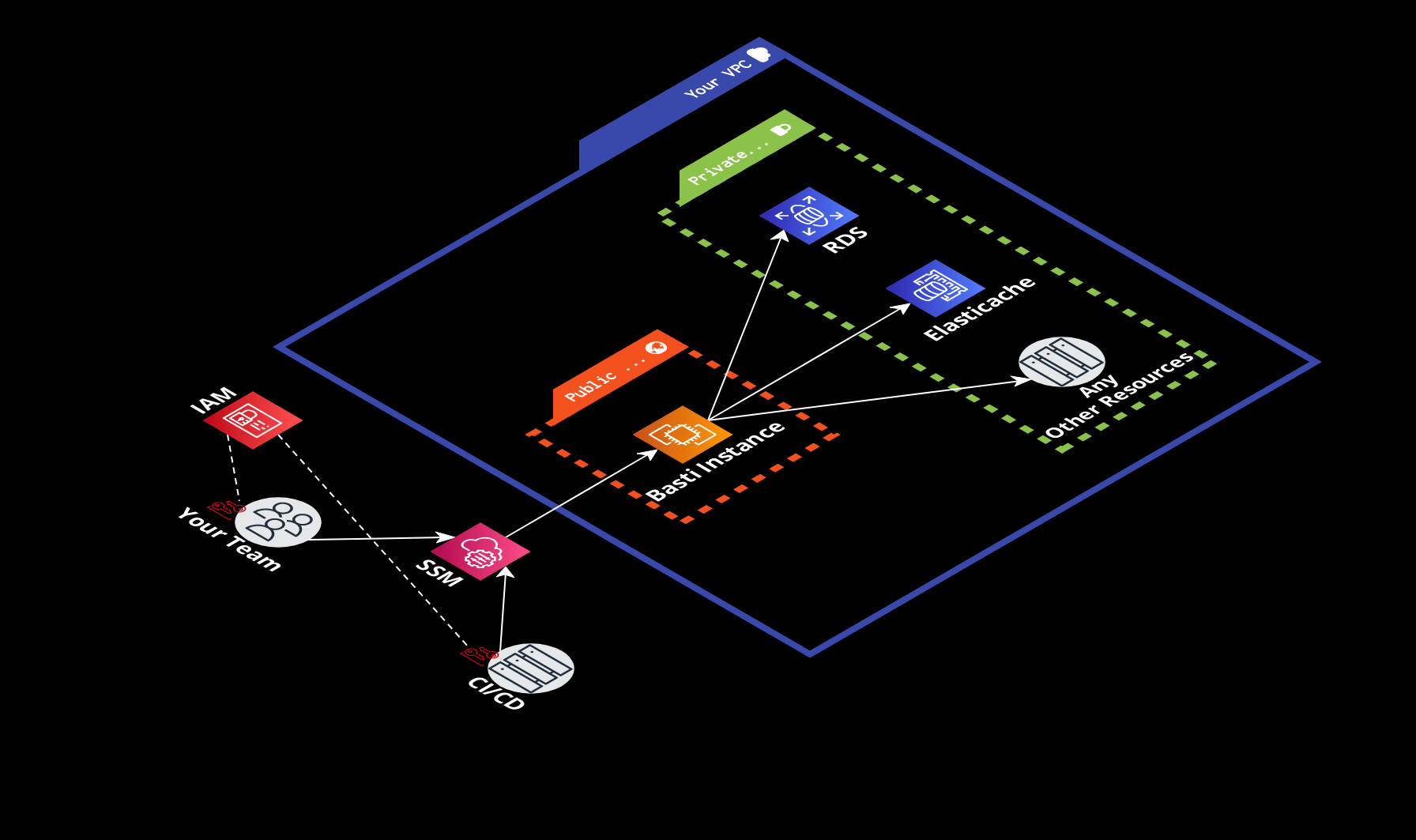
Table of contents
Why Basti?
With Basti, you can securely connect to your RDS/Aurora/Elasticache/EC2 instances in private VPC subnets from a local machine or CI/CD pipeline almost for free!
How it works
- 🏰 Using Basti CDK, you set up a bastion instance in the connection target's VPC.
- 🧑💻 You use Basti CLI to conveniently connect to your target through the bastion instance.
- 💵 Basti takes care of keeping the bastion instance stopped when it's not used to make the solution cost as low as ≈ 0.01 USD per hour of connection plus ≈ 0.80 USD per month of maintaining the instance in a stopped state.
- 🔒 Security completely relies on AWS Session Manager and IAM policies. The bastion instance is not accessible from the Internet and no SSH keys are used.
Installation
The construct is available in multiple languages thanks to JSII.
NPM
npm install basti-cdk
PyPI
pip install basti-cdk
API reference
See the full API reference on Construct Hub.
Examples
See the test CDK apps for working examples of each feature the library provides.
Basic usage
Basti constructs can be imported from the basti-cdk package.
import { BastiAccessSecurityGroup, BastiInstance } from 'basti-cdk';
💡 RDS instance is used as an example target. You can use Basti to connect to any other AWS resource that supports security groups.
Set up Basti instance
Use BastiInstance construct to create Basti EC2 instance.
const bastiInstance = new BastiInstance(stack, 'BastiInstance', {
  vpc,

  // Optional. Randomly generated if omitted.
  // Used to name the EC2 instance and other resources.
  // The resulting name will be "basti-instance-my-bastion"
  bastiId: 'my-bastion',
});
Allow connection to target
Use BastiAccessSecurityGroup construct to create a security group for your target. This security group will allow the Basti instance to connect to the target.
// Create a security group for your target
const bastiAccessSecurityGroup = new BastiAccessSecurityGroup(
  stack,
  'BastiAccessSecurityGroup',
  {
    vpc,

    // Optional. Randomly generated if omitted.
    // Used to name the security group and other resources.
    // The resulting name will be "basti-access-my-target"
    bastiId: 'my-target',
  }
);

// Create the target
const rdsInstance = new aws_rds.DatabaseInstance(stack, 'RdsInstance', {
  // Unrelated properties are omitted for brevity

  vpc,
  port: 5432,

  securityGroups: [bastiAccessSecurityGroup],
});

// Allow the Basti instance to connect to the target on the specified port
bastiAccessSecurityGroup.allowBastiInstanceConnection(
  bastiInstance,
  aws_ec2.Port.tcp(rdsInstance.instanceEndpoint.port)
);
Connect to target
When the stack is deployed, you can use Basti CLI to connect to your target.
basti connect
Advanced usage
Importing existing Basti instance
When sharing a Basti instance across stacks, you can just pass it as a property to the other stack. In case you need to import a Basti instance created in a separate CDK app or not managed by CDK at all, you can use the BastiInstance.fromBastiId method. The method returns an IBastiInstance object which is sufficient for granting access to a connection target.
// Most likely, the VPC was created separately as well
const vpc = aws_ec2.Vpc.fromLookup(stack, 'Vpc', {
  vpcName: 'existing-vpc-id',
});

const bastiInstance = BastiInstance.fromBastiId(
  this,
  'BastiInstance',
  // The BastiID of the Basti instance you want to import
  'existing-basti-id',
  vpc
);

// bastiInstance can now be used to allow access to a connection target
bastiAccessSecurityGroup.allowBastiInstanceConnection(
  bastiInstance,
  aws_ec2.Port.tcp(1717)
);
Granting access to use Basti instance
You can grant the ability to connect to a Basti instance to other resources (users, roles, etc.) using the grantBastiCliConnect method of an existing Basti instance.
const bastiInstance = new BastiInstance(/*...*/);
const grantee = new aws_iam.Role(/*...*/);

bastiInstance.grantBastiCliConnect(grantee);
License
Usage is provided under the MIT License. See LICENSE for the full details.
1 maintainer

Metadata
1 maintainer
Release files for basti-cdk 1.2.0
For a detailed explanation of source distributions (sdists) and built distributions (wheels), please see the package formats documentation.
Source distribution (sdist)
| File | Size | Uploaded | |
|---|---|---|---|
| basti_cdk-1.2.0.tar.gz | 154.7 kB | Details |
Built distribution (wheel)
| File | Interpreter | ABI | Platform | Reset |
|---|---|---|---|---|
| basti_cdk-1.2.0-py3-none-any.whl | Python 3 | none | any | Details |
Total release size: 307.8 kB
Release files / basti_cdk-1.2.0.tar.gz
| Download URL | basti_cdk-1.2.0.tar.gz |
|---|---|
| Size | 154.7 kB |
| Tags | Source |
|
SHA-256 checksum How to use checksums |
3b75e1d37e609461251975cb5b932425c1b1d8c767ad4f78b2a897241ffcacea
|
|
BLAKE2b-256 checksum How to use checksums |
803e1efa0d3a63b054d04d2af694f19f229bb5087d68df8062d41506c7e7fafd
|
| Upload date | |
|
Uploaded using Trusted Publishing? What is trusted publishing? |
No |
| Uploaded via |
twine/6.2.0 CPython/3.13.2
|
Release files / basti_cdk-1.2.0-py3-none-any.whl
| Download URL | basti_cdk-1.2.0-py3-none-any.whl |
|---|---|
| Size | 153.1 kB |
| Tags | Python 3 |
|
SHA-256 checksum How to use checksums |
52ff7d30396e765399c4f6a3428521e0e0adb07481560cebce26811dcb384829
|
|
BLAKE2b-256 checksum How to use checksums |
4d101499e56b80468c08e5458a22977539f55a2aa6ecffe02dd2cf83fe9685ab
|
| Upload date | |
|
Uploaded using Trusted Publishing? What is trusted publishing? |
No |
| Uploaded via |
twine/6.2.0 CPython/3.13.2
|














